1. הקדמה
The Mastech MS8233A is a compact, battery-powered digital multimeter designed for measuring AC/DC voltage, DC current, resistance, diode, continuity, and temperature. It features a 2000-count display, data hold function, and a low battery indicator, making it suitable for various electrical testing applications.
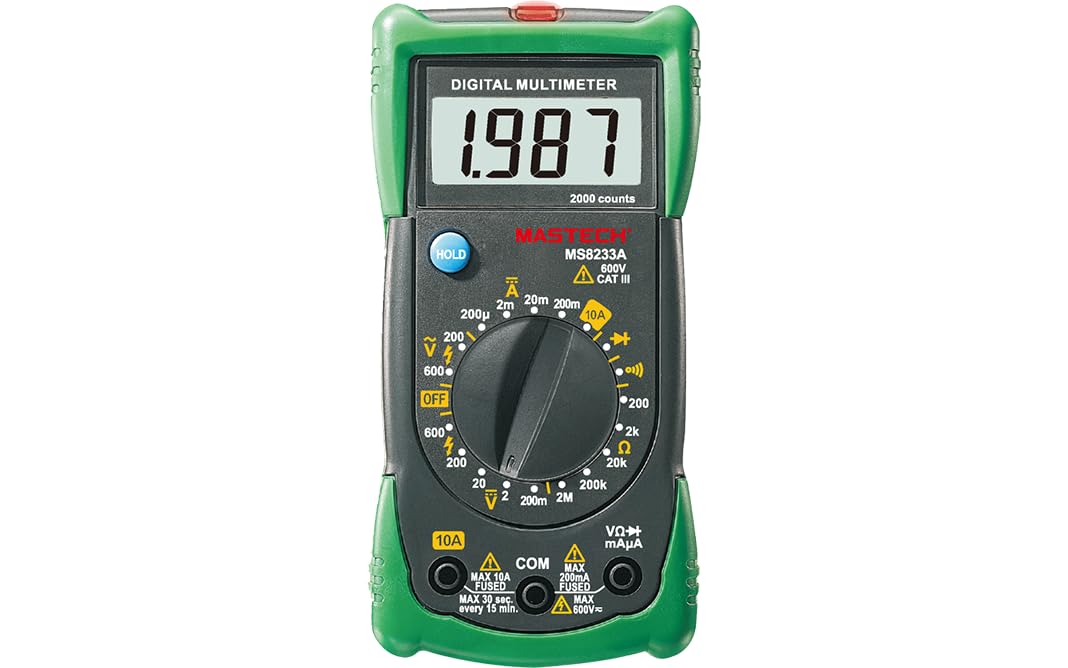
פיגורע 1: פראָנט view of the Mastech MS8233A Digital Multimeter, showing the display, rotary switch, and input jacks.
2. זיכערקייַט אינפֿאָרמאַציע
כדי צו זיכער מאַכן זיכערן אָפּעראַציע און סערוויס פון דעם מעטער, פאָלגט די אינסטרוקציעס:
- שטענדיק זיכער מאַכן אַז דער מעטער איז אין גוטן אַרבעטס צושטאַנד איידער נוצן.
- דו זאלסט נישט צולייגן וואָלtage אדער קראַנט וואָס יקסידז די מאַקסימום ספּעסיפיעד לימאַץ פֿאַר די מעטער.
- ניצן וואָרענען ווען ארבעטן מיט וואָלtagהעכער 60V DC אדער 30V AC RMS, ווייל די שטעלן פאר א שאק געפאר.
- שטענדיק אָפּשטעקן די טעסט דראָטן פֿון דער קרייַז איידער איר ענדערן פֿונקציעס.
- טוישט די באַטעריע גלייך ווען דער נידעריק באַטעריע אינדיקאַטאָר דערשיינט צו ענשור גענויע מעסטונגען.
- Do not operate the meter if the case is open or if it appears damaged.
- אַדכיר צו היגע און נאציאנאלע זיכערקייַט קאָודז.
3. פּראָדוקט פֿעיִקייטן
- ווייַז: 2000 קאַונץ
- Diode Open Voltage: 3.0 וו
- Continuity Buzzer: Sounds at less than 60Ω
- דאַטאַ האָלד פֿונקציע
- Low Battery Display indicator
- מיטלען AC/DC וואָלtage, DC current, resistance, diode check, continuity test, and temperature.
4. פּעקל אינהאַלט
באַשטעטיקן אַז אַלע זאכן זענען פאַראַן אין פּעקל:
- Mastech MS8233A Digital Multimeter
- פּרובירן לידז
- 1x 9V 6F22 Battery (pre-installed or included separately)
- קאַלאַבריישאַן סערטיפיקאַט
- שנעל אָנהייב גייד

Figure 2: Illustration of package contents and main applications for the MS8233A multimeter.
5. סעטאַפּ
5.1 באַטאַרייע ייַנמאָנטירונג
The MS8233A requires one 9V 6F22 battery. If the battery is not pre-installed or needs replacement:
- זיכער מאַכן אַז דער מולטימעטער איז אויסגעלאָשן און אָפּשטעקן אַלע טעסט דראָטן.
- געפינט דעם דעקל פונעם באַטעריע־אָפּטייל אויף דער הינטערשטער זייט פונעם אַפּאַראַט.
- שרויפט אַראָפּ די שרויף(ן) און נעמט פֿאָרזיכטיק אַראָפּ דעם דעקל.
- Connect the 9V battery to the battery clip, observing correct polarity.
- לייגט אריין די באַטעריע אין דעם קאָמפּאַרטמענט און לייגט צוריק דעם דעקל, באַזיגנדיק עס מיט די שרויף(ן).
5.2 פֿאַרבינדן טעסט דראָטן
Insert the test leads into the appropriate input jacks:
- Insert the black test lead into the “COM” (common) jack.
- פֿאַר רובֿ מעסטונגען (וואָל.tage, resistance, diode, continuity, temperature), insert the red test lead into the “VΩmA” jack.
- For DC current measurements up to 10A, insert the red test lead into the “10A” jack.
6. אַפּערייטינג ינסטרוקטיאָנס
To operate the multimeter, turn the rotary switch to the desired function. The display will show the measurement value.
6.1 דק חלקtage Measurement (V–)
- שטעלט דעם ראָטאַרי סוויטש צו דער געוואונטשער DC וואָלומעןtage range (e.g., 200mV, 2V, 20V, 200V, 600V).
- Connect the red test lead to the positive (+) side of the circuit and the black test lead to the negative (-) side.
- לייענען דעם חלקtagE ווערט אויף די אַרויסווייַזן.
6.2 אַק בtage Measurement (V∼)
- שטעלט דעם ראָטאַרי סוויטש צו דער געוואונטשער AC וואָלומעןtagע קייט (למשל, 200V, 600V).
- פֿאַרבינדט די טעסט דראָטן אַריבער די AC וואָלומעןtagE מקור.
- לייענען דעם חלקtagE ווערט אויף די אַרויסווייַזן.
6.3 DC Current Measurement (A–)
- Set the rotary switch to the desired DC Current range (e.g., 200µA, 2mA, 20mA, 200mA, 10A).
- וויכטיק: For 10A measurements, move the red test lead to the “10A” jack. For other current ranges, use the “VΩmA” jack.
- עפֿנט דעם קרייז וואו מען וויל מעסטן דעם שטראָם און פֿאַרבינדט דעם מעטער אין סעריע.
- לייענט דעם איצטיקן ווערט אויפן דיספלעי.
6.4 קעגנשטעל מעסטונג (Ω)
- Set the rotary switch to the desired Resistance range (e.g., 200Ω, 2kΩ, 20kΩ, 200kΩ, 2MΩ).
- זיכער מאַכן אַז די קרייַז אָדער קאָמפּאָנענט איז דעענערדזשייזד איידער איר מעסט די קעגנשטעל.
- פֿאַרבינדט די טעסט־לידער אַריבער דעם קאָמפּאָנענט וואָס מע דאַרף מעסטן.
- לייענען די קעגנשטעל ווערט אויף די אַרויסווייַזן.
6.5 Diode Test (→|–)
- Set the rotary switch to the Diode Test function.
- פֿאַרבינדט דעם רויטן טעסט־דראָט צו דער אַנאָדע און דעם שוואַרצן טעסט־דראָט צו דער קאַטאָדע פֿון דער דיאָד.
- דער דיספּלעי וועט ווײַזן דעם פֿאָרווערטס באַנדtage drop. Reverse the leads to check for open circuit (OL) indication.
6.6 Continuity Test (♫)
- Set the rotary switch to the Continuity Test function.
- פֿאַרבינדט די טעסט־לידער אַריבער דעם קרייַז אָדער קאָמפּאָנענט.
- אויב דער קעגנשטאנד איז אונטער בערך 60Ω, וועט דער בוזער קלינגען, וואס ווײַזט אויף קאנטינעויטעט.
6.7 טעמפּעראַטור מעסטונג (℃/℉)
The MS8233A can measure temperature using a K-type thermocouple (not always included, check package contents).
- Set the rotary switch to the Temperature function.
- Connect the K-type thermocouple to the input jacks, observing polarity.
- Place the thermocouple probe at the point where temperature is to be measured.
- לייענט די טעמפּעראַטור ווערט אויף דעם עקראַן.
6.8 דאַטאַ האַלטן פֿונקציע
Press the “HOLD” button to freeze the current reading on the display. Press it again to release the hold function and resume live readings.
7. וישאַלט
7.1 באַטערי פאַרבייַט
When the low battery indicator appears on the display, replace the 9V battery as described in Section 5.1.
7.2 רייניקונג
ווישן די פאַל מיט אַדamp שטאָף און מילדן וואַשפּולווער. ניצט נישט קיין שוואַרצע מאַטעריאַלן אָדער סאָלווענטן. מאַכט זיכער אַז דער מעטער איז גאָר טרוקן איידער נוצן.
7.3 קאָריק פאַרבייַט
The current input jacks are typically protected by fuses. If the meter fails to measure current, the fuse may need replacement. Refer to the specific fuse ratings printed on the meter or in the detailed specifications. Fuse replacement should only be performed by qualified personnel.
8. טראָובלעשאָאָטינג
If the multimeter does not function correctly, consider the following:
- קיין דיספּלעי אָדער שוואַך דיספּלעי: Check battery charge and ensure it is correctly installed. Replace if necessary.
- אומרעכטע לייענונגען: Verify the correct function and range are selected. Ensure test leads are properly connected and making good contact. Check battery level.
- Cannot measure current: Check the fuse for the current input. Ensure the red test lead is in the correct current jack (e.g., 10A).
- “OL” (Overload) displayed: The measured value exceeds the selected range. Switch to a higher range or verify the circuit is not open.
אויב פּראָבלעמס אָנהאַלטן, קאָנטאַקט קונה שטיצן.
9. ספּעסאַפאַקיישאַנז
9.1 אַלגעמיינע ספּעסאַפאַקיישאַנז
- Power Source: 2 LR44 batteries required (included) - Note: Product description states 1x 9V 6F22 battery. Please verify with actual product.
- פּראָדוקט דימענשאַנז: 16 X 9 X 5 סענטימעטער
- וואָג פון דעם פּראָדוקט: 0.5 קילאָגראַם
- Manufacturer: MASTECH/MGL
- Safety Rating: CAT III 600V
- סערטיפיקאַטיאָנס: סע, ראָהס
- Upper Temperature Rating: 50 Degrees Celsius
9.2 עלעקטריקאַל ספּעסאַפאַקיישאַנז
| ספּעסאַפאַקיישאַנז | קייט | האַכלאָטע | אַקיעראַסי |
|---|---|---|---|
| DC Voltage | 200mV/2V/20V/200V 600V | 0.1mV/1mV/10mV/100mV 1V | ±(0.5%+3) ±(0.5%+3) |
| AC Voltage | 200V 600V | קסנומקסמוו 1V | ±(1.2%+10) ±(1.2%+10) |
| DC Current | 200µA/2mA/20mA/200mA 10 א | 0.1µA/1µA/10µA/0.1mA 0.01 א | ±(1.0%+3) ±(3.0%+5) |
| קעגנשטעל | 200Ω/2kΩ/20kΩ/200kΩ 2MΩ | 0.1Ω/1Ω/10Ω/100Ω 1kΩ | ±(0.8%+4) ±(0.8%+4) |
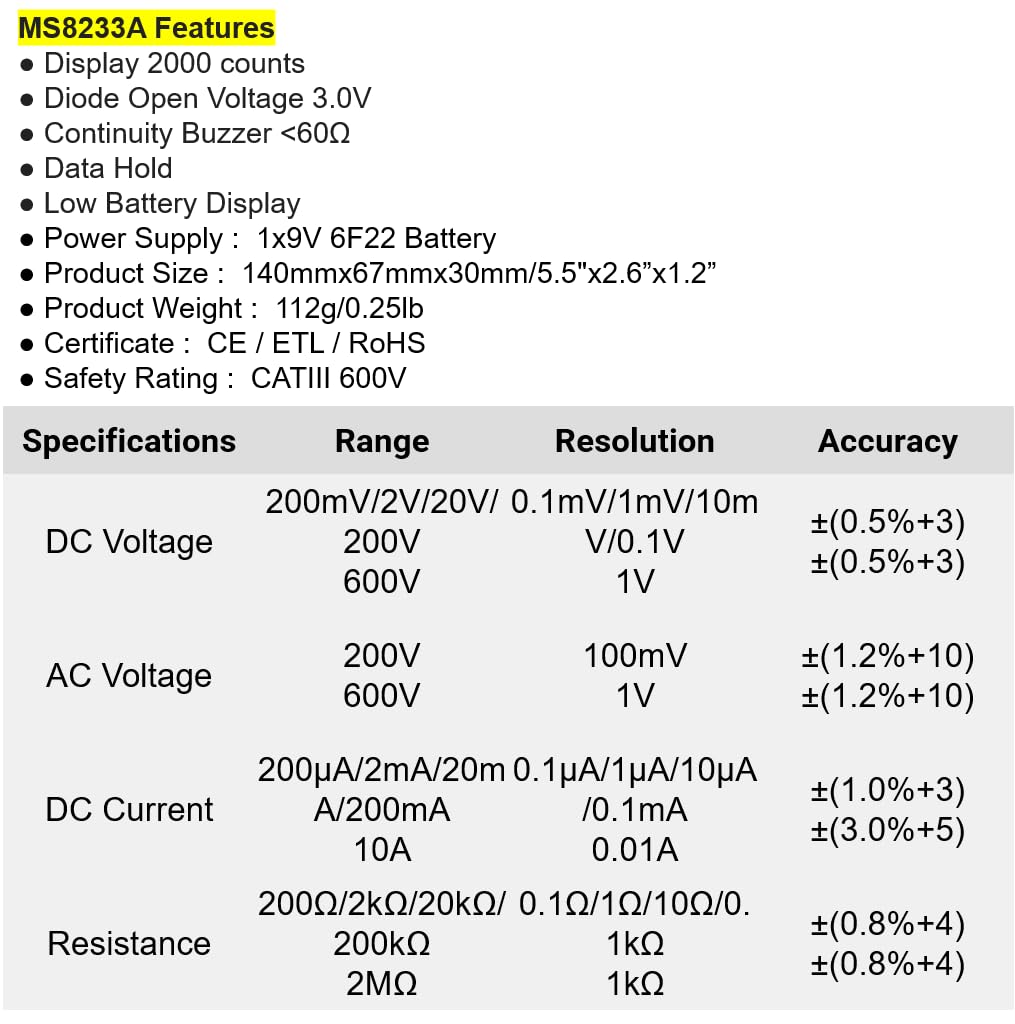
Figure 3: Detailed electrical specifications for the Mastech MS8233A.
9.3 Related Models Comparison

Figure 4: Comparison table of various Mastech manual ranging digital multimeters, including the MS8233A.
10. וואָראַנטי און שטיצן
Mastech products are designed for reliability and performance. For warranty information or technical support, please refer to the warranty card included with your product or contact Mastech customer service through their official webזייטל. האַלט אייער קויף קוויטל ווי אַ באַווייַז פון קויפן פֿאַר וואָראַנטי קליימז.