1. הקדמה
א דאנק פארן קויפןasing the Coolfire Vibrating Alarm Clock Wristband, Model 1685B. This device is designed to provide a discreet and effective silent alarm experience through gentle vibrations on your wrist. This manual provides detailed instructions for setup, operation, and maintenance to ensure optimal performance and longevity of your device.
2. פּראָדוקט איבערview
The Coolfire Vibrating Alarm Clock is a wristband-style watch featuring a digital display and a silent vibration alarm. It is suitable for individuals who need to wake up without disturbing others, or for those with hearing or visual impairments. The device includes a rechargeable battery and a washable sweatband for comfort and hygiene.
שליסל פֿעיִקייטן:
- Silent vibration alarm on the wrist.
- Large, bright LCD digital display.
- Up to 6 daily alarms.
- Three adjustable vibration strengths (Low, Medium, High).
- Integrated 24-hour precision 1/100 seconds digital stopwatch.
- Rechargeable lithium battery via USB.
- Soft, washable sweatband.

פיגורע 1: פראָנט view of the Coolfire Vibrating Alarm Clock Wristband, showing the digital display and control buttons.
3. סעטאַפּ
3.1 טשאַרדזשינג די מיטל
Before initial use, fully charge the device. A full charge takes approximately 4 hours and provides 4-6 weeks of operation.
- Locate the USB charging cable provided with your device.
- Connect the USB cable to any standard USB adapter (not included).
- Release the locking ring from the back of the watch unit and gently push out the watch module from the sweatband.
- Plug the small end of the USB cable into the charging socket located on the back of the watch module.
- לאָזן די מיטל צו אָפּצאָל פֿאַר 4 שעה.
- Once charged, disconnect the cable and reinsert the watch module into the sweatband, securing it with the locking ring.
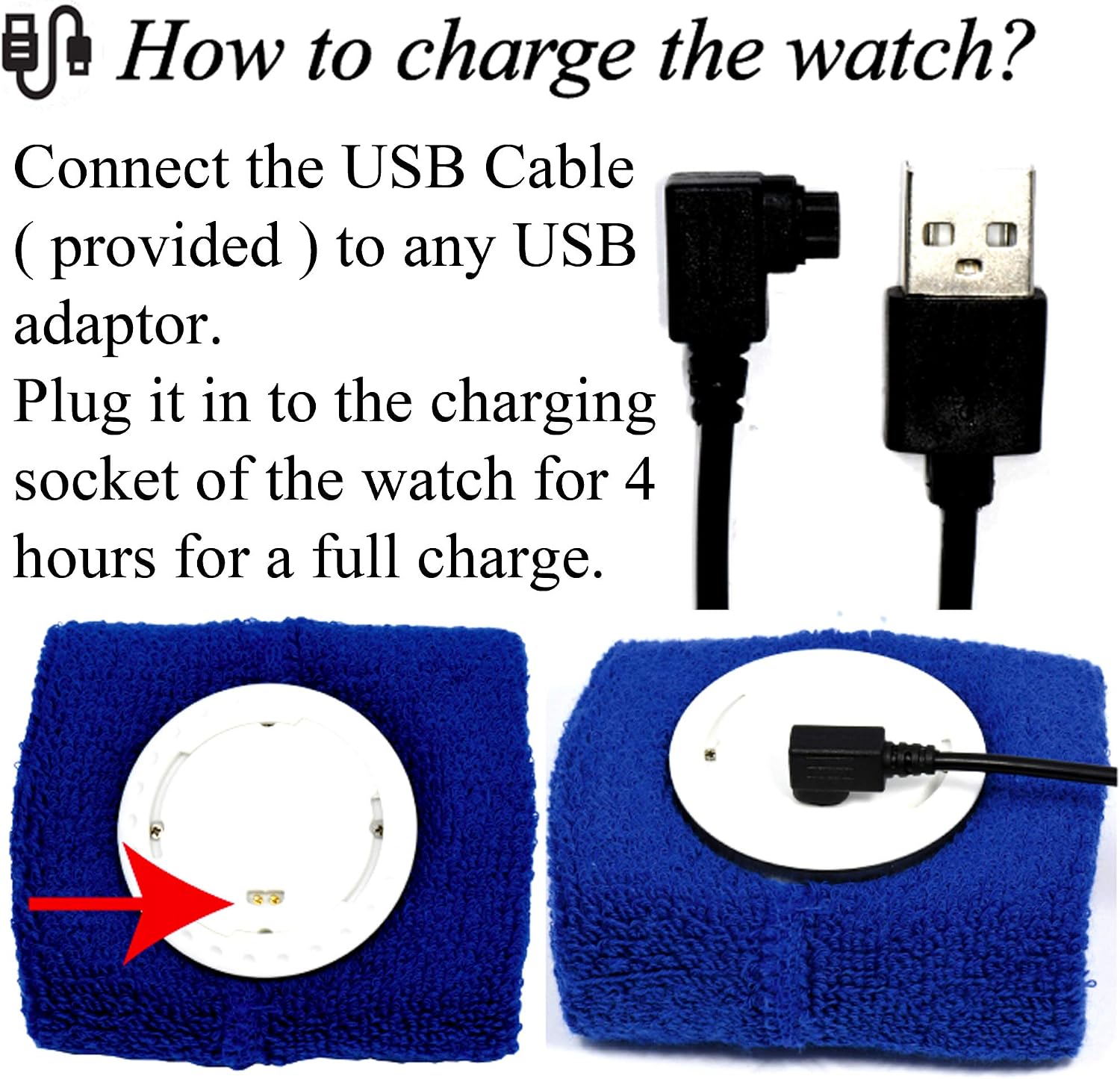
Figure 2: Illustration of connecting the USB cable to the watch module for charging.
3.2 Wearing the Wristband
The wristband is designed for comfortable wear. Ensure the watch module is securely placed within the sweatband.
- The sweatband is adjustable and fits wrist sizes from 6.7 inches (170mm) to 8.5 inches (215mm).
- Wear the wristband snugly enough to ensure good contact for vibration, but not so tight as to be uncomfortable.

פיגורע 3: עקסample of the Coolfire Vibrating Alarm Clock Wristband worn on a wrist, indicating suitable wrist sizes.
4. אַפּערייטינג ינסטרוקטיאָנס
The Coolfire alarm clock features a simple digital display and user-friendly buttons for setting time, alarms, and other functions.
4.1 קנעפּל פאַנגקשאַנז
The watch module has three primary buttons:
- LIGHT/STW: Activates backlight; in stopwatch mode, starts/stops the stopwatch.
- שטעלן: Enters setting mode for time and alarms.
- TIME/ALARM: Toggles between time display and alarm display; in setting mode, adjusts values.
4.2 באַשטעטיקן צייט און דאַטע
- From the main time display, press and hold the שטעלן button until the time digits begin to flash.
- דרוק די צייט / שרעק button to adjust the flashing value (e.g., hours, minutes).
- דרוק די שטעלן button again to move to the next setting (e.g., minutes, year, month, day).
- Repeat steps 2 and 3 until all time and date settings are correct.
- דרוק די שטעלן button one last time to exit setting mode.
4.3 שטעלן אַלאַרמס
The device supports up to 6 daily alarms.
- פֿון דער הויפּט צײַט־אַרויסווייַזונג, דריק די צייט / שרעק button repeatedly until "ALARM" is displayed and you see an alarm number (e.g., AL1).
- דריקן און האַלטן די שטעלן קנעפּל ביז די אַלאַרם צייט ציפערן אָנהייבן צו בליצן.
- דרוק די צייט / שרעק button to adjust the flashing hour.
- דרוק די שטעלן button to move to the minutes.
- דרוק די צייט / שרעק button to adjust the flashing minutes.
- דרוק די שטעלן button to enable/disable the alarm (an alarm icon will appear when enabled).
- דרוק די שטעלן button again to save the alarm setting and exit.
- To set additional alarms, repeat steps 1-7, cycling through AL2, AL3, etc., using the צייט / שרעק קנעפּל.
4.4 Adjusting Vibration Strength
The device offers three vibration strengths: Low, Medium, and High. The method for adjusting this setting is typically found within the alarm settings or a dedicated mode. Refer to the on-screen prompts or experiment with the שטעלן און צייט / שרעק buttons while in alarm setting mode to locate this option.
4.5 ניצן די סטאָפּוואַטש
- פֿון דער הויפּט צײַט־אַרויסווייַזונג, דריק די צייט / שרעק button repeatedly until "STW" (Stopwatch) is displayed.
- דרוק די LIGHT/STW קנעפּל צו אָנהייבן די סטאָפּוואַטש.
- דרוק די LIGHT/STW קנעפּל ווידער צו פּויזירן די סטאָפּוואַטש.
- To reset the stopwatch, while paused, press and hold the שטעלן קנעפּל.
- דרוק די צייט / שרעק קנעפּל צו צוריקקומען צום הויפּט צייט אַרויסווייַזונג.
5. וישאַלט
5.1 Washing the Sweatband
The sweatband is washable, but the watch module is ניט וואַסער-קעגנשטעליק. Always remove the watch module before washing the sweatband.
- To detach the watch module, release the locking ring from the back of the watch.
- Gently push the watch module out from the sweatband.
- Machine wash the sweatband as needed, following standard fabric care instructions.
- Ensure the sweatband is completely dry before reinserting the watch module.
- Reinsert the watch module and secure it with the locking ring.
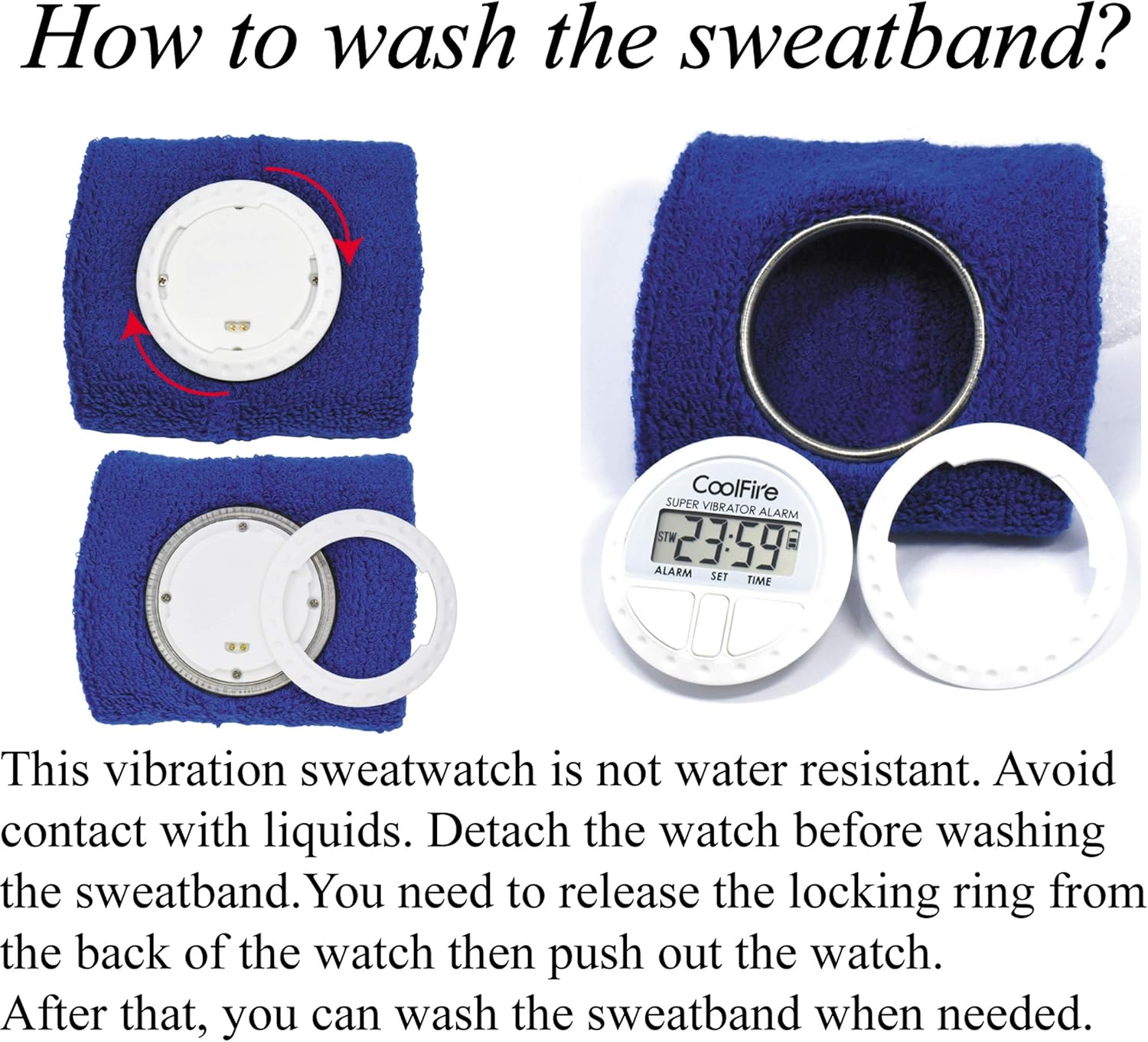
Figure 4: Steps for removing the watch module from the sweatband for cleaning.
6. טראָובלעשאָאָטינג
| פּראָבלעם | מעגלעך סיבה | לייזונג |
|---|---|---|
| Device does not turn on or display is blank. | באַטערי איז דיפּליטיד. | לאָדט אויף דעם מיטל פֿאַר 4 שעה מיטן צוגעשטעלטן USB קאַבל. |
| Vibration alarm is too weak or not felt. | Vibration strength set to Low; wristband is too loose. | Adjust vibration strength to Medium or High. Ensure the wristband is worn snugly. |
| Alarm does not activate. | Alarm is not enabled or set incorrectly. | Verify alarm settings and ensure the alarm icon is displayed, indicating it is active. |
| די דיספּלעי איז שווער צו לייענען. | No backlight activated. | דרוק די LIGHT/STW קנעפּל צו אַקטאַווייט די באַקלייט. |
7. ספּעסאַפאַקיישאַנז
- סאָרט: Coolfire
- מאָדעל נומער: 1685 ב
- קאָליר: שוואַרץ (אנדערע פארבן קען זיין בנימצא)
- פּראָדוקט דימענשאַנז: 8.89 x 3.81 x 8.89 cm (watch module)
- נומער וואָג: 10 g (watch module)
- מאַטעריאַל: Plastic (watch module), Fabric (sweatband)
- ווייַז טיפּ: דיגיטאַל לקד
- מאַכט מקור: קריקאָנלאָדלעך ליטהיום באַטערי
- טשאַרדזשינג צייט: בעערעך 4 שעה
- באַטאַרייע לעבן: 4-6 weeks on a full charge
- ספּעציעלע פֿעיִקייטן: Silent Clock, Vibrating Alarm, Stopwatch
- Wristband Fit: 6.7" (170 מ"מ) ביז 8.5" (215 מ"מ)
8. וואָראַנטי און שטיצן
For warranty information and customer support, please refer to the documentation included with your purchase or contact your retailer. Keep your purchase receipt as proof of purchase.
For further assistance, you may visit the official Coolfire website or contact their customer service department. Contact details are typically found on the product packaging or the brand's official online presence.


