הקדמה
א דאנק פארן קויפןasing the WIITHINK WCD-9949 Portable CD Player Boombox. This device offers versatile audio playback options including CD, FM radio, Bluetooth, USB, and AUX input. Designed for ease of use and portability, it provides a rich audio experience for various settings. Please read this manual carefully to ensure proper operation and maintenance of your new boombox.
זיכערקייַט אינפֿאָרמאַציע
- דו זאלסט נישט ויסשטעלן די אַפּאַראַט צו רעגן אָדער נעץ צו פאַרמייַדן פייַער אָדער קלאַפּ כאַזערדז.
- בלאָקירט נישט די ווענטילאַציע עפענונגען. זאָרגט פֿאַר גענוג פּלאַץ אַרום דעם אַפּאַראַט פֿאַר געהעריקן לופֿטפֿלוס.
- ניצן בלויז אַטאַטשמאַנץ / אַקסעסעריז ספּעסיפיעד דורך דער פאַבריקאַנט.
- אָפּשטעקן די אַפּאַראַט בעשאַס בליץ סטאָרמז אָדער ווען אַניוזד פֿאַר לאַנג פּיריאַדז.
- נישט עפענען דעם אַפּאַראַט casinז. איבערגעבן אלע סערוויסינג צו קוואַליפֿיצירטע סערוויס פּערסאָנעל.
- Dispose of batteries properly. Do not expose batteries to excessive heat.
פּעקל אינהאַלט
באַשטעטיקן אַז אַלע זאכן זענען פאַראַן אין פּעקל:
- 1 x WIITHINK WTB791 Portable CD Radio Boombox (Batteries Not Included)
- 1 x Remote Control (Batteries Not Included)
- 1 x מאַכט קאַבלע
- 1 x AUX ליניע
- 1 x באַניצער מאַנואַל
- 1 רענטגענ פּאַקינג באָקס
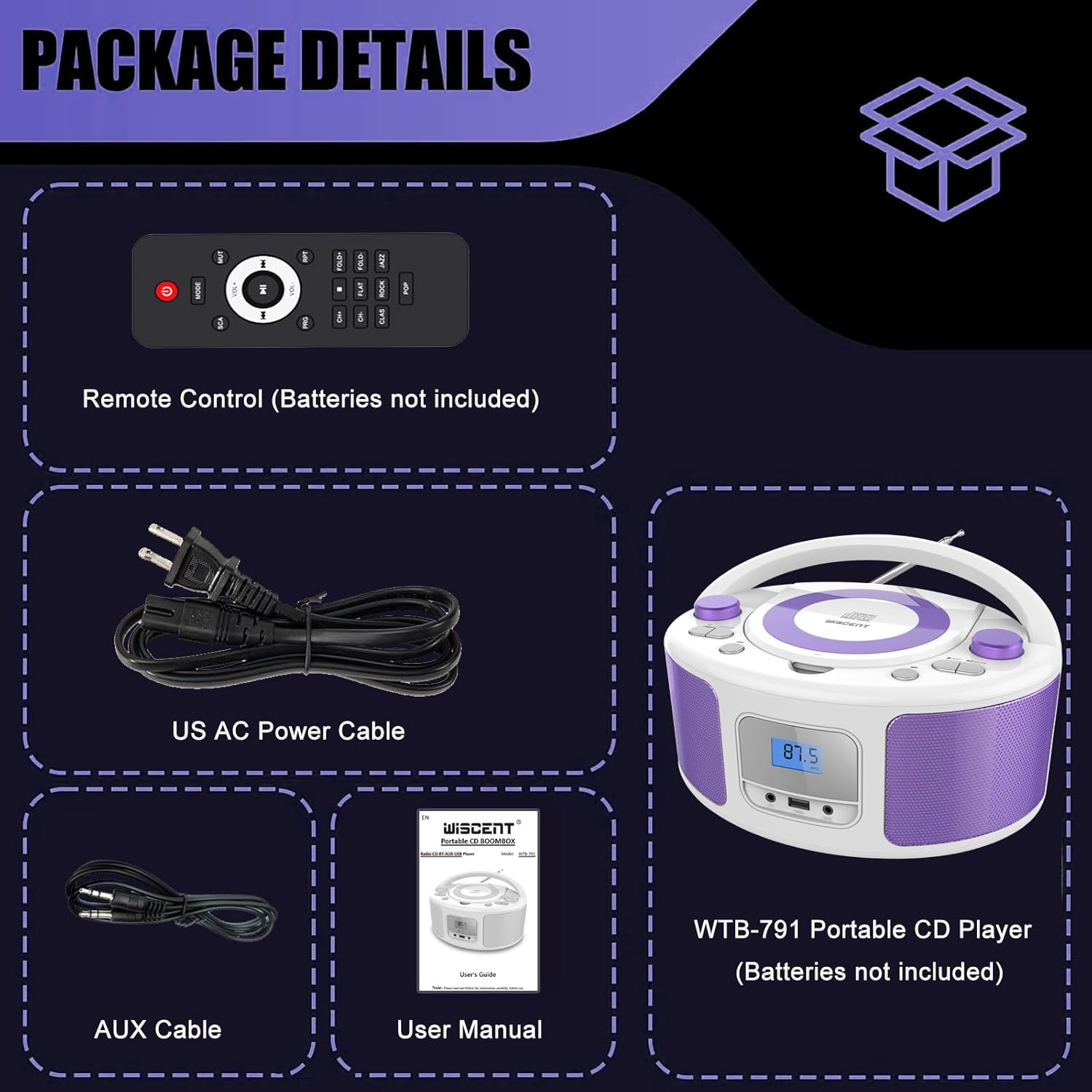
Image: Contents of the WIITHINK WCD-9949 Boombox package, showing the boombox, remote control, power cable, AUX cable, and user manual.
פּראָדוקט איבערview
Familiarize yourself with the main components of your boombox.

בילד: פראָנט view of the WIITHINK WCD-9949 Boombox, highlighting key features such as CD player, Bluetooth, USB port, AUX input, headphone jack, LCD display, FM radio, and power options.
- אויבן-לאָודינג סי-די שפּילער: For playing CDs, CD-R/RW, MP3 CDs, and audiobook CDs.
- FM ראַדיאָ טונער: For listening to FM radio stations.
- בלועטאָאָטה: פֿאַר וויירלעס אַודיאָ סטרימינג פֿון קאָמפּאַטיבלע דעוויסעס.
- וסב ינפּוט: For playing MP3/WMA music files from USB flash drives (FAT32 format, up to 128GB).
- AUX אריינגאנג (3.5 מ"מ): פֿאַר קאַנעקטינג פונדרויסנדיק אַודיאָ דעוויסעס.
- כעדפאָון דזשאַק (3.5 מם): פֿאַר פּריוואַט צוגעהערט.
- LCD ווייַז: Shows current mode, track number, and radio frequency.
- קאָנטראָל קנעפּלעך: Power, Mode, Play/Pause, Skip/Search, Repeat, Scan, EQ/Function.
- באַנד קנעפּלעך: אַדזשאַסטירן אַודיאָ אַוטפּוט לעוועל.
- טונינג קנעפּל: אַדזשאַסטירט FM ראַדיאָ פרעקווענץ.
- טעלאַסקאָפּיק אַנטענע: פֿאַר פֿאַרבעסערטע FM ראַדיאָ אָפּנאַם.
- קעריינג שעפּן: פֿאַר גרינג פּאָרטאַביליטי.
סעטאַפּ
מאַכט די בומבאַקס
Your boombox can be powered by AC power or batteries.
AC Power (Wall Outlet)
- Ensure the boombox is turned off.
- Insert one end of the provided AC power cable into the AC IN jack on the back of the boombox.
- שטעקט אריין דעם אנדערן עק פונעם AC שטראָם קאַבל אין א נאָרמאַלן וואַנט אַוטלעט.

בילד: הינטערשטע view of the boombox, indicating the AC IN jack for power connection and the battery compartment.
Battery Power (Portable Use)
- Ensure the boombox is turned off and disconnected from AC power.
- געפינען די באַטאַרייע אָפּטייל אויף די דנאָ פון די אַפּאַראַט.
- עפענען די באַטאַרייע אָפּטייל דעקן.
- Insert 4 x UM2-C 1.5V batteries (not included), ensuring correct polarity (+/-).
- פאַרמאַכן די באַטאַרייע אָפּטייל דעקן סיקיורלי.
באַמערקונג: אַרויסנעמען באַטעריעס אויב די אַפּאַראַט וועט נישט ווערן גענוצט פֿאַר אַ לענגערע צייט צו פאַרמייַדן ליקאַדזש און שעדיקן.
אַפּערייטינג ינסטראַקשאַנז
אַלגעמיינע אָפּעראַציע
- מאַכט אויף / אַוועק: דרוק די מאַכט קנעפּל צו קער די אַפּאַראַט אויף אָדער אַוועק.
- אויסקלייַבן מאָדע: דרוק די מאָדע button repeatedly to cycle through available modes: CD, FM, Bluetooth (BT), USB, AUX. The selected mode will be displayed on the LCD screen.
- סטרויערן באַנד: דרייען די באַנד קנעפּל זייגערווייז צו פֿאַרגרעסערן די באַנד און קעגן זייגערווייז צו פֿאַרמינערן די באַנד.
- עק מאָדעס: דרוק די EQ/שפּאַס button to select different equalizer presets: ROCK / POP / FLAT / CLASS / JAZZ.

בילד: איבערview of the boombox's multiple playback modes and features.
קאָמפּאַקטדיסק פּלייַבאַקק
- דרוק די מאָדע button to select CD mode. "CD" will appear on the display.
- עפֿנט דעם דעקל פֿון דעם סי-די אָפּטייל דורך עס לײַכט אויפֿהייבן.
- לייגט אַ סי-די (סי-די, סי-די-ר/רוו, MP3 סי-די, אױדיאָ-בוך סי-די) אויף דער שפּינדל מיטן עטיקעט-זײַט אַרויף.
- Close the CD compartment cover. The CD will begin playing automatically.
- שפּיל / פּויזע: דרוק די שפּיל / פּויזע קנעפּל צו פּויזע אָדער נעמענ זיכ ווידער פּלייבאַק.
- האָפּקען טראַקס: דרוק די האָפּקען פאָרויס or האָפּקען צוריק קנעפּלעך צו האָפּקען צו דער ווייַטער אָדער פריערדיקן שפּור.
- איבערחזרן: דרוק די RPT button to repeat the current track (Repeat 1) or all tracks (Repeat All).
- פּראָגראַם שפּיל: Refer to the detailed user manual for programming specific track orders.

Image: Close-up of the top-loading CD player with a disc inside, ready for playback.
עפעם ראַדיאָ אָפּעראַציע
- דרוק די מאָדע button to select FM radio mode. The FM frequency will appear on the display.
- פֿאַרלענגערט די טעלעסקאָפּישע אַנטענע פֿאַר אַן אָפּטימאַלן אָפּנאַם.
- אַוטאָ סקאַן: דריקן און האַלטן די יבערקוקן button to automatically scan and save available FM stations (up to 30 presets).
- מאַנואַל טונינג: דרייען די טונינג knob to manually adjust the frequency.
- סעלעקטירן פּריסעט: ניצן די פאָרגעשטעלט +/- buttons on the remote control to navigate through saved stations.

Image: Visual representation of the FM radio feature, showing the frequency range and preset capabilities.
בלועטאָאָטה פּערינג
- דרוק די מאָדע button to select Bluetooth mode. "BT" will flash on the display, indicating it's ready for pairing.
- אויף אייער בלוטוט-פארשטארקטע דעווייס (סמאַרטפאָן, טאַבלעט, אאז"וו), אַקטיווירט בלוטוט און זוכט פֿאַר פֿאַראַן דעווייסעס.
- אויסקלייבן "WTB-791" פון דער ליסטע פון דעווייסעס.
- Once paired, "BT" will stop flashing and remain solid. You can now stream audio wirelessly.
- Control playback (Play/Pause, Skip) using the boombox buttons or your connected device.

Image: The boombox displaying "BT" for Bluetooth mode, connected to a smartphone for wireless music streaming.
וסב פּלייַבאַקק
- Insert a USB flash drive (FAT32 format, up to 128GB) containing MP3/WMA audio files into the USB port on the front of the boombox.
- דרוק די מאָדע button to select USB mode. "USB" will appear on the display.
- Playback will start automatically. Use the Play/Pause and Skip buttons to control playback.
AUX ינפּוט
- Connect an external audio device (e.g., MP3 player, laptop) to the AUX IN jack on the front of the boombox using the provided 3.5mm AUX cable.
- דרוק די מאָדע button to select AUX mode. "AUX" will appear on the display.
- Control playback from your external device. Adjust volume using the boombox's volume knob.

Image: The boombox connected to multiple external devices via AUX input, demonstrating its versatility.
כעדפאָון נוצן
For private listening, plug 3.5mm headphones (not included) into the HEADPHONE jack on the front of the boombox. The speakers will automatically mute.
ווייַט קאָנטראָל
The included remote control allows you to operate the boombox from a distance. Ensure batteries are inserted correctly (2 x AAA, not included). Functions include Power, Mode selection, Volume, Mute, Play/Pause, Skip/Search, Repeat, Scan, and EQ modes.

Image: The boombox and its remote control, highlighting the convenience of remote operation.
וישאַלט
- רייניקט דעם אַפּאַראַט מיט אַ ווייכן, טרוקענעם שטאָף. ניצט נישט קיין שרײַבנדיקע רייניגערס אדער סאָלווענטן.
- Keep the CD compartment clean and free of dust. Use a CD lens cleaner if necessary.
- האַלט דעם אַפּאַראַט אין אַ קיל, טרוקן אָרט אַוועק פון דירעקט זונשייַן און עקסטרעמע טעמפּעראַטורן.
טראָובלעשאָאָטינג
| פּראָבלעם | לייזונג |
|---|---|
| קיין מאַכט | Check if the AC power cable is securely connected. If using batteries, ensure they are inserted correctly and not depleted. |
| סי-די שפּילט נישט | Ensure the CD is clean and free of scratches. Verify the CD is inserted correctly with the label side up. Close the CD compartment completely. Ensure CD mode is selected. |
| נעבעך עפעם ראַדיאָ אָפּטראָג | Extend and adjust the telescopic antenna. Try repositioning the unit. |
| בלועטאָאָטה איז נישט פּערינג | Ensure the boombox is in Bluetooth mode and "BT" is flashing. Make sure your device's Bluetooth is enabled and within range. Forget previous pairings on your device and try again. |
| פּראָבלעמען מיט USB ווידערשפּיל | Ensure the USB drive is formatted to FAT32 and contains compatible MP3/WMA files. The maximum capacity supported is 128GB. |
ספּעסאַפאַקיישאַנז
| שטריך | דעטאַל |
|---|---|
| מאָדעל נומער | WCD-9949 |
| פּראָדוקט דימענשאַנז (L x W x H) | 7 X 10 X 5 אינטשעס |
| פּונקט וואָג | 3.91 פונט |
| קאַנעקטיוויטי טעכנאָלאָגיע | הילפס-פארבינדונג, בלועטוט, יו-עס-בי |
| רעדנער טיפּ | געבויט-אין |
| מאַכט רעזולטאַט | 2x2W RMS |
| עפעם ראַדיאָ פרעקווענסי | 87.5-108 מהז |
| מאַכט מקור | AC 100-240V~ / 4 x C batteries (not included) |
| וסב קאַפּאַסיטי | Up to 128GB (FAT32 format only) |
וואָראַנטי & שטיצן
WIITHINK is committed to customer satisfaction. Your product comes with:
- 18-חודש אויסטויש: For missing parts or defective products.
- לעבן טעכניש שטיצן: Assistance with any product inquiries.
- Amazon Buyer-Seller Messaging: Available 7/24 for support.
For any inquiries, please go to Your Orders, find your order in the list, and click on "WIITHINK" to contact us.

Image: Details on WIITHINK's customer support, including replacement policy and technical assistance.
אפיציעלע פּראָדוקט ווידיאס
WIITHINK Direct - CD Radio Portable CD Player Boombox with Bluetooth
Video: An official product video from WIITHINK Direct showcasing the features and functionality of the CD Radio Portable CD Player Boombox with Bluetooth.


