1. איבערview
1.1 פּראָדוקט באַשרייַבונג
The PNI GreenHouse SC1800C PRO Solar Inverter is a central component for small off-grid solar systems, suitable for areas with or without grid electricity. It provides a continuous output of 3000W with a pure sine wave, making it suitable for various household lighting installations and other small electronic motors, including refrigerators, pumps, tools, and charging devices for phones, laptops, and TVs.
1.2 שליסל פֿעיִקייטן
- Maximum photovoltaic panel input power: 2000 W.
- מאַקסימום דק אַרייַנשרייַב וואָלtage from photovoltaic panels: 30 - 120 VDC (Vmp).
- Maximum solar charge current: 30 A input from panels, 60 A output to batteries.
- Solar charging efficiency: 98%.
- MPPT solar charger type.
- רייטאַד רעזולטאַט וואָלtagE: 230 V.
- Rated output power: 3000 W (under ideal conditions with proportional battery count and 100% charged batteries).
- Maximum apparent power: 6000 VA (peak, 0.5 seconds under ideal conditions).
- רעזולטאַט וואָלtage waveform: Pure sine wave.
- Output signal frequency: 50, 60 Hz.
- אַרייַנשרייַב וואָלtagE: 230 V AC.
- Grid connection for backup.
- Compatible with 24V batteries: AGM, lead-acid, gel, flooded lithium-ion.
- Minimum battery start voltage: 23 V (cold start voltagאון).
- Integrated high-frequency inverter type (switching).
- Inverter efficiency: 90% ~ 93% (100% charged battery).
- Typical transfer time: 10 ms (UPS, VDE) 20 ms (APL).
- Line mode efficiency: > 95% (rated R load, fully charged battery).
- Hybrid operating modes: SBU – Solar/Battery/Utility, Solar Utility (UPS).
- AC charge voltagE: 230 V.
- Maximum AC charge current: 30 A.
- Automatic switching: Solar - Batteries - Grid.
- ענערגיע שפּאָרן פֿונקציע.
- Multiple protections.
- מולטיפונקטיאָן אַרויסווייַזן.
- Dedicated menu for advanced settings.
- Monitoring with PC software (USB cable included).
- Remote monitoring from mobile/PC (with optional WiFi USB dongle).
1.3 פּעקל אינהאַלט
- PNI GreenHouse SC1800C PRO Solar Inverter
- וסב קאַבלע
- באַניצער מאַנואַל
- PNI Smart Dongle-WLAN (for WiFi monitoring)
2. זיכערקייַט אינפֿאָרמאַציע
ביטע ליינט אלע אינסטרוקציעס און ווארענונגען קערפול איידער די אינסטאלאציע און באניץ. נישט נאכפאלגן די אינסטרוקציעס קען רעזולטירן אין עלעקטרישע שאק, פייער, אדער ערנסטע שאדן.
- קוואַלאַפייד פּערסאַנעל: ייַנמאָנטירונג און וישאַלט מוזן זיין דורכגעקאָכט דורך קוואַלאַפייד פּערסאַנעל.
- ריזיקירן פון עלעקטריקאַל קלאַפּ: דאָס אַפּאַראַט אַרבעט מיט הויך וואָלומעןtages. Do not open the casing unless specifically instructed.
- באַטערי זיכערקייַט: Batteries can produce explosive gases. Ensure proper ventilation. Do not smoke or allow sparks or flames near batteries. Wear eye protection.
- געהעריק ווענטאַליישאַן: אינסטאלירט דעם אינווערטער אין א גוט-ווענטילירטן ארט צו פארמיידן איבערהיצונג.
- ינווייראַנמענאַל טנאָים: Avoid exposure to rain, snow, spray, or any liquids. Operate within the specified temperature range (-26 °C to 80 °C).
- גראָונדינג: זיכער מאַכן אַז דער ינווערטער איז ריכטיק געערדט לויט די לאָקאַלע עלעקטרישע קאָודן.
- דיסקאַנעקט מאַכט: Always disconnect all power sources (solar, battery, AC grid) before performing any wiring or maintenance.
3. פּראָדוקט קאַמפּאָונאַנץ
3.1 PNI GreenHouse SC1800C PRO Solar Inverter

פיגורע 3.1: פראָנט view of the PNI GreenHouse SC1800C PRO Solar Inverter, showing the display and control buttons.

פיגורע 3.2: דערציען view of the PNI GreenHouse SC1800C PRO Solar Inverter, illustrating the various connection ports for solar panels, batteries, AC input, and AC output.
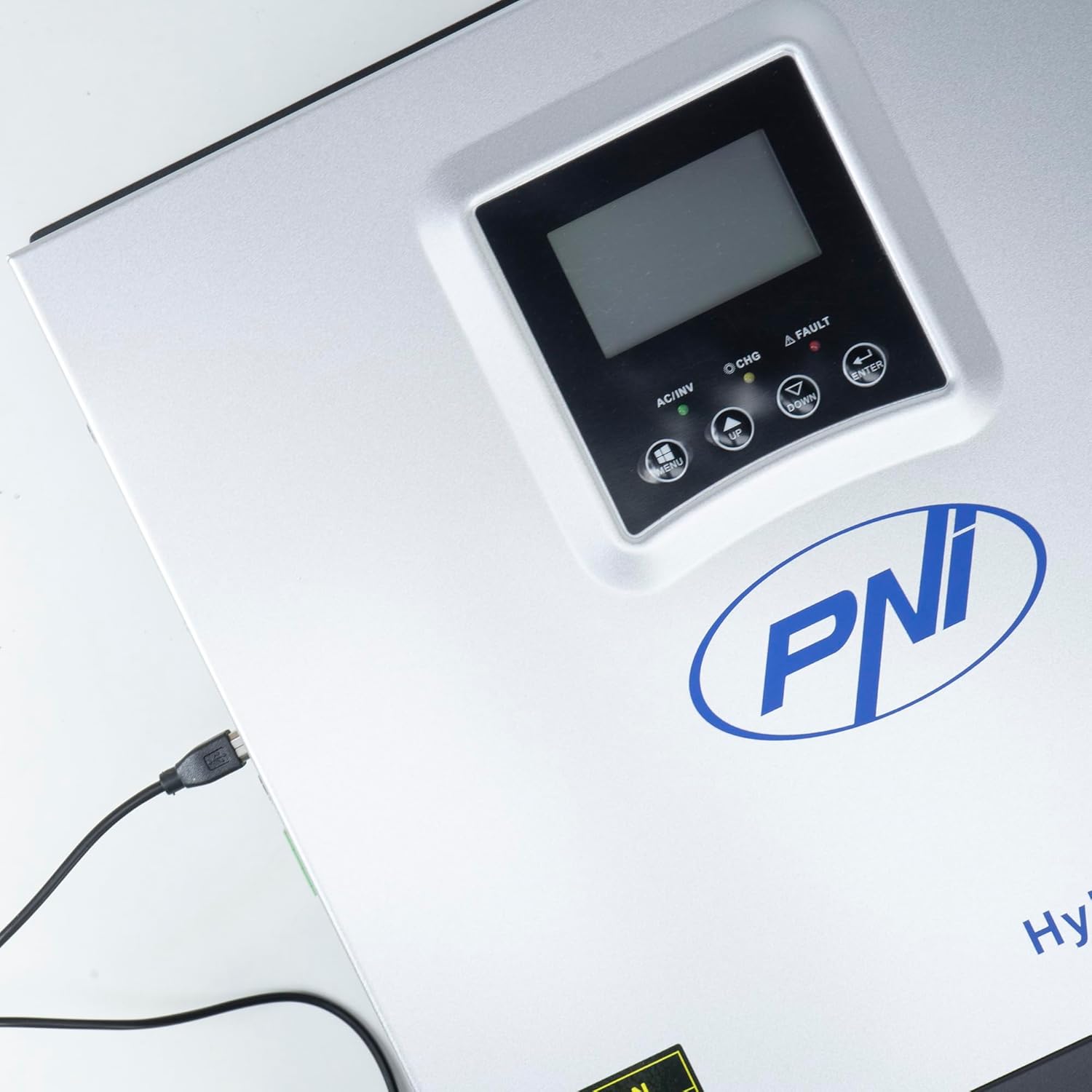
Figure 3.3: Close-up of the USB connection port on the inverter, used for PC monitoring.
3.2 PNI Smart Dongle-WLAN (Optional)

Figure 3.4: The PNI Smart Dongle-WLAN, an optional accessory for remote WiFi monitoring of the inverter.

Figure 3.5: The PNI Smart Dongle-WLAN connected to the inverter's dedicated port for WiFi communication.
4. ייַנמאָנטירונג און סעטאַפּ
4.1 וואנט מאָונטינג
The inverter is designed for wall mounting. Choose a location that is dry, well-ventilated, and protected from direct sunlight and moisture. Ensure sufficient clearance around the unit for proper airflow and heat dissipation. Use appropriate mounting hardware for your wall type.
4.2 סיסטעם קאַנעקשאַן דיאַגראַמע

Figure 4.1: Basic application diagram showing the connections between solar panels, utility grid, generator, inverter, battery, and home loads. Note: Generator, PV modules, WiFi module, and battery are not included with the inverter unless specified.
4.3 וויירינג קאַנעקשאַנז
Follow the diagram above and the labels on the inverter for correct wiring. Ensure all connections are secure and properly insulated. It is highly recommended that a qualified electrician performs all wiring.
- סאָלאַר פּאַנעל קאַנעקשאַן: Connect your solar panels to the designated PV input terminals. Observe correct polarity (positive to positive, negative to negative). The maximum DC input voltagE איז 120 וודק.
- באַטערי קשר: Connect the 24V battery bank to the battery terminals. Ensure correct polarity. The inverter supports AGM, lead-acid, gel, and flooded lithium-ion batteries.
- AC Input (Grid/Generator): Connect the AC utility grid or a generator to the AC input terminals. This provides backup power and can charge batteries.
- AC Output (Loads): Connect your household loads to the AC output terminals.
4.4 ערשט מאַכט-אַרויף
After all connections are made and verified:
- צינד אן דעם באַטעריע ברעיקער.
- Turn on the solar panel breaker (if applicable).
- Turn on the AC input breaker (if connected to grid/generator).
- צינדט אן דעם אינווערטער'ס מאַכט קנעפּל.
- Observe the display for status indicators and initial readings.
5. אַפּערייטינג מאָדעס
The PNI GreenHouse SC1800C PRO offers intelligent energy management with several configurable operating modes:
- Solar Priority Mode (SBU): In this mode, the inverter prioritizes power consumption from solar energy. If solar power is insufficient, it will draw from batteries. The utility grid acts as a backup.
- באַטאַרייע בילכערקייַט מאָדע: The inverter prioritizes drawing power from the batteries. Solar energy will charge the batteries. The utility grid is used only when battery voltage פאלט אונטער א באשטימטן שוועל.
- Utility Priority Mode (UPS): This mode prioritizes power from the utility grid. Solar energy will charge the batteries. The inverter switches to battery power only when the grid is unavailable, functioning as an Uninterruptible Power Supply (UPS).
These modes can be configured via the inverter's multifunction display and dedicated menu for advanced settings.
5.1 מאָניטאָרינג
The inverter supports monitoring through:
- PC Software (USB): Connect the inverter to a PC using the provided USB cable and dedicated software for detailed monitoring and analysis of parameters.
- Remote Monitoring (WiFi - Optional): With the optional PNI Smart Dongle-WLAN, you can monitor the inverter remotely via a mobile application or web צובינד.
6. וישאַלט
Regular maintenance ensures optimal performance and longevity of your inverter. Always disconnect all power sources before performing any maintenance.
- רייניקונג: רייניקן פּעריִאָדיש די אויסערלעכע זייט פון דעם ינווערטער מיט אַ טרוקענעם שטאָף. זיכער מאַכן אַז די ווענטילאַציע עפענונגען זענען פריי פון שטויב און שמוץ. נישט נוצן פליסיקע רייניגער.
- קשר טשעקס: Annually inspect all wiring connections (solar, battery, AC input/output) for tightness and signs of corrosion. Tighten any loose connections.
- באַטערי דורכקוק: If using lead-acid batteries, check electrolyte levels and terminal condition as per battery manufacturer guidelines.
- ענוויראָנמענטאַל קאָנטראָל: זיכער מאַכן אַז די אינסטאַלאַציע סביבה בלייבט אין די ספּעציפֿישע טעמפּעראַטור און הומידיטי ריינדזשאַז.
7. טראָובלעשאָאָטינג
די סעקציע גיט אנווייזונגען פאר אלגעמיינע פראבלעמען. פאר קאמפליצירטע פראבלעמען, קאנטאקטירט קוואליפיצירטע סערוויס פערסאנעל.
| פּראָבלעם / שרעק | מעגלעך סיבה | לייזונג |
|---|---|---|
| נידעריק באַטערי שרעק | באַטערי וואָלtage איז אונטער די נידעריק-וואָלtage warning threshold. | Check battery charge level. Ensure solar panels are producing power or AC input is connected for charging. Reduce load. |
| Battery Disconnected Alarm | Battery cables are loose or disconnected. | Safely disconnect all power sources and check battery connections. Reconnect securely. |
| אָווערוואָלtagE שרעק | אַרייַנשרייַב וואָלtage (PV or AC) exceeds safe limits. | Verify solar panel array voltage or AC input voltage. Ensure it is within the inverter's specifications. |
| אַק אָווערלאָאַד פּראַטעקשאַן | Connected loads exceed the inverter's output capacity. | Reduce the total load connected to the inverter. Check individual appliance power consumption. |
| קיין רעזולטאַט מאַכט | Inverter off, low battery, overload, or fault. | Check if the inverter is powered on. Verify battery voltage. Check for overload or fault codes on the display. |
8. ספּעסאַפאַקיישאַנז
| שטריך | באַשרייַבונג |
|---|---|
| סאָרט | פּני |
| מאָדעל נומער | PNI-SC1800P-DG |
| רייטאַד מאַכט | 3000 וו |
| שפּיץ מאַכט | 6000 VA (0.5 seconds) |
| באַטערי וואָלtage | 24 V |
| מאַקס. פּוו אַרייַנשרייַב מאַכט | 2000 וו |
| מאַקס. פּוו אַרייַנשרייַב חלקtage (וומפּ) | 30 - 120 VDC |
| MPPT Solar Charge Current | 60 A (output to batteries) |
| אַק אַרייַנשרייַב חלקtage | 230 V |
| אַק רעזולטאַט וואָלtage | 230 V |
| רעזולטאַט וואַוועפאָרם | ריין סיין וואַווע |
| רעזולטאַט אָפטקייַט | 50/60 הז |
| מאַקס. AC טשאַרדזש קראַנט | 30 א |
| עפעקטיווקייַט פון ינווערטער | 90% ~ 93% |
| אַפּערייטינג טעמפּעראַטור | -26 °C צו 80 °C |
| דימענסיעס (L X W X H) | 29 X 12 X 35 סענטימעטער |
| וואָג | 6.9 קג |
| סטאַנדביי קאַנסאַמשאַן | ≈ 25 W (Energy saving mode ≈ 12.5 W) |
| קאָמוניקאַציע | USB, Optional WiFi Dongle |
9. וואָראַנטי און שטיצן
פֿאַר וואָראַנטי אינפֿאָרמאַציע און טעכנישע שטיצע, ביטע זעט די דאָקומענטאַציע וואָס איז צוגעשטעלט געוואָרן מיט אייער קויף אָדער קאָנטאַקטירט אייער הענדלער. האַלט אייער קויף באַווייַז פֿאַר וואָראַנטי קליימז.


