
1. הקדמה
This manual provides detailed instructions for the installation, operation, and maintenance of your CHACON Wi-Fi Wired Video Intercom, Model 34895. Please read this manual thoroughly before installation and use to ensure proper functionality and safety.
2. פּראָדוקט איבערview
The CHACON Wi-Fi Wired Video Intercom system allows you to see and communicate with visitors at your entrance via an indoor monitor or your smartphone. It features high-quality video, remote call answering, and the ability to remotely open a gate or door lock.
שליסל פֿעיִקייטן:
- High-quality video display on indoor monitor and smartphone.
- Remote video call answering via smartphone.
- Remote gate/door lock release (requires wired installation with a 12V electric lock or dry contact).
- Visitor message recording capability when you are absent.
- Automatic photo recording of each visitor on the monitor's internal memory.
- Standalone system, not compatible with DiO 1.0 ecosystem.
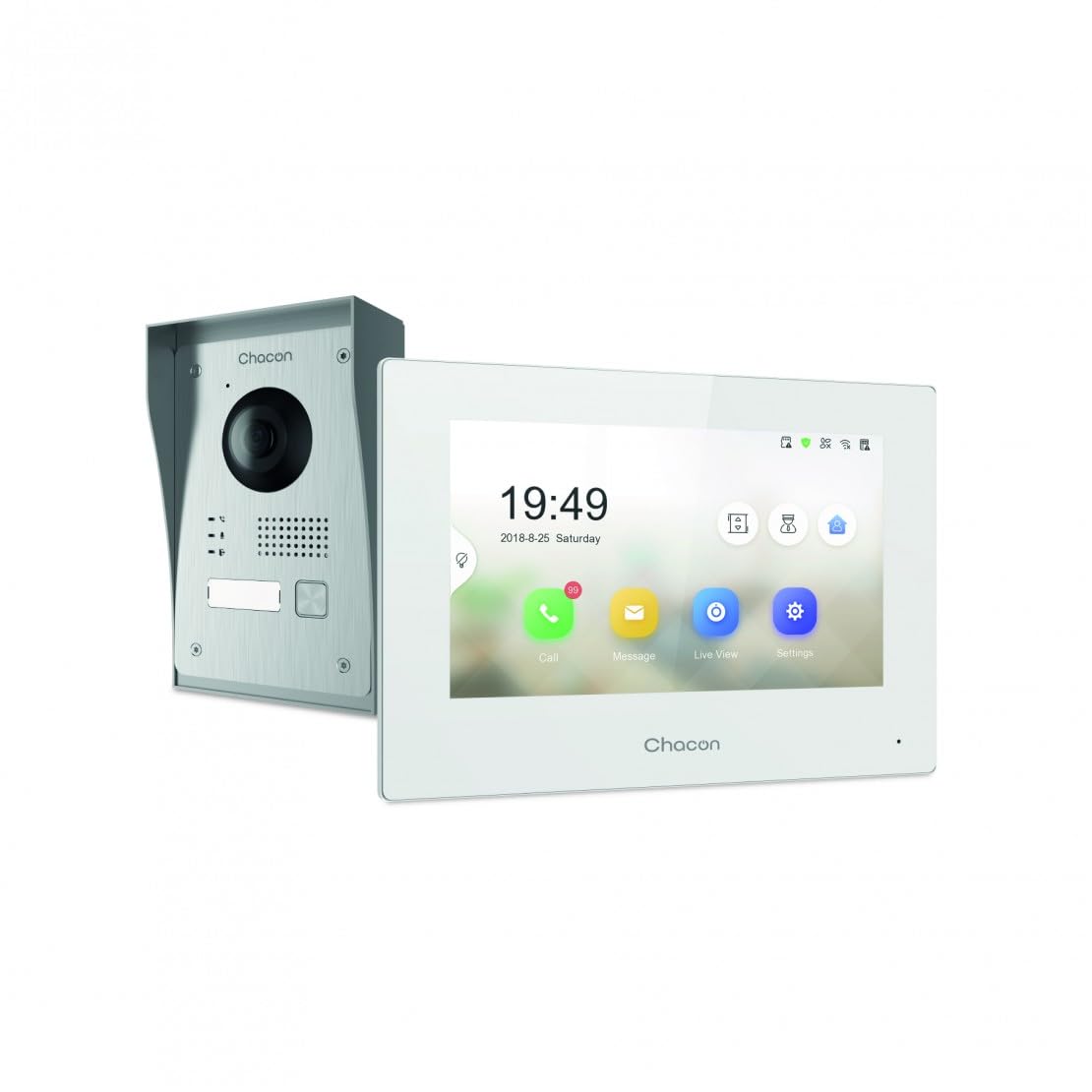
Figure 2.1: Indoor Monitor Unit. This image shows the indoor monitor with its user interface displaying time, date, and icons for call, message, live view, און סעטטינגס.
3. פּעקל אינהאַלט
ביטע טשעק די פּאַקעט פֿאַר די פאלגענדע זאכן:
- אינעווייניק מאָניטאָר אַפּאַראַט
- דרויסנדיק טיר-גלאָק אַפּאַראַט
- מאָנטירונג אַקסעסאָריעס (שרויף, וואַנט פּלאַגז)
- מאַכט אַדאַפּטער
- באַניצער מאַנואַל (דעם דאָקומענט)
- Wiring cables

Figure 3.1: Outdoor Doorbell Unit. This image displays the outdoor unit, featuring a camera lens, microphone, speaker, and doorbell button, designed for external installation.
4. זיכערקייַט אינפֿאָרמאַציע
Read all safety warnings and instructions carefully before installing and operating this device. Failure to follow these instructions may result in electric shock, fire, or serious injury.
- זיכער מאַכן אַז די מאַכט איז אָפּגעטיילט איידער קיין ינסטאַלירונג אָדער וויירינג.
- די אינסטאַלאַציע זאָל דורכגעפירט ווערן דורך אַ קוואַליפֿיצירטן עלעקטריקער אויב איר זענט נישט זיכער וועגן די וויירינג.
- Do not expose the outdoor unit to extreme temperatures, direct sunlight for prolonged periods, or heavy rain without proper protection.
- ניצן בלויז די צוגעשטעלט מאַכט אַדאַפּטער און קייבאַלז.
- האַלטן די מיטל אַוועק פון וואַסער און נעץ.
5. סעטאַפּ
5.1. אינסטאַלאַציע פון דרויסנדיקער אַפּאַראַט
The outdoor unit can be surface-mounted or flush-mounted. Ensure the unit is installed at a height that allows the camera to capture visitors clearly.
- Choose a suitable location near your entrance, protected from direct weather if possible.
- מאַרקירט די בויער פונקטן ניצנדיק די מאַונטינג קלאַמער ווי אַ שאַבלאָן.
- בויער האָלעס און אַרייַנלייגן וואַנט פּלאַגז.
- פאַרריכטן די מאַונטינג קלאַמער צו די וואַנט.
- Connect the necessary wiring (power, indoor monitor, electric lock if applicable) to the outdoor unit. Refer to the wiring diagram in section 5.3.
- באַפעסטיקט די דרויסנדיקע איינהייט צו די מאַונטינג קלאַמער.

פיגורע 5.1: עקסample of Outdoor Unit Installation. This image shows the outdoor doorbell unit mounted on a wall next to a gate, demonstrating a typical installation scenario.
5.2. אינסטאַלאַציע פון אינעווייניק מאָניטאָר
The indoor monitor should be installed in a convenient location within your home, preferably near a power outlet.
- Choose a wall location for the indoor monitor.
- מאַרקירן די דרילינג פונקטן.
- בויער האָלעס און אַרייַנלייגן וואַנט פּלאַגז.
- Secure the monitor's mounting plate to the wall.
- Connect the wiring from the outdoor unit and the power adapter to the indoor monitor.
- Mount the indoor monitor onto its plate.

Figure 5.2: Indoor Monitor in a Home Environment. This image shows the indoor monitor installed on a wall in a modern kitchen setting, illustrating its discreet integration into a living space.
5.3. וויירינג דיאַגראַמע
Connect the outdoor unit to the indoor monitor using the provided 2-wire cable. If connecting an electric lock or gate opener, ensure it is a 12V electric lock or a dry contact system. Consult a professional if you are unsure about electrical wiring.
באַמערקונג:
- The system requires a wired connection for the outdoor unit to the indoor monitor.
- For remote gate/door opening, a separate wired connection from the indoor monitor to a 12V electric lock or dry contact is necessary.
5.4. Wi-Fi פֿאַרבינדונג און אַפּ סעטאַפּ
To enable smartphone connectivity, connect the indoor monitor to your home Wi-Fi network and set up the CHACON app.
- צינדט אן דעם אינעווייניקסטן מאָניטאָר.
- Navigate to the 'Settings' menu on the monitor.
- Select 'Wi-Fi' and choose your home network. Enter the password.
- Download the CHACON app from your smartphone's app store (iOS/Android).
- Register an account and follow the in-app instructions to add your video intercom device. This typically involves scanning a QR code displayed on the monitor or entering a device ID.
- Once connected, you can receive calls, view live feed, and control the lock remotely via the app.
6. אַפּערייטינג ינסטרוקטיאָנס
6.1. ענטפֿערן אַ רוף
When a visitor presses the doorbell button on the outdoor unit:
- The indoor monitor will ring and display the visitor's video feed. Tap the 'Call' icon to answer.
- Your smartphone (if connected to Wi-Fi and the app is running) will receive a notification. Tap the notification to answer the video call.
6.2. Remote Lock Release
During an active call (either on the indoor monitor or smartphone app), you can unlock your gate or door:
- On the indoor monitor, tap the 'Unlock' icon.
- On the smartphone app, tap the corresponding 'Unlock' button.
Ensure your electric lock or gate opener is correctly wired to the system as described in Section 5.3.
6.3. לייוו View
איר קענען view the outdoor camera feed at any time:
- On the indoor monitor, tap the 'Live View' איקאָן.
- On the smartphone app, select the device and choose the 'Live View' option.
6.4. Visitor Message Recording
If you are unavailable to answer a call, visitors can leave a message:
- After a set period of no answer, the outdoor unit will prompt the visitor to leave a message.
- These messages can be accessed and played back from the 'Message' menu on the indoor monitor or via the smartphone app.
6.5. Photo Recording
The system automatically captures a photo of each visitor when the doorbell is pressed. These photos are stored in the internal memory of the indoor monitor and can be reviewed via the 'Message' or 'History' menu.
7. וישאַלט
- רייניקונג: ניצט אַ ווייכע, טרוקענע שטאָף צו רייניקן דעם אינעווייניקסטן מאָניטאָר און דעם דרויסנדיקן אַפּאַראַט. ניצט נישט קיין שרײַבנדיקע רייניגערס אדער סאָלווענטן.
- שוץ פון דרויסנדיקע איינהייטן: Regularly check the outdoor unit for any debris or obstructions around the camera lens, microphone, and speaker.
- ווייכווארג דערהייַנטיקונגען: Check the indoor monitor's settings or the smartphone app for available firmware updates to ensure optimal performance and security.
- וויירינג קאָנטראָל: Periodically inspect all wiring connections for any signs of wear or damage.
8. טראָובלעשאָאָטינג
| פּראָבלעם | מעגלעך סיבה | לייזונג |
|---|---|---|
| קיין בילד אויף אינעווייניקסטן מאָניטאָר. | Power issue, loose wiring, outdoor unit malfunction. | Check power supply to indoor monitor. Verify all wiring connections between outdoor and indoor units. Ensure outdoor unit is powered. |
| קיין געזונט בעשאַס קאַללס. | Microphone/speaker obstruction, volume too low, wiring issue. | Check for obstructions on outdoor unit's microphone/speaker. Adjust volume settings on indoor monitor. Inspect audio wiring. |
| Smartphone app not receiving calls/notifications. | No Wi-Fi connection, incorrect app settings, network issues. | Ensure indoor monitor is connected to Wi-Fi. Check smartphone's internet connection. Verify app notification settings. Restart app and monitor. |
| Remote lock release not working. | Incorrect wiring to lock, incompatible lock, power issue to lock. | Confirm electric lock/gate opener is a 12V system or dry contact. Check wiring between monitor and lock. Ensure lock has power. |
| נעבעך ווידעא קוואַליטעט. | Dirty camera lens, poor lighting, network bandwidth. | Clean the camera lens on the outdoor unit. Ensure adequate lighting. Check Wi-Fi signal strength. |
9. ספּעסאַפאַקיישאַנז
| סאָרט | טשאַקאָן |
| מאָדעל נומער | 34895 |
| קאָליר | ווייַס |
| פּונקט וואָג | 1.3 קילאָגראַמס |
| פּעקל דימענשאַנז | 38 X 24.5 X 17 סענטימעטער |
| קאַנעקטיוויטי | Wired (2-wire), Wi-Fi |
| לאַק קאַמפּאַטאַבילאַטי | 12V Electric Lock or Dry Contact |
| פאַבריקאַנט | טשאַקאָן |
| לאַנד פון אָריגין | כינע |
10. וואָראַנטי און שטיצן
For warranty information and technical support, please refer to the official CHACON webזייטל אדער קאנטאקט זייער קאסטומער סערוויס גלייך. האלט אייער קויף קוויטל אלס באווייז פון קויפן פאר גאראנטיע קליימס.
אָנליין רעסורסן: Visit the CHACON official website for FAQs, updated manuals, and support contact information.
קונה סערוויס: Contact details can typically be found on the manufacturer's webוועבזייטל אדער אויף דער פּראָדוקט פּאַקאַדזשינג.