1. הקדמה
This manual provides detailed instructions for the setup, operation, and maintenance of your CZEview ZY-D1 Babyphone. Please read this manual thoroughly before using the device to ensure proper functionality and safety. The CZEview ZY-D1 is designed to help you monitor your baby with advanced features such as 2K Ultra HD video, AI-powered detection, two-way audio, and environmental monitoring.
2. פּעקל אינהאַלט
- CZEview ZY-D1 Babyphone Camera
- מאַכט אַדאַפּטער און קאַבלע
- Mounting Accessories (for wall mounting)
- באַניצער מאַנואַל (דעם דאָקומענט)
3. פּראָדוקט איבערview און פֿעיִקייטן
די CZEview ZY-D1 Babyphone offers a comprehensive monitoring solution with the following key features:
- 2K אולטרא HD ווידעא: גיט קלאָרע און דעטאַלירטע ווידעא אויפזיכט.
- 360° AI Tracking: Intelligent AI technology tracks movements, ensuring no blind spots with 355° horizontal and 90° vertical rotation.
- אינסטאַנט נאָטיפיקאַטיאָנס: Receive immediate alerts for detected motion, noise, or crying.
- צוויי-וועג אַודיאָ: Communicate with your baby remotely using the built-in microphone and speaker.
- Stable Dual-Band Wi-Fi: Compatible with both 2.4 GHz and 5 GHz Wi-Fi networks for reliable connectivity.
- ינפרערעד נאַכט זעאונג: Clear monitoring even in low-light or dark conditions.
- Comfort Night Light & Lullabies: Features a looping night light and 14 pre-installed lullabies to soothe your baby.
- מאָניטאָרינג טעמפּעראַטור און הומידיטי: Keep track of the nursery environment.
- שלאף אנאליז: Monitor and analyze your baby's sleep patterns.
- Alexa ינאַגריישאַן: Seamlessly integrates with Amazon Alexa for voice control and viewing.

בילד 1: די CZEview ZY-D1 Babyphone camera, featuring a white body and colorful ears, designed for monitoring infants.
4. סעטאַפּ
4.1 מאַכט אויף
- Connect the provided power cable to the camera's power port.
- צאַפּן די מאַכט אַדאַפּטער אין אַ נאָרמאַל עלעקטריקאַל ווענטיל.
- די קאַמעראַ וועט זיך אנצינדן, און אַן אינדיקאַטאָר ליכט וועט ווײַזן איר סטאַטוס.
4.2 אַפּ ינסטאַלירונג
- Scan the QR code provided on the product packaging or in the quick start guide to download the official CZEview אַפּ.
- ינסטאַלירן די אַפּ אויף דיין סמאַרטפאָנע אָדער טאַבלעט.
- רעגיסטרירט זיך פֿאַר אַ נײַעם אַקאַונט אָדער לאָגט זיך אײַן אויב איר האָט שוין אײנס.
4.3 ווי-פי קאַנעקשאַן
- עפֿנט די CZEview app and follow the on-screen instructions to add a new device.
- Select your Wi-Fi network (supports both 2.4 GHz and 5 GHz).
- אַרייַן דיין Wi-Fi פּאַראָל.
- The app will guide you through pairing the camera with your network. This usually involves scanning a QR code displayed on your phone with the camera lens.
- Once connected, the camera's indicator light will change, and you will see the live feed in the app.

בילד 2: Illustration of the CZEview Babyphone's compatibility with both 5GHz and 2.4GHz dual-band Wi-Fi for a stable connection.
4.4 מאָונטינג די אַפּאַראַט
די CZEview ZY-D1 Babyphone can be placed on a flat surface or mounted to a wall. If wall mounting, use the provided accessories and ensure the camera is securely fastened at a safe distance from the crib, out of reach of children.
5. אַפּערייטינג ינסטרוקטיאָנס
5.1 לעבן View און פּאַן/טילט קאָנטראָל
- עפֿנט די CZEview app and select your camera to view די לעבן קאָרמען.
- Use the on-screen controls to pan (355° horizontal) and tilt (90° vertical) the camera lens to adjust the viewינג ווינקל.
- The automatic tracking feature will detect and follow moving objects within its field of view.
5.2 צוויי-וועג אַודיאָ

בילד 3: A parent using the CZEview app on a smartphone to engage in two-way communication with a baby in a crib.
- בשעת אין לעבן view, צאַפּן דעם מיקראָפאָן ייקאַן אין דער אַפּ.
- Speak into your phone's microphone to transmit your voice through the camera's speaker.
- Release the microphone icon to listen to your baby.
5.3 AI Detection and Notifications

בילד 4: די CZEview Babyphone camera positioned near a baby in a crib, highlighting its intelligent AI detection capabilities for motion, noise, and crying.
- Access the detection settings in the app.
- Enable Motion Detection, Noise Detection, and Cry Detection as needed.
- אַדזשאַסטירן סענסיטיוויטי לעוועלס צו מינימיזירן פאַלשע אַלאַרמס.
- You will receive instant push notifications on your smartphone when an event is detected.
5.4 Night Vision and Lullabies

בילד 5: די CZEview Babyphone emitting a soft glow as a night light, with musical notes floating around a sleeping baby, illustrating its infrared night vision and lullaby features.
- Night vision activates automatically in low-light conditions.
- To play lullabies or activate the night light, navigate to the respective controls in the app.
- Select from the 14 available lullabies to soothe your baby.
5.5 טעמפּעראַטור און הומידיטי מאָניטאָרינג
The app displays real-time temperature and humidity readings from the camera's environment. You can set alerts for specific temperature or humidity ranges.
5.6 Sleep Analysis

בילד 6: A visual representation of a sleep analysis timeline on a smartphone screen, showing snapshots of a baby at different times during sleep.
די CZEview app provides a timeline view of your baby's activity, which can be used to analyze sleep patterns. Review recorded events and snapshots to understand sleep duration and disturbances.
5.7 אַמאַזאָן אַלעקסאַ אינטעגראַציע
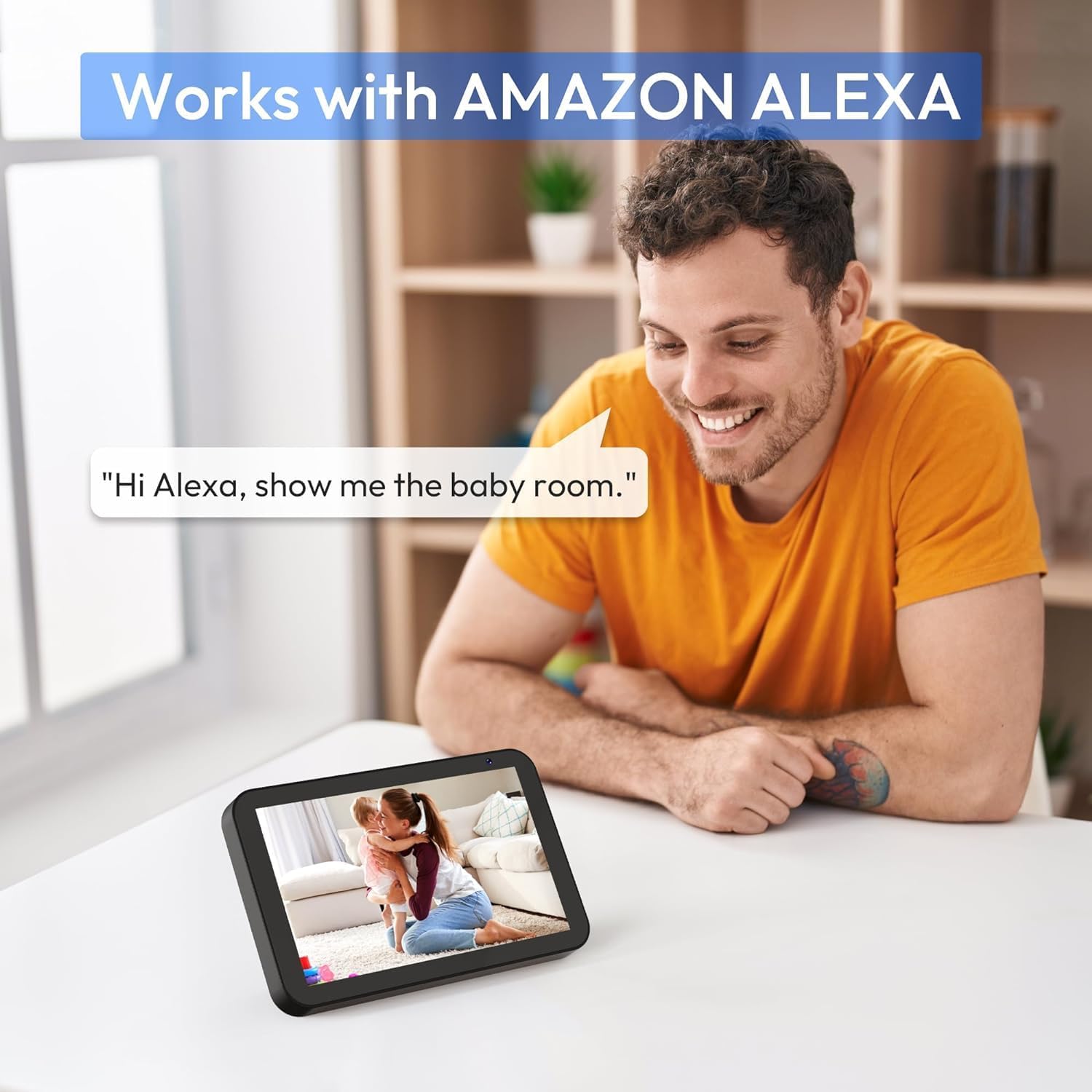
בילד 7: A person interacting with an Amazon Echo Show device, displaying the live feed from the CZEview Babyphone, demonstrating Alexa integration.
- Enable the CZEview skill in your Amazon Alexa app.
- Link your CZEview אקאונט מיט אַלעקסאַ.
- Use voice commands such as "Alexa, show me the baby room" to view the camera feed on compatible Alexa devices.
5.8 Multi-User Access and SD Card Recording
- משפּחה ייַנטיילונג: You can invite family members to view the camera feed through the app. Invited users may have limited control functions compared to the primary account holder.
- לאקאלע סטאָרידזש: Insert an SD card (not included) into the camera's designated slot for local video recording and to enable certain features like playing lullabies directly from the camera.
6. וישאַלט
- רייניקונג: ניצט אַ ווייכע, טרוקענע שטאָף צו רייניקן די קאַמעראַ לינזע און קערפּער. ניצט נישט פליסיקע רייניגער אָדער אַעראָזאָלן.
- Firmware דערהייַנטיקונגען: קאָנטראָלירט רעגולער די אַפּ פֿאַר פֿאַראַן פירמווער דערהייַנטיקונגען צו ענשור אָפּטימאַלע פאָרשטעלונג און זיכערהייט.
- אָרט: Ensure the camera is placed in a well-ventilated area and not exposed to extreme temperatures or direct sunlight.
7. טראָובלעשאָאָטינג
- קיין מאַכט: Ensure the power cable is securely connected to both the camera and the power outlet. Try a different outlet.
- Wi-Fi קאַנעקשאַן ישוז: Verify your Wi-Fi password. Ensure the camera is within range of your router. Restart your router and the camera. Confirm your network is 2.4 GHz or 5 GHz compatible.
- נעבעך בילד קוואַליטעט: Check your internet connection speed. Ensure the camera lens is clean and free from obstructions. Adjust the video quality settings in the app if available.
- נעבעך אַודיאָ קוואַליטעט: Ensure there are no obstructions near the camera's microphone or speaker. Check the volume settings in the app.
- נאָטיפיקאַטיאָנס ניט באקומען: Check app notification settings on your phone and within the CZEview app. Ensure the camera is connected to Wi-Fi.
- אַפּאַראַט ענטפערט נישט: Unplug the camera, wait 10 seconds, and plug it back in to restart.
8. ספּעסאַפאַקיישאַנז
| שטריך | באַשרייַבונג |
|---|---|
| מאָדעל נומער | ZY-D1 |
| ווירעלעסס קאָמוניקאַציע טעכנאָלאָגיע | Wi-Fi (2.4 GHz און 5 GHz) |
| Viewינג אַנגלע | 360 Degrees (355° horizontal, 90° vertical) |
| מאַטעריאַל | פּלאַסטיק |
| נומער דימענשאַנז (L X W X H) | 12.7 X 7.62 X 7.62 סענטימעטער |
| קאַנעקטיוויטי פּראָטאָקאָל | ווי-פי |
| קאָנטראָללער טיפּ | אַמאַזאָן אַלעקסאַ |
| מאַונטינג טיפּ | וואנט בארג |
| קאָליר | ווייַס |
| קאַמפּאָונאַנץ אַרייַנגערעכנט | קאַבלע |
| רעקאָממענדעד ניצט | Babyphone, Baby Monitoring, Night Vision |
9. זיכערקייַט אינפֿאָרמאַציע
- Keep the camera and all accessories out of reach of children.
- Do not place the camera or its power cord within 1 meter (3 feet) of the crib or playpen to prevent strangulation hazards.
- ניצט נאָר דעם צוגעשטעלטן מאַכט אַדאַפּטער. ניצן נישט-אָטעריזירטע אַדאַפּטערס קען שעדיקן דעם אַפּאַראַט און בטל מאַכן די וואָראַנטי.
- שטעלט נישט אויס דעם אפאראט צו וואסער, פייכטקייט, אדער עקסטרעמע טעמפעראטורן.
- פרובירט נישט צו עפענען אדער פאררעכטן דעם אפאראט אליין. קאנטאקטירט קאסטומער סופארט פאר הילף.
10. וואָראַנטי און שטיצן
For warranty information and customer support, please refer to the warranty card included in your product packaging or visit the official CZEview website. If you encounter any issues not covered in this manual, please contact CZEview קונה דינסט פֿאַר הילף.


