הקדמה
The Discovery Bright Doodles LCD Art Tablet provides a mess-free and engaging platform for creative expression. Designed for children aged 3 and up, this portable drawing pad allows users to draw, write, and doodle without the need for paper or ink. Its intuitive design and durable construction make it suitable for various environments, from home to travel.
This manual provides essential information on setting up, operating, and maintaining your LCD Art Tablet to ensure optimal performance and longevity.
זיכערקייַט אינפֿאָרמאַציע
- This product is intended for children aged 3 years and older. Adult supervision is recommended.
- Do not expose the tablet to extreme temperatures, direct sunlight, or moisture.
- Avoid dropping the tablet or subjecting it to strong impacts, as this may damage the LCD screen.
- Only use the provided stylus or a similar non-abrasive, blunt instrument to draw on the screen. Sharp objects can permanently damage the display.
- האַלט באַטעריעס אַוועק פון קליינע קינדער. אויב געשלונגען, זוכט גלייך מעדיצינישע הילף.
פּעקל אינהאַלט
ביטע טשעקן דעם פּעקל צו זיכער מאַכן אַז אַלע זאכן זענען דאָרט:
- 1 x Discovery Bright Doodles LCD Art Tablet
- 1 x Tethered Stylus
- 1 x אינסטרוקציע מאַנואַל (דאָס דאָקומענט)

Image: The Discovery Bright Doodles LCD Art Tablet shown alongside its retail packaging. The tablet is blue with a black screen displaying colorful doodles, and a green tethered stylus is visible.
סעטאַפּ
ייַנמאָנטירונג פון באַטאַרייע
The Discovery Bright Doodles LCD Art Tablet requires 2 AAA batteries (not included) for operation. Follow these steps to install them:
- געפינען די באַטאַרייע אָפּטייל אויף די צוריק פון די טאַבלעט.
- ניצנדיק אַ קליינעם שרויפנציהער (נישט אַרייַנגערעכנט), עפֿנט פֿאָרזיכטיק דעם דעקל פֿונעם באַטעריע־אָפּטייל.
- אַרײַנשטעלן 2 AAA באַטעריעס, און זיכער מאַכן אַז די ריכטיקע פּאָלאַריטעט (+/-) איז אָנגעוויזן אין דעם אָפּטייל.
- פאַרבייַטן די דעקן פון די באַטאַרייע אָפּטייל און באַוואָרענען עס מיט די שרויף.
באַמערקונג: ניצט שטענדיק פרישע באַטעריעס און וואַרפט אַוועק אַלטע באַטעריעס פאַראַנטוואָרטלעך. מישט נישט אַלטע און נייע באַטעריעס, אדער פאַרשידענע טייפּס באַטעריעס.
אַפּערייטינג ינסטראַקשאַנז
Drawing on the Tablet
Use the included tethered stylus to draw or write on the LCD screen. You can also use your fingertip. The screen will display colorful lines as you draw.

Image: A child's hand holding the green stylus and drawing colorful lines on the black screen of the blue Discovery Bright Doodles LCD Art Tablet.
Erasing the Screen
To clear the entire screen and start a new drawing, press the erase button located on the bottom edge of the tablet. The screen will instantly clear.
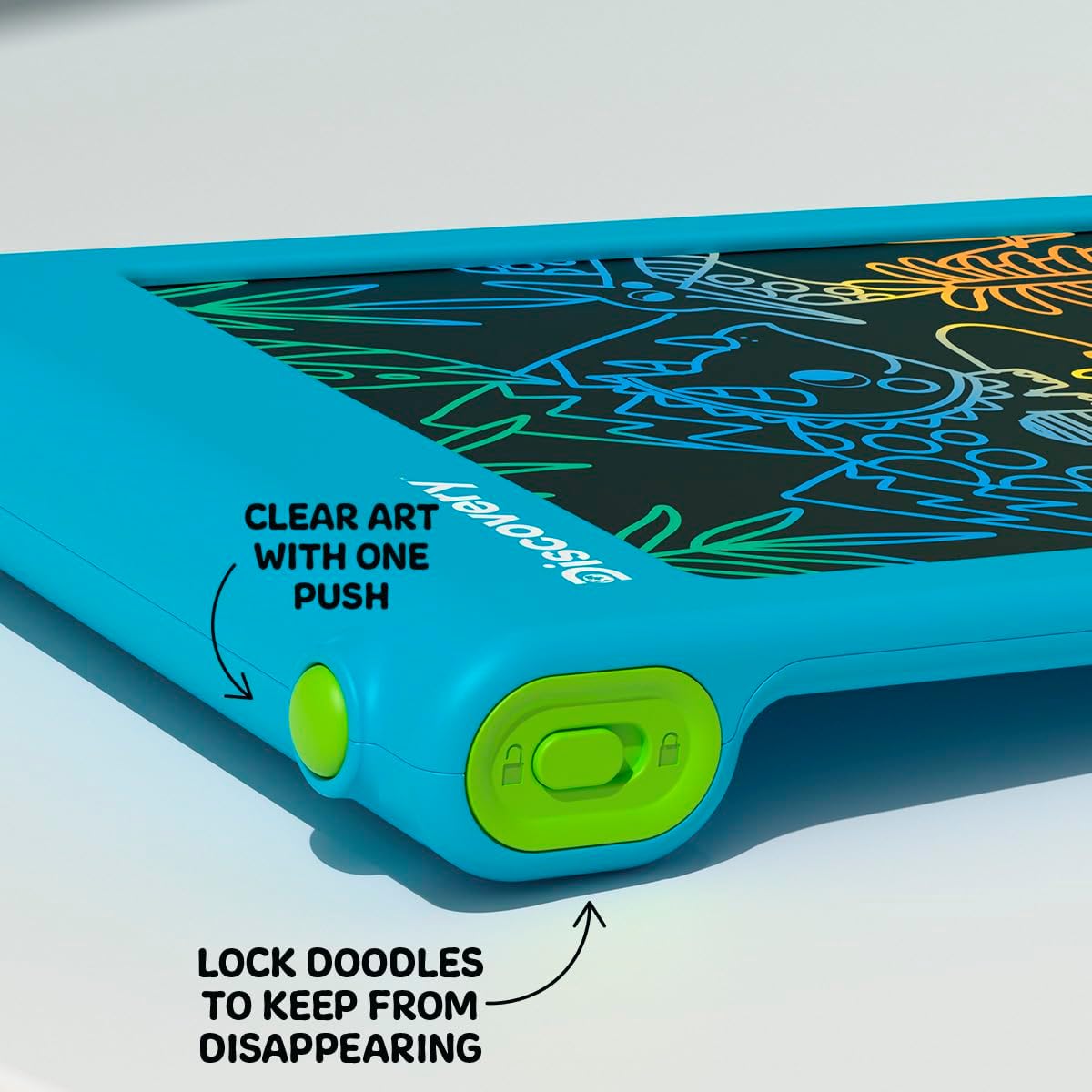
בילד: א נאָענטע בילד view of the bottom edge of the tablet, showing the round green erase button and the rectangular green screen lock switch with an open and closed padlock icon.
סקרין לאַק פונקציע
The tablet features a screen lock switch to prevent accidental erasing. This is useful for preserving artwork or notes.
- צו שלאָס the screen: Slide the screen lock switch (located next to the erase button) to the position showing a closed padlock icon. While locked, pressing the erase button will not clear the screen.
- צו ופשליסן the screen: Slide the screen lock switch to the position showing an open padlock icon. The erase button will now function normally.
טיפּ: Always ensure the screen is unlocked before attempting to erase your drawing.
סטיילוס סטאָרידזש
The included stylus is tethered to the tablet to prevent loss. When not in use, the stylus can be neatly stored in the designated slot on the side of the tablet.

בילד: א נאָענטע בילד view of the side of the tablet, showing the green tethered stylus inserted into its storage slot.
וישאַלט
רייניקונג
To clean the tablet, gently wipe the screen and casing with a soft, dry, lint-free cloth. Do not use abrasive cleaners, solvents, or chemical sprays, as these can damage the screen or casing.
באַטערי פאַרבייַט
If the erase function stops working or the screen becomes dim, it may be time to replace the batteries. Refer to the "Battery Installation" section under Setup for instructions.
טראָובלעשאָאָטינג
- Screen does not clear when erase button is pressed:
- Check if the screen lock switch is in the "locked" position. Slide it to the "unlocked" position.
- Ensure batteries are correctly installed and not depleted. Replace batteries if necessary.
- Drawing lines are faint or inconsistent:
- דאָס קען אָנווייַזן אַ נידעריקע באַטאַרייע. טוישט די באַטאַרייעס.
- Ensure you are using the stylus or a suitable blunt object with appropriate pressure.
- Stylus is lost:
- The stylus is tethered to the tablet to prevent loss. If it becomes detached, a replacement stylus may be available from the manufacturer or a compatible alternative can be used.
ספּעסאַפאַקיישאַנז
| מאָדעל נומער | 1017870 |
| סאָרט | ופדעקונג |
| פּראָדוקט דימענשאַנז | 9.7 X 6.2 X 0.1 אינטשעס |
| פּונקט וואָג | 1.12 פונט |
| רעקאַמענדיד עלטער | 3 יאר און העכער |
| מאַכט מקור | 2 X AAA באַטעריז (ניט אַרייַנגערעכנט) |
| ספּעציעלע שטריך | ילומאַנייטאַד לקד סקרין |
| פאַבריקאַנט | מערטשסאָורסע |
וואָראַנטי און שטיצן
For warranty information or technical support, please refer to the contact details provided on the product packaging or visit the official Discovery brand webזייטל. ביטע באַהאַלטן אייער קויפן באַווייַז פֿאַר קיין וואָראַנטי קליימז.


