הקדמה
This manual provides essential instructions for the assembly, operation, maintenance, and troubleshooting of your Xtrike-Me GC 907 Gaming Chair. Please read this manual thoroughly before assembly and use to ensure safe and correct operation and to maximize the lifespan of your product.
זיכערקייַט אינפֿאָרמאַציע
וויכטיק: Always adhere to these safety guidelines to prevent injury or damage to the product.
- The maximum weight capacity for this chair is 150 kg (approximately 330 lbs). Do not exceed this limit.
- Ensure the chair is properly assembled according to the instructions before use.
- Use the chair on a hard, level floor to ensure stability and prevent tipping.
- פֿאַרמײַדט צו שטיין אויף דעם שטול אָדער צו ניצן עס ווי אַ טרעפּ־בענקל.
- האַלט קינדער און חיות אַוועק פון דעם שטול בעת די פֿאַרזאַמלונג.
- קאָנטראָלירט רעגולער אַלע באָלץ און שרויפן צו זיכער מאַכן אַז זיי זענען פעסט. פֿעסטצושטעלן אויב נייטיק.
סעטאַפּ און אַסעמבלי
The Xtrike-Me GC 907 Gaming Chair requires assembly. All necessary components and instructions are provided in the packaging. Please follow the included assembly guide carefully. Below are general steps and key components:
- אָפּלייגן קאַמפּאָונאַנץ: Carefully remove all parts from the packaging and verify against the parts list in the separate assembly guide.
- צוטשעפּען ראָדלעך צו באַזע: Insert the casters into the holes on the 350 mm nylon base.
- אינסטאַלירן גאַז ליפט: Place the 100 mm hydraulic lifting system (gas lift) into the center hole of the base.
- צוזאַמענשטעלן זיץ און רוקן: Follow the specific instructions to attach the backrest to the seat mechanism.
- צוטשעפּען אַרמרעסץ: Secure the 3D armrests to the seat base.
- פֿאַרבינדן זיץ צום גאַז ליפט: לייגט דעם צוזאמענגעשטעלטן זיץ אויפן גאז-ליפט.
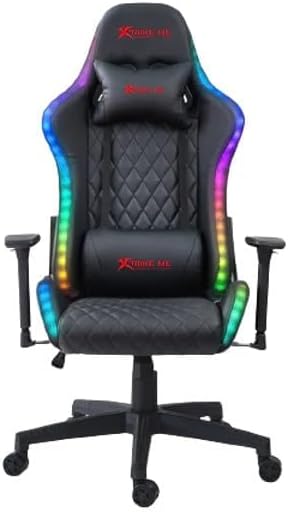
בילד: פראָנט view of the Xtrike-Me GC 907 Gaming Chair, showcasing the ergonomic design, headrest, lumbar support, and integrated RGB lighting along the edges.
אַפּערייטינג ינסטראַקשאַנז
Your Xtrike-Me GC 907 Gaming Chair offers several adjustable features for personalized comfort.
- הייך אַדזשאַסטמאַנט: Use the lever located under the seat on the right side to adjust the chair's height. Pull the lever up while seated to lower the chair, or pull it up while standing to raise it. Release the lever to lock the height. The 100 mm hydraulic lifting system allows for smooth adjustments.
- צוריק רעקלינע: The backrest can be adjusted up to 180 degrees. Locate the recline lever on the side of the chair (typically on the right). Pull the lever up and lean back to your desired angle, then release the lever to lock the backrest in place.
- 3D אַרמרעסץ: The armrests are multi-directional. They can typically be adjusted for height, forward/backward position, and rotation. Experiment with the buttons or levers on the armrests to find your preferred position.
- RGB באַקלייטונג: The chair is equipped with RGB backlighting. Connect the USB cable from the chair to a power source (e.g., a USB port on your computer or a USB wall adapter) to activate the lights. A controller, usually integrated or inline with the cable, allows you to change lighting modes, colors, and brightness.

בילד: זייט פּראָfile of the Xtrike-Me GC 907 Gaming Chair, highlighting the contoured backrest, adjustable armrest, and the vibrant RGB light strip running along the chair's side.
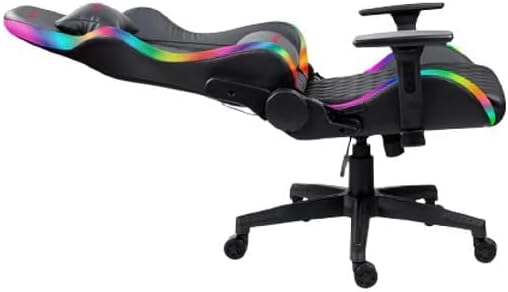
Image: The Xtrike-Me GC 907 Gaming Chair shown in a fully reclined position, demonstrating its 180-degree recline capability, suitable for resting or napping.
וישאַלט
געהעריגע אויפהאלטונג וועט פארלענגערן דאס לעבן און אויסזען פון אייער גיימינג בענקל.
- רייניקונג: ווישן ריין מיט אַ ווייך, דamp cloth. For stubborn stains on the PU and PVC materials, use a mild soap solution and then wipe with a clean, damp שטאָף. פֿאַרמײַדט שאַרפֿע כעמיקאַלן אָדער אַברייסיוו רייניגער.
- ייַזנוואַרג טשעק: Periodically check all screws, bolts, and connections to ensure they are tight. Retighten as necessary to maintain stability and safety.
- קאַסטער קער: Keep the casters free of hair, dust, and debris to ensure smooth movement.
- ויסמיידן דירעקט זונשייַן: פארלענגערטע אויסשטעלונג צו דירעקטער זונשייַן קען פאַראורזאַכן דעם מאַטעריאַל צו פֿאַרבלאַסן אָדער צו צעברעכן.

בילד: הינטערשטע view of the Xtrike-Me GC 907 Gaming Chair, showing the sturdy construction of the backrest, the Xtrike-Me logo, and the attachment points for the headrest and lumbar cushions.
טראָובלעשאָאָטינג
If you encounter issues with your gaming chair, refer to the following common solutions:
| פּראָבלעם | מעגלעך סיבה | לייזונג |
|---|---|---|
| דער שטול וואַקלט זיך אָדער פילט זיך נישט סטאַביל. | לויזע שרויפן אדער אומגלייכע שטאָק. | קאָנטראָלירט און פֿעסטשטעלט אַלע פֿאַרזאַמלונג שרויפֿן. מאַכט זיכער אַז דער שטול איז אויף אַ גלאַטער, גלייכער ייבערפֿלאַך. |
| Height adjustment not working. | Gas lift malfunction or lever obstruction. | Ensure the lever is fully engaged. Check for any obstructions around the gas lift mechanism. If the issue persists, the gas lift may need replacement. |
| רוקן-שטיצע לייגט זיך נישט צוריק אדער פארשליסט זיך נישט. | Recline mechanism obstruction or damage. | Check for any objects blocking the recline mechanism. Ensure the lever is fully pulled/released. |
| RGB לעמפּלעך אַרבעטן נישט. | Power connection issue or controller malfunction. | Verify the USB cable is securely connected to a working power source. Check the inline controller for damage or ensure it's turned on. Try a different USB port or power adapter. |
| די ראָדלעך דרייען זיך נישט גלאַט. | ברוכוואַרג געכאפט אין ראָדלעך. | Turn the chair over and carefully remove any hair, dust, or debris from the caster wheels. |
ספּעסאַפאַקיישאַנז
Key technical specifications for the Xtrike-Me GC 907 Gaming Chair:
| שטריך | דעטאַל |
|---|---|
| מאָדעל נומער | XTRIKE ME GC-907 |
| קאָליר | שוואַרץ |
| ערשטיק מאַטעריאַל | PU and PVC (Chair), Nylon (Base, Frame) |
| פּראָדוקט דימענשאַנז (ד רענטגענ וו רענטגענ ה) | 48 X 57 X 136 סענטימעטער (18.9 X 22.4 X 53.5 אינטשעס) |
| פּונקט וואָג | 5.3 קג (11.7 לבס) |
| מאַקסימום מאַסע קאַפּאַציטעט | 150 קג (330 לבס) |
| Hydraulic Lift System | 100 מם |
| אַרמרעסץ | 3D אַדזשאַסטאַבאַל |
| באַזע טיפּ | 350 mm Nylon Base |
| רוקן-ריקליין ווינקל | אַרויף צו 180 דיגריז |
| ספּעציעלע פֿעיִקייטן | RGB Backlighting, Adjustable Height, Arm Rest, Recliner |
| אַסעמבלי פארלאנגט | Yes, instructions provided |
| זאָרגן אינסטרוקציעס | ווישן ריין |
וואָראַנטי און שטיצן
For warranty information or technical support, please refer to the documentation included with your purchase or contact Xtrike-Me customer service through their official webזייטל. האַלט דיין קויפן באַווייַז פֿאַר וואָראַנטי קליימז.


