הקדמה
This manual provides detailed instructions for the safe and effective operation of your WOUXUN KG-R56 VHF Professional Radio. Please read this manual thoroughly before using the device to ensure proper function and to prevent damage.
פּראָדוקט איבערview
The WOUXUN KG-R56 is a compact and robust professional VHF transceiver designed for authorized users, operating within the 66-88 MHz frequency range. It features 256 memory channels, advanced menu functions, and integrated USB Type-C charging. The device is compliant with current R&TTE RED CE standards.
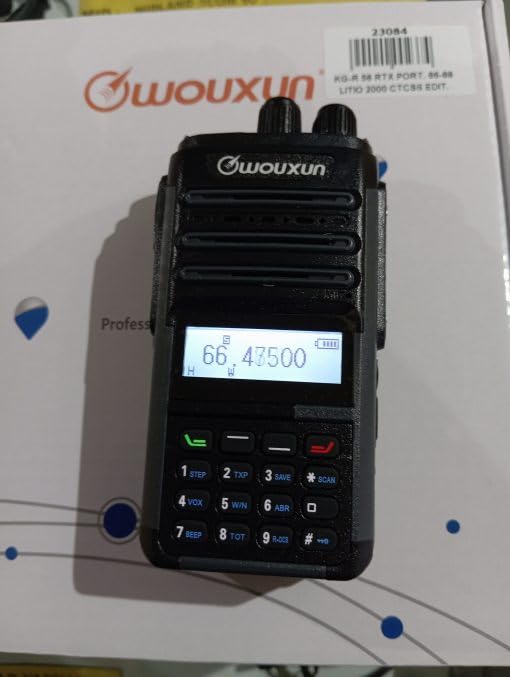
Image: WOUXUN KG-R56 VHF Professional Radio. This image shows the front view פונעם ראַדיאָ, ארויסהייבנדיק זײַן אַרויסווײַז, קלאַוויאַטור, און אַנטענע פֿאַרבינדונג.
פּעקל אינהאַלט
באַשטעטיקט אַז אַלע זאכן וואָס זענען אויסגערעכנט אונטן זענען פאַראַן אין אייער פּעקל:
- KG-R56 Transceiver
- 7.4V - 2000 mAh Lithium-Ion Battery Pack
- טשאַרדזשער
- 220 וו מאַכט צושטעלן
- Flexible Rubber Antenna
- גאַרטל קליפּ
- User Manual (in original language)
- סערטיפיקאַטיאָנס
סעטאַפּ
1. באַטאַרייע ייַנמאָנטירונג
- גלייכט אויס די באַטעריע פּאַק מיט די גרוווז אויף דער צוריק פון די ראַדיאָ.
- רוקט די באַטעריע פּאַק אַרויף ביז עס קליקט זיכער אין פּלאַץ.
- צו אַראָפּנעמען, דריק די באַטעריע אויסלאָז לאַטש (אויב פֿאַראַן) און שלעפּ די באַטעריע אַראָפּ.
2. טשאַרדזשינג די באַטערי
The KG-R56 features an integrated USB Type-C port for convenient charging.
- Connect a USB Type-C cable to the radio's USB-C port.
- Connect the other end of the cable to the provided charger or a compatible USB power source.
- The charging indicator light on the radio will show the charging status.
- A full charge typically takes several hours. Avoid overcharging the battery.
3. אנשטעלן די אנטענע
- Screw the flexible rubber antenna clockwise onto the antenna connector on top of the radio until it is finger-tight.
- Do not overtighten the antenna.
4. אַטאַטשינג די גאַרטל קלעמערל
- Use the provided screws to attach the belt clip to the designated area on the back of the radio.
אַפּערייטינג ינסטראַקשאַנז
1. מאַכט אויף / אויסגעלאשן
Rotate the Power/Volume knob clockwise to turn the radio on. Rotate it counter-clockwise until a click is heard to turn it off.
2. אַדזשאַסטינג באַנד
After powering on, continue rotating the Power/Volume knob to adjust the audio output level to your preference.
3. קאַנאַל סעלעקציע
Use the Up/Down arrow keys or the rotary encoder (if present) to select the desired channel or frequency. The display will show the selected channel number, frequency, or channel name.
4. שיקן און באַקומען
- צו טראַנסמיטירן, דריק און האַלט דעם Push-To-Talk (PTT) קנעפּל אויף דער זייט פון ראַדיאָ. רעדט קלאָר אין מיקראָפאָן.
- מעלדונג די PTT קנעפּל צו באַקומען.
- Always ensure the channel is clear before transmitting to avoid interference.
5. מעניו נאַוויגאַציע
The KG-R56 features an advanced menu system for managing various radio functions.
- דרוק די MENU קנעפּל צו אַרייַן די הויפּט מעניו.
- Use the Up/Down arrow keys to scroll through the available menu options.
- דרוק MENU ווידער אָדער OK (if available) to select an option.
- Use the Up/Down keys to change settings within a selected option.
- דרוק אַרויסגאַנג or צוריק to return to the previous menu or exit the menu system.
שליסל פֿעיִקייטן
- DTMF Encoding/Decoding: Supports DTMF tones for advanced signaling capabilities.
- CTCSS/DCS: Includes 50 CTCSS groups and 105 DCS groups for selective calling. These can be customized via PC programming software.
- CTCSS/DCS Scanner: Automatically detects CTCSS/DCS tones on a received signal.
- קול גייד: Provides audible prompts for menu navigation and function selection, enhancing user experience.
- Channel Name Display: Allows for editing and displaying custom channel names for easier identification.
- Battery Capacity Inquiry: Check the current battery level directly from the radio.
- פּיסי פּראָגראַמירבאַר: Customize radio settings, frequencies, and channels using dedicated PC software.
- Selectable Bandwidth: Choose between various channel spacing options (5K/6.25K/10K/12.5K/25K).
- Reverse Frequency Function: Quickly switch between transmit and receive frequencies for specific operations.
- Multiple Scan Modes (TO/CO/SE): Offers various scanning options for monitoring channels efficiently.
- ווייַז מאָדעס: Switch between displaying Frequency, Channel Number, or Channel Name.
- TOT (טיים-אויט טיימער): Prevents excessively long transmissions by limiting transmission duration.
- פארנומענע קאנאל לאקאוט (BCLO): Prevents transmission on an occupied channel, avoiding interference.
- Keypad Lock (Automatic/Manual): Prevents accidental key presses and setting changes.
- Wired Clone Function: Copy settings and configurations from one radio to another using a cable.
- USB Type-C טשאַרדזשינג: Conveniently charge the radio via a standard USB-C port.
וישאַלט
רייניקונג
ווישט די ראַדיאָ'ס ייבערפלאַך מיט אַ ווייכן, דamp שטאָף. ניצט נישט קיין שאַרפע כעמיקאַלן, אַברייסיוו רייניגערס, אדער סאָלווענטן, ווייל די קענען שאַטן דעם קasing. Ensure the USB-C port cover is closed when not charging to protect against dust and moisture.
באַטערי קער
- אָפּצאָל די באַטאַרייע גאָר איידער ערשט נוצן.
- שטעלט נישט אויס די באַטעריע צו עקסטרעמע טעמפּעראַטורן (הייס אָדער קאַלט).
- אויב דער ראַדיאָ וועט נישט געניצט ווערן פֿאַר אַ לענגערע צייט, נעמט אַרויס די באַטאַרייע און לייגט עס אַוועק אין אַ קיל, טרוקן אָרט.
- Use only WOUXUN approved battery packs and chargers to ensure safety and optimal performance.
טראָובלעשאָאָטינג
| פּראָבלעם | מעגלעך סיבה | לייזונג |
|---|---|---|
| ראַדיאָ גייט נישט אָן. | די באַטעריע איז נידעריק אָדער נישט ריכטיק אינסטאַלירט. | לאָדט אויף די באַטאַרייע אָדער אינסטאַלירט עס ריכטיק. |
| קען נישט טראַנסמיטירן. | Busy Channel Lockout (BCLO) active; incorrect frequency/channel; low battery. | Wait for the channel to clear; verify frequency/channel settings; charge battery. |
| No reception or weak signal. | Antenna not attached correctly; squelch level too high; out of range. | Check antenna connection; adjust squelch level; move closer to transmitting station. |
| די קלאַוויאַטור רעאַגירט נישט. | קלאַוויאַטור שלאָס איז אַקטיוו. | דיאַקטיווירן די קלאַוויאַטור שלאָס (זעט די אָפּערייטינג אינסטרוקציעס פֿאַר אַ ספּעציפֿישע קנעפּל קאָמבינאַציע). |
| USB-C טשאַרדזשינג אַרבעט נישט. | Cable or charger faulty; port dirty. | Try a different USB-C cable/charger; carefully clean the port if visibly dirty. |
| Audio output is distorted. | Volume too high; weak signal; speaker damage. | Adjust volume; check signal strength; contact support if speaker is damaged. |
טעכניש ספּעסאַפאַקיישאַנז
- מאָדעל: KG-R56
- אָפטקייַט קייט: 66-88 מהז
- נומער פון טשאַנאַלז: 256
- קאַנאַל ספּייסינג: 5K/6.25K/10K/12.5K/25K
- מאָדולאַטיאָן: עפעם פ3ע
- אַפּערייטינג וואָלtage: 7.4V DC
- RF רעזולטאַט מאַכט: 5W/1W (selectable)
- ופנעמער סענסיטיוויטי: 0.25 µV (12 dB SINAD)
- סקוועלטש סענסיטיוויטי: <0.16 µV
- אַודיאָ רעזולטאַט מאַכט: 500 mW at 8 ohms
- באַטערי טיפּ: 7.4V - 2000 mAh Lithium-Ion Pack
- סטאַנדביי קראַנט: 50 מאַ
- אַפּערייטינג טעמפּעראַטור: -30°C צו +60°C
- דימענשאַנז (H x W x D): 105 x 63 x 39 mm (without antenna and battery)
- וואָג: 250 g (with battery and antenna)
- אינטערנאציאנאלע שוץ רייטינג: IP54 (Protected from limited dust ingress and water spray from any direction)
- וואַסער קעגנשטעל מדרגה: Not designed for immersion in water.
- ספּעציעלע פֿעיִקייטן: Weather-resistant, USB rechargeable
באַמערקונג: די ספּעסאַפאַקיישאַנז קענען זיין געביטן אָן באַמערקן.
זיכערקייַט אינפֿאָרמאַציע
- Do not operate the radio in explosive atmospheres (e.g., near flammable gases, dust particles, or metallic powders).
- Do not modify the radio. Unauthorized modifications can void your warranty and violate regulatory compliance.
- Keep the radio away from medical devices (e.g., pacemakers) to avoid potential interference.
- Use only WOUXUN approved accessories, including batteries and chargers.
- Do not expose the radio to direct sunlight for extended periods or to extreme heat sources.
- Dispose of batteries properly according to local environmental regulations.
- While rated IP54 for weather resistance, this device is not designed for immersion in water. Avoid exposing it to heavy rain or submersion.
וואָראַנטי און שטיצן
For warranty information or technical support, please contact your authorized WOUXUN dealer or the point of purchase. Keep your purchase receipt as proof of purchase.
For further assistance, you may visit the official WOUXUN website or consult the contact information provided in your original product packaging.


