1. הקדמה
Thank you for choosing the A4TECH F.STYLER FBK11 Wireless Bluetooth Keyboard. This versatile keyboard offers dual connectivity modes (Bluetooth and 2.4 GHz wireless) and supports pairing with up to four devices simultaneously. It is designed for seamless use across various operating systems, including Windows, macOS, Android, and iOS. This manual provides detailed instructions to help you set up, operate, and maintain your new keyboard.

פיגורע 1: פראָנט view of the A4TECH F.STYLER FBK11 Wireless Bluetooth Keyboard, showcasing its compact design and key layout.
2. פּראָדוקט פֿעיִקייטן
- צווייענדיק קאַנעקטיוויטי: Supports both Bluetooth and 2.4 GHz wireless modes for flexible connection options.
- Multi-Device פּערינג: Connect and switch between up to 4 devices (3 via Bluetooth, 1 via 2.4G wireless) seamlessly.
- מולטימעדיאַ האָטקייס: Dedicated shortcut keys for quick access to media controls and other functions.
- אַפּערייטינג סיסטעם קאַמפּאַטאַבילאַטי: Compatible with Windows, macOS, Chrome OS, Android, and iOS devices.
- סאָליד און פּאָרטאַטיוו פּלאַן: Lightweight and easy to carry for on-the-go productivity.
- אַראַביש/ענגליש אויסלייג: Features a dual-language key layout for broader usability.
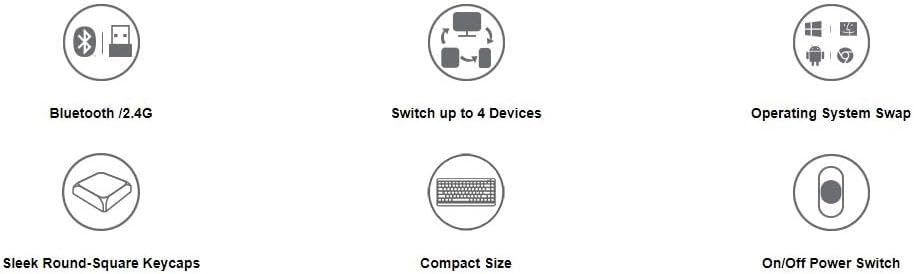
Figure 2: Visual representation of key features including Bluetooth/2.4G connectivity, multi-device switching, OS swap, sleek keycaps, compact size, and on/off power switch.
3. פּעקל אינהאַלט
ביטע טשעק די פּאַקעט פֿאַר די פאלגענדע זאכן:
- A4TECH F.STYLER FBK11 Wireless Bluetooth Keyboard
- 2.4 גיגאַהערץ יו־עס־בי נאַנאָ ריסיווער
- 2 רענטגענ אַאַאַ אַלקאַלינע באַטעריז
- באַניצער מאַנואַל (דעם דאָקומענט)

Figure 3: The keyboard shown with its included accessories: the USB receiver and two AAA batteries.
4. סעטאַפּ
4.1. באַטאַרייע ייַנמאָנטירונג
- געפינט די באַטעריע אָפּטייל אויף דער אונטערשטער זייט פון דער קלאַוויאַטור.
- עפענען די באַטאַרייע אָפּטייל דעקן.
- Insert the two AAA alkaline batteries, ensuring correct polarity (+/-).
- פאַרמאַכן די באַטאַרייע אָפּטייל דעקן סיקיורלי.
4.2. מאַכט אויף / אויסגעלאשן
Slide the power switch, located on the top right edge of the keyboard, to the 'ON' position to power on the keyboard. Slide it to 'OFF' when not in use to conserve battery life.
5. אַפּערייטינג ינסטרוקטיאָנס
5.1. קאָנעקטיוויטי מאָדעס
The FBK11 keyboard supports two connectivity modes: Bluetooth and 2.4 GHz wireless.
5.1.1. 2.4 GHz דראָטלאָזע פֿאַרבינדונג
- Insert the 2.4 GHz USB Nano Receiver into an available USB port on your computer or device.
- קער אויף די קלאַוויאַטור.
- The keyboard should automatically connect to the receiver. The 2.4G indicator light on the keyboard will illuminate briefly.
5.1.2. בלועטאָאָטה קאַנעקשאַן
The keyboard can connect to up to three Bluetooth devices (BT1, BT2, BT3).
- קער אויף די קלאַוויאַטור.
- דריקן און האַלטן די Fn key and then press one of the Bluetooth keys (BT1, BT2, אָדער BT3) for 3-5 seconds until the corresponding Bluetooth indicator light starts blinking rapidly. This indicates the keyboard is in pairing mode.
- אויף אייער דעווייס (קאמפיוטער, טאַבלעט, סמאַרטפאָון), גייט צו בלועטוט סעטטינגס און זוכט פֿאַר נייע דעווייסעס.
- Select "A4TECH FBK11" or a similar name from the list of available devices.
- פֿאָלגט אַלע אינסטרוקציעס אויף דעם עקראַן צו פֿאַרענדיקן דעם פּאָרינג פּראָצעס. די אינדיקאַטאָר ליכט וועט אויפֿהערן צו בלינקען און בלייבן פֿעסט פֿאַר אַ פּאָר סעקונדעס אַמאָל פֿאַרבונדן.
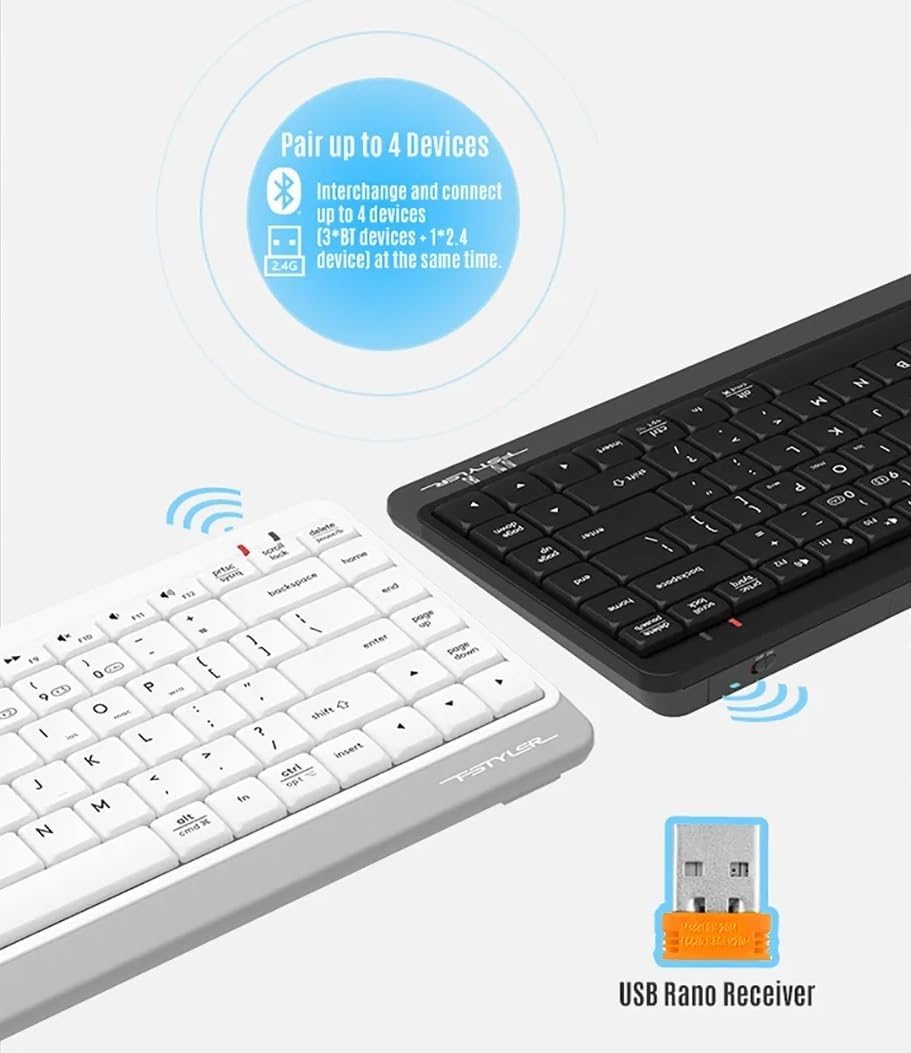
Figure 4: The keyboard demonstrating its dual connectivity options, including the USB Nano Receiver for 2.4G wireless and Bluetooth pairing capabilities.
5.2. סוויטשינג צווישן קייפל דעווייסעס
צו באַשטימען צווישן קאָננעקטעד דעוויסעס:
- דרוק Fn + 2.4G to switch to the device connected via the 2.4 GHz USB receiver.
- דרוק Fn + BT1 to switch to the first Bluetooth-paired device.
- דרוק Fn + BT2 to switch to the second Bluetooth-paired device.
- דרוק Fn + BT3 to switch to the third Bluetooth-paired device.

Figure 5: Diagram illustrating how the keyboard can be paired with up to four different devices simultaneously, including a smartphone, tablet, laptop, and desktop computer.
5.3. אָפּערייטינג סיסטעם סוויטשינג
The keyboard features dedicated keys to optimize its layout for different operating systems:
- דרוק Fn + Q for Android/iOS mode.
- דרוק פן + וו for Windows mode.
- דרוק Fn + E for macOS mode.
5.4. Multimedia Hotkeys and FN Lock Mode
The keyboard includes 12 multimedia and internet hotkeys (F1-F12) that can be accessed directly or by using the Fn key.

פיגורע 6: איבערview of the keyboard's main functions, highlighting FN Locking Mode, Multimedia & Internet Hotkeys, Multi-Device Switch, Operating System Swap, and PC/MAC Dual-Function Keys.
5.4.1. FN Lock Mode
By default, after pairing, the FN shortcut is locked in FN mode. This means you can use the multimedia functions (F1-F12) directly without pressing the Fn key.
- לאַק Fn מאָדע: No need to press the Fn key for multimedia functions.
- ופשליסן Fn מאָדע: דרוק Fn + ESC to switch back to standard F1-F12 key functions, requiring the Fn key to access multimedia shortcuts.
The locking FN mode is memorized when switching devices and shutting down.

Figure 7: Detailed explanation of how to lock and unlock the FN mode, allowing direct access to multimedia functions.
6. טראָובלעשאָאָטינג
| פּראָבלעם | מעגלעך סיבה | לייזונג |
|---|---|---|
| קלאַוויאַטור ניט ריספּאַנדינג | Low battery; Keyboard is off; Incorrect connection mode; Device Bluetooth is off. | Replace batteries; Turn on keyboard; Switch to correct connection mode (2.4G/BT1/BT2/BT3); Enable Bluetooth on your device. |
| קען נישט צוזאמענשטעלן דורך בלוטוט | Keyboard not in pairing mode; Device is too far; Interference. | Ensure keyboard is in pairing mode (blinking light); Move keyboard closer to device; Remove potential sources of interference. |
| 2.4G connection issues | USB receiver not properly inserted; Interference. | Re-insert USB receiver; Try a different USB port; Move keyboard closer to receiver; Remove potential sources of interference. |
| מולטימעדיאַ שליסלען נישט ארבעטן | FN Lock mode is off. | דרוק Fn + ESC to toggle FN Lock mode. |
7. ספּעסאַפאַקיישאַנז
- מאָדעל: FBK11
- קאַנעקטיוויטי: Bluetooth 5.0, 2.4 GHz Wireless
- אַפּערייטינג קייט: אַרויף צו 10 מעטער (33 פֿיס)
- באַטערי טיפּ: 2 רענטגענ אַאַאַ אַלקאַלינע באַטעריז
- מאַטעריאַל: פּלאַסטיק
- קאָליר: שוואַרץ
- דימענסיעס: בעערעך 36.1 X 15.3 X 4.4 סענטימעטער
- וואָג: בעערעך 363 גראַמז
- קאַמפּאַטאַבאַל אַס: Windows, macOS, Chrome OS, Android, iOS
- ספּעציעלע פֿעיִקייטן: Lightweight, Portable, Multi-functional, Multi-device support
8. וישאַלט
- רייניקונג: Use a soft, dry cloth to clean the keyboard. For stubborn dirt, a slightly damp מען קען ניצן אַ שטאָף, אָבער זאָרגט זיך אַז קיין נאַס זאָל נישט אַרײַנגיין אין דער קלאַוויאַטור.
- סטאָרידזש: האַלט די קלאַוויאַטור אין אַ קיל, טרוקן אָרט אַוועק פון דירעקט זונשייַן און עקסטרעמע טעמפּעראַטורן.
- באַטערי זאָרגן: Remove batteries if the keyboard will not be used for an extended period to prevent leakage.
- ויסמיידן ליקווידס: Do not expose the keyboard to water or other liquids.
- שעפּן מיט זאָרג: פֿאַרמײַדט צו לאָזן פאַלן אָדער אויסשטעלן די קלאַוויאַטור צו שטאַרקע קלאַפּן.
9. וואָראַנטי און שטיצן
This product comes with a standard manufacturer's warranty. For detailed warranty terms and conditions, please refer to the warranty card included with your purchase or contact your local A4TECH distributor or retailer.
For technical support, troubleshooting assistance, or inquiries about your A4TECH F.STYLER FBK11 keyboard, please visit the official A4TECH website or contact their customer service department. Contact information can typically be found on the product packaging or the A4TECH webפּלאַץ.


