1. הקדמה
Thank you for choosing the SBS MagSafe Compatible Wireless Power Bank. This compact and versatile 5000 mAh power bank is designed to provide convenient and efficient charging for a wide range of devices, including iPhones with MagSafe technology, Android smartphones, e-readers, smartwatches, and TWS earphones. Its dual charging capabilities (wireless and USB-C) ensure your devices stay powered on the go. This manual provides essential information on how to set up, operate, and maintain your power bank.

Image 1: The SBS MagSafe Compatible Wireless Power Bank magnetically attached to the back of an iPhone, illustrating its primary use.
2. פּראָדוקט איבערview
2.1 שליסל פֿעיִקייטן
- 5000 mAh קאַפּאַציטעט: Provides sufficient power to charge most smartphones up to two times.
- MagSafe קאַמפּאַטאַבילאַטי: Magnetic attachment and wireless charging for compatible iPhones.
- Universal Wireless Charging: Supports wireless charging for other Qi-enabled Android devices.
- USB-C 10W Output/Input: Fast and safe wired charging for various devices, and for recharging the power bank itself.
- Intelligent Charge (IC) Technology: Optimizes charging speed for connected devices.
- LED סטאַטוס ינדיקאַטאָרס: Four LEDs to precisely monitor the power bank's internal charge level.
- סאָליד און פּאָרטאַטיוו פּלאַן: גרינג צו טראָגן פֿאַר טשאַרדזשינג אויף דער גיין.
- ערליין באוויליקט: Safe for transport in aircraft cabins.
- זיכערקייַט פֿעיִקייטן: Includes short-circuit protection and overload protection.
2.2 פּעקל אינהאַלט
- SBS MagSafe Compatible Wireless Power Bank (Model: TEBB5000MAG1CK)
- USB-A צו וסב-C טשאַרדזשינג קאַבלע

Image 2: The power bank's interface, highlighting its compatibility with various electronic devices.

בילד 3: דעטאַלירט view of the power bank's features, including wireless charging area and port labels.
3. סעטאַפּ
3.1 ערשטע אויפלאדונג פון דער פאוער באנק
Before first use, it is recommended to fully charge your SBS Power Bank. This ensures optimal performance and battery longevity.
- Connect the included USB-A to USB-C charging cable to the USB-C port on the power bank.
- Plug the USB-A end of the cable into a compatible USB wall adapter (not included) or a computer's USB port.
- The LED indicators on the power bank will illuminate to show the charging progress. All four LEDs will be solid when fully charged.
A full charge typically takes several hours depending on the power source.
4. אַפּערייטינג ינסטרוקטיאָנס
4.1 קאָנטראָלירונג די באַטאַרייע מדרגה
Press the power button once to check the current battery level of the power bank. The four LED indicators will light up to show the remaining charge:
- 1 LED: 0-25% אָפּצאָל
- 2 לעדס: 25-50% אָפּצאָל
- 3 לעדס: 50-75% אָפּצאָל
- 4 לעדס: 75-100% אָפּצאָל
4.2 Charging Devices Wirelessly (MagSafe & Qi Compatible)
The power bank supports both MagSafe magnetic wireless charging for compatible iPhones and standard Qi wireless charging for other devices.
- For MagSafe Compatible iPhones: Align the power bank with the back of your iPhone. The magnets will automatically snap it into place, and wireless charging will begin.
- For Other Qi-Enabled Devices (e.g., Android phones): Place your device centrally on the wireless charging surface of the power bank. Ensure proper alignment for charging to initiate.
The power bank's LEDs may indicate active wireless charging. Remove your device once fully charged or when you no longer need to charge.
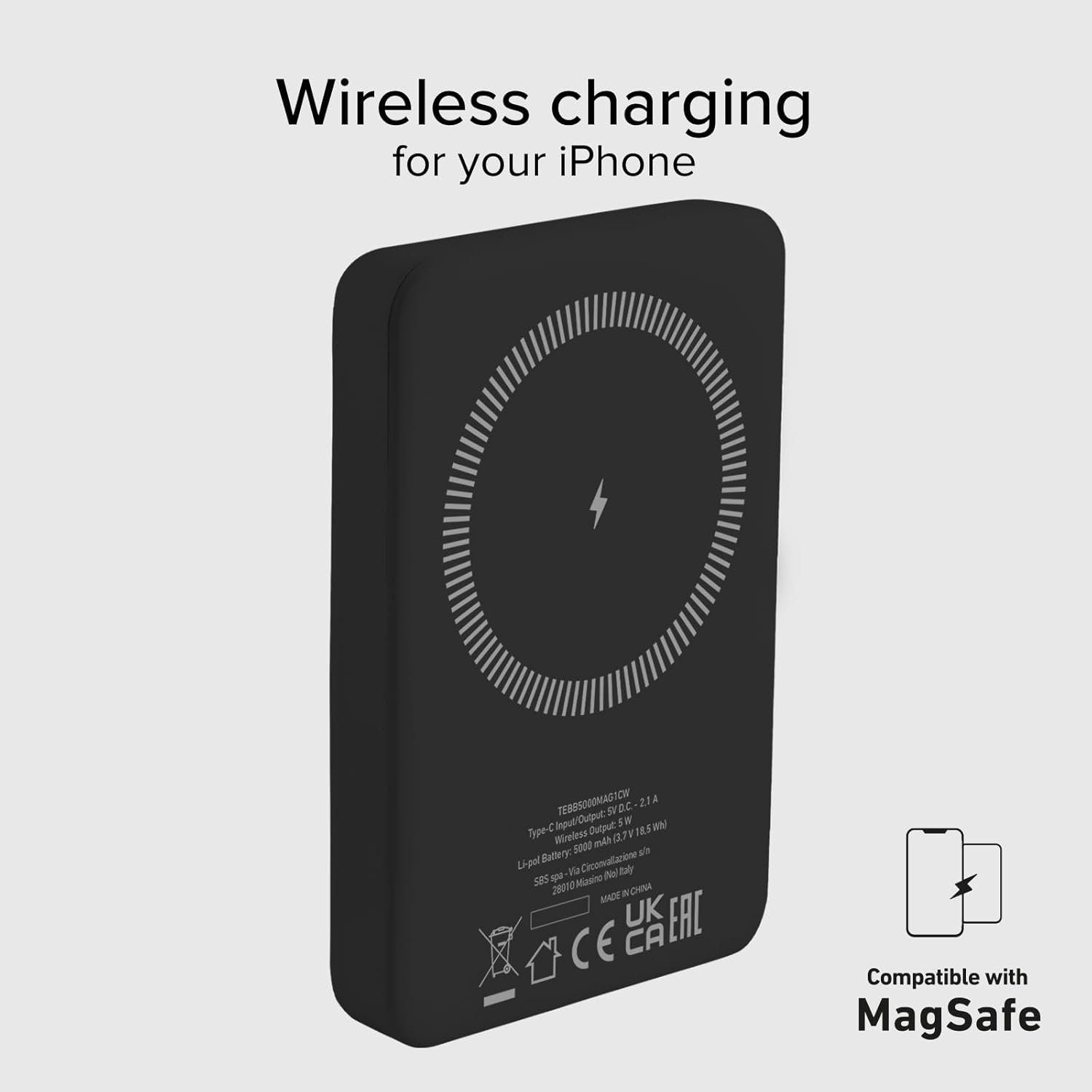
Image 4: The power bank's wireless charging surface, designed for MagSafe compatibility.

Image 5: Demonstrating the magnetic attachment of the power bank to a compatible iPhone.

Image 6: Wireless charging an Android device by placing it on the power bank.
4.3 Charging Devices via USB-C Cable
The USB-C port on the power bank can be used to charge devices that support wired charging.
- Connect one end of a compatible USB-C cable (or the included USB-A to USB-C cable with an appropriate adapter for your device) to the USB-C port on the power bank.
- פֿאַרבינדט דעם אַנדערן עק פֿונעם קאַבל צו דעם טשאַרדזשינג פּאָרט פֿון אייער דעווייס.
- Charging will begin automatically. The power bank's Intelligent Charge (IC) technology will optimize the charging speed for your device.
The 10W output ensures rapid charging for most compatible devices.

Image 7: Charging a smartphone using the USB-C cable.
4.4 גלייכצייטיגע אויפלאדונג
The power bank can charge one device wirelessly and another via the USB-C port simultaneously, though total output may be shared.

Image 8: The power bank allows for device usage while charging.
5. וישאַלט
געהעריגע זאָרג און וישאַלט וועט פֿאַרלענגערן דאָס לעבן פֿון אייער פּאַוער באַנק.
- רייניקונג: ניצט אַ ווייכע, טרוקענע שטאָף צו רייניקן די ייבערפלאַך פון דער פּאַוער באַנק. ניצט נישט שטרענגע כעמיקאַלן אָדער אַברייסיוו מאַטעריאַלן.
- סטאָרידזש: האַלט די פּאַוער באַנק אין אַ קיל, טרוקן אָרט אַוועק פון דירעקט זונשייַן, עקסטרעמע טעמפּעראַטורן און הומידיטי.
- באַטערי זאָרגן: כּדי צו האַלטן די באַטאַריע געזונט, זאָל מען גאָר אויפלאָדן און אויסלאָדן די פּאַוער באַנק לפּחות איין מאָל יעדע דריי חדשים אויב זי ווערט נישט רעגולער גענוצט.
- ויסמיידן טראפנס: באַשיצן דעם מיטל פון גשמיותדיקע שאַקס און פאַלן.
- וואַסער ויסשטעלן: This power bank is not waterproof. Avoid exposure to water or other liquids.
6. טראָובלעשאָאָטינג
אויב איר טרעפט פּראָבלעמען מיט אייער פּאַוער באַנק, באַציעט זיך צו די פאלגענדע געוויינטלעכע לייזונגען:
- מאַכט באַנק ניט טשאַרדזשינג:
- זיכער מאַכן אַז דער טשאַרדזשינג קאַבל איז זיכער פארבונדן צו ביידע די פּאַוער באַנק און די מאַכט מקור.
- Try a different USB wall adapter or USB port.
- באַשטעטיקן אַז די מאַכט מקור איז אַקטיוו.
- מיטל ניט טשאַרדזשינג ווירעלעססלי:
- Ensure your device is Qi-enabled or MagSafe compatible.
- Check that your device is correctly centered on the power bank's wireless charging surface.
- אַראָפּנעמען אַלע דיקע טעלעפאָן קאַסטן וואָס קענען שטערן די וויירלעס טשאַרדזשינג.
- Device Not Charging via USB-C:
- זיכער מאַכן אַז דער USB-C קאַבל איז זיכער פארבונדן צו ביידע די פּאַוער באַנק און דיין מיטל.
- פּרוּווט אַ אַנדערש וסב-C קאַבלע.
- באַשטעטיקן אַז אייער דעווייס'ס טשאַרדזשינג פּאָרט איז ריין און פריי פון שמוץ.
- פּאַמעלעך טשאַרדזשינג:
- Ensure you are using a compatible charging cable and adapter.
- Charging speed can be affected by the device's battery level (slower when nearly full).
- Avoid using your device heavily while charging.
- LEDs צינדן זיך נישט אן:
- The power bank might be completely discharged. Connect it to a power source for a few minutes.
- Press the power button to activate the LED indicators.
If problems persist, please contact SBS customer support.
7. ספּעסאַפאַקיישאַנז
| אַטריביוט | דעטאַל |
|---|---|
| סאָרט | SBS |
| מאָדעל נאָמען | Mag Power Bank Color |
| מאָדעל נומער | TEBB5000MAG1CK |
| באַטאַרייע קאַפּאַציטעט | 5000 מיליamper-hour (mAh) |
| באַטאַרייע זאַץ | ליטהיום פּאָלימער |
| אַרייַנשרייַב / רעזולטאַט פּאָרט | 1 x USB-C (10W) |
| ווירעלעסס טשאַרדזשינג רעזולטאַט | 5 וו (וויירלעסס) |
| Voltage | 5 וואלטס |
| קאַמפּאַטאַבאַל דעוויסעס | Smartphones (iPhone, Android), E-readers, Speakers, Headphones, Smartwatches, MP3 Players, Cameras |
| ספּעציעלע פֿעיִקייטן | Lightweight, Short-circuit Protection, Overload Protection, Wireless Charging, LED Indicator Lights |
| וואָג | 187 ג |
| קאָליר | שוואַרץ |
| אַרייַנגערעכנט קאַמפּאָונאַנץ | טשאַרדזשינג קאַבלע (USB-A צו USB-C) |
| Airline Transportable | Yes (Cabin Allowed) |

Image 9: The power bank is approved for air travel.
8. וואָראַנטי און שטיצן
For warranty information and customer support, please refer to the documentation provided with your purchase or visit the official SBS website. You can also visit the SBS Brand Store on Amazon for more product information and support resources.
SBS Brand Store: https://www.amazon.it/stores/SBS/page/57FDEEEA-56BF-47BC-BBDB-9389D6E570BD


