הקדמה
Welcome to the GOBOULT UFO True Wireless Earbuds user manual. These earbuds are designed to provide a superior audio experience with features like extended playtime, low latency gaming, advanced noise cancellation, and robust bass drivers. Please read this manual carefully to ensure proper use and optimal performance of your device.
וואָס איז אין די קעסטל
- GOBOULT UFO True Wireless Earbuds
- ווירעלעסס טשאַרדזשינג קאַסע
- טיפ-C שנעל טשאַרדזשינג קאַבל
- עקסטרע פּאָר פון עאַרטיפּס
- באַניצער מאַנואַל
- וואָראַנטי קאַרד
פּראָדוקט איבערview
The GOBOULT UFO earbuds feature a distinctive design with integrated breathing LEDs on both the earbuds and the charging case. They are equipped with 13mm drivers for rich bass and Quad Mic ENC for clear calls.

Image: GOBOULT UFO Earbuds and Charging Case. This image highlights key features such as Bluetooth 5.3 connectivity, 48 hours of playtime, Quad Mic ENC, 13mm drivers, 45ms low latency, and Type-C fast charging.
ברידינג לעדס
The breathing LEDs on the case and earbuds provide visual feedback for various actions, including opening/closing the case, charging, and when buds are connected.

Image: The GOBOULT UFO charging case and earbuds displaying their distinctive breathing LED lights, which indicate various operational states.
אַודיאָ קוואַליטעט
Experience high-fidelity sound with precision-tuned 13mm drivers, ensuring clear audio across all frequencies and rich bass. The Quad Mic ENC (Environmental Noise Cancellation) system ensures crystal-clear, interference-free calls.
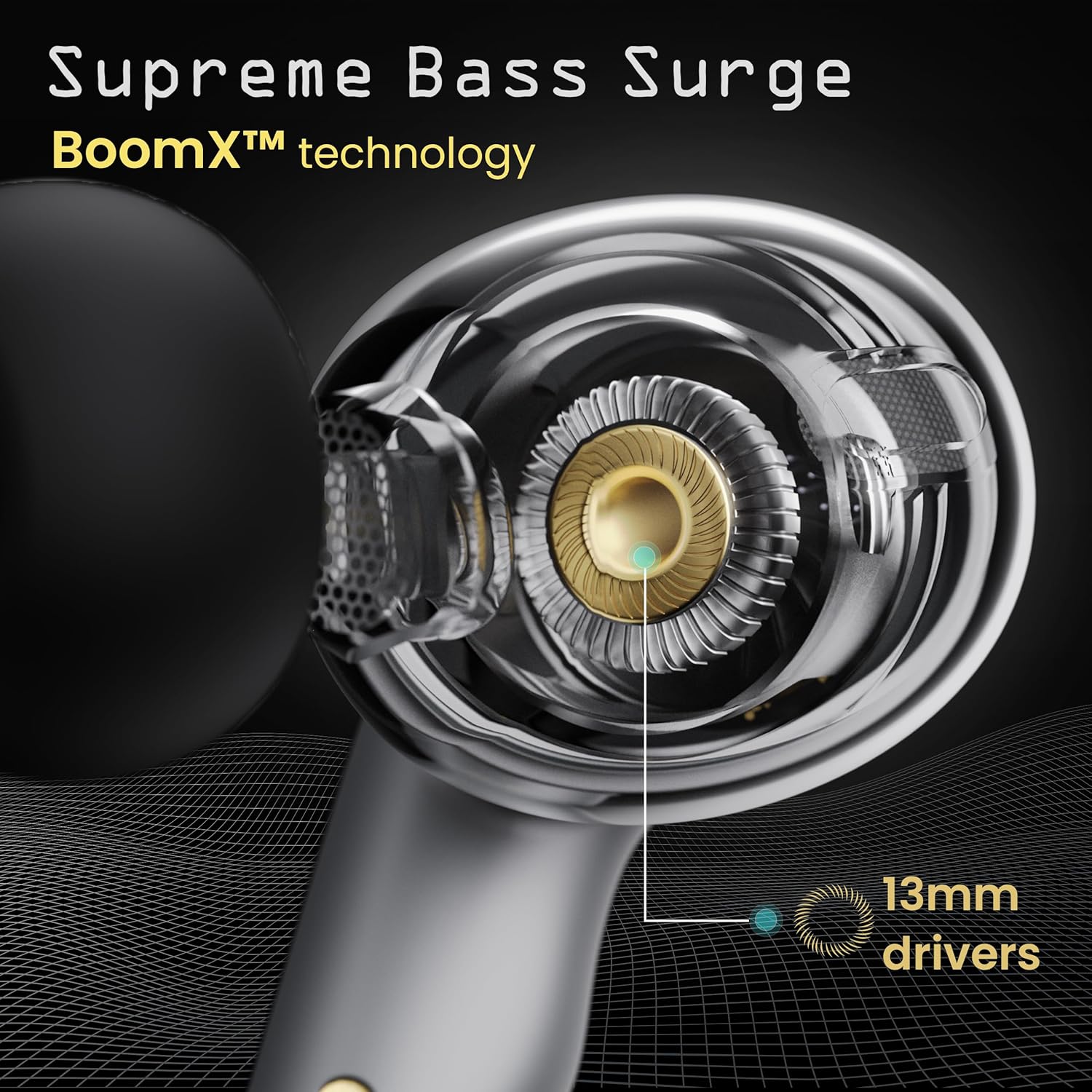
Image: A close-up of a GOBOULT UFO earbud, highlighting the 13mm drivers responsible for supreme bass surge.

בילד: א דעטאַלירטע view of a GOBOULT UFO earbud, showcasing the AI-powered Quad Mic AI-ENC technology for high-definition call clarity and Zen™ mode for silence.
סעטאַפּ
ערשט פּאָרינג
- עפֿנט דעם טשאַרדזשינג קעסטל. די אויערקנעפּלעך וועלן אויטאָמאַטיש אַרײַן אין פּערינג מאָדע.
- אויף אייער דעווייס (סמאַרטפאָן, טאַבלעט, אאז"וו), אַקטיווירט בלועטוט.
- זוכן פֿאַר "GOBOULT UFO" in the list of available Bluetooth devices and select it to connect.
- Once connected, you will hear an audio prompt, and the LED indicators on the earbuds will change.
The earbuds utilize Bluetooth 5.3 for stable and efficient connection, featuring Blink & Pair™ technology for fast pairing.

Image: GOBOULT UFO Earbuds illustrating stable connectivity with Bluetooth 5.3 and fast pairing technology.
אַפּ שטיצן
Enhance your experience by downloading the dedicated GOBOULT app. The app allows you to:
- Switch between 6 Equalizer Modes.
- קאַסטאַמייז ריר קאָנטראָלס.
- טוישן דעם נאָמען פון אייערע אויערן-קנעפּלעך.
- Access additional settings and features.
אַפּערייטינג ינסטראַקשאַנז
ריר קאָנטראָלס
The GOBOULT UFO earbuds feature intuitive touch controls on each earbud.
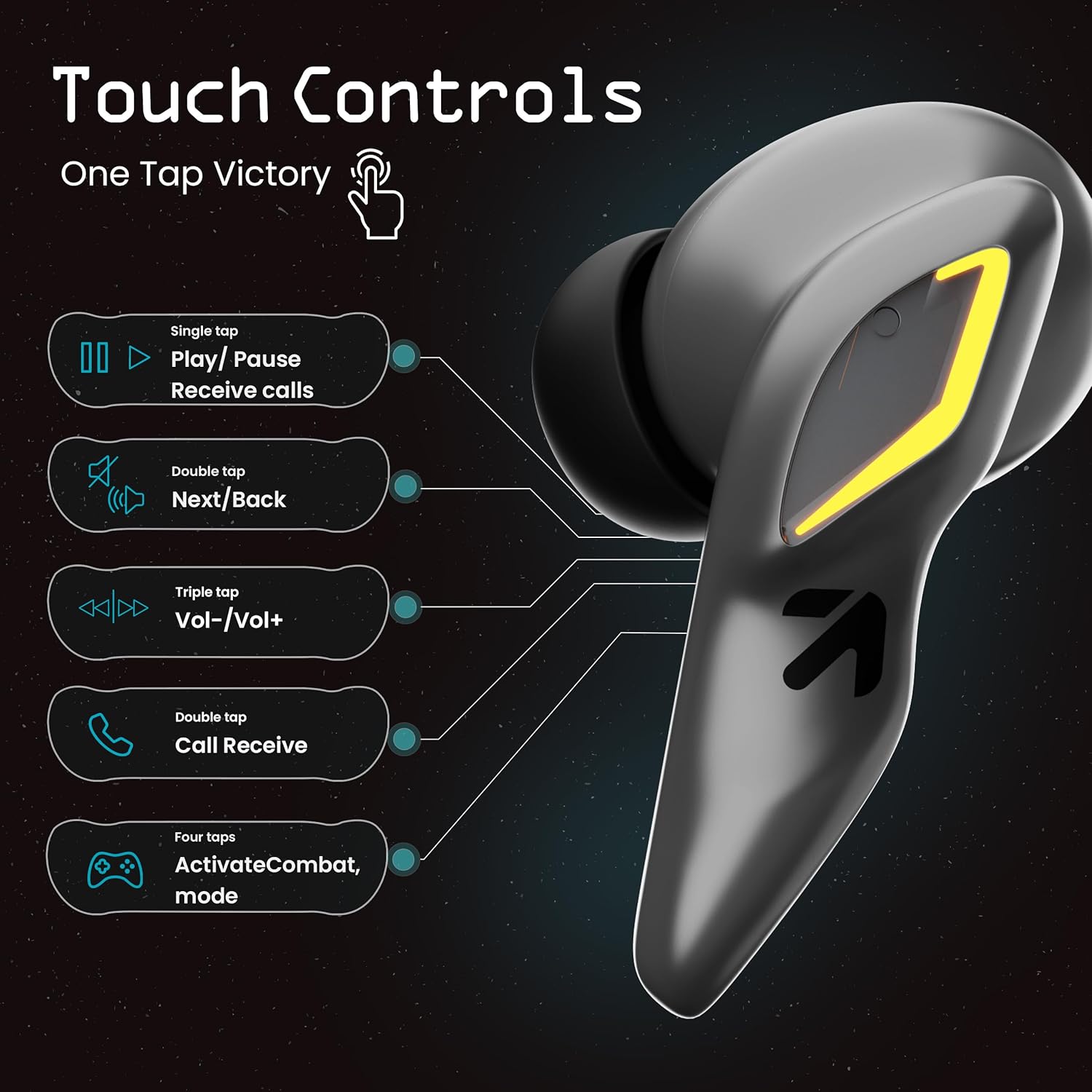
Image: A visual guide to the touch controls on the GOBOULT UFO Earbuds, detailing single, double, triple, and four-tap functions.
- איין טאַפּ: Play/Pause music, Receive calls.
- טאָפּל טאַפּ: Next/Back track.
- דרייַיק טאַפּ: באַנד אַרויף / אַראָפּ.
- Four Taps: Activate Combat Mode (Gaming Mode).
- לאנג פּרעס: Activate Voice Assistant (Google Assistant, Siri).
Gaming Mode (Combat Mode)
Activate Combat Mode for an ultra-low latency experience of 45ms, ideal for gaming. Tap the earbud four times to toggle this mode.

Image: The GOBOULT UFO Earbuds case open, highlighting the Combat Gaming Mode with 45ms ultra-low latency, activated by four taps.
קול אַססיסטאַנט
Long press the touch control area on either earbud to activate your device's voice assistant (e.g., Google Assistant, Siri).

Image: GOBOULT UFO Earbuds demonstrating the long-press gesture to activate the voice assistant feature.
טשאַרדזשינג
The GOBOULT UFO earbuds offer up to 48 hours of total playtime with the charging case.
טשאַרדזשינג די קאַסטן און עאַרבודז
- לייגט די אויערן-קנעפּלעך אין דעם טשאַרדזשינג קעסטל. מאַכט זיכער אַז זיי זענען ריכטיק אײַנגעזעצט.
- Connect the Type-C fast charging cable to the charging port on the case and to a power source.
- די געפירט ינדיקאַטאָרס אויף דעם פאַל וועט ווייַזן די טשאַרדזשינג סטאַטוס.
- A full charge for the earbuds and case takes approximately 100 minutes.
- With Type-C fast charging, a 10-minute charge can provide up to 1.5 hours of playtime.
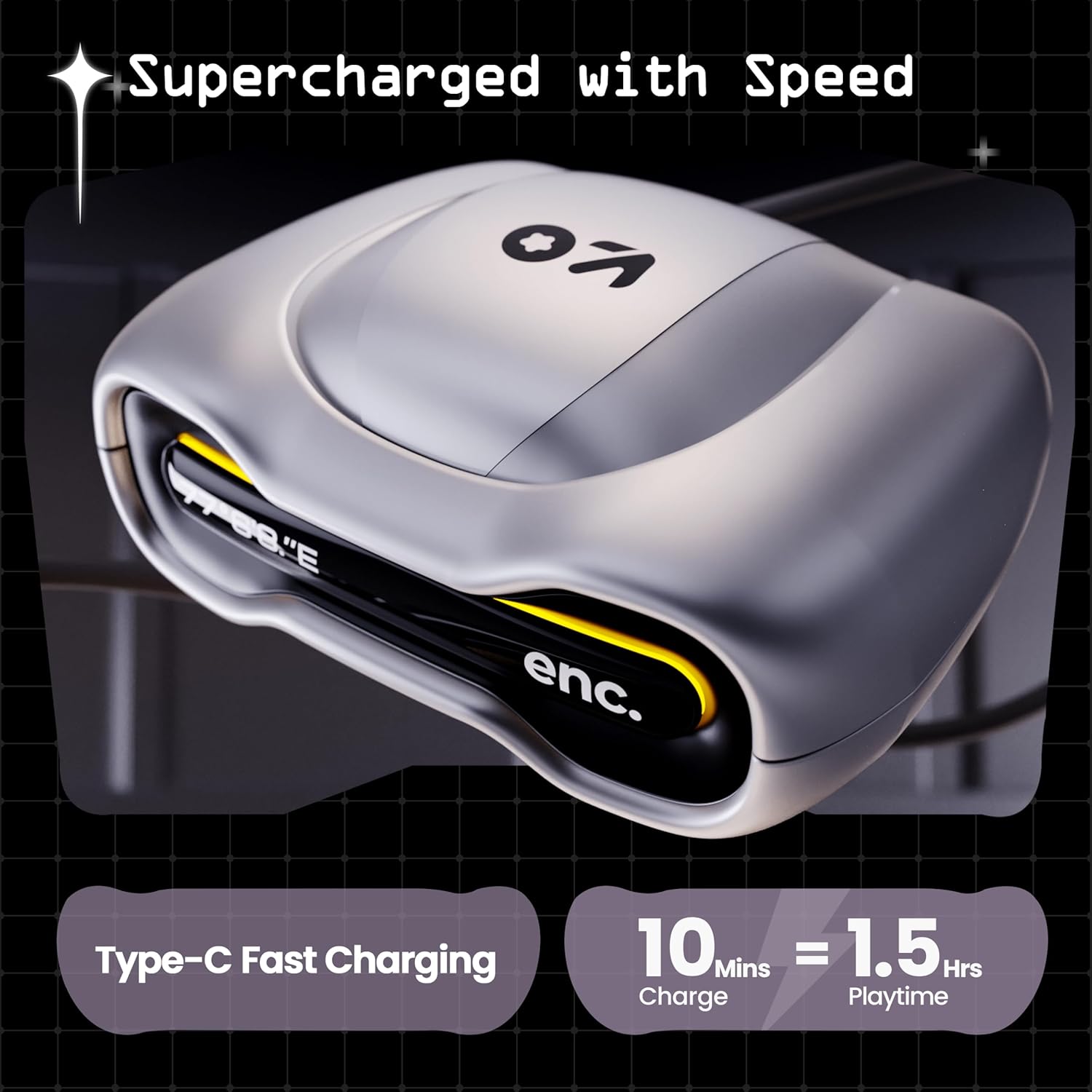
Image: The GOBOULT UFO charging case, illustrating its Type-C fast charging capability, providing 1.5 hours of playtime from a 10-minute charge.
וישאַלט
וואַסער קעגנשטעל
The GOBOULT UFO earbuds are IPX5 water-resistant, making them sweatproof, rainproof, and splashproof. This protection allows for use during workouts or in light rain.

Image: GOBOULT UFO Earbuds on a metallic surface, indicating their IPX5 water resistance, making them suitable for sweat, rain, and splashes.
רייניקונג
כּדי צו האַלטן אָפּטימאַלע פאָרשטעלונג און היגיענע, רייניקט רעגולער אייערע אויערן-קנעפּלעך און טשאַרדזשינג קעסטל.
- ניצט אַ ווייכן, טרוקענעם, לינט-פֿרייע שטאָף צו ווישן די אויערקנעפּלעך און קעסטל.
- פֿאַר שווערן שמוץ, אַ ביסל דampשווענק דעם שטאָף מיט וואַסער. פֿאַרמייַדט ניצן שאַרפע כעמיקאַלן אָדער אַברייסיוו מאַטעריאַלן.
- זיכער מאַכן אַז די טשאַרדזשינג קאָנטאַקטן אויף ביידע די אויערקנעפּלעך און די קעסטל זענען ריין און פריי פון שמוץ.
- Allow all components to dry completely before placing earbuds back in the case or charging.
טראָובלעשאָאָטינג
If you encounter any issues with your GOBOULT UFO earbuds, please refer to the following common solutions:
- קיין קול: Ensure earbuds are charged and properly connected to your device. Check device volume.
- פּאָרינג ישוז: זייט זיכער אז בלועטוט איז איינגעשטעלט אויף אייער דעווייס. פרובירט צו פארגעסן דעם דעווייס אין אייערע בלועטוט סעטינגס און ווידער פארבינדן. זייט זיכער אז די אויערן-קנעפלעך זענען פולשטענדיג אויפגעלאדן.
- איין עאַרבוד טוט נישט אַרבעטן: Place both earbuds back in the case, close it, and then open it again. This often resets the connection.
- נעבעך רופן קוואַליטי: Ensure microphones are clean. Check for strong Bluetooth connection.
- ניט ריספּאַנדאַבאַל ריר קאָנטראָלס: זיכער מאַכן אַז אייערע פינגער זענען ריין און טרוקן. פּרוּווט ווידער אָנצינדן די אויערקנעפּלעך דורך זיי אַרײַנלייגן אין דעם קעסטל און זיי אַרויסנעמען.
For further assistance, please contact GOBOULT customer support.
ספּעסאַפאַקיישאַנז
| שטריך | דעטאַל |
|---|---|
| מאָדעל נאָמען | UFO (Airbass Earbuds) |
| בלועטאָאָטה ווערסיע | 5.3 |
| פּלייַטימע | ביז 48 שעה (מיט טשאַרדזשינג קעסטל) |
| אַודיאָ לייטאַנס | 45 מיליסעקונדעס (גיימינג מאָדע) |
| דריווערס | 13 מם דינאַמיש דריווערס |
| מיקראָפאָנעס | Quad Mic ENC (Environmental Noise Cancellation) |
| וואַסער קעגנשטעל | IPX5 (Sweatproof, Rainproof, Splashproof) |
| טשאַרדזשינג פּאָרט | טיפּ-C שנעל טשאַרדזשינג |
| טשאַרדזשינג צייט | בעערעך 100 מינוט |
| בלועטאָאָטה קייט | 10 מעטער |
| אָפטקייַט ענטפער | 20 הז |
| סענסיטיוויטי | 115 דב |
| ימפּידאַנס | 32 אָהמס |
| פּונקט וואָג | 60 גראַמז |
| פּראָדוקט דימענשאַנז | 4.7 X 9 X 10 סענטימעטער |
| מאַטעריאַל | מעטאַל |
וואָראַנטי און שטיצן
וואָראַנטי אינפֿאָרמאַציע
The GOBOULT UFO True Wireless Earbuds come with a 1 יאָר פאַבריקאַנט ס וואָראַנטי from the date of purchase. Please retain your proof of purchase for warranty claims. The warranty covers manufacturing defects. It does not cover damage caused by misuse, accidents, or unauthorized modifications.
קונה שטיצן
For any questions, technical support, or warranty claims, please contact GOBOULT customer service.
פאַבריקאַנט: Exotic Mile Pvt. Ltd.
אַדרעס: B67 Wazirpur Industrial Area, New Delhi 110052, India.
Please refer to the warranty card included in your product packaging for specific contact details and procedures.


