סעטאַפּ אינסטרוקציעס
1. אויספּאַקן די קעסטל און קאָמפּאָנענט אידענטיפֿיקאַציע
Carefully unpack all components from the packaging. Ensure all parts listed in the packing list are present. It is recommended to lay out all parts on a clean, flat surface before beginning assembly.

This image displays the main components of the umbrella as they appear after unboxing, including the folded canopy, the main pole, the curved arm, and the cross base pieces. A small solar panel is also visible.
2. באַזע אַסעמבלי
Assemble the cross base by connecting the two base pieces. Secure them using the provided hardware. This cross base is designed to fit into a separate filling or self-weight base stand (not included with this product) for stability.

The diagram illustrates the assembled cross base, which forms the foundation for the umbrella. The base is designed to be weighted down by separate base weights or sandbags for optimal stability.
3. Attaching the Umbrella Pole to the Base
Insert the main pole into the assembled cross base. Ensure it is securely fastened according to the instructions. The pole features a handy cranking system for easy operation.

This image shows the complete umbrella structure, with the main pole securely attached to the cross base. The curved arm extends from the pole, supporting the canopy.
4. Connecting Solar Panel and LED Lights
Locate the solar panel at the top of the umbrella arm. Connect the wiring from the LED lights embedded in the umbrella ribs to the solar panel. Ensure the connection is secure. The solar panel charges the 32 LED lights during the day for nighttime illumination.

This image highlights the solar panel located at the top of the umbrella arm, responsible for charging the integrated LED lights. A switch on the pole allows for manual control of the lights.
This official product video demonstrates the unboxing, assembly, and key features of the Yaheetech 10FT Solar Offset Umbrella, including the solar-powered LED lights and the cranking mechanism.
אַפּערייטינג ינסטראַקשאַנז
1. Opening and Closing the Umbrella
To open the umbrella, use the handy cranking system located on the main pole. Turn the crank clockwise to extend the canopy. To close, turn the crank counter-clockwise until the canopy is fully retracted.

This visual guide demonstrates the simple crank mechanism used to effortlessly open and close the umbrella canopy. It also shows how to adjust the umbrella's angle.
2. Adjusting Canopy Angle and Tilt
The umbrella features a mechanism to adjust the canopy's angle and tilt. Loosen the fixing sleeve on the main pole, adjust the umbrella to your desired position, and then clamp it into the fixed position. This allows for optimal shade coverage throughout the day.
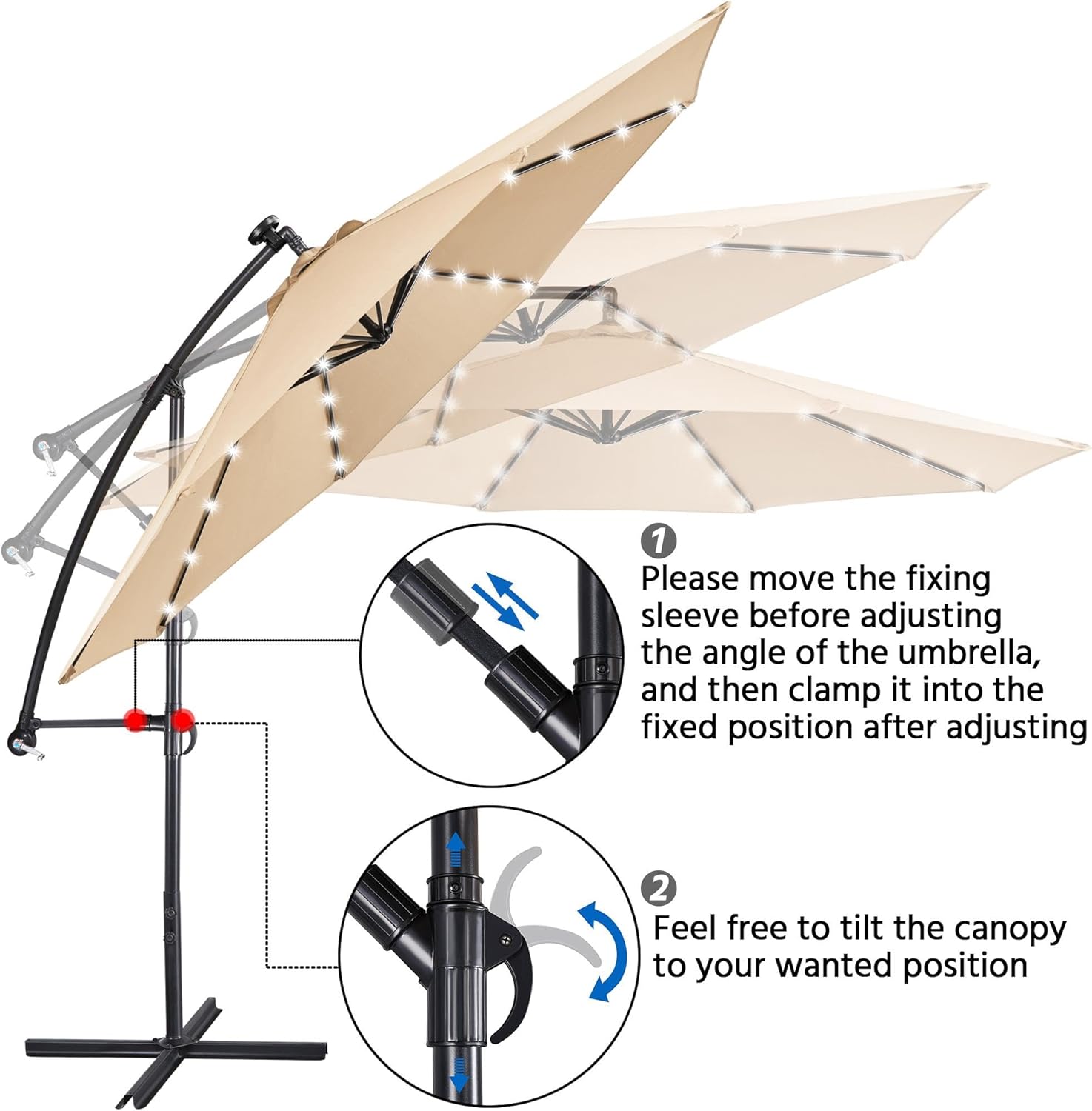
This image provides a clear visual of how to manipulate the umbrella's angle and tilt using the fixing sleeve and the main pole mechanism, ensuring flexible shade positioning.
3. ניצן די געפירט ליגהץ
The 32 solar-powered LED lights are designed to illuminate automatically at dusk if the solar panel has received sufficient sunlight during the day. There is also a manual on/off switch located on the pole for controlling the lights.

This image demonstrates the dual functionality of the umbrella, offering shade during daylight hours and ambient lighting from its 32 solar-powered LED lights after sunset.

A beautiful night scene showcasing the umbrella's LED lights, which provide a soft glow, perfect for evening gatherings on a patio or deck.
וישאַלט
1. Cleaning the Canopy
To clean the polyester fabric canopy, use a mild soap solution and a soft brush or cloth. Rinse thoroughly with clean water and allow to air dry completely before closing or storing. Avoid harsh chemicals or abrasive cleaners.
2. Pole and Base Care
Wipe down the powder-coated iron pole and base with a damp cloth regularly to prevent rust and maintain appearance. Ensure all moving parts of the cranking system are free of debris.
3. ווינטער סטאָרידזש
During off-season or periods of strong winds, it is recommended to close the umbrella and secure it with a cover. For prolonged storage, disassemble the umbrella and store it in a dry, protected area to extend its lifespan.
טראָובלעשאָאָטינג
1. LED ליכטער ארבעטן נישט
- טשעק זונ פּאַנעל: Ensure the solar panel is clean and receiving direct sunlight for at least 6-8 hours daily.
- טשעק סוויטש: Verify the manual on/off switch on the pole is in the 'ON' position.
- באַטערי: The umbrella uses 1 Lithium Ion battery (included). If lights are consistently dim or not working after sufficient charging, the battery may need replacement.
2. Umbrella Instability
- באַזע וואָג: This umbrella requires a separate weighted base (not included) for stability. Ensure your base is adequately filled with sand or water to prevent tipping, especially in windy conditions.
- זיכער אַסעמבלי: Double-check all screws and connections on the cross base and pole to ensure they are tightened securely.
3. Difficulty Cranking
- מניעות: Inspect the cranking mechanism and the umbrella ribs for any obstructions or debris.
- שמירן: Apply a silicone-based lubricant to the moving parts of the cranking system if it feels stiff.
ספּעסאַפאַקיישאַנז
| שטריך | דעטאַל |
|---|---|
| סאָרט | יאעטעטש |
| מאָדעל נומער | YT-00134195 |
| כופּע דיאַמעטער | 114 inches (approx. 10FT) |
| מאַטעריאַל | Polyester Fabrics, Powder-coated Iron |
| געפירט ליגהץ | 32 Solar-powered LEDs (4 per rib) |
| מאַכט מקור | Solar Energy (1 Lithium Ion battery included) |
| פּונקט וואָג | 29.5 פונט |
| פּראָדוקט דימענשאַנז | 113.78 X 113.78 X 96.65 אינטשעס |
| באַזע טיפּ | Cross Base (requires additional weight, not included) |
וואָראַנטי און שטיצן
For warranty information or product support, please refer to the original purchase documentation or contact Yaheetech customer service directly. Keep your proof of purchase for any warranty claims.
קאָנטאַקט אינפֿאָרמאַציע: ביטע באַזוכן דעם באַאַמטער Yaheetech Store on Amazon for the latest support details and contact options.


