1. הקדמה
The TSUN MS300 is a high-efficiency micro inverter designed for connecting to a single solar panel. This compact and lightweight device simplifies solar power generation by converting direct current (DC) from your solar panel into alternating current (AC) for your home or grid. It features integrated Wi-Fi for real-time monitoring via a dedicated application, ensuring you can track your energy production effortlessly.
Key features include easy Plug & Play installation, robust IP65 waterproofing, and comprehensive electrical safety protections against over/under voltage, overload, and under-frequency. The MS300 offers a maximum efficiency of 96.70% and comes with a 12-year manufacturer warranty.
2. זיכערקייַט אינפֿאָרמאַציע
Please read and understand all safety instructions before installing or operating the TSUN MS300 Micro Inverter. Failure to follow these instructions may result in electric shock, fire, or serious injury.
- עלעקטריקאַל סכנה: This device operates with electricity. Installation and maintenance should only be performed by qualified personnel.
- DC Voltage: The MS300 operates with a maximum DC voltage of 60V, significantly reducing the risk of high DC voltage hazards compared to traditional string inverters. However, always treat electrical components with caution.
- וואָטערפּרוף שאַץ: The inverter has an IP65 waterproof structure, protecting it from environmental elements. Ensure all connections are properly sealed during installation.
- שוץ פֿעיִקייטן: The MS300 includes built-in protection against overvoltage, ונדעראָלtage, overload, and under-frequency. Do not bypass or modify these safety features.
- אפגעזונדערטקייט שוץ: The device offers isolation protection to prevent electrical hazards.
- ווענטילאַטיאָן: זיכער מאַכן גענוג ווענטילאַציע אַרום דעם ינווערטער צו פאַרמייַדן איבערהיצונג.
3. פּעקל אינהאַלט
באַשטעטיקן אַז אַלע זאכן זענען פאַראַן און נישט געשעדיגט ביים אויספּאַקן:
- TSUN MS300 Micro Inverter (1 unit)
- באַניצער מאַנואַל (דעם דאָקומענט)
- Mounting accessories (may vary by package, check your specific kit)
4. סעטאַפּ און ייַנמאָנטירונג
The TSUN MS300 is designed for easy Plug & Play installation. Follow these general steps:
4.1 מאַונטינג די ינווערטער
Mount the micro inverter securely to a suitable structure, typically beneath the solar panel or on a mounting rail. Ensure the mounting location allows for proper ventilation and is accessible for connections.
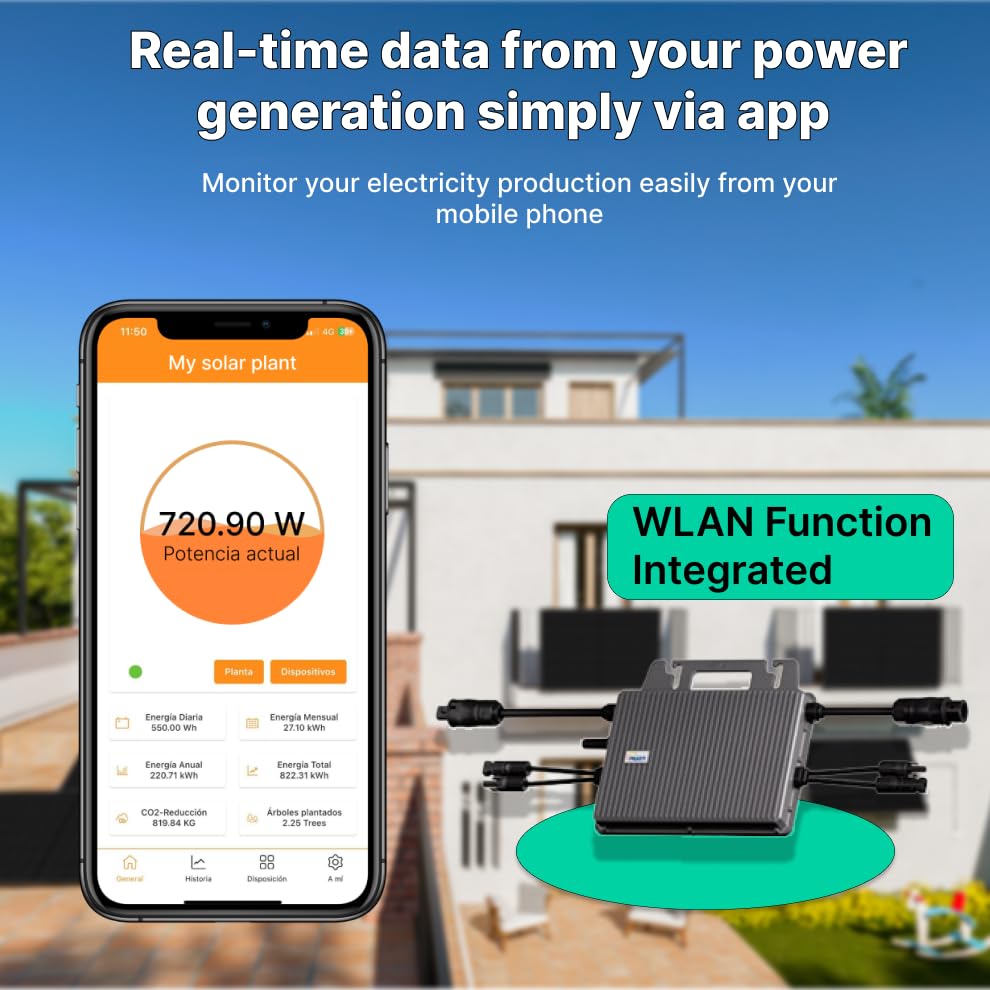
Figure 1: TSUN MS300 Micro Inverter with connection points.
This image shows the compact design of the TSUN MS300 Micro Inverter, highlighting its robust casing and the various input/output ports for connecting to a solar panel and the AC grid. The design facilitates easy integration into a solar power system.
4.2 עלעקטריקאַל קאַנעקשאַנז
- דק ינפּוט: Connect the DC cables from your single solar panel to the DC input terminals of the MS300. Ensure correct polarity (positive to positive, negative to negative). The inverter supports a 14A DC input.
- אַק רעזולטאַט: Connect the AC output cable from the MS300 to your home's electrical grid or a dedicated AC circuit. The inverter provides a maximum AC output of 300W.
- גראָונדינג: זיכער מאַכן אַז דער ינווערטער איז ריכטיק געערדט לויט די לאָקאַלע עלעקטרישע קאָודן.
4.3 ווי-פי קאַנעקשאַן
The MS300 features direct Wi-Fi connectivity for monitoring. No additional smart plug is required. Refer to the specific instructions provided with the monitoring application for connecting your inverter to your local Wi-Fi network.
5. אַפּערייטינג ינסטרוקטיאָנס
Once installed and connected, the TSUN MS300 will begin converting solar energy. The primary method for monitoring its performance is through the dedicated mobile application.
5.1 Monitoring Application
- אראפקאפיע אַפּ: Download the official TSUN monitoring application from your device's app store (e.g., Apple App Store, Google Play Store).
- שאַפֿן אַ חשבון: שאַפֿן אַ חשבון און קלאָץ אין.
- לייג דיווייס: Follow the in-app instructions to add your MS300 micro inverter to your account. This typically involves scanning a QR code on the inverter or manually entering its serial number.
- פאַקטיש-צייט מאָניטאָרינג: The app provides real-time data on your power generation, including current output, daily production, monthly production, and total energy generated.

פיגורע 2: עקסample of the TSUN monitoring application interface.
This image illustrates the user interface of the TSUN mobile application, showing real-time power generation data. Users can view current power output, daily, monthly, and total energy production, and other relevant statistics directly from their mobile device via the integrated WLAN function.
6. וישאַלט
The TSUN MS300 Micro Inverter is designed for minimal maintenance due to its robust construction and IP65 rating. However, periodic checks are recommended to ensure optimal performance and longevity.
- וויסואַל דורכקוק: Periodically inspect the inverter and its connections for any signs of physical damage, corrosion, or loose wiring.
- רייניקונג: אויב נייטיק, רייניקט פֿאָרזיכטיק די אויסערלעכע זייט פֿון דעם ינווערטער מיט אַ ווייכן, דamp cloth. Do not use abrasive cleaners, solvents, or high-pressure water jets, as this may damage the casing or seals.
- ווענטילאַטיאָן: Ensure that the area around the inverter remains clear of obstructions to allow for proper airflow and heat dissipation.
- Firmware דערהייַנטיקונגען: Check the monitoring application or TSUN's official website for any available firmware updates for your inverter. Follow the instructions carefully for any update procedures.
7. טראָובלעשאָאָטינג
If you encounter issues with your TSUN MS300 Micro Inverter, refer to the following troubleshooting steps:
- קיין מאַכט רעזולטאַט:
- Check DC connections from the solar panel to ensure they are secure and correctly polarized.
- Verify AC connections to the grid are secure and that the circuit breaker is not tripped.
- Ensure there is sufficient sunlight reaching the solar panel.
- Wi-Fi קאַנעקשאַן ישוז:
- זיכער מאַכן אַז אייער Wi-Fi ראַוטער איז אנגעצינדן און אַרבעט ריכטיק.
- Check the distance between the inverter and the Wi-Fi router. Signal strength may be an issue.
- Restart the inverter and attempt to reconnect via the monitoring app.
- Error Messages in App:
- Refer to the monitoring application's help section or TSUN's online resources for specific error code explanations and solutions.
- רעדוצירטע מאַכט רעזולטאַט:
- Check for shading on the solar panel.
- Clean the solar panel surface if it is dirty.
- Verify ambient temperature is within the inverter's operating range.
If problems persist after attempting these steps, please contact TSUN customer support.
8. ספּעסאַפאַקיישאַנז
| שטריך | באַשרייַבונג |
|---|---|
| פאַבריקאַנט | TSUN |
| מאָדעל נומער | TSOL-MS300 |
| DC Input Current (Max) | 14 א |
| AC Output Power (Max) | 300 וו |
| DC Voltage (מאַקס) | 60 V |
| מאַקסימום עפעקטיווקייַט | 96.70% |
| דימענסיעס (L X W X H) | 15.3 X 17.8 X 2.8 סענטימעטער |
| וואָג | 2.41 קילאָגראַמס |
| ינגרעסס פּראַטעקשאַן (IP) שאַץ | IP65 |
| מאַטעריאַל | מעטאַל (אַלומינום) |
| קאָליר | שוואַרץ |
| קאַנעקטיוויטי | ינאַגרייטיד ווי-פי |
9. וואָראַנטי און שטיצן
9.1 מאַנופאַקטורער וואָראַנטי
The TSUN MS300 Micro Inverter is covered by a 12-יאָר פאַבריקאַנט וואָראַנטידי וואָראַנטי דעקט חסרונות אין מאַטעריאַלן און אַרבעט אונטער נאָרמאַל נוצן און סערוויס באדינגונגען. ביטע האַלטן דיין קויפן באַווייַז פֿאַר וואָראַנטי קליימז.
The warranty does not cover damage caused by improper installation, misuse, unauthorized modifications, natural disasters, or external factors beyond the manufacturer's control.
9.2 קונה שטיצן
For technical assistance, troubleshooting, or warranty inquiries, please contact TSUN customer support. Refer to the official TSUN webזייטל אדער פּראָדוקט פּאַקאַדזשינג פֿאַר די מערסט אַרויף-צו-דאַטע קאָנטאַקט אינפֿאָרמאַציע.
When contacting support, please have your product model (TSOL-MS300) and serial number readily available to expedite the service process.


