הקדמה
Welcome to the SENTRY Ultra-Light Bluetooth Earbuds user manual. These earbuds are designed to provide a seamless and immersive audio experience, perfect for active lifestyles. With an ultra-light design, LED power display, and intelligent touch controls, you can enjoy high-quality sound and convenient operation. Please read this manual carefully to ensure proper use and maintenance of your new earbuds.
פּעקל אינהאַלט
- SENTRY Ultra-Light Bluetooth Earbuds (Left and Right)
- פּאָרטאַטיוו טשאַרדזשינג קאַסע
- וסב טשאַרדזשינג קאַבלע
- באַניצער מאַנואַל
פּראָדוקט פֿעיִקייטן
- LED מאַכט ווייַז: Transparent design on the charging case allows real-time battery monitoring.
- סאָליד פּלאַן: Ultra-compact and space-saving, making them highly portable.
- Bass Acoustic Design: Advanced dynamic drivers deliver crystal-clear audio with enhanced bass and treble.
- ינטעליגענט ריר קאָנטראָלס: Effortlessly manage volume, music tracks, calls, and voice assistants.
- Stable Connections: Advanced Bluetooth technology ensures lag-free and reliable performance.
פּראָדוקט איבערview
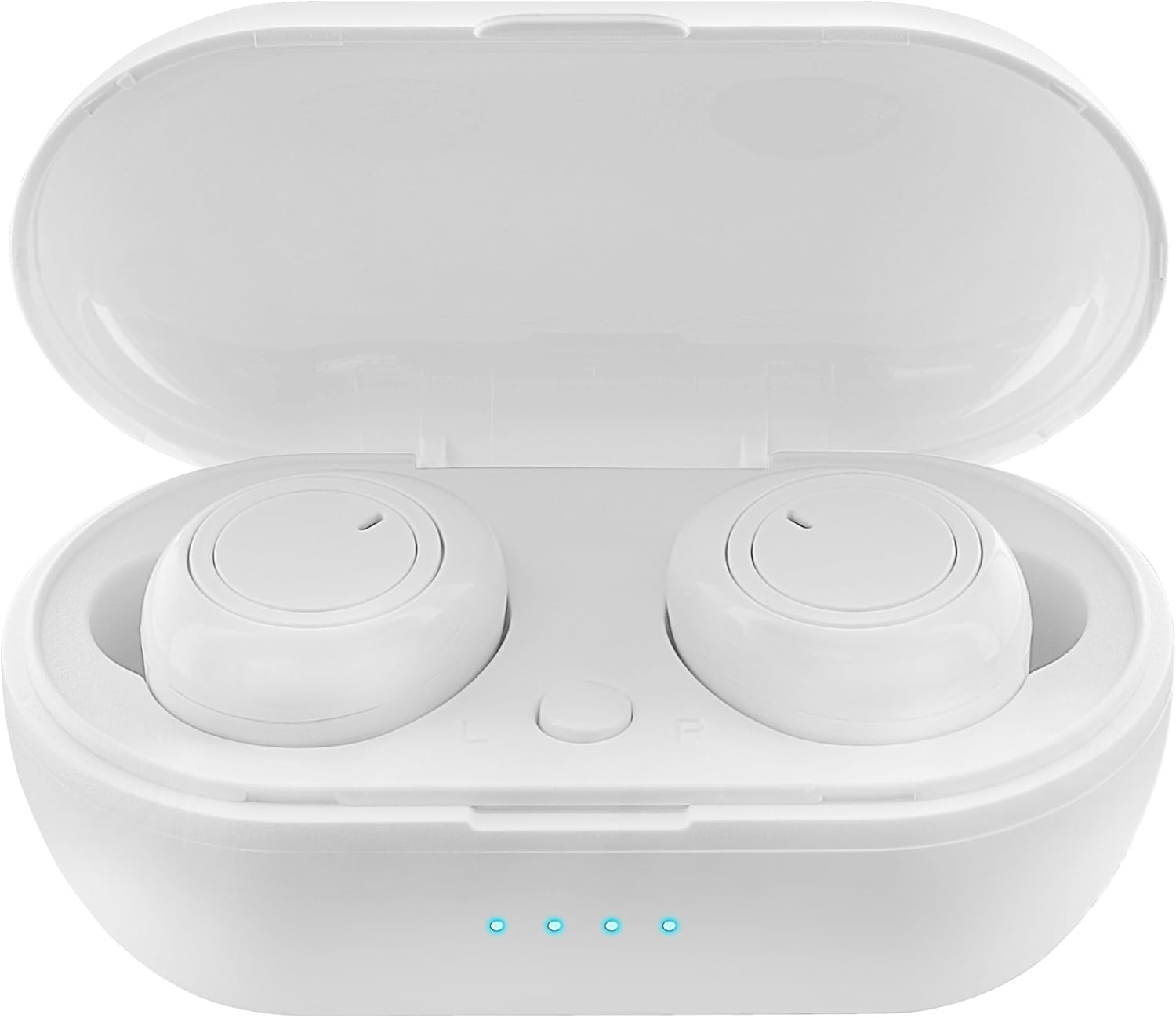
Figure 1: Earbuds in Charging Case with LED Indicators. The charging case features a transparent lid and three blue LED lights indicating battery status.

Figure 2: Individual Earbuds (Front View). Each earbud features a circular touch control area for easy operation.

Figure 3: Individual Earbuds (Side View). The ergonomic design ensures a comfortable and secure fit in the ear.
סעטאַפּ
1. אויפלאָדן די אויערקנעפּלעך און קעסטל
- לייגט די אויערן-קנעפּלעך אין דעם טשאַרדזשינג קעסטל. מאַכט זיכער אַז זיי זענען ריכטיק אײַנגעזעצט.
- פֿאַרבינדט דעם USB טשאַרדזשינג קאַבל צום טשאַרדזשינג פּאָרט אויף דער קעיס און צו אַ מאַכט מקור (למשל, USB וואַנט אַדאַפּטער, קאָמפּיוטער USB פּאָרט).
- The LED display on the charging case will indicate the charging status. A full charge is indicated when all lights are solid.
- Allow approximately 1-2 hours for a full charge of both earbuds and the case.
2. פּערינג מיט דיין מיטל
- עפֿנט דעם טשאַרדזשינג קעסטל. די אויערקנעפּלעך וועלן אויטאָמאַטיש אַרײַן אין פּערינג מאָדע (אָנגעצייגט דורך בלינקנדיקע ליכטלעך אויף די אויערקנעפּלעך).
- אויף אייער סמאַרטפאָון אָדער בלועטוט-ענייבאַלד מיטל, גייט צו די בלועטוט סעטטינגס.
- זוכן פֿאַר new devices and select "SENTRY Earbuds" (or similar name) from the list.
- Once connected, the earbud lights will stop flashing, and you will hear a confirmation tone.
- די אויערקנעפּלעך וועלן זיך אויטאָמאַטיש ווידער פֿאַרבינדן צום לעצטן געפּאָרטן מיטל ווען מען נעמט זיי אַרויס פֿון קעסטל, אויב בלועטוט איז אַקטיוויזירט אויף דעם מיטל.
אַפּערייטינג ינסטראַקשאַנז
Your SENTRY Ultra-Light Bluetooth Earbuds feature intelligent touch controls for easy management of your audio and calls.
| פֿונקציע | קאַמף |
|---|---|
| שפּיל / פּויזע מוזיק | איין צאַפּן אויף יעדער עאַרבוד |
| ווייַטער שפּור | טאָפּל-טאַפּ אויף די רעכטע אויערקנעפּל |
| פֿריִערדיקע שפּירט | טאָפּל-טאַפּ אויף די לינקע אויערקנעפּל |
| ענטפֿערן / סוף רופן | איין צאַפּן אויף יעדער עאַרבוד |
| אָפּוואַרפן רופן | דריקן און האַלטן יעדער עאַרבוד פֿאַר 2 סעקונדעס |
| אַקטאַווייט די קול אַססיסטאַנט | דריי מאָל צאַפּן אויף יעדן אויערקנעפּל |
| באַנד אַרויף | Press and hold Right earbud |
| באַנד אַראָפּ | Press and hold Left earbud |
וישאַלט
- רייניקונג: ניצט אַ ווייכע, טרוקענע, לינט-פֿרייע שטאָף צו רייניקן די אויערקנעפּלעך און די טשאַרדזשינג קעסטל. ניצט נישט קיין שאַרפע כעמיקאַלן אָדער אַברייסיוו מאַטעריאַלן.
- סטאָרידזש: ווען נישט אין באַנוץ, לייגט די אויערן-קנעפּלעך אין זייער טשאַרדזשינג קעסטל צו באַשיצן זיי און האַלטן זיי טשאַרדזשד. לייגט זיי אין אַ קיל, טרוקן אָרט אַוועק פון דירעקט זונשייַן און עקסטרעמע טעמפּעראַטורן.
- באַטערי זאָרגן: כדי צו פארלענגערן די לעבן פון די באַטעריע, זאָלט איר נישט אָפט גאָר אויסלאָדן די אויערקנעפּלעך און די טשאַרדזשינג קעסטל. טשאַרדזשט זיי רעגולער, אפילו אויב זיי ווערן נישט קעסיידער גענוצט.
- וואַסער קעגנשטעל: די אויערן-קנעפּלעך זענען נישט וואַסער-קעגנשטעליק. פֿאַרמייַדן אויסשטעלונג צו וואַסער, שווייס, אָדער הויך הומידיטי.
טראָובלעשאָאָטינג
- אויערקנעפּלעך נישט פּערינג: Ensure both earbuds are charged. Place them back in the case, close the lid, then open it again to re-enter pairing mode. Check your device's Bluetooth settings and try reconnecting.
- נאָר איין אויערקנעפּל אַרבעט: Try placing both earbuds back in the charging case, closing the lid, and then taking them out again. This often re-syncs them.
- קיין קול: קאָנטראָלירט דעם וואָלומען אויף ביידע אייער דעווייס און די אויערקנעפּלעך. מאַכט זיכער אַז די אויערקנעפּלעך זענען ריכטיק פֿאַרבונדן צו אייער דעווייס.
- טשאַרדזשינג ישוז: Ensure the charging cable is securely connected to both the case and the power source. Try a different USB port or charger. Clean the charging contacts on the earbuds and inside the case.
- נעבעך געזונט קוואַליטעט: Ensure the earbuds are properly seated in your ears. Try cleaning any debris from the earbud grilles.
ספּעסאַפאַקיישאַנז
| שטריך | דעטאַל |
|---|---|
| מאָדעל נאָמען | 5002-407 |
| קאַנעקטיוויטי טעכנאָלאָגיע | ווירעלעסס (בלועטאָאָטה) |
| ווירעלעסס קאָמוניקאַציע טעכנאָלאָגיע | בלועטאָאָטה |
| עלטער קייט (דיסקריפּשאַן) | דערוואַקסן |
| טשאַרדזשינג צייט | Approximately 1-2 Hours (for earbuds and case) |
| קאַמפּאַטאַבאַל דעוויסעס | Smartphones, Apple Devices |
| קאָנטראָל טיפּ | מעדיע קאָנטראָל |
| קאַבלע שטריך | אָן קאַבלע |
| וואַסער קעגנשטעל מדרגה | ניט וואַסער קעגנשטעליק |
| אָפטקייַט ראַנגע | 20 הערץ - 20 קילאָהרץ |
| קאָנטראָל מעטאָד | ריר |
| באַטערי לעבן | ביז 12 שעה (מיט טשאַרדזשינג קעסטל) |
| אַודיאָ דרייווער טיפּ | דינאַמיש דרייווער |
| טראָגן קעסטל קאָליר | ווייַס |
| עאַרפּיעסע פאָרעם | ראַונדיד |
| סאָרט | SENTRY |
| קאָליר | ווייַס |
| אויער פּלייסמאַנט | אין אויער |
| פאָרם פאַקטאָר | אין אויער |
| ראַש קאָנטראָל | קיינער |
וואָראַנטי און שטיצן
SENTRY products are designed for reliability and performance. For information regarding warranty coverage and customer support, please refer to the warranty card included with your product or visit the official SENTRY webפּלאַץ. איר קענט אויך באַזוכן די יו SENTRY Store on Amazon פֿאַר נאָך פּראָדוקט אינפֿאָרמאַציע און שטיצע רעסורסן.


