1. הקדמה
The ZEBRONICS Riser Party DJ Speaker is designed to deliver a powerful audio experience with versatile connectivity and entertainment features. This manual provides detailed instructions for setting up, operating, and maintaining your speaker to ensure optimal performance.
2. פּעקל אינהאַלט
ביטע אָפּהאַקן דאָס קעסטל פֿאַר די פֿאָלגנדיקע זאַכן:
- 1 x ZEBRONICS Riser Party DJ Speaker
- 1 x רימאָוט קאָנטראָל
- 2 x ווירעלעסס UHF מיקראָפאָנעס
- 1 x מאַכט קאַבלע

Image: ZEBRONICS Riser Party DJ Speaker with included accessories.
3. פּראָדוקט איבערview
3.1 אויבערשטע פּאַנעל קאָנטראָלס
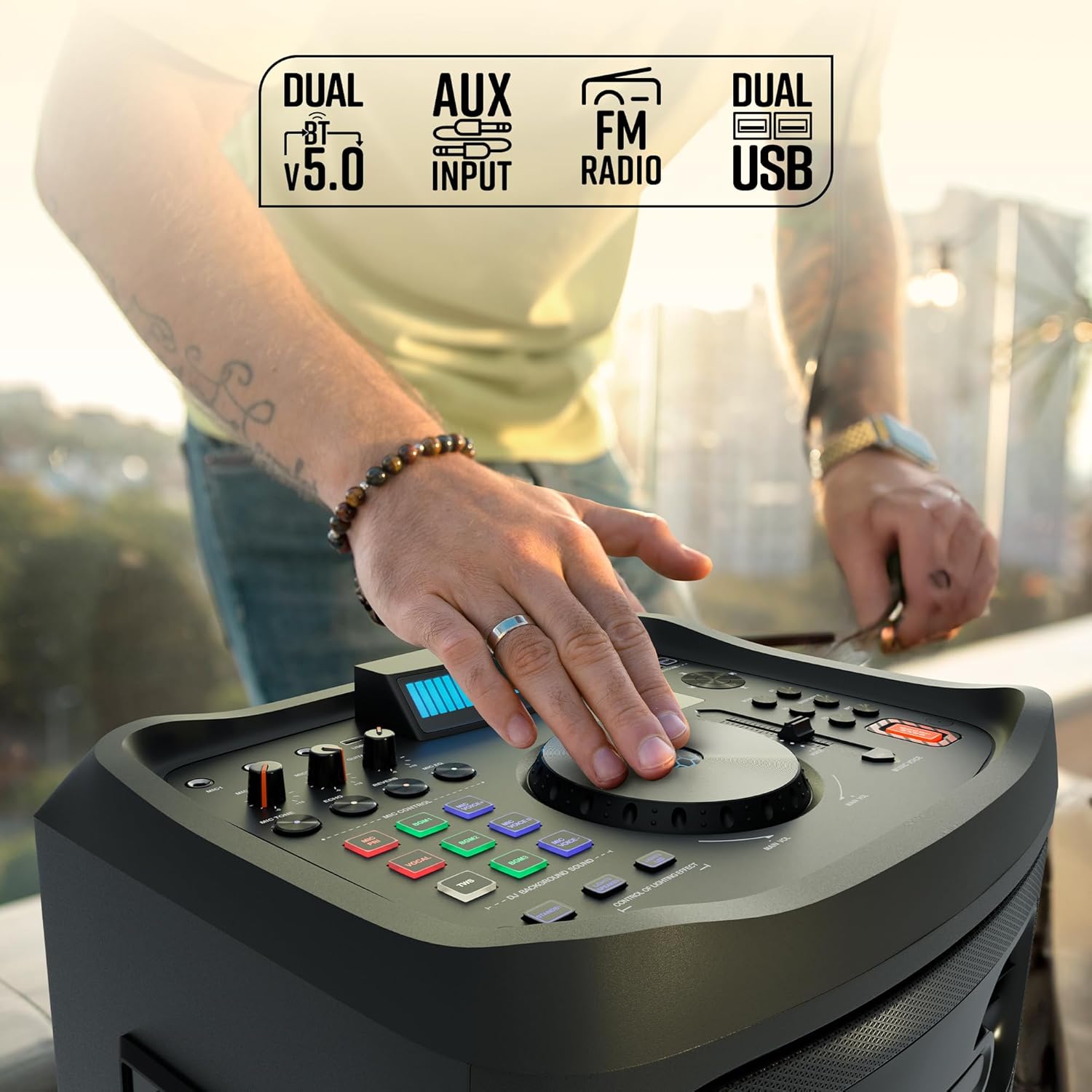
בילד: דעטאַלירט view of the speaker's top control panel.
The top panel features various controls for audio adjustment, input selection, and special functions:
- הויפּט באַנד קנעפּל: Adjusts the overall speaker volume.
- Microphone Volume Knobs (MIC1, MIC2): Controls the volume for each connected microphone.
- Guitar Volume Knob: Adjusts the volume for the connected guitar.
- Echo/Reverb/Mic Tone Knobs: Fine-tune microphone effects.
- מאָדע קנעפּל: Cycles through input sources (Bluetooth, USB, AUX, FM, HDMI ARC).
- באַס/טרעבל קאָנטראָלס: Adjusts low and high frequencies.
- עק קנעפּל: Selects preset equalizer modes.
- מעדיע קאָנטראָל קנעפּלעך: Play/Pause, Skip Track, Repeat.
- DJ BGM Effects: Buttons for activating various DJ background sound effects.
- געפֿירט ווייַז: Shows current mode, track information, and other settings.
- ליכט קאָנטראָלס: Buttons to manage the speaker's LED lighting effects.
- באַס בוסט קנעפּל: Enhances low-frequency output.
- Music Pitch Control: Adjusts the pitch of the music playback.
- Mic Pitch Control: Adjusts the pitch of the microphone input.
3.2 דערציען פּאַנעל קאַנעקשאַנז

Image: Rear panel connections of the speaker.
The rear panel provides essential connection ports:
- מאַכט אַרייַנשרייַב: Connects the power cable to an electrical outlet.
- USB פּאָרטן (x2): For USB drive playback and charging.
- AUX אַרייַנשרייַב: 3.5 מ״מ דזשעק פֿאַר פֿאַרבינדן עקסטערנע אַודיאָ דעוויסעס.
- HDMI (ARC) פּאָרט: For connecting to compatible TVs or audio systems.
- גיטאַרע אַרייַנשרייַב: 6.3 מ״מ דזשעק פֿאַר פֿאַרבינדן אַ גיטאַר.
- MIC Inputs (x2): 6.3mm jacks for wired microphones (in addition to wireless mics).
4. סעטאַפּ
4.1 מאַכט קאַנעקשאַן
- Connect the provided power cable to the Power Input port on the rear of the speaker.
- שטעקט אריין דעם אנדערן עק פונעם עלעקטרישן קאבל אין א געווענליכן עלעקטרישן אויסגאבע.
- Ensure the power switch on the speaker is in the 'OFF' position before connecting to power.
4.2 ערשטע פּלאַצירונג
Place the speaker on a stable, flat surface. For optimal sound dispersion, position it in an open area, away from walls or corners that might obstruct audio. The speaker is designed for floor standing use.
5. אַפּערייטינג ינסטרוקטיאָנס
5.1 מאַכט אויף / אַוועק
To power on the speaker, flip the power switch located on the rear panel to the 'ON' position. The LED display will illuminate. To power off, flip the switch back to 'OFF'.
5.2 בלועטוט קאָנעקטיוויטי
- Turn on the speaker. The default mode is usually Bluetooth. If not, press the 'Mode' button until 'BT' appears on the LED display.
- אויף דיין רירעוודיק מיטל, געבן בלועטאָאָטה און זוכן פֿאַר בנימצא דעוויסעס.
- Select 'ZEBRONICS Riser' from the list of devices.
- Once paired, the speaker will indicate a successful connection, and you can play audio from your device.
5.3 יו-עס-בי פּלייבּעק
- אַרײַנשטעלן אַ USB פֿלעש דרייוו מיט MP3 אַודיאָ files into one of the USB ports.
- Press the 'Mode' button until 'USB' appears on the LED display.
- The speaker will automatically begin playing audio files from the USB drive. Use the media control buttons to navigate tracks.
5.4 AUX אַרייַנשרייַב
- Connect an external audio device (e.g., smartphone, MP3 player) to the AUX input port using a 3.5mm audio cable.
- Press the 'Mode' button until 'AUX' appears on the LED display.
- שפּילט אַודיאָ פֿון אייער פֿאַרבונדענעם מיטל.
5.5 עפעם ראַדיאָ
- Press the 'Mode' button until 'FM' appears on the LED display.
- Use the media control buttons to scan for and select FM radio stations.
5.6 HDMI ARC Connection
- Connect an HDMI cable from the HDMI ARC port on the speaker to the HDMI ARC port on your television.
- Press the 'Mode' button until 'HDMI ARC' appears on the LED display.
- Ensure your TV's audio output settings are configured for HDMI ARC.
5.7 Guitar Input
- Connect your guitar to the 'Guitar Input' 6.3mm jack on the rear panel.
- Adjust the 'Guitar Vol' knob on the top panel to control the guitar's volume.
5.8 Microphone Input and Karaoke

בילד: איבערview of microphone and karaoke features.
- ווירעלעסס מיקראָפאָן: Insert batteries into the provided UHF wireless microphones. Turn them on. They will automatically connect to the speaker.
- דראָטיקע מיקראָפאָנען: Connect wired microphones to the 'MIC1' or 'MIC2' 6.3mm jacks.
- Adjust the 'MIC1 Vol' and 'MIC2 Vol' knobs to control microphone volume.
- Use the 'Echo', 'Reverb', and 'Mic Tone' knobs to add effects to your vocals.
- The 'Instant Karaoke Maker' function allows you to sing along to music.
- Utilize the 'Mic Pitch Control' for vocal adjustments.
5.9 TWS (אמת'ע ווירעלעס סטערעאָ) פונקציע

Image: Two speakers demonstrating the TWS function for stereo sound.
To connect two Zeb-Riser speakers for a true wireless stereo experience:
- זיכער מאַכן אַז ביידע רעדנערס זענען אנגעצונדן און אין בלועטוט מאָדע, אָבער נאָך נישט געפּאָרט מיט קיין דעווייס.
- On one of the speakers (this will be the primary speaker), press and hold the 'TWS' button.
- The primary speaker will search for the secondary speaker and connect automatically.
- Once connected, the LED display will indicate TWS mode. You can now pair your mobile device to the primary speaker via Bluetooth, and audio will play in stereo through both units.
5.10 DJ Effects
The speaker includes 3 DJ BGM (Background Music) Effects. Press the corresponding buttons on the top panel to activate these effects during playback.
5.11 LED Light Controls

Image: LED display and light control section.
The speaker features dynamic LED lights. Use the 'Lights Speaker' and 'Lights LED' controls on the top panel to customize or turn off the lighting effects.
5.12 אַודיאָ אַדזשאַסטמאַנץ
Use the 'Bass/Treble' knobs to adjust the low and high frequencies of the audio output. The 'EQ' button allows you to cycle through various preset equalizer modes to suit different music genres.
6. וישאַלט
כדי צו זיכער מאַכן די לאַנגלעבעניש און אָפּטימאַלע פאָרשטעלונג פון דיין רעדנער:
- Clean the speaker's exterior with a soft, dry cloth. Avoid using abrasive cleaners or solvents.
- Keep the speaker away from direct sunlight, excessive heat, dust, and moisture.
- Do not block the ventilation openings on the speaker.
- האַלט דעם רעדנער אין אַ קיל, טרוקן אָרט ווען עס איז נישט אין באַנוץ פֿאַר לענגערע פּעריאָדן.
7. טראָובלעשאָאָטינג
| פּראָבלעם | מעגלעך סיבה | לייזונג |
|---|---|---|
| קיין מאַכט | Power cable not connected; Power switch off; Power outlet faulty. | Ensure power cable is securely connected; Turn power switch ON; Test power outlet with another device. |
| קיין געזונט | Volume too low; Incorrect input mode; Device not playing audio; Cables loose. | Increase volume; Select correct input mode; Check audio playback on source device; Secure all audio cables. |
| בלועטאָאָטה איז נישט קאַנעקטינג | רעדנער נישט אין פּערינג מאָדע; מיטל בלועטוט אויסגעלאָשן; רעדנער שוין פארבונדן צו אן אנדער מיטל. | Ensure speaker is in BT mode; Turn device Bluetooth on/off; Disconnect from other devices and try again. |
| מיקראָפאָן טוט נישט אַרבעטן | Mic volume low; Batteries dead (wireless mic); Mic not connected (wired mic); Faulty mic. | Increase mic volume; Replace batteries; Ensure wired mic is fully inserted; Test with another mic if possible. |
| געזונט דיסטאָרשאַן | Volume too high; Source audio quality poor; Speaker placed too close to interference. | Reduce volume; Use high-quality audio source; Relocate speaker away from electronic devices. |
8. ספּעסאַפאַקיישאַנז
| שטריך | דעטאַל |
|---|---|
| מאָדעל נאָמען | Zeb-Riser |
| רעזולטאַט מאַכט (RMS) | 210 וו |
| דרייווער גרייס | 25.4cm (Full-range), 7.62cm (Tweeter) |
| קאַנעקטיוויטי | Dual BT v5.0, USB x 2, FM, AUX, HDMI (ARC) |
| ינפּוץ | Guitar Input, Dual 6.3mm MIC Input |
| מיקראָפאָנעס | Dual Wireless UHF Mic |
| ספּעציעלע פֿעיִקייטן | Instant Karaoke Maker, TWS Function, 3x DJ BGM Effects, Colorful LED lights, Dynamic Visualizer, 3D EQ, 12x Music Pitch Control, 24x Mic Pitch Control, Bass Boost |
| מאַונטינג טיפּ | שטאָק שטייענדיק |
| מאַכט מקור | קאָרדעד עלעקטריק |
| פּונקט וואָג | 12.5 קג |
| פּראָדוקט דימענשאַנז (LxWxH) | 38.3 X 46 X 73 סענטימעטער |
9. וואָראַנטי און שטיצן
This product comes with a standard manufacturer's warranty. For detailed warranty information, service, or technical support, please refer to the warranty card included in your package or visit the official ZEBRONICS webפּלאַץ. האַלטן דיין קויפן קאַבאָלע פֿאַר וואָראַנטי קליימז.


