הקדמה
This manual provides essential instructions for the proper setup, operation, and maintenance of your 3nStar PTA0157-432 All-in-One POS System. Please read this manual thoroughly before using the device to ensure optimal performance and longevity.
זיכערקייַט אינפֿאָרמאַציע
Observe the following safety precautions to prevent damage to the device or injury to yourself and others:
- שטעלט נישט אויס דעם אפאראט צו וואסער אדער איבעריגע פייכטקייט.
- ויסמיידן פּלייסינג די מיטל לעבן היץ קוואלן אָדער אין דירעקט זונשייַן.
- ניצט נאָר דעם צוגעשטעלטן AC אַדאַפּטער.
- פרובירט נישט צו עפענען אדער פאררעכטן דעם אפאראט אליין. לאָזט איבער אלע סערוויסעס צו קוואַליפֿיצירטע פּערסאָנעל.
- זיכער מאַכן אַז די ווענטילאַציע אַרום דעם אַפּאַראַט איז ריכטיק בעתן אָפּעראַציע.
פּעקל אינהאַלט
באַשטעטיקן אַז אַלע זאכן זענען פאַראַן אין פּעקל:
- 3nStar PTA0157-432 All-in-One POS System
- אַק אַדאַפּטער
- באַניצער מאַנואַל (דעם דאָקומענט)
פּראָדוקט איבערview
The 3nStar PTA0157-432 is a 15.6-inch All-in-One Point of Sale system designed for various business environments. It features a 10-point capacitive touchscreen, runs on Android 11, and is powered by a Quad-Core processor with 4GB RAM and 32GB storage. Integrated Wi-Fi and Bluetooth connectivity are also included.

פיגורע 1: פראָנט view of the 3nStar PTA0157-432 All-in-One POS System, showcasinדעם 15.6-אינטש דיספּלעי און אינטעגרירטן שטאַנד.

Figure 2: A user interacting with the 10-point capacitive touchscreen of the POS system, demonstrating its touch responsiveness.

פיגורע 3: דערציען view of the 3nStar POS System, showing the ventilation slots and the sturdy integrated stand.
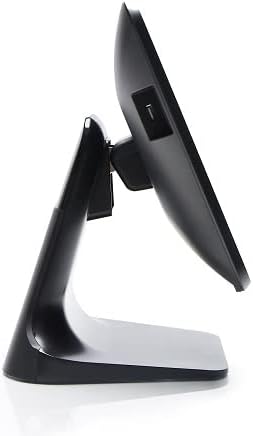
פיגור 4: זייט פּראָfile of the 3nStar POS System, highlighting its slim design and adjustable screen angle.
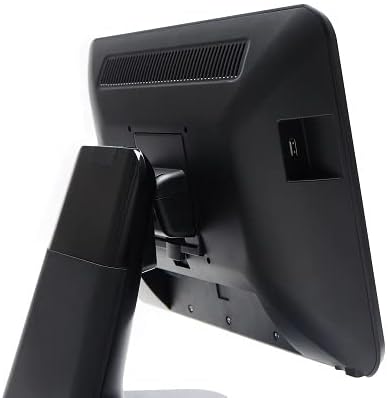
Figure 5: Rear-side view of the 3nStar POS System, illustrating the location of various connectivity ports for peripherals.
סעטאַפּ
- אויספּאַקן די סיסטעם: Carefully remove the POS system and all accessories from the packaging.
- פּאָזיציאָנירן די סיסטעם: Place the POS system on a stable, flat surface, ensuring adequate ventilation around the device.
- פאַרבינדן מאַכט: Connect the AC adapter to the power input port on the back of the POS system, then plug the adapter into a standard electrical outlet.
- ערשט מאַכט אויף: Press the power button, usually located on the side or back of the display. The system will boot up to the Android 11 operating system.
- ערשט קאַנפיגיעריישאַן: Follow the on-screen prompts to complete the initial Android setup, including language selection, Wi-Fi connection, and Google account setup (optional).
- פאַרבינדן פּעריפעראַלס: Connect any necessary peripherals such as barcode scanners, receipt printers, or cash drawers to the available USB or other designated ports. Refer to the peripheral's manual for specific connection instructions.
אַפּערייטינג ינסטראַקשאַנז
The 3nStar PTA0157-432 operates on Android 11, providing a familiar and intuitive user experience.
יקערדיק נאַוויגאַציע
- טאָוטשסקרעען: Use your fingers to tap, swipe, pinch, and zoom on the 15.6-inch capacitive display.
- היים פאַרשטעלן: Access your installed applications and widgets from the main home screen.
- אַפּ שופלאָד: Swipe up from the bottom of the screen or tap the app drawer icon to view אַלע אינסטאַלירן אַפּלאַקיישאַנז.
- נאָטיפיקאַטיאָנס: סווייפּ אַראָפּ פֿון דער שפּיץ פֿונעם עקראַן צו צוקומען צו נאָטיפיקאַציעס און שנעלע סעטטינגס.
קאַנעקטינג צו Wi-Fi
- גיין צו סעטטינגס > נעץ און אינטערנעט > ווי-פי.
- טוישן Wi-Fi On.
- אויסקלייבן אייער געוואונטשענע נעץ פון דער ליסטע און אַרייַן די פּאַראָל אויב געבעטן.
קאַנעקטינג בלועטאָאָטה דעוויסעס
- גיין צו סעטטינגס > קאָננעקטעד דעוויסעס > קאַנעקשאַן פּרעפֿערענצן > בלועטאָאָטה.
- באַשטימען בלועטאָאָטה On.
- מאַכן זיכער אַז דיין בלועטאָאָטה מיטל איז אין פּערינג מאָדע.
- Select the device from the list to pair.
Using POS Software
The system is designed to run various Android-compatible Point of Sale applications. Install your preferred POS software from the Google Play Store or other trusted sources. Refer to your specific POS software's documentation for detailed usage instructions.
וישאַלט
רייניקונג די מיטל
- פאַרשטעלן: ניצן אַ ווייך, לינט-פֿרייַ שטאָף אַ ביסל דampened with water or a screen cleaner specifically designed for electronic displays. Do not spray cleaner directly onto the screen.
- גוף: Wipe the exterior surfaces with a soft, dry cloth. Avoid abrasive cleaners or solvents.
- ווענטילאַטיאָן: Ensure ventilation slots are free from dust and debris to prevent overheating. Use compressed air if necessary.
ווייכווארג דערהייַנטיקונגען
Regularly check for and install system updates for Android 11 to ensure optimal performance, security, and compatibility. Go to סעטטינגס > סיסטעם > סיסטעם דערהייַנטיקן.
סטאָרידזש מאַנאַגעמענט
Monitor the 32GB internal storage to ensure sufficient space for applications and data. Delete unnecessary files or uninstall unused applications to free up space. Go to סעטטינגס > סטאָרידזש.
טראָובלעשאָאָטינג
| פּראָבלעם | מעגלעך סיבה | לייזונג |
|---|---|---|
| די מיטל טוט נישט מאַכט אויף. | Power cable not connected properly; AC adapter malfunction. | Ensure the AC adapter is securely connected to the device and a working power outlet. Test the outlet with another device. |
| דער טאָוטשסקרין רעאַגירט נישט. | Software glitch; screen dirty; physical damage. | Restart the device. Clean the screen with a soft cloth. If the issue persists, contact support. |
| Wi-Fi פֿאַרבינדונג פּראָבלעמען. | אומרעכט פּאַראָל; אַרויס פון קייט; ראַוטער פּראָבלעם. | Verify Wi-Fi password. Ensure the device is within range of the router. Restart the router and the POS system. |
| Peripheral (e.g., printer) not detected. | Incorrect connection; driver issue; peripheral not powered on. | Check physical connections. Ensure the peripheral is powered on. Install necessary drivers or apps for the peripheral. Restart the POS system. |
ספּעסאַפאַקיישאַנז
| שטריך | דעטאַל |
|---|---|
| מאָדעל נומער | PTA0157-432 |
| אָפּערייטינג סיסטעם | אַנדרויד 11 |
| פאַרשטעלן גרייס | 15.6 אינטשעס |
| פאַרשטעלן האַכלאָטע | 1920 רענטגענ 1080 פּיקסעלס |
| טאָוטשסקרעען | 10-point Capacitive |
| פּראַסעסער | Quad-Core (Rockchip 3568, 2 GHz) |
| באַראַן | 4 גיגאבייט LPDDR4 |
| סטאָרידזש | 32GB SSD (Flash Memory) |
| גראַפיקס | ינטעגראַטעד גראַפיקס |
| קאַנעקטיוויטי | ווי-פי, בלועטאָאָטה |
| פּראָדוקט דימענשאַנז (LxWxH) | 10 X 13 X 16 אינטשעס |
| פּונקט וואָג | 11 פונט |
| קאָליר | שוואַרץ |
וואָראַנטי און שטיצן
For warranty information, technical support, or service inquiries, please refer to the official 3nStar webזייטל אדער קאָנטאַקט אייער בארעכטיגטן ווידער-פארקויפטער. האַלט אייער קויף-קבלה ווי אַ באַווייַז פון קויפן פֿאַר וואָראַנטי קליימז.
Online resources and frequently asked questions may be available on the manufacturer's support page: 3nStar שטיצע


