1. הקדמה
This manual provides essential information for setting up, operating, maintaining, and troubleshooting your Svikou 15.6'' 165Hz 2.5K FHD Laptop. Please read this manual thoroughly before using your device to ensure optimal performance and longevity.
The Svikou 15.6'' laptop is designed for high-performance computing, featuring an AMD Ryzen 7 5700U processor, a vibrant 165Hz 2.5K FHD display, 16GB of RAM, and a 512GB NVMe SSD. It comes pre-installed with Windows 11 Pro.

Image 1.1: The Svikou 15.6-inch laptop with a high-resolution display, showcasing its visual capabilities.
2. אָנהייבן (סעטאַפּ)
2.1. פּעקל אינהאַלט
איידער איר גייט ווייטער, זיכערט זיך אז אלע זאכן זענען פאראן אין פעקל:
- Svikou 15.6'' Laptop x1
- טשאַרדזשער x1
- ווירעלעסס מאַוס x1
- English Operation Manual x1 (this document)
- וואָראַנטי קאַרד קס 1
2.2. ערשטע אויפשטעל
- Connect the charger to the laptop's DC charging port and a power outlet.
- עפענען די לאַפּטאַפּ דעקל.
- דריק דעם מאַכט קנעפּל וואָס געפינט זיך אויף דער קלאַוויאַטור.
- Follow the on-screen instructions to complete the Windows 11 Pro setup. This includes selecting your region, language, and setting up your user account.
3. הויפּט פֿעיִקייטן און אָפּעראַציע
3.1. ווייַז
The laptop features a 15.6-inch 2.5K FHD (2560 x 1440) IPS display with a 165Hz refresh rate. This provides a clear, dynamic visual experience with a 90% screen share and 100% sRGB color gamut.
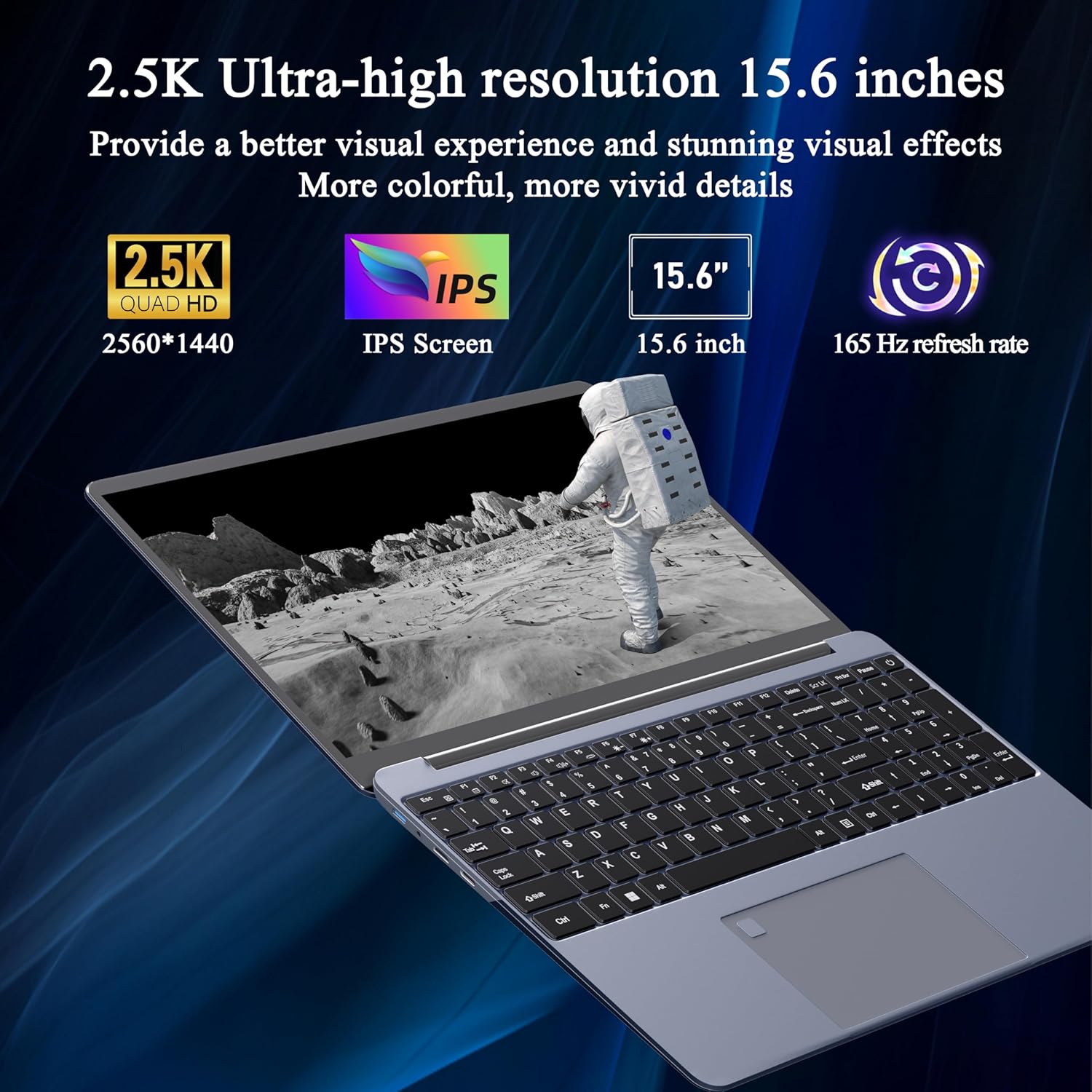
Image 3.1: Visual representation of the laptop's 2.5K Ultra-high resolution 15.6-inch display specifications.
3.2. פּראַסעסער
Equipped with an AMD Ryzen 7 5700U eight-core processor, the laptop offers a base frequency of 1.8GHz and can accelerate up to 4.3GHz. This processor is designed for high-performance computing and multitasking.

בילד 3.2: דעטאַלירט view of the AMD Ryzen 7 5700U processor, highlighting its core specifications.
3.3. זכּרון און סטאָרידזש
The laptop features 16GB of DDR4 RAM, enabling smooth multitasking across multiple applications. For storage, it includes a 512GB NVMe SSD, which provides fast startup times and efficient data access with minimal noise.

Image 3.3: The laptop demonstrating its capacity for handling multiple applications with 16GB RAM and 512GB SSD.
3.4. קאָנעקטיוויטי און פּאָרטן
The laptop offers versatile connectivity options:
- ווירעלעסס: 5G dual-band WiFi, Bluetooth 4.2
- פּאָרץ: 2x USB 3.0, 1x Micro SD card slot, 1x Type-C, 1x Mini HDMI, 1x Headphone Jack, 1x DC charging port

Image 3.4: An illustration detailing the available ports on the Svikou laptop for external device connections.
3.5. קלאַוויאַטור און אַרייַנשרייַב
The laptop features a backlit keyboard for improved visibility in various lighting conditions. It also includes a fingerprint unlock sensor for enhanced security and convenient access.
- באַקלייט קלאַוויאַטור: To toggle the keyboard backlight, press Fn + F5.
- ופשליסן פינגערפּרינט: Use the integrated fingerprint sensor for secure login.

Image 3.5: Close-up of the backlit keyboard and the fingerprint unlock feature.
3.6. באַטאַרייע
The laptop is equipped with a 5000mAh high-capacity battery, providing up to 5 hours of usage depending on the workload.

Image 3.6: The laptop's design emphasizing its durable battery life.
4. וישאַלט
To ensure the longevity and optimal performance of your Svikou laptop, follow these maintenance guidelines:
- רייניקונג: ניצט אַ ווייכע, לינט-פֿרייע שטאָף צו רייניקן דעם עקראַן און אויסערלעכן טייל. פֿאַרמייַדט שטרענגע כעמיקאַלן.
- ווייכווארג דערהייַנטיקונגען: Regularly update your Windows operating system and drivers to ensure security and performance.
- באַטערי זאָרגן: Avoid fully discharging the battery frequently. For long-term storage, charge the battery to about 50-70%.
- ווענטילאַטיאָן: זיכער מאַכן אַז די לאַפּטאַפּ'ס ווענטילאַציעס זענען נישט פֿאַרשטאָפּט צו פאַרמייַדן איבערהיצונג. ניצט דעם לאַפּטאַפּ אויף אַ שווערער, גלאַטער ייבערפלאַך.
- סטאָרידזש: האַלט דעם לאַפּטאָפּ אין אַ קיל, טרוקן אָרט אַוועק פון דירעקט זונשייַן און עקסטרעמע טעמפּעראַטורן.
5. טראָובלעשאָאָטינג
די סעקציע באהאנדלט אלגעמיינע פראבלעמען וואס איר קענט באגעגענען מיט אייער סוויקאו לעפטאפ.
5.1. קלאַוויאַטור רעאַגירט נישט
- Restart the Laptop: A simple restart can often resolve temporary software glitches.
- Check Drivers: Ensure your keyboard drivers are up to date. Go to Device Manager, locate 'Keyboards', right-click your keyboard device, and select 'Update driver'.
- סיסטעם File טשעק: If issues persist after a Windows update, open Command Prompt as administrator and run
DISM /Online /Cleanup-Image /RestoreHealth. Allow it to complete, then restart your computer.
5.2. אָוווערכיטינג
- טשעק ווענטאַליישאַן: Ensure the laptop's vents are clear of dust and obstructions. Use compressed air to clean them if necessary.
- ייבערפלאַך: Use the laptop on a hard, flat surface to allow for proper airflow. Avoid using it on soft surfaces like beds or couches.
- שליסן נישט גענוצטע אַפּליקאַציעס: Reduce the workload on the CPU and GPU by closing unnecessary programs.
- מאַכט סעטטינגס: Adjust power settings to a 'Balanced' or 'Power saver' mode to reduce performance and heat generation.
5.3. באַטעריע ווערט שנעל אויסגעליידיקט
- אַדזשאַסטירן סקרין העלקייט: Lowering screen brightness significantly reduces battery consumption.
- פֿאַרמאַכן הינטערגרונט אַפּפּס: Many applications consume power even when not actively in use. Close them from Task Manager.
- מאַכט מאָדע: Switch to 'Battery Saver' mode in Windows settings.
- דיאַקטיווירן נישט גענוצטע פֿעיִטשערז: Turn off Wi-Fi, Bluetooth, or other peripherals when not needed.
6. ספּעסאַפאַקיישאַנז
| שטריך | באַשרייַבונג |
|---|---|
| סאָרט | סוויקאָו |
| מאָדעל נאָמען | 15AR757 |
| פאַרשטעלן גרייס | 15.6 אינטשעס |
| ווייַז האַכלאָטע | 2560 x 1440 (2.5K FHD) |
| דערפרישן קורס | 165 הז |
| פּראַסעסער | AMD Ryzen 7 5700U (8-core, 1.8 GHz base, up to 4.3 GHz) |
| באַראַן | 16 גיגאבייט LPDDR4X |
| סטאָרידזש | 512 GB NVMe SSD |
| אָפּערייטינג סיסטעם | Windows 11 פּראָ |
| גראַפיקס קאַרד | אינטעגרירטע AMD Radeon גראַפיקס |
| ווירעלעסס טיפּ | 802.11ax (5G Dual-Band WiFi) |
| בלועטאָאָטה | בלועטאָאָטה 4.2 |
| וסב 3.0 פּאָרץ | 2 |
| אנדערע פּאָרץ | Type-C, Mini HDMI, Micro SD Card Slot, Headphone Jack, DC Charging Port |
| באַטערי | 5000 מאַה ליטהיום יאָן |
| פּונקט וואָג | 6.07 פונט |
| פּראָדוקט דימענשאַנז | 14 X 9 X 0.7 אינטשעס |
| קאָליר | גרוי |
7. וואָראַנטי און שטיצן
Your Svikou laptop comes with a 12-month product quality assurance. If you encounter any discrepancies or issues, particularly regarding Windows 11 Pro certification, please contact our customer service team.
We offer 24-hour email support to assist you with any questions or concerns. Please refer to the warranty card included in your package for specific terms and conditions.
קאָנטאַקט שטיצן: For assistance, please refer to the contact information provided on your warranty card or the official Svikou webפּלאַץ.