1. הקדמה
The SABLUTE Large Print Keyboard is designed to enhance typing comfort and visibility. Featuring large, easy-to-read characters and an ergonomic design with an integrated wrist rest, this wired keyboard is suitable for various users, including the elderly, students, and office professionals. It also includes a convenient phone/tablet holder for improved multitasking.
2. סעטאַפּ
The SABLUTE Large Print Keyboard offers a straightforward plug-and-play setup, requiring no additional drivers or software installation.
- ופשליסן די קלאַוויאַטור: נעמט פֿאָרזיכטיק אַרויס די קלאַוויאַטור פֿון איר פּאַקעט.
- פאַרבינדן צו קאָמפּיוטער: Locate an available USB-A port on your computer (desktop, laptop, etc.). Insert the USB-A cable from the keyboard firmly into the USB-A port.
- סיסטעם דערקענונג: Your operating system (Windows, macOS, Chrome OS, Vista) should automatically detect and configure the keyboard. A notification may appear indicating that the device is ready for use.
- אָנהייבן טייפּן: The keyboard is now ready for immediate use.

Figure 2.1: The keyboard features a USB-A connection for plug-and-play compatibility with various operating systems.
3. אַפּערייטינג ינסטרוקטיאָנס
3.1 Basic Typing and Ergonomics
The keyboard features large, high-contrast yellow keycaps with black characters for enhanced visibility. The ergonomic design includes a built-in wrist rest and bottom support to reduce wrist fatigue during extended use.

Figure 3.1: The ergonomic design with an integrated wrist rest promotes comfortable typing posture.
3.2 Integrated Phone/Tablet Holder
A dedicated slot is integrated into the keyboard's design to securely hold your smartphone or tablet, allowing for convenient viewing during computer use. This holder does not provide charging functionality.

Figure 3.2: The integrated slot provides a stable resting place for mobile devices.
3.3 מולטימעדיאַ און קורץ-וועג שליסלען
The keyboard includes several one-touch multimedia and shortcut keys located above the function row for quick access to common functions. These include navigation (forward, backward), refresh, search, stop loading, and calculator. Note that multimedia keys may have limited compatibility with macOS systems.
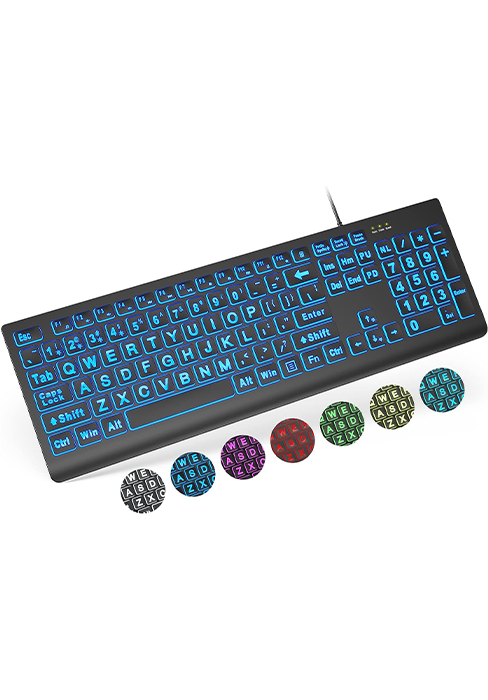
פיגורע 3.3: איבערview of the dedicated shortcut keys for enhanced productivity.
4. וישאַלט
To ensure the longevity and cleanliness of your SABLUTE Large Print Keyboard, regular maintenance is recommended.
- רייניקונג פון די שליסלען: ניצן אַ ווייך, לינט-פֿרייַ שטאָף אַ ביסל דampened with water or a mild, non-abrasive cleaning solution to wipe down the keycaps. Avoid excessive moisture.
- Cleaning the Wrist Rest: The hard plastic wrist rest can be easily cleaned with a damp cloth. Avoid harsh chemicals that may damage the surface.
- באַזייַטיקונג פון שטויב: Periodically use compressed air to remove dust and debris from between the keys.
5. טראָובלעשאָאָטינג
If you encounter issues with your SABLUTE Large Print Keyboard, consider the following troubleshooting steps:
- קלאַוויאַטור ניט ריספּאַנדינג:
- Ensure the USB-A cable is securely connected to both the keyboard and the computer's USB port.
- פרובירט צו קאנעקטן די קלאַוויאַטור צו אַן אַנדער USB פּאָרט אויף אייער קאָמפּיוטער.
- ריסטאַרט דיין קאָמפּיוטער צו דערפרישן די USB קאַנעקשאַנז.
- שליסלען רעגיסטרירט זיך נישט:
- Check for any physical obstructions or debris under the affected keys.
- Gently press the key multiple times to dislodge any stuck particles.
- Multimedia Keys Not Working (macOS):
- Some multimedia keys may have limited or no functionality on macOS systems due to operating system design. This is expected behavior and not a defect.
6. ספּעסאַפאַקיישאַנז
| שטריך | דעטאַל |
|---|---|
| סאָרט | SABLUTE |
| מאָדעל | B0CT2R9TN9 |
| קאַנעקטיוויטי טעכנאָלאָגיע | יו-עס-בי-א (ווייערד) |
| קאַמפּאַטאַבאַל דעוויסעס | Laptop, PC (Windows, macOS, Chrome OS, Vista) |
| קלאַוויאַטור באַשרייַבונג | פלעקסאַבאַל |
| ספּעציעלע פֿעיִקייטן | Ergonomic, Large Print, Phone Holder, Wired, Wrist Rest |
| קאָליר | געל |
| נומער פון קיז | 111 |
| פּראָדוקט דימענשאַנז | 17.32"L x 9.49"W x 1.81"H (43.99 x 24.10 x 4.60 ס״מ) |
| פּונקט וואָג | 1.98 פונט (0.90 קג) |
7. וואָראַנטי און שטיצן
SABLUTE is committed to customer satisfaction. For any inquiries or support needs, please refer to the following information:
- Manufacturer Warranty: The product is covered by a 360-day manufacturer warranty.
- פאַרבייַט פּאָליטיק: A 90-day replacement policy is available for eligible issues.
- קונה סערוויס: Expect a reply to your inquiries within 24 hours.
- קאָנטאַקט נומער (יו. עס.): 1-213-296-1273 (Mon-Fri 9am-1pm, 2pm-6pm PST)
- Brand Care: SABLUTE provides dedicated brand care for its products.

Figure 7.1: SABLUTE customer support details.


