הקדמה
This manual provides detailed instructions for the safe and effective use of your Yesido SF17 Multifunctional Selfie Stick Tripod. Please read this manual thoroughly before operating the device and retain it for future reference.
פּראָדוקט איבערview
The Yesido SF17 is a versatile device designed to function as both a selfie stick and a tripod stand. It features an extendable pole, a 360-degree rotating phone holder, and a detachable Bluetooth remote control for convenient photo and video capture.
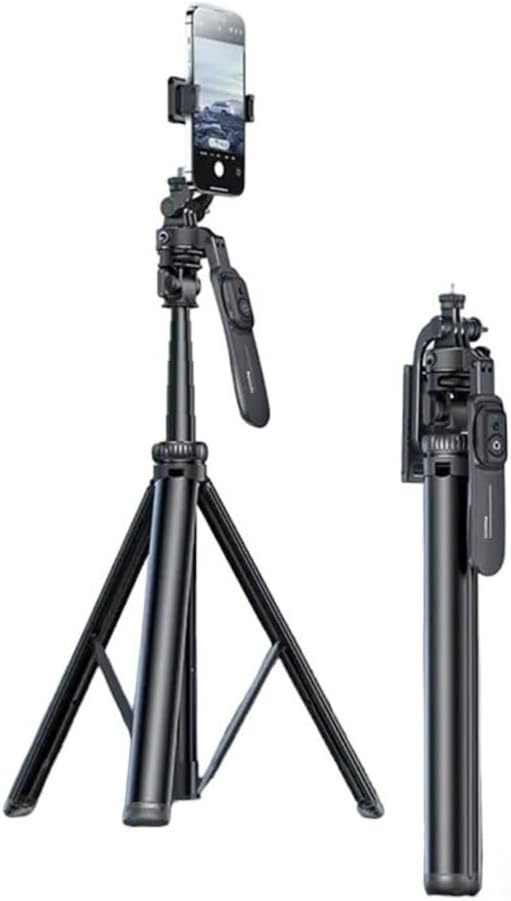
Image: The Yesido SF17 Selfie Stick Tripod shown both fully extended as a tripod with a phone attached, and folded into a compact stick for portability.
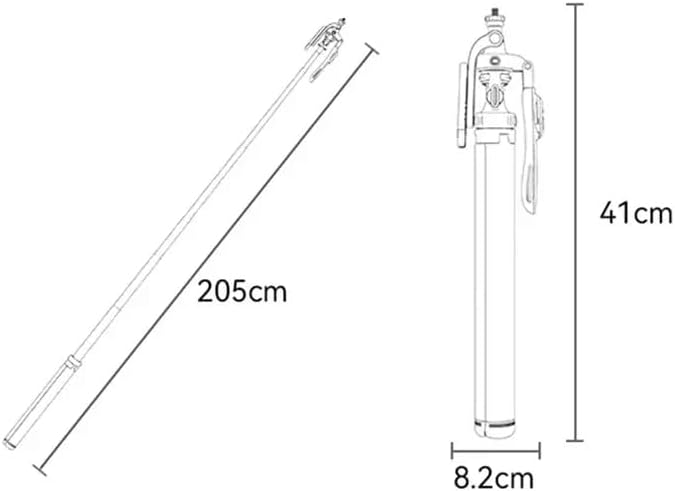
Image: A diagram illustrating the dimensions of the Yesido SF17. When folded, it measures approximately 41cm in length and 8.2cm in width. When fully extended, the pole reaches 205cm.
שליסל קאַמפּאָונאַנץ:
- Extendable Pole: Allows for adjustable height up to 200cm.
- דרייפוס פיס: Provides stable support when used as a tripod.
- טעלעפאָן האָלדער: אַדזשאַסטאַבאַל קלamp to secure smartphones.
- בלועטאָאָטה רימאָוט קאָנטראָל: Detachable remote for wireless photo/video capture.
- 1/4" Screw Mount: For attaching professional cameras or other accessories.
- קאַלטע שוך זיץ: For mounting supplementary lighting or microphones.

בילד: נאָענט-אַרויף views of the Yesido SF17 tripod head, highlighting the 1/4 inch screw for professional camera installation, a 1/4 inch nut for microphone attachment, and a cold shoe seat for supplementary lighting.
סעטאַפּ אינסטרוקציעס
- עפֿנט אויס דעם דרייפוס: Gently pull the three legs outwards from the base of the stick until they are fully extended and stable.
- פארברייטערן דעם פּאָל: Pull the telescopic sections of the stick upwards to achieve the desired height. Ensure all sections are securely locked in place.
- צובינדן דיין מיטל:
- פֿאַר סמאַרטפאָנעס: Open the adjustable phone holder clamp and carefully insert your smartphone. Ensure it is securely gripped. The holder supports phones between 4.7 and 7.1 inches.
- פֿאַר קאַמעראַס: If using a camera, screw it onto the 1/4" screw mount located at the top of the tripod head.
- פּאָר די בלועטאָאָטה רימאָוט:
- זיכער מאַכן אַז די ווײַטקאָנטראָל איז אויפגעלאָדן (אויב אָנווענדלעך) און אנגעצונדן.
- אַקטאַווייט בלועטאָאָטה אויף דיין סמאַרטפאָנע.
- זוכן פֿאַר available devices and select "YESIDO" or a similar identifier.
- Once paired, the remote can be used to trigger your phone's camera shutter from up to 10 meters away.

Image: The Yesido SF17 tripod stand with a smartphone mounted, demonstrating the use of the detachable Bluetooth remote control for capturing photos from a distance of up to 10 meters.
אַפּערייטינג ינסטראַקשאַנז
- Adjusting Phone Holder Orientation: The phone holder can be rotated horizontally or vertically to suit your shooting needs.
- Adjusting Shooting Angles:
- The tripod head allows for 360-degree pan tilt rotation for panoramic shots.
- The holder can be adjusted up and down by 260 degrees to meet various shooting angles.
- Further adjustments of 180 degrees are available for diverse photo styles.
- Using as a Selfie Stick:
- Fold the tripod legs back into the handle.
- Extend the pole to your desired length.
- Use the Bluetooth remote to capture photos or videos.
- Attaching External Accessories:
- מיקראָפאָן: Utilize the 1/4" nut for attaching external microphones.
- Supplementary Lighting: Mount LED lights or other lighting accessories onto the cold shoe seat.
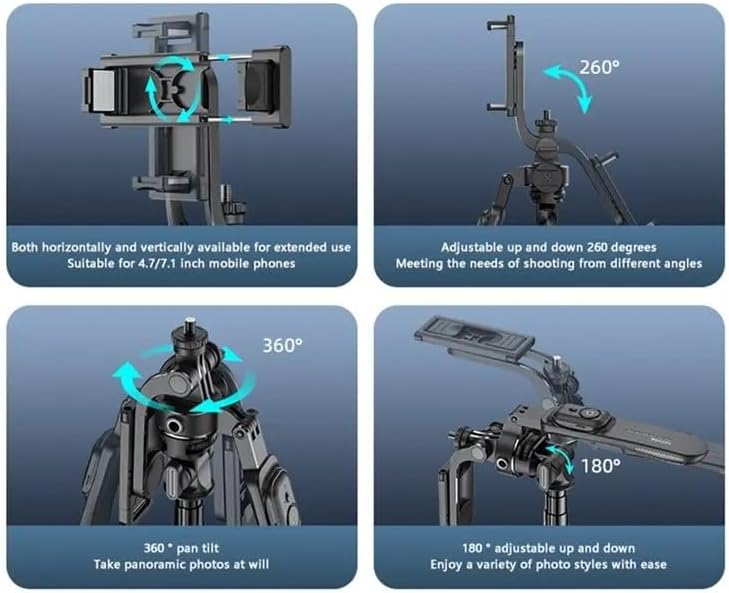
Image: Illustrations demonstrating the various adjustment capabilities of the Yesido SF17 tripod: horizontal and vertical phone holder rotation, 260-degree up and down adjustment, 360-degree pan tilt for panoramic photos, and 180-degree adjustable up and down for diverse photo styles.
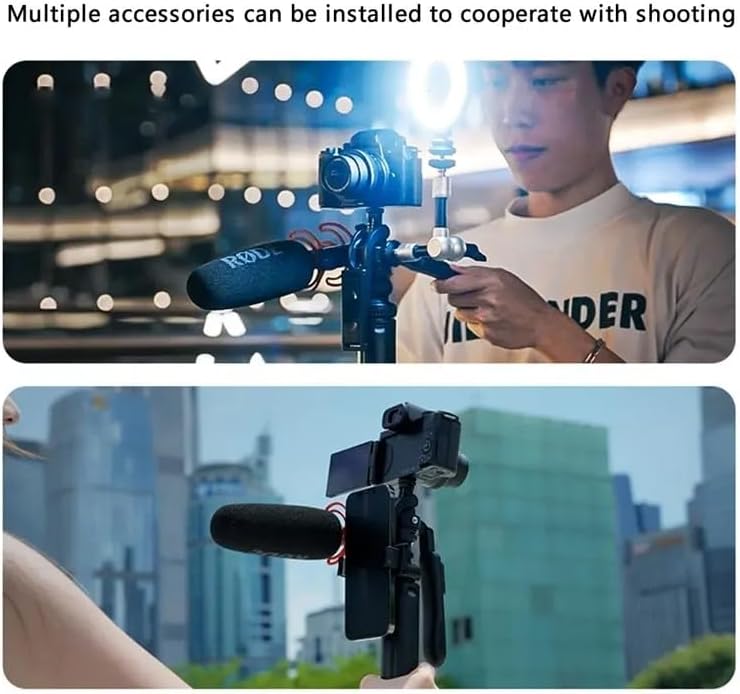
Image: Two scenarios showing the Yesido SF17 tripod with multiple accessories installed. The top image shows a camera, microphone, and supplementary light attached. The bottom image shows a smartphone, microphone, and external screen attached, demonstrating its versatility for content creation.
וישאַלט
- רייניקט דעם אפאראט מיט א ווייכן, טרוקענעם טוך. פארמיידט ניצן שרײַבנדיקע רייניגערס אדער סאָלווענטן.
- האַלט דעם דרייפוס אין אַ קיל, טרוקן אָרט אַוועק פון דירעקט זונשייַן און עקסטרעמע טעמפּעראַטורן.
- Ensure the telescopic pole sections are free from dust and debris to maintain smooth extension and retraction.
- קאָנטראָלירט פּעריִאָדיש אַלע שרויפן און פֿאַרבינדונגען צו זיכער מאַכן אַז זיי זענען זיכער.
טראָובלעשאָאָטינג
- Problem: Bluetooth remote does not pair.
- לייזונג: Ensure the remote is charged and powered on. Turn off and on your phone's Bluetooth. If the issue persists, try restarting both your phone and the remote.
- Problem: Tripod feels unstable.
- לייזונג: Ensure the tripod legs are fully extended and placed on a flat, stable surface. Do not overload the tripod beyond its weight capacity.
- Problem: Pole does not extend or retract smoothly.
- לייזונג: Check for any obstructions or debris in the telescopic sections. Clean the pole with a dry cloth. Avoid forcing the pole if it resists movement.
ספּעסאַפאַקיישאַנז
| מאָדעל נאָמען | Multifunctional Tripod Stand (SF17) |
| סאָרט | YESIDO |
| מאַטעריאַל | Metal, Acrylonitrile Butadiene Styrene (ABS), Aluminum |
| מאַקסימום הייך | 200 Centimeters (205cm as per image) |
| פאָולדיד לענג | Approximately 41 Centimeters |
| פּונקט וואָג | 0.3 קילאָגראַם (300 ג) |
| מאַקסימום וואָג קאַפּאַציטעט | 2.2 פונט |
| קאַמפּאַטאַבאַל דעוויסעס | סמאַרטפאָונז (4.7-7.1 אינטשעס), קאַמעראַס |
| בלועטוט ווײַט־ראַנגע | אַרויף צו 10 מעטער |
| סיסטעם קאַמפּאַטאַבילאַטי | אַנדרויד 4.4/יאָס 5.1 אָדער העכער |
| Tripod Head Type | שפּיל פּילקע העאַדס |
זיכערקייַט אינפֿאָרמאַציע
- שטעלט נישט אויס דעם אפאראט צו וואסער אדער איבעריגע פייכטקייט.
- ויסמיידן דראַפּינג אָדער אונטערטעניק די מיטל צו שטאַרק ימפּאַקץ.
- האַלטן אויס פון דערגרייכן פון קינדער.
- דו זאלסט נישט פּרווון צו דיסאַסעמבאַל אָדער מאָדיפיצירן די מיטל.
- Ensure your device is securely mounted before use to prevent accidental falls.