1. פּראָדוקט איבערview
The DJI Mic 2 is a wireless microphone system designed for high-quality audio recording. This system includes one transmitter (TX) and one receiver (RX), along with a compact DJI Lavalier Mic. It features intelligent noise cancelling, 32-bit float internal recording, and a 250-meter (820 ft.) transmission range, making it suitable for various recording scenarios including interviews, vlogs, and live streaming. The system is compatible with a wide range of devices including iPhones, Android phones, PCs, and cameras.
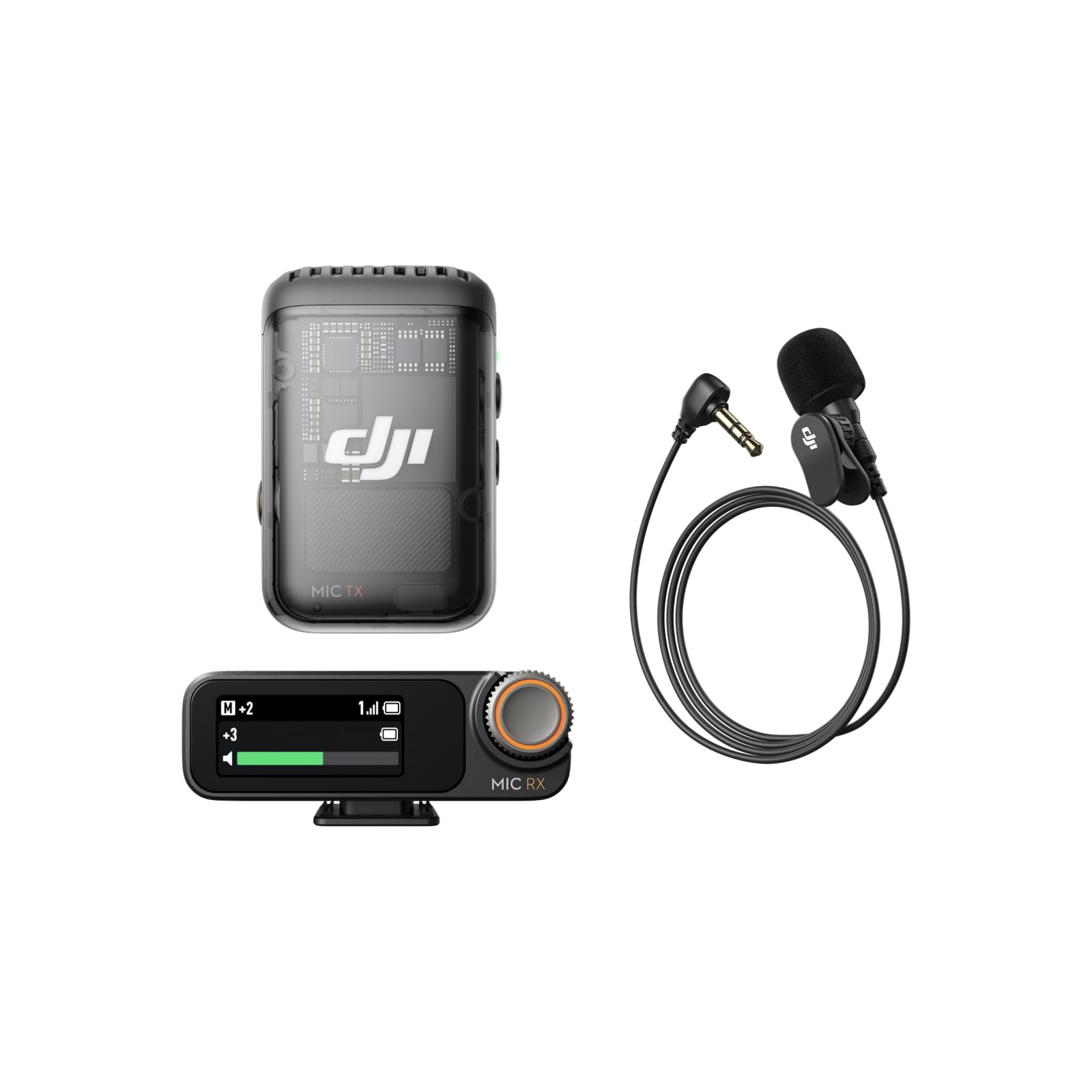
Image: The DJI Mic 2 wireless microphone system, showcasinג זײַן קאָמפּאַקטן דיזײַן.
2. וואָס איז אין דער קעסטל
The DJI Mic 2 (1 TX + 1 RX) + Lavalier Mic combo includes the following components:
- DJI Mic 2 ופנעמער
- DJI Mic 2 Transmitter (Shadow Black)
- DJI Lavalier Mic
- DJI Mic 2 Carrying Pouch
- DJI Mic Splitter Charging Cable
- DJI Mic 2 Windscreen
- DJI Mic 2 Clip Magnet
- DJI Mic 2 Camera Audio Cable (3.5mm TRS)
- DJI Mic 2 Mobile Phone Adapter (Lightning)
- DJI Mic 2 Mobile Phone Adapter (Type-C)

בילד: דעטאַלירט view of all components included in the DJI Mic 2 package.
3. סעטאַפּ
- טשאַרדזשינג: Ensure both the transmitter and receiver are fully charged using the provided charging cable. The charging case (if included in your specific kit) also charges the units.
- מאַכט אויף: Press and hold the power button on both the transmitter and receiver to turn them on.
- פּאָרינג: The transmitter and receiver should automatically pair upon powering on. If not, refer to the device's screen for pairing instructions or initiate pairing manually.
- פאַרבינדן צו מיטל:
- פֿאַר סמאַרטפאָנעס: Attach the appropriate USB-C or Lightning adapter to the receiver and plug it into your phone's charging port.
- פֿאַר קאַמעראַס: Use the 3.5mm TRS camera audio cable to connect the receiver's output port to your camera's microphone input jack.
- פֿאַר פּיסי: Connect the receiver to your PC via a USB-C cable.
- מיקראָפאָן אָרט: Attach the transmitter to your clothing using the clip or magnetic attachment. For optimal sound, place it approximately 15-20 cm (6-8 inches) from the sound source. If using the lavalier mic, plug it into the transmitter's 3.5mm input jack and secure the lavalier mic to clothing.

Image: Proper placement of the DJI Mic 2 transmitter on clothing for clear audio capture.

Image: The DJI Mic 2 receiver connected to a smartphone and a camera using the included adapters, demonstrating wide compatibility.
4. אַפּערייטינג ינסטרוקטיאָנס
4.1. יקערדיק אָפּעראַציע
- רעקאָרדינג: Press the record button on the transmitter to start/stop internal recording. The 32-bit float internal recording provides up to 14 hours of backup audio.
- מאָניטאָרינג: Connect headphones to the receiver's 3.5mm monitoring port for real-time audio monitoring.
- געווינס אַדזשאַסטמאַנט: Use the precision parameter dial on the receiver to adjust the gain (audio input level) for optimal sound.
- טאָוטשסקרעען: The 1.1-inch OLED touchscreen on the receiver displays information such as volume, battery level, and charging status. Swipe up or down to access settings.

Image: Close-up of the DJI Mic 2 receiver's 1.1-inch OLED touchscreen and precision parameter dial for easy control.
4.2. אַוואַנסירטע פֿעיִקייטן
- ינטעליגענט ראַש קאַנסאַלינג: Activate this feature for clearer vocals, especially in environments with background noise.
- זיכערקייַט שפּור: The system can record a second audio track at -6dB alongside the main track, providing a backup against unexpected audio level spikes.
- DJI OsmoAudio™ Direct Connection: The transmitter supports direct connection to various DJI products (e.g., Osmo Nano, Osmo 360, Osmo Action 5 Pro, Osmo Pocket 3) without needing the receiver, delivering premium audio.

Image: Visual representation of intelligent noise cancelling, showing audio waveforms before and after processing.

Image: Diagram illustrating the safety track feature, showing a normal audio track and a -6dB safety track.
5. וישאַלט
- רייניקונג: Use a soft, dry cloth to clean the transmitter, receiver, and charging case. Avoid using liquids or abrasive cleaners.
- סטאָרידזש: Store the DJI Mic 2 system in its carrying pouch or charging case when not in use to protect it from dust and damage.
- באַטערי זאָרגן: For long-term storage, ensure the batteries are charged to approximately 50-60% to prolong their lifespan. Recharge periodically if stored for extended periods.
- ווינטשויב: Regularly clean or replace the windscreen to maintain optimal audio quality and prevent debris from entering the microphone.
6. טראָובלעשאָאָטינג
- קיין אַודיאָ:
- Check if both transmitter and receiver are powered on and paired.
- Verify the receiver is correctly connected to your recording device (phone, camera, PC).
- Ensure the recording device's audio input is set to the external microphone.
- Adjust the gain on the receiver.
- שלעכטע אַודיאָ קוואַליטעט/גערויש:
- Ensure the transmitter is placed correctly and not rubbing against clothing.
- Activate the intelligent noise cancelling feature.
- Use the windscreen in windy environments.
- קוק פֿאַר ינטערפיראַנס פון אנדערע וויירליס דעוויסעס.
- קאַנעקטיוויטי ישוז:
- Ensure the transmitter and receiver are within the 250m (820 ft.) operating range.
- ריסטאַרט ביידע דעם טראַנסמיטער און ופנעמער.
- Re-pair the devices if necessary.
- באַטאַרייע ניט טשאַרדזשינג:
- Verify the charging cable is securely connected to a power source and the device.
- פרובירט אן אנדערן טשאַרדזשינג קאַבל אדער מאַכט אַדאַפּטער.
- Clean the charging contacts on the devices and case.
7. ספּעסאַפאַקיישאַנז
| שטריך | באַשרייַבונג |
|---|---|
| סיגנאַל-צו-נויז ראַטיאָ | 60 דב |
| ייַזנוואַרג פּלאַטפאָרמע | Camera, PC, Smartphone |
| נומער פון טשאַנאַלז | 2 |
| קאַנעקטיוויטי טעכנאָלאָגיע | וסב |
| קאַנעקטער טיפּ | 3.5 מ״מ דזשעק, USB |
| ספּעציעלע שטריך | קליפ |
| קאַמפּאַטאַבאַל דעוויסעס | סמאַרטפאָנע |
| קאָליר | שוואַרץ |
| פּאָליאַר מוסטער | אָמנידירעקטיאָנאַל |
| מיקראָפאָן פאָרם פאַקטאָר | לאַוואַליער |
| מאַכט מקור | קאָרדעד עלעקטריק |
8. Product Comparison (DJI Mic 1 vs. DJI Mic 2)
This video provides a comparison between the DJI Mic 1 and DJI Mic 2, highlighting key differences in features and design to help users understand the advancements in the newer model.
Video: A comparison of the DJI Mic 1 and DJI Mic 2, detailing their differences in features and included accessories.

Image: A table comparing the features of DJI Mic 2 and DJI Mic 1, including noise cancelling, internal recording, operating time, and connectivity.
9. וואָראַנטי און שטיצן
פֿאַר וואָראַנטי אינפֿאָרמאַציע און טעכנישע שטיצע, ביטע זען די באַאַמטער DJI webזייטל אדער קאנטאקט DJI קאסטומער סערוויס. האלט אייער באווייז פון קויפן פאר גאראנטיע טענות.


