1. פּראָדוקט איבערview
The SANPTENT Portable 9-inch FHD Touch Screen Car Stereo is designed to enhance your in-car entertainment and navigation experience. It features wireless Apple CarPlay and Android Auto, Mirror Link functionality, Bluetooth connectivity, an FM transmitter, and support for a rear camera. This manual provides instructions for proper installation, operation, and maintenance.

בילד 1.1: איבערview of the SANPTENT Portable Car Stereo, showing the 9-inch display, included backup camera, and wireless connectivity options for Android Auto and Apple CarPlay.
2. פּעקל אינהאַלט
באַשטעטיקן אַז אַלע זאכן זענען פאַראַן אין פּעקל איידער איר גייט ווייטער מיט דער אינסטאַלאַציע.
- 1 x 9-Inch Portable Car Stereo
- 1 x Waterproof AHD Rear Camera with 26.2ft cable
- 1 x 4.65ft Aux cable
- 1 x 4.92ft Car Charger Cable
- 1 x דעסקטאָפּ בראַקאַץ

Image 2.1: Visual representation of the package contents, including the main unit, cables, and rear camera.
3. סעטאַפּ און ייַנמאָנטירונג
3.1 מאָנטירן די דיספּליי יוניט
The portable car stereo can be mounted on your dashboard using the provided desktop bracket. Ensure the mounting location does not obstruct your view אָדער אַרייַנמישנ זיך מיט פאָרמיטל קאָנטראָלס.
- Attach the display unit to the desktop bracket.
- Clean the desired mounting surface on your dashboard thoroughly.
- Apply the provided gel sticker to the base of the desktop bracket.
- Securely press the bracket onto the cleaned dashboard surface. The gel sticker allows for secure attachment without drilling.

Image 3.1: The portable car stereo mounted on a dashboard, demonstrating its placement and integration with the car's interior.
3.2 מאַכט קאַנעקשאַן
Connect the car charger cable to the portable stereo and plug the other end into your vehicle's 12V power outlet (cigarette lighter socket).
3.3 אַודיאָ רעזולטאַט קאַנעקשאַן
There are three primary methods to output audio from the portable stereo to your car's audio system:
- FM טראַנסמיטער: Tune the portable stereo's FM transmitter to an unused FM frequency, then tune your car's radio to the same frequency.
- AUX קאַבלע: Connect the provided 4.65ft AUX cable from the portable stereo's AUX output to your car's AUX input.
- געבויט-אין רעדנער: The unit has a local 4Ω 3W speaker for direct audio output.

Image 3.2: Illustration of the three audio output methods: FM transmission, AUX connection, and the unit's internal speaker.
3.4 דערציען אַפּאַראַט ינסטאַלירונג
The included waterproof AHD rear camera provides a 170° viewing angle and supports HD color night vision. Professional installation is recommended for optimal performance.
- Mount the rear camera at the back of your vehicle, ensuring a clear view.
- Route the 26.2ft camera cable from the rear of the vehicle to the portable stereo unit.
- Connect the camera cable to the "Rear Camera In" port on the portable stereo.
- Connect the camera's power cable to your vehicle's reverse light circuit so it activates automatically when shifting into reverse.

Image 3.3: Details of the backup camera, highlighting its waterproof design, wide-angle lens, night vision, and 1080P resolution.
4. אַפּערייטינג ינסטרוקטיאָנס
4.1 פּאַוערינג אויף / אַוועק
- מאַכט אויף: The unit will power on automatically when connected to the car's power supply and the vehicle is started.
- מאַכט אַוועק: Disconnect the car charger cable or turn off your vehicle's ignition.
4.2 Wireless Apple CarPlay / Android Auto
This unit supports wireless connectivity for both Apple CarPlay and Android Auto, providing access to your phone's features on the 9-inch display.
- מאַכן זיכער אַז בלועטאָאָטה איז ענייבאַלד אויף דיין סמאַרטפאָנע.
- On the portable stereo, navigate to the CarPlay or Android Auto interface.
- On your phone, search for and connect to the portable stereo's Bluetooth device name.
- Follow any on-screen prompts on both your phone and the stereo to complete the pairing process.
- Once connected, your phone's CarPlay or Android Auto interface will appear on the stereo display.

Image 4.1: Step-by-step guide for wirelessly connecting an iPhone to Apple CarPlay on the SANPTENT stereo.

Image 4.2: Step-by-step guide for wirelessly connecting an Android phone to Android Auto on the SANPTENT stereo.
4.3 שפּיגל לינק פונקציאָנאַליטעט
Mirror Link allows you to display your smartphone's screen directly onto the portable stereo. This feature is useful for viewing content not natively supported by CarPlay or Android Auto, such as certain video streaming applications.
- Connect your iPhone and the portable stereo to the same Wi-Fi network.
- On your iPhone, access the Control Center and select "Screen Mirroring."
- Choose the portable stereo from the list of available devices (often labeled "SmartScreen").
- Your iPhone's screen will now be mirrored on the stereo display.
- For Android devices, connect via USB cable and follow on-screen prompts for screen mirroring.
באַמערקונג: This unit does not support Netflix via Mirror Link.

Image 4.3: Demonstration of Mirror Link, showing a smartphone screen duplicated on the car stereo display.
4.4 שטימע קאנטראל (סירי/גוגל אסיסטענט)
Utilize voice commands for hands-free operation through Siri (for Apple CarPlay) or Google Assistant (for Android Auto). The built-in microphone ensures clear voice input.
- Activate Siri or Google Assistant by saying "Hey Siri" or "Hey Google," or by pressing the voice command button on the screen.
- Issue commands such as "Play music," "Get directions to [destination]," "Send message to [contact]," or "Make a phone call."
4.5 Backup Camera Operation
When the rear camera is properly installed and connected to your vehicle's reverse light circuit, the display will automatically switch to the camera view when you shift into reverse gear. This provides a visual aid for parking and reversing maneuvers.
וויכטיק: The backup camera is an auxiliary reversing aid and does not record video. Always check your surroundings manually before and during reversing.
4.6 ווייַז סעטטינגס
The 9-inch HD touchscreen offers various display adjustments for optimal viewing.
- ברייטקייט: Adjust screen brightness through the settings menu to suit ambient light conditions.
- טאָג / נאַכט מאָדע: The unit may automatically switch between day and night display modes or allow manual selection for improved visibility.
- רעזאלוציע: The screen supports 1080P video playback for a clear viewינג דערפאַרונג.

Image 4.4: Comparison of 1080P Full HD display quality versus 720P, highlighting the clarity of the SANPTENT unit's screen.
5. וישאַלט
To ensure the longevity and optimal performance of your SANPTENT Portable Car Stereo, follow these maintenance guidelines:
- רייניקונג די פאַרשטעלן: ניצט אַ ווייכע, לינט-פֿרייע שטאָף צו פֿאָרזיכטיק ווישן דעם טאָוטשסקרין. פֿאַר שווערע פֿלעקן, אַ ביסל ווישןampווישט דעם שטאָף מיט וואַסער אָדער אַ פאַרשטעלן-זיכער רייניגער. פֿאַרמייַדט שטרענגע כעמיקאַלן אָדער אַברייסיוו מאַטעריאַלן.
- קאַבלע פאַרוואַלטונג: Ensure all cables are neatly routed and secured to prevent damage from snagging or excessive bending.
- טעמפּעראַטור ויסשטעל: Avoid exposing the unit to extreme temperatures for prolonged periods. While designed for automotive use, extreme heat or cold can affect performance and lifespan.
- ווייכווארג דערהייַנטיקונגען: קוק די פאַבריקאַנט ס webזוכט דעם וועבזייטל פון צייט צו צייט פאר אלע פארהאן פירמווער דערהייַנטיקונגען צו זיכער מאכן די בעסטע פאָרשטעלונג און קאָמפּאַטאַביליטי.
6. טראָובלעשאָאָטינג
If you encounter issues with your portable car stereo, refer to the following common troubleshooting steps:
- קיין מאַכט:
- Ensure the car charger cable is securely plugged into both the unit and the vehicle's 12V power outlet.
- קוקט צי די 12V עלעקטרישע ווענטיל פונעם אויטאָ אַרבעט (למשל, דורך אריינשטעקן אן אנדער דעווייס).
- Verify the vehicle's fuse for the 12V power outlet is not blown.
- קיין אַודיאָ רעזולטאַט:
- FM טראַנסמיטער: Confirm the stereo's FM frequency matches your car radio's frequency and that the chosen frequency is clear of other broadcasts.
- AUX קאַבלע: Ensure the AUX cable is fully inserted into both the portable stereo and your car's AUX input. Select the correct AUX input source on your car's audio system.
- בלועטאָאָטה: Verify your phone is connected via Bluetooth and the volume on both the phone and the stereo is turned up.
- Check the volume settings on the portable stereo itself.
- קאַרפּליי/אַנדרויד אויטאָ פֿאַרבינדט זיך נישט:
- Ensure Bluetooth is enabled on your phone and the stereo.
- פֿאַרגעסט דעם דעווייס פֿון אייער טעלעפֿאָן'ס בלועטוט סעטטינגס און פּאָר עס ווידער.
- Restart both your phone and the portable stereo.
- Confirm your phone's operating system is up to date and supports CarPlay/Android Auto.
- Touchscreen Unresponsive or Slow:
- ריסטאַרט די אַפּאַראַט דורך דיסקאַנעקטינג און רי-אַנעקטינג די מאַכט.
- זיכער מאַכן אַז דער עקראַן איז ריין און פריי פון שמוץ.
- באַקאַפּ קאַמעראַ ווייַזט נישט:
- Check all camera cable connections, ensuring they are secure.
- Verify the camera's power connection to the reverse light circuit is correct.
- Ensure the vehicle is in reverse gear.
אויב די טריט לייזן נישט דעם פראבלעם, ביטע קאנטאקטירט קאסטומער סופארט.
7. ספּעסאַפאַקיישאַנז
| שטריך | דעטאַל |
|---|---|
| פּראָדוקט דימענשאַנז | 10 X 4 X 6 אינטשעס |
| פּונקט וואָג | 2 פונט |
| ASIN | B0CSFSRW39 |
| קאַנעקטיוויטי טעכנאָלאָגיע | הילפס-פארבינדונג, בלועטוט |
| ספּעציעלע פֿעיִקייטן | Built-In Microphone, Reverse Assist, Siri/Google Assistant Voice Control, Touch Screen, Wireless & Wired Apple CarPlay Android Auto |
| אנדערע ווייַז פֿעיִקייטן | ווירעלעסס |
| קאָליר | שוואַרץ |
| פאַבריקאַנט | SANPTENT |
| פאָרמיטל סערוויס טיפּ | מאַשין, טראָק |
| Video Capture Resolution (Camera) | 1080 פּ |
| מאַונטינג טיפּ | דאַשבאָרד בארג |
| פעלד פון View (קאמערא) | 175 דיגריז |
| קאָנטראָל מעטאָד | ריר |
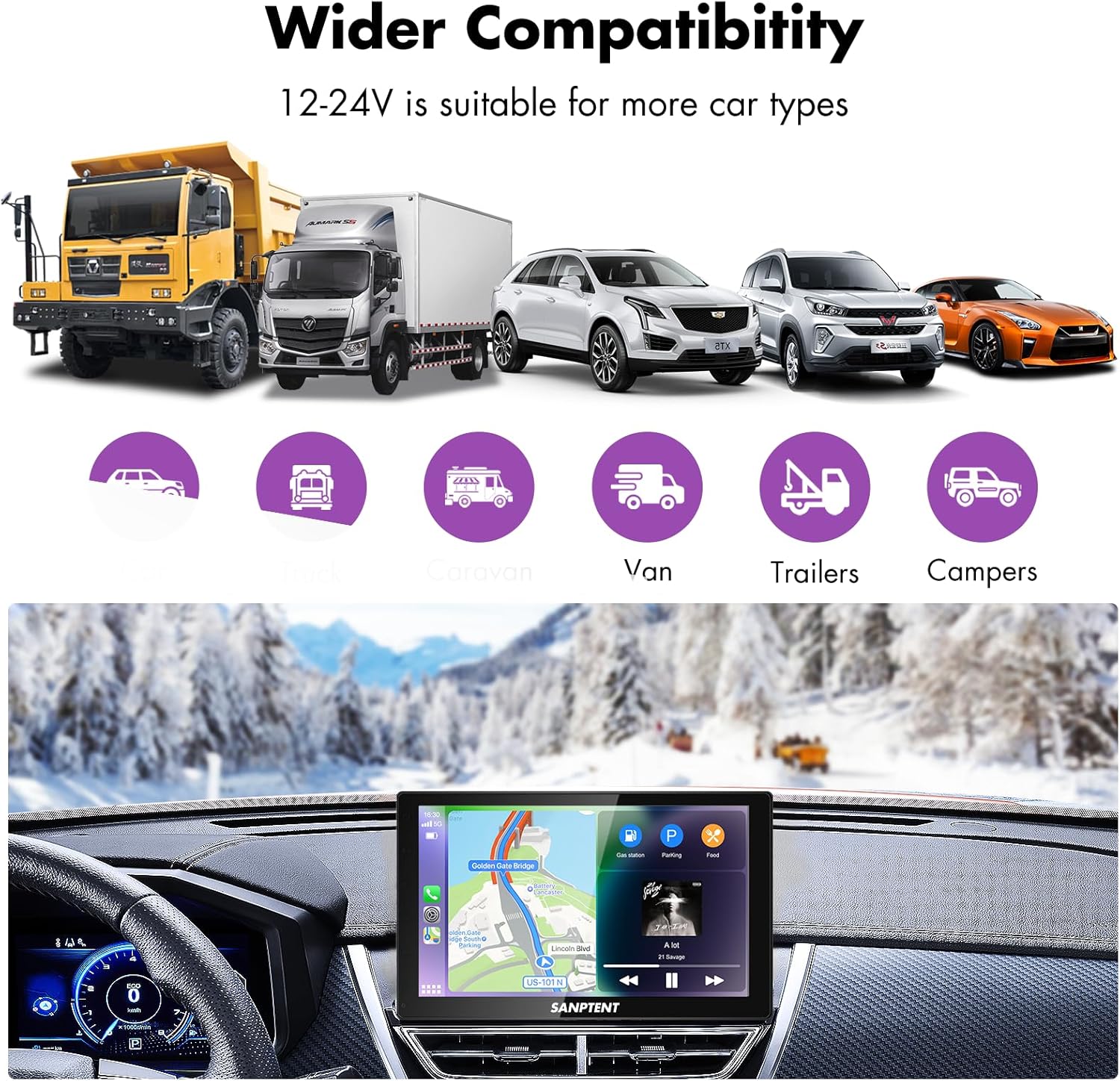
Image 7.1: The portable car stereo is compatible with 12-24V power systems, suitable for various vehicle types including cars, trucks, caravans, vans, trailers, and campערס.
8. וואָראַנטי און שטיצן
8.1 לימיטעד וואָראַנטי
SANPTENT products are covered by a limited warranty against defects in materials and workmanship from the date of purchase. Please refer to the warranty card included in your package or visit the official SANPTENT webזייטל פֿאַר דעטאַלירטע וואָראַנטי טערמינען און באַדינגונגען. האַלט דיין באַווייַז פון קויפן פֿאַר וואָראַנטי קליימז.
8.2 קונה שטיצן
For technical assistance, troubleshooting, or warranty inquiries, please contact SANPTENT customer support. Contact information can typically be found on the product packaging, the official SANPTENT webוועבזייטל, אדער דורך אייער הענדלער.

