1. הקדמה
The LAUNCH X431 Elite V2.0 BBA Bi-Directional OBD2 Scanner is a professional diagnostic tool designed for BMW, Mercedes-Benz, and Volkswagen Audi Group (V.A.G) vehicles. It offers comprehensive system diagnostics, advanced special functions, ECU coding, and bi-directional control capabilities. This manual provides detailed instructions for setting up, operating, and maintaining your device to ensure optimal performance and accurate vehicle diagnostics.
2. פּראָדוקט איבערview
The LAUNCH X431 Elite V2.0 BBA is an all-in-one diagnostic tool offering full system diagnostics, full bi-directional control, full OBDII modes, full special resets/relearn/calibration, ECU coding, and lifetime free updates. It is designed to provide dealership-level troubleshooting for a wide range of vehicle systems.
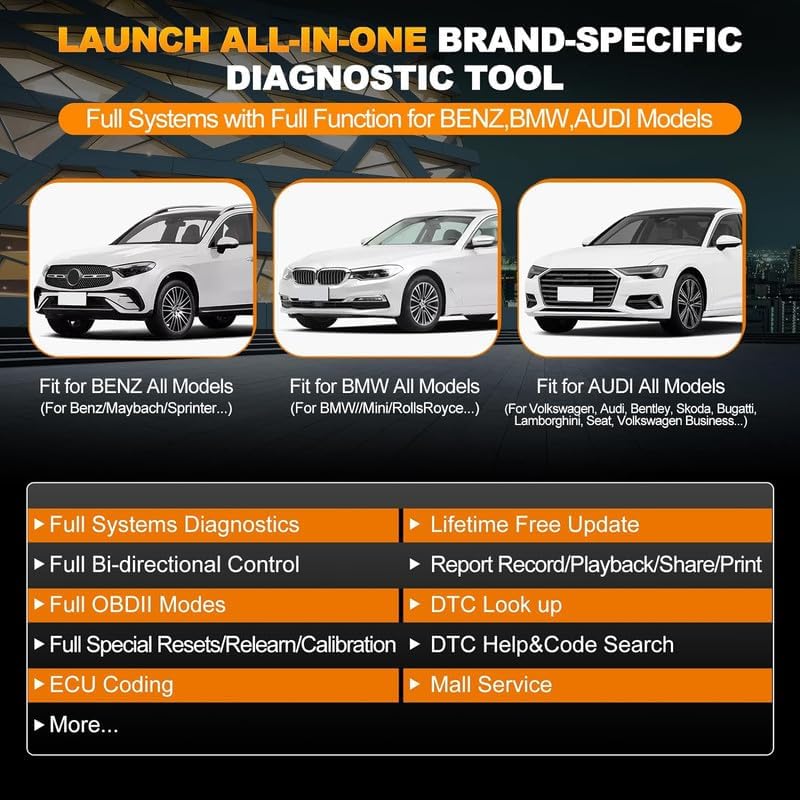
Image: LAUNCH X431 Elite V2.0 BBA Diagnostic Tool highlighting supported brands (Benz, BMW, Audi) and key features like Full Systems Diagnostics, Bi-directional Control, OBDII Modes, Resets, ECU Coding, and Lifetime Free Update.
2.1 שליסל פֿעיִקייטן
- Full Systems Diagnostics: Access and diagnose all available electronic systems in supported vehicles.
- צוויי-דירעקציאָנעלע קאָנטראָל (אַקטיווער טעסט): Perform active tests on various vehicle components to verify their functionality.
- ECU קאָדירונג: Modify vehicle settings, activate hidden functions, and adapt components.
- ספּעציעלע פאַנגקשאַנז: Includes Oil Reset, ABS Bleeding, Throttle Reset, Injector Coding, SAS Reset, EPB Reset, BMS Reset, DPF Reset, and more.
- OBDII Modes: Supports all 10 OBDII test modes for basic diagnostics.
- Battery Register: Perform battery registration for supported vehicles.
- לעבנס-לאנגע פרייע דערהייַנטיקונגען: Ensures the device always has the latest software and vehicle coverage.
- 4-אינטש טאָוטשסקרין: Provides an intuitive user interface.
- מולטי-שפּראַך שטיצן: Operates in English, French, Spanish, German, Italian, Portuguese, Japanese, Korean, and Chinese.
2.2 Supported Vehicle Groups
- BMW Group: BMW, Mini, Rolls-Royce.
- Mercedes-Benz Group: Mercedes-Benz, Maybach, Sprinter.
- V.A.G Group: Volkswagen, Audi, Bentley, Skoda, Bugatti, Lamborghini, Seat.

Image: Detailed list of coding and active test functions supported for BMW, Benz, and V.A.G Group vehicles by the LAUNCH X431 Elite BBA scanner.
3. פּעקל אינהאַלט
ביים עפענען דעם פעקל, זיכער מאכן אז אלע זאכן זענען דא און אין גוטן צושטאנד:
- LAUNCH X431 Elite V2.0 BBA Main Unit
- OBDII דיאַגנאָסטיק קאַבל
- באַניצער מאַנואַל
- קעריינג באַג
Video: Unboxing the LAUNCH Creader BBA, showing the main unit, diagnostic cable, user manual, and carrying bag included in the package.
4. סעטאַפּ
פֿאָלגט די סטעפּס פֿאַר דער ערשטער סעטאַפּ און פֿאַרבינדונג:
- מאַכט אויף: דריקן און האַלטן די מאַכט קנעפּל אויף די מיטל צו קער עס אויף.
- פאַרבינדן צו פאָרמיטל: Locate the vehicle's OBDII port (usually under the dashboard). Connect the diagnostic cable to the OBDII port and then to the LAUNCH X431 Elite V2.0 BBA unit.
- ערשט קאַנפיגיעריישאַן: The device will automatically detect the vehicle's VIN (Vehicle Identification Number) and establish communication. Follow any on-screen prompts for initial setup, such as language selection or time zone settings.

Image: The LAUNCH X431 Elite V2.0 BBA diagnostic tool connected to a vehicle's OBDII port, displaying its main menu.
5. אַפּערייטינג ינסטרוקטיאָנס
The LAUNCH X431 Elite V2.0 BBA offers various diagnostic and special functions. Navigate through the menu using the touchscreen or the physical buttons.
5.1 Basic Diagnostics (OBD II)
For standard OBDII functions applicable to all vehicles:
- פון די הויפּט מעניו, אויסקלייַבן 'OBD II'.
- The device will perform a scan and display scan results, including readiness status and supported data streams.
- You can then choose to:
- Read I/M Readiness: Check if the vehicle is ready for emissions inspection.
- לייענען לייוו דאַטן: View real-time parameters from the vehicle's sensors. You can select multiple parameters and combine them into a graph for analysis.
- לייענט פריז ראַם: View a snapshot of sensor data when a fault code was set.
- לייענען שולד קאָד: Retrieve current, pending, and historic Diagnostic Trouble Codes (DTCs).
- קלאָר שולד קאָד: Erase DTCs from the vehicle's ECU.
- Test Results: On-Board Monitoring Test: Check results of on-board diagnostic monitoring tests.
- לייענט אינפֿאָרמאַציע וועגן דעם אויטאָ: Access vehicle identification details (VIN, calibration IDs, etc.).

Image: The LAUNCH X431 Elite V2.0 BBA displaying its menu with options like Auto VIN, DTC Help & Code Search, One-Click Update, 4-in-1 Data Stream, Battery Register, Online Feedback, Diagnostic Report, and Mall Service.
5.2 Advanced Diagnostics (Diagnose)
For in-depth diagnostics specific to BMW, Mercedes-Benz, and V.A.G Group vehicles:
- פון די הויפּט מעניו, אויסקלייַבן 'Diagnose'.
- Choose your vehicle's brand (e.g., BMW, Mercedes-Benz, Audi).
- The device will automatically detect the vehicle's information. Confirm the details.
- You will be presented with options such as:
- געזונטהייט באריכט: Performs a comprehensive scan of all vehicle systems and generates a report of any detected fault codes.
- סיסטעם סקען: Scans all equipped modules in the vehicle to identify their presence and status.
- סיסטעם סעלעקציע: Allows you to manually select a specific system (e.g., Engine, Transmission, ABS) for detailed diagnostics.
5.3 ספּעציעלע פאַנגקשאַנז
The device supports various special functions for specific vehicle groups:
- ECU קאָדירונג: Reflash hidden functions, reset adaptive data, improve vehicle performance, recode changed modules, and more.
- צוויי-דירעקציאָנעלע קאָנטראָל (אַקטיווער טעסט): Perform tests on components like radiator fan, mirrors, injectors, fuel pump, and more.
- Resets/Relearn/Calibration: Access functions such as Oil Reset, ABS Bleeding, Throttle Reset, Injector Coding, SAS Reset, Suspension Reset, Gearbox Reset, Tyre Learning, EPB Reset, BMS Reset, Clutch Reset, Crank Sensor Relearn, SCR Adblue Reset, Seat Matching, DPF Reset, Sun Reset, Coolant Learning, Cylinder Reset, TPMS Reset, and Transport Reset.
- פערזענליכען: Customize vehicle settings.
Image: A visual representation of the ECU Coding function, showing a car's computer system.

Image: The LAUNCH X431 Elite V2.0 BBA demonstrating full-module active tests, including power seat, wipers, doors/windows, and interior lights.
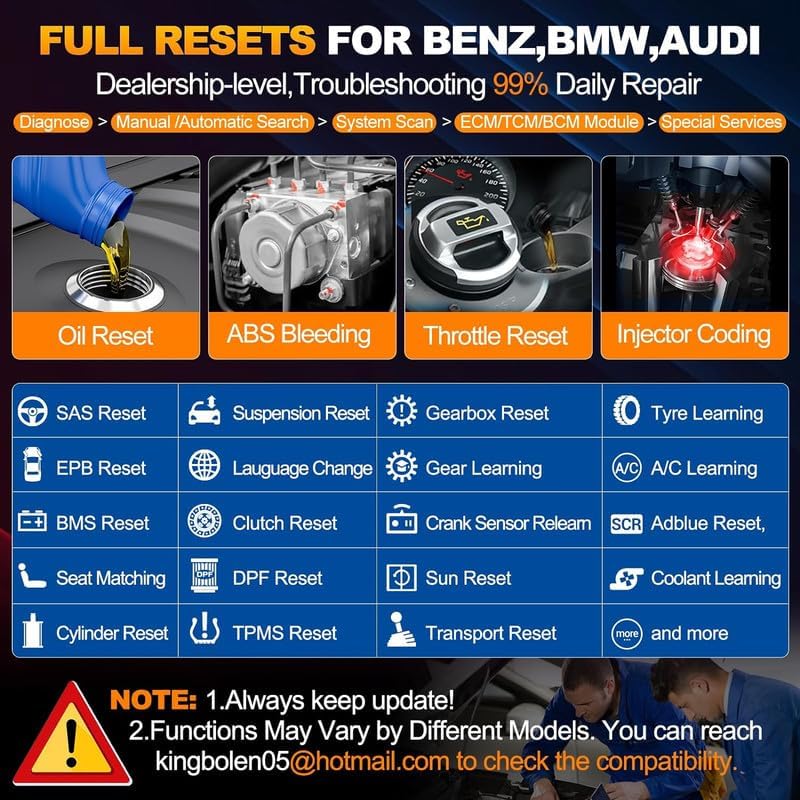
Image: The LAUNCH X431 Elite V2.0 BBA displaying a wide array of reset functions for Benz, BMW, and Audi vehicles, such as Oil Reset, ABS Bleeding, and Injector Coding.
Video: Demonstration of how to perform coding to stop headlight cleaning using the LAUNCH BBA diagnostic tool.
Video: Demonstration of how to perform coding for day lights on and off using the LAUNCH BBA diagnostic tool.
Video: Demonstration of how to perform coding for indicator lights using the LAUNCH BBA diagnostic tool.
5.4 דאַטאַ מאַנאַגעמענט
- Backup/Restore Coding Data: Save and restore vehicle coding data to prevent data loss during operations.
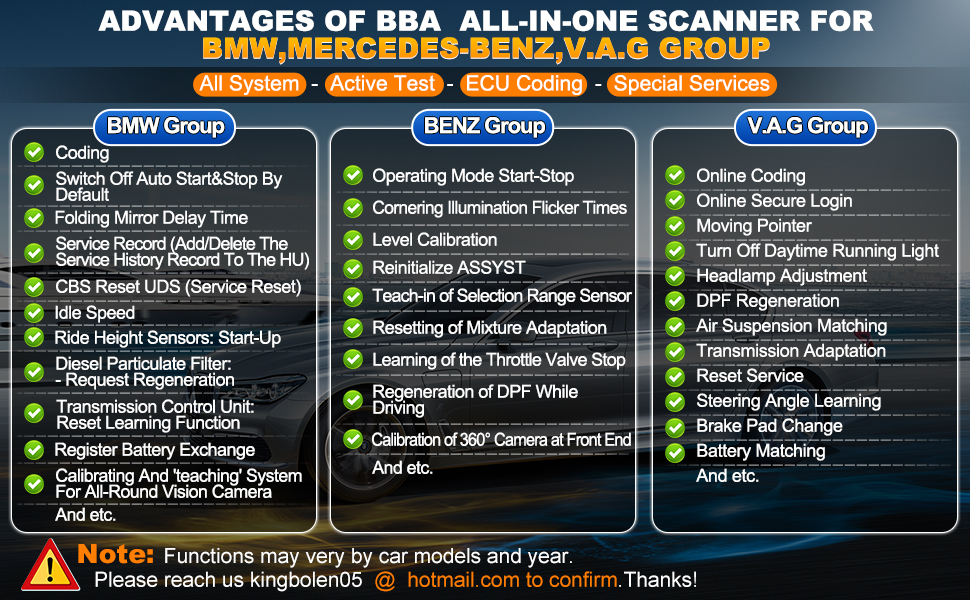
Image: The LAUNCH X431 Elite V2.0 BBA displaying additional functions like Auto Vin, DTC Help & Code Search, Lifetime Free WIFI Update, 4 in 1 Live Data Stream, Share/Print Diagnostic Report, and Timely Online Feedback.
6. וישאַלט
To ensure the longevity and optimal performance of your LAUNCH X431 Elite V2.0 BBA, follow these maintenance guidelines:
- ווייכווארג דערהייַנטיקונגען: Regularly check for and install software updates to ensure compatibility with new vehicle models and access to the latest features. The device offers lifetime free updates.
- רייניקונג: ניצט אַ ווייכע, טרוקענע שטאָף צו רייניקן דעם אַפּאַראַט. פֿאַרמייַדט ניצן אַברייסיוו רייניגער אָדער סאָלווענטן.
- סטאָרידזש: האַלט דאָס אַפּאַראַט אין זײַן טראָג־זאַק אין אַ קילן, טרוקענעם אָרט ווען עס איז נישט אין באַנוץ.
- קאַבלע זאָרגן: Inspect the diagnostic cable regularly for any signs of wear or damage. Replace if necessary.
7. טראָובלעשאָאָטינג
אויב איר טרעפט פּראָבלעמען מיט אייער מיטל, זעט די פאלגענדע געוויינטלעכע טראָובלעשווטינג טריט:
- מיטל נישט פּאַוערינג אויף: Ensure the device is properly connected to the vehicle's OBDII port. The device draws power from the vehicle.
- קאָמוניקאַציע טעות: Verify that the diagnostic cable is securely connected to both the device and the vehicle. Ensure the vehicle's ignition is in the ON position.
- Software Freezes: Restart the device. If the issue persists, perform a software update.
- ומפּינקטלעך רידינגז: Ensure the correct vehicle make, model, and year are selected (if not auto-detected). Check for any pending software updates.
For persistent issues, contact LAUNCH customer support.
8. ספּעסאַפאַקיישאַנז
| באַשרייַבונג | ווערט |
|---|---|
| סאָרט | LAUNCH |
| נומער מאָדעל נומער | Launch Creader Elite 2.0 BBA |
| פּונקט וואָג | 1.95 פונט |
| פּראָדוקט דימענשאַנז | 9.84 X 7.08 X 3.14 אינטשעס |
| מאַכט מקור | באַטאַרייע פּאַוערד |
| אָפּערייטינג סיסטעם | Android 8.0/Full Systems with Full Function for Benz/Maybach/Sprinter/BMW/Mini/RollsRoyce/Audi/Bentley/Skoda/Bugatti/Lamborghini/Seat/Active Test/ECU Coding/Lifetime Free Update |
| פאַרשטעלן גרייס | 4 אינטשעס |
9. וואָראַנטי און שטיצן
The LAUNCH X431 Elite V2.0 BBA comes with a 5-year warranty, ensuring reliability and peace of mind. It also includes lifetime free software updates, providing continuous access to the latest vehicle data and diagnostic functions.
For technical assistance, product inquiries, or warranty claims, please contact LAUNCH customer support through their official channels. You can also refer to the official LAUNCH webפּלאַץ פֿאַר נאָך רעסורסן און FAQ.


