פּראָדוקט איבערview
The ATTACK SHARK X Ajazz AK820 is a 75% layout hot-swappable mechanical keyboard designed for gaming and everyday use. It features an 82-key layout, a multi-function rotary knob, gasket-mounted design for enhanced typing feel, and customizable LED backlighting. This keyboard is compatible with both Windows and Mac operating systems and connects via USB-C wired connection.
שליסל פֿעיִקייטן
- 75% Percent Layout (82 keys) for space efficiency while retaining essential keys.
- N-Key Rollover (NKRO) ensures all simultaneous key presses are registered accurately.
- Multi-Function Metal Knob for independent volume control and mute functionality.
- Gasket Mounted Design with 5 layers of sound insulation (Poron sandwich cotton, IXPE under-axis pad, PET premium sound pad, bottom cotton) for a softer, more elastic typing experience and reduced noise.
- Hot-Swappable PCB (3/5-pin) allows for easy switch replacement without soldering.
- Pre-lubed AS Red Switches (linear) with a 50 million keystroke lifespan, ideal for gaming and office use.
- 20 LED Backlight Effects (white light) with 5 brightness levels and 5 lighting speeds.
- Durable PBT Keycaps with wear-resistant, waterproof properties and high light transmittance.
- Ergonomic Design with OEM keycaps for comfortable typing.
פּעקל אינהאַלט
- ATTACK SHARK X Ajazz AK820 Mechanical Keyboard
- וסב קאַבלע
- 2-in-1 Key Extractor (Keycap Puller)
קלאַוויאַטור אויסלייג

פיגורע 1: איבערview of the AK820 keyboard layout.

Figure 2: Visual representation of the AK820's key features.
סעטאַפּ
קאַנעקטינג די קלאַוויאַטור
- געפינט דעם USB-C פּאָרט אויף דער הינטערשטער אָדער זייט פון דער קלאַוויאַטור.
- פֿאַרבינדט דעם צוגעשטעלטן USB-C קאַבל צום USB-C פּאָרט פֿון דער קלאַוויאַטור.
- Plug the other end of the USB cable into an available USB port on your computer (PC or Mac).
- די קלאַוויאַטור איז פּלאַג-און-פּליי און זאָל ווערן אויטאָמאַטיש דערקענט דורך אייער אָפּערייטינג סיסטעם.

Figure 3: The compact design and USB-C connection point.
אַפּערייטינג ינסטראַקשאַנז
Multimedia Knob Functionality
The metal rotary knob located on the top right of the keyboard provides convenient multimedia control:
- דרייען: Turn the knob clockwise to increase volume, and counter-clockwise to decrease volume.
- דרוק: Press the knob to mute or unmute the audio.
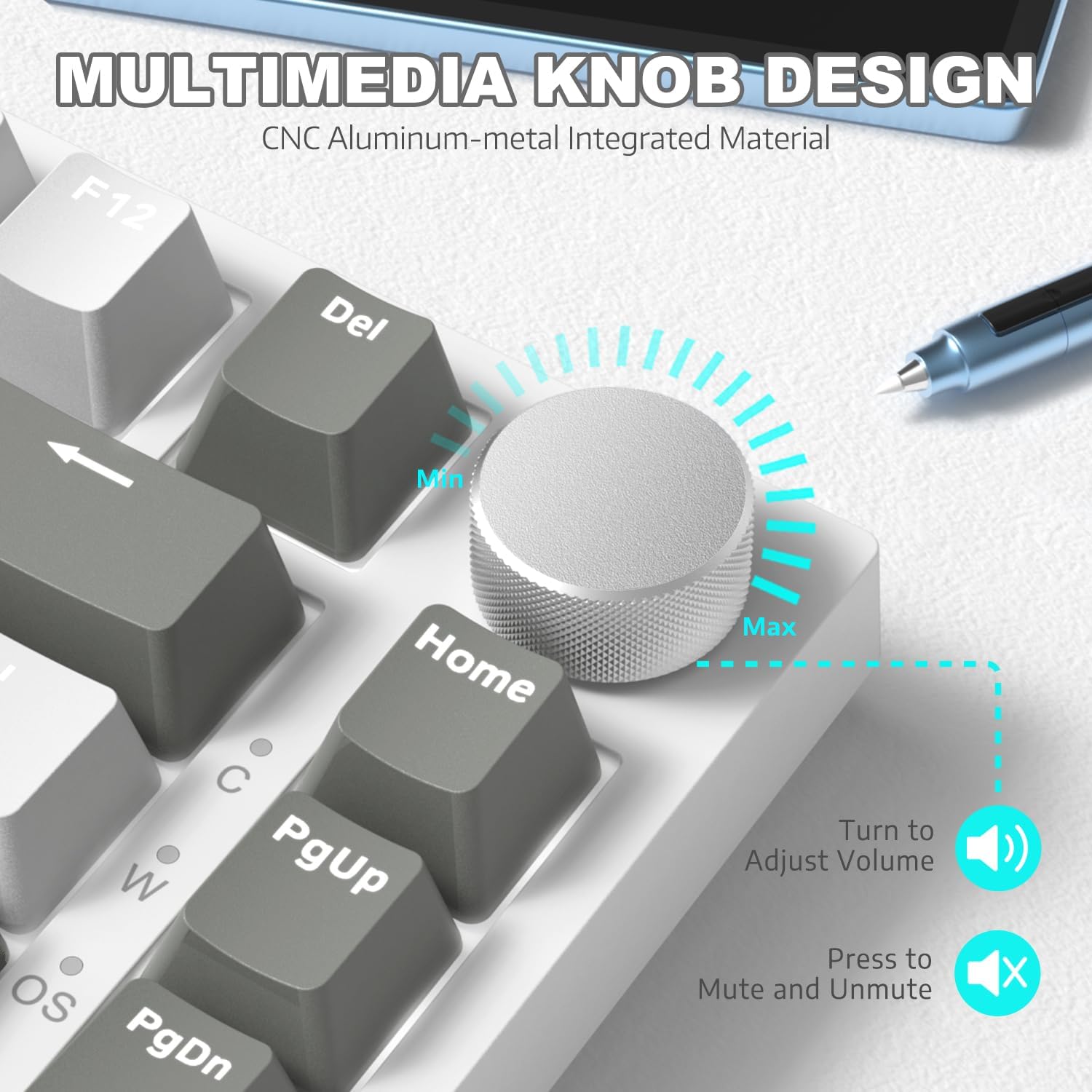
פיגורע 4: דעטאַילעד view of the multimedia knob and its functions.
באַקלייט קאָנטראָל
The AK820 features 20 white LED backlight effects. You can customize the lighting to suit your preference:
- טוישן ליכט יפעקץ: דרוק FN + | to cycle through the 20 available backlight effects.
- סטרויערן ברייטנאַס: Use specific key combinations (refer to keyboard legends or software) to adjust between 5 brightness levels.
- סטרויערן גיכקייַט: Use specific key combinations (refer to keyboard legends or software) to adjust between 5 lighting speeds.
- Custom Gaming Lighting: דרוק FN + 1! / 2@ / 3# to access and customize 3 sets of gaming lighting effects. Choose the light recording mode and save your lighting profiles.

פיגור 5: די קלאַוויאַטור ווייַזונגasing its LED backlight effects.
הייס-סוואַפּפּאַבלע סוויטשיז
The AK820's high-quality PCB supports 3/5-pin hot-swap switches, allowing you to easily change switches without soldering. This feature enables customization of your typing experience.
- Use the included 2-in-1 key extractor to carefully remove keycaps and switches.
- Align the pins of the new switch with the sockets on the PCB and gently press down until it clicks into place.
- פֿאַרבײַטן די קלאַוויאַטור.
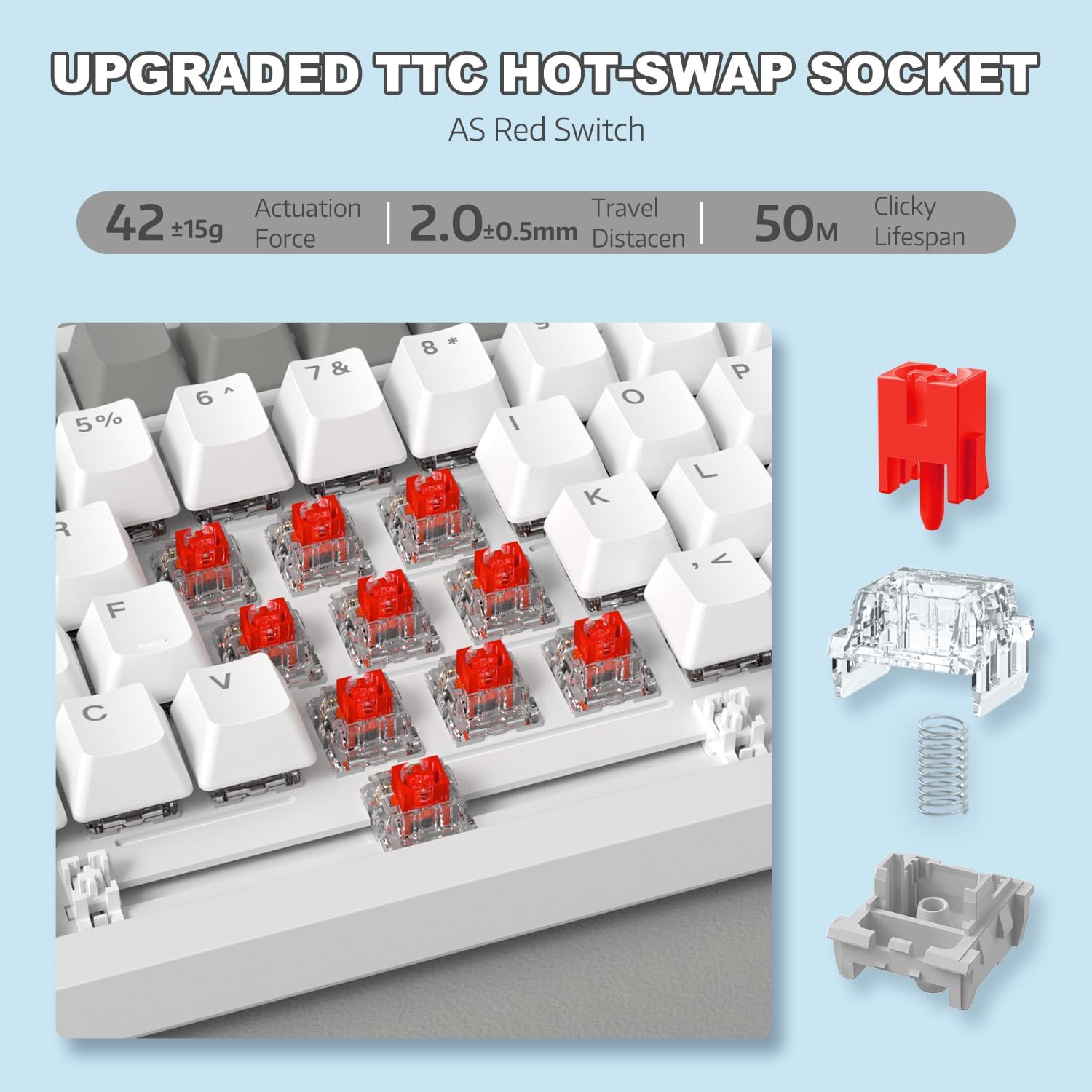
פיגור 6: אילוסטראציע פון די הייס-סוואַפּאַבל סוויטש מעקאַניזאַם.
Video 1: Demonstrating the unboxing, features, and sound test of the ATTACK SHARK AK820 mechanical keyboard, including its hot-swappable switches and rotary knob.
N-Key Rollover (NKRO)
The AK820 supports N-Key Rollover, meaning that every key press is registered independently, even when multiple keys are pressed simultaneously. This is crucial for fast-paced gaming and accurate typing, preventing
פֿאַרבונדענע דאָקומענטן - AK820
 |
אַטאַק שאַרק AKS068 ווייערד מעכאַנישע גיימינג קלאַוויאַטור באַניצער מאַנואַל א פולשטענדיגע באַניצער מאַנואַל פֿאַר די Attack Shark AKS068 דראָט מעכאַנישע גיימינג קלאַוויאַטור. לערנט וועגן איר 65% אַליס אויסלייג, הייס-סוואַפּאַבל סוויטשיז, גאַסקעט מאָונט, RGB באַקלייטונג, VIA פּראָגראַממאַביליטי, און קאָמפּאַטאַביליטי מיט Windows און macOS. |
 |
אַטאַק שאַרק M71 וויירלעסס קלאַוויאַטור באַניצער מאַנואַל א פולשטענדיגע באַניצער מאַנואַל פֿאַר די אַטאַק שאַרק M71 וויירלעס קלאַוויאַטור, מיט דעטאַלן וועגן ספּעציפֿיקאַציעס, אָפּעראַציע, קאָנעקטיוויטי, און טראָובלעשווטינג פֿאַר 2.4G, בלועטוט, און ווייערד מאָדעס. כולל אינפֿאָרמאַציע וועגן RGB לייטינג און הייס-סוואַפּאַבאַל סוויטשיז. |
 |
אַטאַק שאַרק K86 RGB מעכאַנישע קלאַוויאַטור אַפּערייטינג אינסטרוקציעס קאָמפּרעהענסיווע אָפּערירן אינסטרוקציעס פֿאַר די אַטאַק שאַרק K86 RGB מעכאַנישע קלאַוויאַטור, וואָס דעקן בלועטוט און ווייערד קאַנעקשאַנז, לייטינג קאָנטראָלס, הייס-סוואַפּאַבאַל סוויטשיז, און מולטימעדיאַ פאַנגקשאַנז. |
 |
ATTACK SHARK X85 מעכאנישע קלאַוויאַטור באַניצער מאַנואַל א פולשטענדיגע באנוצער מאנואל פארן ATTACK SHARK X85 75% גאסקעט מאונט הייס-סוואַפּאַבאַל מעכאנישע קלאַוויאַטור, וואָס דעקט ספּעציפֿיקאַציעס, סעטאַפּ, באַניץ און טראָובלעשווטינג לייזונג. |
 |
אַטאַק שאַרק X68 HE גיימינג קלאַוויאַטור באַניצער מאַנואַל א פולשטענדיגע באנוצער מאנואל פארן אטאק שאַרק X68 HE גיימינג קלאַוויאַטור, מיט פרטים וועגן זיינע פֿעיִקייטן, סעטאַפּ, און קאַסטאַמייזיישאַן אָפּציעס, אַרייַנגערעכנט שנעלע טריגער, מאַגנעטישע סוויטשיז, און RGB לייטינג. |
 |
אַטאַק שאַרק X87 קלאַוויאַטור באַניצער מאַנואַל און אָפּערייטינג אינסטרוקציעס א פולשטענדיגע אנווייזונג פארן אטאקע שאַרק X87 קלאַוויאַטור, וואָס דעקט דראָטיקע און וויירלעסע קאָנעקטיוויטי, RGB לייטינג, באַטאַרייע אינדיקאַטאָרן, מולטימעדיאַ פונקציעס, און הייס-סוואַפּאַבל סוויטש אָפּעראַציע. כולל FCC קאָנפאָרמאַטי אינפֿאָרמאַציע. |