1. הקדמה
Thank you for choosing the ATTACK SHARK Ajazz AK820 Mechanical Keyboard. This 75% TKL keyboard is designed for gaming and productivity, featuring hot-swappable switches, customizable RGB backlighting, and a convenient multi-function knob. This manual provides detailed instructions for setup, operation, maintenance, and troubleshooting to ensure optimal performance and longevity of your keyboard.
2. שליסל פֿעיִקייטן
- 75% אויסשטעל (82 שליסלען): Compact design retaining essential arrow and function keys, optimizing desk space. Features N-key rollover for simultaneous key presses.
- Multi-Function Metal Knob: Allows independent control of volume level and mute function. Compatible with Mac and Windows operating systems.
- גאַסקעט מאָונטעד פּלאַן: Coupled with a Flex-cut PC plate and 5 layers of sound insulation (Poron sandwich cotton, IXPE under-axis pad, PET premium sound pad, bottom cotton, bottom silicone) to maximally reduce noise and provide a softer, more elastic typing feel.
- Hot-Swappable Mechanical Sea Salt Switches: High-quality PCB supports 3/5-pin hot-swap, allowing easy switch replacement without soldering. Pre-lubed Sea Salt Linear switches offer a smooth and pleasing typing experience with a 50 million keystroke lifespan.
- RGB באַקלייטונג: South-facing LEDs with 1.6M RGB. Offers 20 lighting effects changeable via "FN+|" and customizable via driver software. Double-shot PBT keycaps provide superior shine-through.
3. פּעקל אינהאַלט
- ATTACK SHARK Ajazz AK820 Mechanical Keyboard
- וסב- C קאַבלע
- 2-in-1 Keycap/Switch Puller

Image 1: The ATTACK SHARK Ajazz AK820 Mechanical Keyboard and its included USB-C cable.

בילד 2: אן איבערview highlighting the 82-key layout and key features like Knob Design, Gasket Mount, PBT Keycaps, RGB, 75% Layout, and Hot Swap capability.
4. סעטאַפּ גייד
4.1 פֿאַרבינדן די קלאַוויאַטור
- געפינט דעם USB-C פּאָרט אויף דער הינטערשטער אָדער זייט פון דער קלאַוויאַטור.
- פֿאַרבינדט איין עק פֿון דעם צוגעשטעלטן USB-C קאַבל צום קלאַוויאַטור.
- Connect the other end of the USB-C cable to an available USB port on your computer (Laptop or PC).
- The keyboard is plug-and-play and should be automatically recognized by your operating system (Windows/Mac).

Image 3: The keyboard displaying its RGB backlighting, illustrating the 16.8 million colors and FN key combinations for controlling lighting modes.
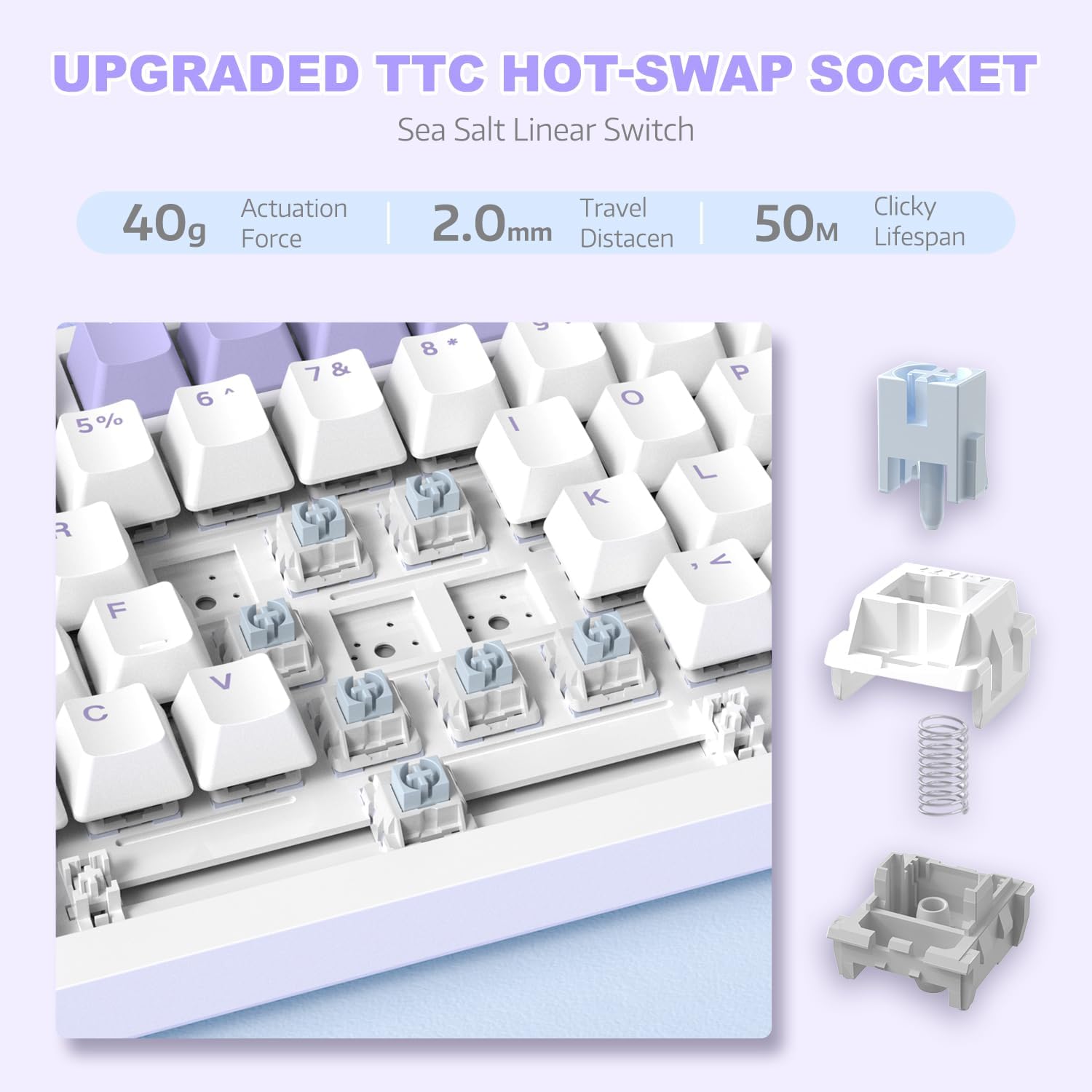
בילד 4: א דעטאלירטע view of the hot-swappable switch socket, demonstrating how switches can be easily removed and replaced.
5. אַפּערייטינג ינסטרוקטיאָנס
5.1 Multi-Function Knob Control
The metal knob located on the top right of the keyboard provides convenient multimedia control:
- דריי זייגערווייז: פאַרגרעסערן באַנד.
- Turn Counter-clockwise: פאַרמינערן באַנד.
- דרוק אַראָפּ: שטום/אויפֿשטום מאַכן אַודיאָ.

Image 5: The multimedia knob, illustrating its functions for adjusting volume and muting audio.
5.2 RGB באַקלייטונג קאָנטראָל
The keyboard features vibrant RGB backlighting with multiple effects. Use the following key combinations to control the lighting:
- FN + | (Backslash): גייט דורך 20 פֿאַרשידענע לייטינג עפֿעקטן.
- FN + X: Turn RGB backlighting ON/OFF.
- Refer to the included quick guide for additional lighting customization options or download the dedicated driver software for advanced control.
5.3 Hot-Swapping Switches and Keycaps
The AK820 supports hot-swapping, allowing you to change mechanical switches and keycaps without soldering.
- אַראָפּנעמען שליסל קאַפּס: Use the keycap puller tool to gently grip the keycap and pull upwards until it detaches from the switch.
- רימוווינג סוויטשיז: Use the switch puller (the other end of the 2-in-1 tool) to grip the top and bottom clips of the switch. Gently pull upwards until the switch detaches from the PCB.
- אינסטאַלירן סוויטשיז: Align the pins of the new 3-pin or 5-pin mechanical switch with the holes on the PCB. Press down firmly until the switch clicks into place. Ensure pins are not bent.
- אינסטאַלירן קלאַוויאַטור קאַפּס: Align the cross-stem of the keycap with the stem of the switch and press down firmly until it is seated.

Image 6: Highlighting the durable PBT keycaps, known for their oil and wear resistance.
5.4 אָפּערייטינג סיסטעם קאָמפּאַטיביליטי
The keyboard is compatible with both Windows and Mac operating systems. No special drivers are typically required for basic functionality.

Image 7: Visual representation of the keyboard's compatibility with both Mac and Windows operating systems.
6. וישאַלט
6.1 רייניקן די קלאַוויאַטור
- אָפּשטעקן די קלאַוויאַטור פֿון אייער קאָמפּיוטער איידער איר רייניקט.
- ניצט אַ קאַן מיט קאַמפּרעסט לופט צו בלאָזן אַוועק שטויב און דעבריס פון צווישן די קלאַוויאַטורן.
- For surface cleaning, use a soft, lint-free cloth lightly dampגעוואשן מיט וואַסער אָדער אַ מילדער רייניקונג לייזונג. פֿאַרמייַדן איבעריקע פֿײַכטקייט.
- שפריצט נישט רייניקונג לייזונגען גלייך אויף דער קלאַוויאַטור.
6.2 Keycap and Switch Care
- When removing keycaps or switches, do so gently to avoid damaging the components.
- Store spare keycaps and switches in a clean, dry place.

Image 8: An exploded diagram illustrating the multi-layer noise reduction installation, including PORON sandwich cotton, IXPE switch pads, PET voice actor pdd, bottom cotton, and bottom silicone.
7. טראָובלעשאָאָטינג
7.1 קלאַוויאַטור רעאַגירט נישט
- זיכער מאַכן אַז דער USB-C קאַבל איז זיכער פארבונדן צו ביידע די קלאַוויאַטור און דעם קאָמפּיוטער.
- פרובירט צו קאנעקטן די קלאַוויאַטור צו אַן אַנדער USB פּאָרט אויף אייער קאָמפּיוטער.
- פּרובירט די קלאַוויאַטור אויף אַן אַנדער קאָמפּיוטער צו אויסשליסן אַ קאָמפּיוטער-ספּעציפֿישן פּראָבלעם.
- ריסטאַרט דיין קאָמפּיוטער.
7.2 RGB Backlighting Not Working/Incorrect
- דרוק פן + רענטגענ to ensure the RGB is turned on.
- דרוק FN + | (Backslash) to cycle through different lighting modes.
- If using custom settings, ensure the driver software is installed and configured correctly.
7.3 Keys Not Registering (Anti-Ghosting)
The AK820 features N-key rollover (NKRO) to prevent ghosting. If specific keys are not registering:
- Ensure the keycap and switch are properly seated. Gently press down on the keycap to ensure it's fully attached.
- If a specific switch is faulty, use the hot-swap feature to replace it with a new one.

Image 9: Illustration of the 82-key anti-ghosting feature, demonstrating the ability to register multiple simultaneous key presses.
7.4 Video Demonstration: AK820 Keyboard Overview
ווידעא 1: אן אפיציעלער איבערview of the AK820 75% Wired RGB Gasket Mechanical Keyboard, demonstrating its features including the volume knob, hot-swappable switches, and RGB lighting effects.
8. ספּעסאַפאַקיישאַנז
| שטריך | דעטאַל |
|---|---|
| מאָדעל נומער | AK820 |
| פּראָדוקט דימענשאַנז | 12.87 X 5.35 X 1.57 אינטשעס |
| פּונקט וואָג | 2.05 פונט |
| פאַבריקאַנט | באַפאַלן שאַרק |
| קאַנעקטיוויטי טעכנאָלאָגיע | מיט אַ דראָט (USB-C) |
| קלאַוויאַטור באַשרייַבונג | גיימינג |
| נומער פון קיז | 82 |
| באַשטימען טיפּ | Sea Salt Linear Switch (Hot-Swappable) |
| קייקאַפּ מאַטעריאַל | PBT |
| באַקלייט | RGB (South-facing LEDs) |
| ספּעציעלע פֿעיִקייטן | 5 Layers of sound insulation cotton, CNC Metal Knob, Hot-Swappable |
| קאַמפּאַטאַבאַל דעוויסעס | Laptop, PC (Windows, Mac) |
9. וואָראַנטי און שטיצן
פֿאַר וואָראַנטי אינפֿאָרמאַציע און טעכנישע שטיצע, ביטע זען די באַאַמטער אַטאַק שאַרק webזייטל אדער קאנטאקט זייער קאסטומער סערוויס גלייך. האלט אייער קויף קוויטל אלס באווייז פון קויפן פאר יעדע גאראנטיע טענות.
פאַבריקאַנט: באַפאַלן שאַרק
ערשטער דאַטע בנימצא: 15טן דעצעמבער 2023


