הקדמה
The ttec AirBeat Snap True Wireless Bluetooth Earphones are designed to provide a superior audio experience for music and calls. Featuring advanced Bluetooth 5.3 connectivity, touch controls, and a lightweight, sweat-resistant design, these earbuds offer comfort and performance for daily use, gaming, and more.
This manual provides detailed instructions on setting up, operating, maintaining, and troubleshooting your ttec AirBeat Snap earphones. Please read it carefully before use to ensure optimal performance and longevity of your device.
פּעקל אינהאַלט
ביטע אָפּהאַקן דאָס קעסטל פֿאַר די פֿאָלגנדיקע זאַכן:
- 1 x ttec AirBeat Snap True Wireless TWS Bluetooth Earphones (Left and Right Earbuds)
- 1 x Earphone Charging and Storage Case
- 3 x Sets of Earbud Tips (Sizes: S, M, L)
- 1 x USB-A צו וסב-C טשאַרדזשינג קאַבלע
- 1 x באַניצער מאַנואַל (דאָס דאָקומענט)
סעטאַפּ
1. ערשטע אויפלאָדונג
פארן ערשטן באַנוץ, לאָדן די אויערפאָונז און די טשאַרדזשינג קעסטל גאָר אויף.
- Place both earbuds into the charging case. Ensure they are correctly seated; the indicator lights on the earbuds should illuminate.
- פֿאַרבינדט דעם USB-C טשאַרדזשינג קאַבל צום טשאַרדזשינג פּאָרט אויף דער קעיס און דעם אַנדערן עק צו אַ USB מאַכט מקור (למשל, קאָמפּיוטער USB פּאָרט, וואַנט אַדאַפּטער).
- The charging indicator on the case will show charging status. A full charge typically takes approximately 1.5 hours.
- אַמאָל גאָר באפוילן, דיסקאַנעקט די טשאַרדזשינג קאַבלע.

Image: ttec AirBeat Snap earbuds placed inside their white charging case, ready for charging or storage.
2. פארבינדן מיט א דעווייס (בלוטוט 5.3)
The ttec AirBeat Snap uses Bluetooth 5.3 for a stable and fast wireless connection.
- Open the charging case. The earbuds will automatically enter pairing mode, indicated by flashing lights (if applicable, refer to specific light indicators in product documentation).
- אויף אייער דעווייס (סמאַרטפאָן, טאַבלעט, לאַפּטאָפּ), גייט צו די בלועטוט סעטטינגס.
- אַקטיווירן בלועטוט און זוכן פֿאַר בנימצא דעוויסעס.
- Select "ttec AirBeat Snap" from the list of found devices.
- Once connected, you will hear a confirmation tone, and the earbud indicator lights will change (e.g., turn off or solid).
מאָנאָסמאַרט טעכנאָלאָגיע: Both earbuds can be used independently. Simply take one earbud out of the case, and it will automatically connect to your paired device. If both are out, they will connect as a stereo pair.

Image: Illustration showing the ttec AirBeat Snap earbuds next to a smartphone with Bluetooth settings open, highlighting Bluetooth 5.3 and MonoSmart Technology for fast and easy connection.
אַפּערייטינג ינסטראַקשאַנז
ריר קאָנטראָלס
The ttec AirBeat Snap features intuitive touch sensors on each earbud for easy control of music, calls, and voice assistants.
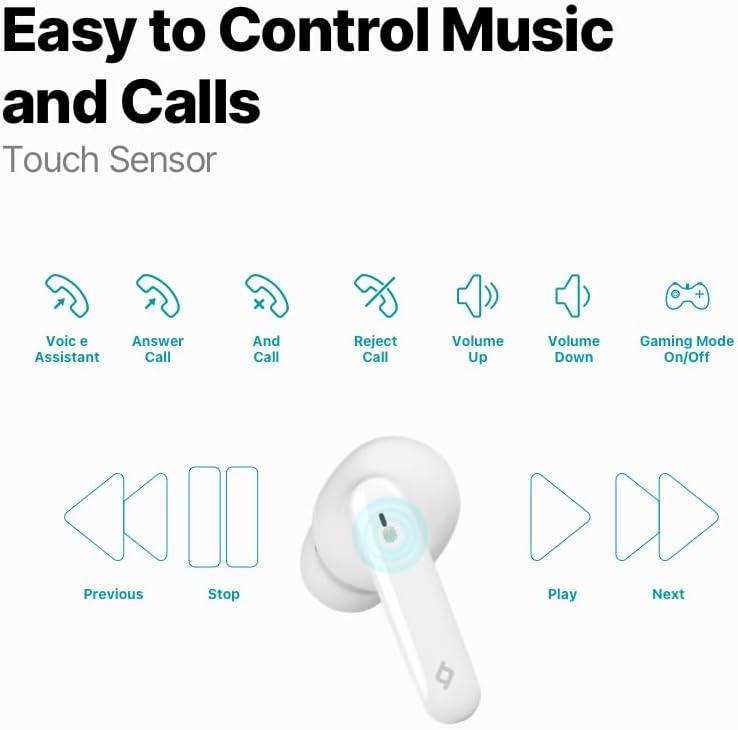
Image: Diagram illustrating the touch control functions for the earbuds, including voice assistant, answer/end/reject call, volume up/down, gaming mode on/off, previous/next track, play/stop.
| קאַמף | פֿונקציע |
|---|---|
| איין צאַפּ (לינקס/רעכטס) | שפּילן/פּויזירן מוזיק, ענטפֿערן/ענדיגן רוף |
| טאָפּל טאַפּ (לינקס) | פֿריִערדיקע שפּירט |
| טאָפּל טאַפּ (רעכטס) | ווייַטער שפּור |
| דרייַיק צאַפּן (לינקס) | באַנד אַראָפּ |
| דרייַיק צאַפּן (רעכט) | באַנד אַרויף |
| לאנג דרוק (2 סעקונדעס) | אָפּוואַרפן רוף, אַקטיווירן שטימע אַסיסטאַנט |
| Quadruple Tap (Left/Right) | Toggle Gaming Mode On/Off |
מוזיק דערפאַרונג
Enjoy superior sound and deep bass for an impressive music experience.

Image: The ttec AirBeat Snap earbuds floating above their open charging case, with sound waves emanating, illustrating superior sound and deep bass.
Gaming Mode (60ms Low Latency)
Activate Gaming Mode for an outstanding gaming and video experience with ultra-low latency of 60ms, ensuring synchronized audio and visuals.

Image: The ttec AirBeat Snap earbuds positioned next to a smartphone displaying a mobile game, emphasizing the 60ms low latency feature for an enhanced gaming experience.
באַטאַרייע לעבן און טשאַרדזשינג
The earbuds provide up to 5 hours of battery life on a single charge. The ultra-compact USB-C charging case extends the total usage time up to 28 hours.
טשאַרדזש&גאָ פֿונקציע: A quick 15-minute charge provides approximately 1.5 hours of usage.
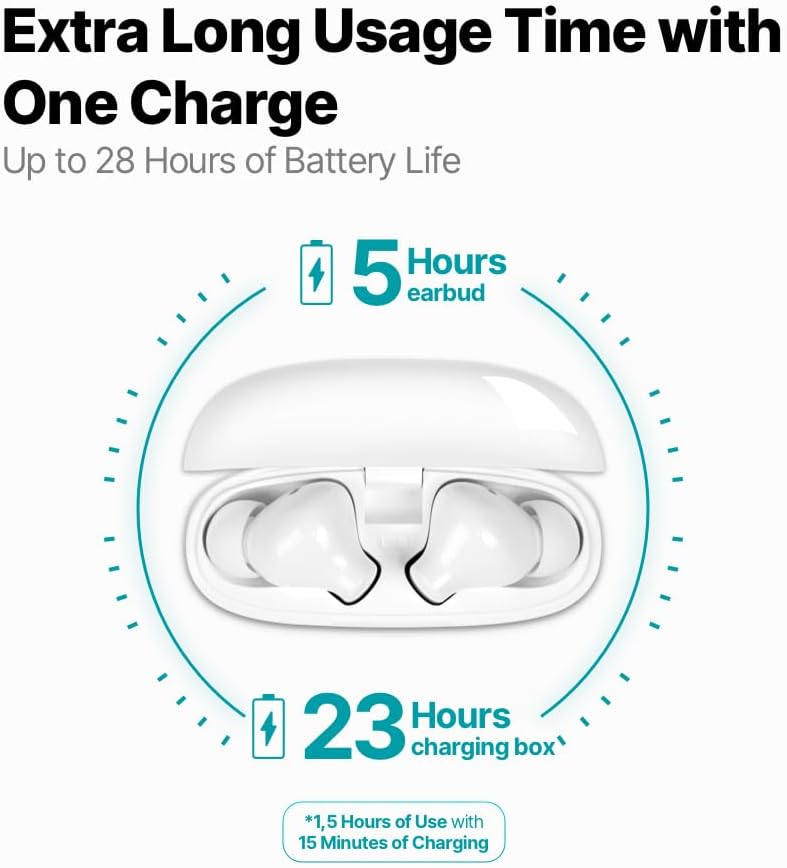
Image: An infographic showing the ttec AirBeat Snap earbuds in their charging case, indicating 5 hours of battery life for the earbuds and an additional 23 hours from the charging case, totaling 28 hours. It also highlights the Charge&Go feature.
וישאַלט
רייניקונג
- רייניקט רעגולער די אויערקנעפּלעך און די טשאַרדזשינג קעסטל מיט אַ ווייכן, טרוקענעם, לינט-פֿרייע שטאָף.
- ניצט נישט קיין שרײַבנדיקע רייניגער, אַלקאָהאָל, אדער כעמישע סאָלווענטן.
- אַראָפּנעמען פֿאָרזיכטיק יעדן אויערוואַקס אָדער שמוץ פֿון די אויערקנעפּלעך און רעדנער מעש מיט אַ קליינעם, ווייכן באַרשט אָדער וואַטע שטעכל.
- Ensure charging contacts on both earbuds and the case are clean and free of dust.
סטאָרידזש
- ווען נישט אין באַנוץ, שטענדיק האַלטן די אויערן-קנעפּלעך אין זייער טשאַרדזשינג קעסטל צו באַשיצן זיי און האַלטן זיי טשאַרדזשד.
- האַלט דעם אַפּאַראַט אין אַ קיל, טרוקן אָרט, אַוועק פון דירעקט זונשייַן און עקסטרעמע טעמפּעראַטורן.
Water and Sweat Resistance (IPX6 Rated)
The ttec AirBeat Snap earbuds are IPX6 rated, meaning they are resistant to strong jets of water and sweat. This makes them suitable for workouts and outdoor activities.
- טונקט נישט די אויערן-קנעפּלעך אין וואַסער.
- Do not expose the charging case to water, as it is not water-resistant.
- After exposure to sweat or water, wipe the earbuds dry before placing them back into the charging case to prevent damage to the charging contacts.

Image: A person wearing the ttec AirBeat Snap earbuds, demonstrating their sweat and water-resistant design with an IPX6 rating, suitable for active use.
טראָובלעשאָאָטינג
| פּראָבלעם | מעגלעך סיבה / לייזונג |
|---|---|
| די אויערקנעפּלעך פאַרבינדן זיך נישט מיטן אַפּאַראַט. |
|
| בלויז איין עאַרבוד אַרבעט. |
|
| נידעריגע וואָלומען אָדער שלעכטע געזונט קוואַליטעט. |
|
| די אויערקנעפּלעך לאָדן זיך נישט אויף. |
|
| ריר קאָנטראָלס ריספּאַנד נישט. |
|
ספּעסאַפאַקיישאַנז
| שטריך | דעטאַל |
|---|---|
| מאָדעל נאָמען | AirBeat Snap |
| פּראָדוקט מאָדעל נומער | 2KM147 |
| סאָרט | טטעק |
| קאַנעקטיוויטי טעכנאָלאָגיע | ווירעלעס (בלוטוט 5.3) |
| עאַרבוד באַטערי לעבן | אַרויף צו 5 שעה |
| טשאַרדזשינג קאַסע באַטאַרייע לעבן | Up to 23 hours (total 28 hours with earbuds) |
| טשאַרדזשינג צייט | אומגעפער 1.5 שעה (פאר א פולע אויפלאדונג) |
| Charge&Go Feature | 15 min charge for 1.5 hours use |
| עאַרבוד ווייט | 3.5 גראַמז (יעדער) |
| טשאַרדזשינג קאַסע וואָג | 30 גראַמז |
| אויערקנעפל גרייסן (L x B x H) | 32 X 21 X 2.3 מם |
| דימענסיעס פון די טשאַרדזשינג קעסטל (L x B x H) | 57 X 23 X 44 מם |
| אַפּערייטינג דיסטאַנסע | אַרויף צו 10 מעטער |
| וואַסער קעגנשטעל מדרגה | IPX6 (בלויז עאַרבודז) |
| נידעריק לאַטאַנסי גיימינג מאָדע | 60ms |
| שליסל פֿעיִקייטן | Touch Control, Lightweight, Microphone Included, Volume Control, Sweat Resistant, MonoSmart Technology |
| קאַמפּאַטאַבאַל דעוויסעס | Mobile Phone, Laptop, Desktop Computer, Tablet |
| קאָליר | ווייַס |
| ASIN | B0CQ7YZPFG |
וואָראַנטי און שטיצן
For warranty information and customer support, please refer to the official TTEC webזייטל אדער קאָנטאַקט אייער לאקאלן הענדלער. האַלט אייער קויפן-באַווייַז פֿאַר וואָראַנטי-קליימז.
וויכטיק באַמערקונג: As per health and hygiene regulations, products that come into direct contact with the human body, such as earphones, can only be returned if their packaging has not been opened, the product has not been tried, damaged, or used.


