1. וויכטיק סאַפעטי אינסטרוקציעס
Please read all instructions carefully before using the ILIFE X1000 Robotic Vacuum Cleaner. Retain this manual for future reference.
- דעם אַפּפּליאַנסע איז בדעה פֿאַר געשעפט נוצן.
- Do not allow children to operate the robot. Supervise children and pets when the robot is operating.
- Ensure the charging dock is placed against a wall in an open area, free from obstacles.
- Do not use the robot in wet environments or on surfaces with standing water.
- Remove any loose cables, small objects, or fragile items from the cleaning path to prevent entanglement or damage.
- Use only the original power adapter and charging dock provided by ILIFE.
- Do not attempt to repair or modify the robot yourself. Contact ILIFE customer support for service.
- Always turn off the robot and disconnect it from the power source before performing any maintenance or cleaning.
2. פּעקל אינהאַלט
באַשטעטיקן אַז אַלע זאכן זענען פאַראַן אין פּעקל:
- ILIFE X1000 ראָבאָטישע וואַקוום קלינער
- טשאַרדזשינג דאָק
- מאַכט אַדאַפּטער
- זייט ברושעס (2 פּאָר)
- High-Efficiency Filter (pre-installed in dustbin)
- באַניצער מאַנואַל
3. פּראָדוקט איבערview
3.1 Robot Components
Familiarize yourself with the main parts of your ILIFE X1000 robot.

פיגורע 3.1: פראָנט view of the ILIFE X1000 Robotic Vacuum Cleaner, showing the main body, front bumper, and side brushes.

פיגורע 3.2: Top view of the ILIFE X1000, highlighting the integrated touch screen display and LiDAR sensor module.
- לידאַר נאַוויגאַציע סענסאָר: Located on top, used for precise mapping and navigation.
- ריר סקרין ווייַז: Interactive interface for direct control and status updates.
- AI Stereo Camera: Assists in object recognition and obstacle avoidance.
- 3D Time-of-Flight (ToF) Sensors: Enhance environmental perception and mapping accuracy.
- מיסט Large 3L capacity, easily detachable for emptying.
- זייט ברושעס: Two brushes to sweep debris from edges and corners into the cleaning path.
- הויפּט באַרשט: Located underneath, for deep cleaning carpets and hard floors.
- דרייווינג רעדער: Allow the robot to traverse various floor types and small obstacles.
- טשאַרדזשינג קאָנטאַקטן: On the underside, for automatic recharging at the charging dock.
3.2 שליסל פֿעיִקייטן
The ILIFE X1000 is designed for efficient and autonomous cleaning in commercial environments.
- שטאַרק סאַקשאַן: Delivers 20,000Pa suction power for thorough cleaning of various debris.
- אַוואַנסירטע נאַוויגאַציע: Utilizes 3D ToF Sensors and LiDAR Technology for accurate 3D mapping and navigation.
- AI Object Recognition: AI Stereo Camera identifies and avoids common obstacles like shoes, cables, and socks.
- Large Area Coverage: Capable of cleaning areas up to 1000m² with dual detachable batteries.
- עקסטענדעד רונטימע: Provides up to 200 minutes of continuous cleaning on a single charge.
- קאַסטאַמייזד רייניקונג: Supports app-controlled cleaning schedules, no-go zones, and specific area cleaning.
- אויטאָמאַטיש אויפלאָדן און ווידער אויפנעמען: Automatically returns to the charging dock when battery is low and resumes cleaning from where it left off.
- באַניצער-פרייַנדלעך צובינד: Operates via an intuitive touch screen and a dedicated mobile application.

פיגורע 3.3: Visual representation of key features: 20000Pa suction, customized cleaning options, 3L dustbox capacity, and sensitive touch screen operation.

פיגורע 3.4: Illustration of the robot's advanced navigation system, including 3D ToF sensors, LiDAR technology for precise mapping, and AI stereo camera for object recognition.
4. סעטאַפּ
4.1 אויספּאַקן און ערשטע צוגרייטונג
- Carefully remove the robot and all accessories from the packaging.
- Remove any protective films or stickers from the robot and charging dock.
- Attach the side brushes by pressing them onto the square posts on the underside of the robot until they click into place.
4.2 טשאַרדזשינג דאָק פּלאַצירונג
Proper placement of the charging dock is crucial for the robot's autonomous operation.
- Place the charging dock against a wall in an area with good Wi-Fi signal.
- Ensure there is at least 1 meter (3 feet) of clear space on both sides of the dock and 2 meters (6 feet) in front of it.
- Connect the power adapter to the charging dock and plug it into a power outlet. The indicator light on the dock will illuminate.
4.3 ערשט טשאַרדזשינג
Before first use, fully charge the robot.
- Place the robot onto the charging dock, ensuring the charging contacts align.
- The robot's display will show charging status. A full charge typically takes 4-6 hours.
- For optimal battery life, allow the robot to fully charge before its first cleaning cycle.
4.4 אַפּ קאַנעקשאַן
Download the ILIFE app to unlock full control and advanced features.
- Scan the QR code in the manual or search for "ILIFE" in your app store to download the official app.
- Create an account and follow the in-app instructions to add your X1000 robot.
- זיכער מאַכן אַז אייער Wi-Fi נעץ איז 2.4GHz פֿאַר אַ געראָטן פֿאַרבינדונג.
5. אַפּערייטינג ינסטרוקטיאָנס
5.1 אָנהייבן אַ רייניקונג ציקל
- Via Touch Screen: Tap the 'Clean' button on the robot's display.
- דורך אַפּ: Open the ILIFE app, select your X1000, and tap 'Start Cleaning'.
- The robot will automatically map the area and begin cleaning.
5.2 רייניקונג מאָדעס
The X1000 offers various cleaning modes to suit different needs:
- אַוטאָ ריין: The default mode, where the robot intelligently navigates and cleans the entire accessible area.
- אָרט ריין: Directs the robot to intensively clean a specific small area. Activate via app or touch screen.
- ברעג רייניקונג: The robot cleans along walls and furniture edges. Selectable via app.
- Customized Area Clean: Use the app to draw specific areas on the map for the robot to clean or avoid (no-go zones).
5.3 פּלאַנירן רייניקונג
Set up recurring cleaning schedules using the ILIFE app.
- Open the ILIFE app and navigate to the scheduling section.
- Set desired cleaning times and days.
- The robot will automatically start cleaning at the scheduled times.

פיגורע 5.1: The ILIFE X1000 supports smart app and voice control, offering up to 200 minutes of runtime, making it suitable for various commercial environments like workshops, warehouses, and offices.
6. וישאַלט
Regular maintenance ensures optimal performance and extends the lifespan of your ILIFE X1000.
6.1 אויסליידיקן דעם מיסטקאסטן
- Press the dustbin release button and pull out the 3L dustbin.
- Open the dustbin cover and empty its contents into a trash receptacle.
- שווענקט אויס דעם מיסטקאסטן מיט וואסער אויב נויטיג, און מאכט זיכער אז עס איז אינגאנצן טרוקן איידער איר לייגט עס צוריק אריין.
6.2 רייניקונג פילטערס
The X1000 uses a 4-layer filter system, including HEPA and Microfilters.
- Remove the filters from the dustbin.
- Tap the filters gently to remove loose dust. Do not wash HEPA filters with water.
- Replace filters every 3-6 months, depending on usage.
6.3 רייניקונג פון די זייט־באַרשטן און די הויפּט־באַרשט
- Periodically check side brushes for tangled hair or debris. Pull them off to clean.
- Remove the main brush cover on the underside of the robot. Lift out the main brush and use the cleaning tool (if provided) to remove hair and debris.
6.4 רייניקונג פון סענסאָרן און טשאַרדזשינג קאָנטאַקטן
- Wipe the cliff sensors, anti-collision sensors, and charging contacts on both the robot and the charging dock with a clean, dry cloth.
- Ensure the LiDAR sensor window is clean and free from obstructions.
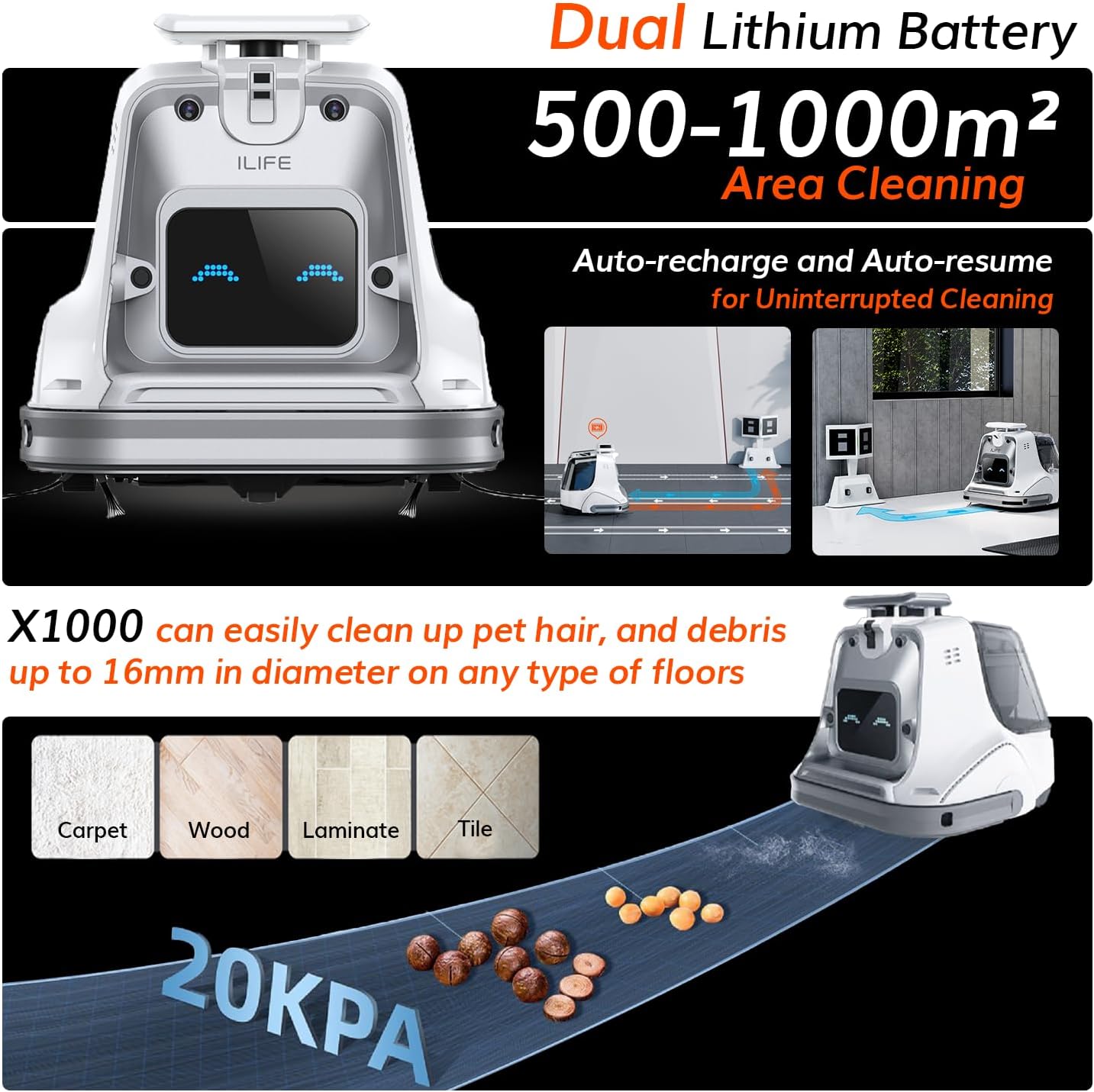
פיגורע 6.1: The ILIFE X1000 effectively cleans debris up to 16mm on carpet, wood, laminate, and tile floors, featuring dual lithium batteries for 500-1000m² area cleaning and auto-recharge/resume for uninterrupted operation.
7. טראָובלעשאָאָטינג
If you encounter issues with your ILIFE X1000, refer to the following common problems and solutions.
| פּראָבלעם | מעגלעך סיבה | לייזונג |
|---|---|---|
| ראָבאָט טוט נישט קער אויף | נידעריגע באַטעריע; מאַכט אויסשאַלטן | שטעלט דעם ראָבאָט אויף דער טשאַרדזשינג דאָק; מאַכט זיכער אַז דער מאַכט קנעפּל איז אָן. |
| ראָבאָט קען נישט לאָדן | טשאַרדזשינג קאָנטאַקטן שמוציק; דאָק נישט געשטיצט | Clean charging contacts; Check power adapter connection. |
| ראָבאָט בלייבט אָפט שטעקן | Obstacles; Loose cables | Clear cleaning path; Use no-go zones in app. |
| נעבעך רייניקונג פאָרשטעלונג | פולער מיסטקאסטן; פארשטאפטע פילטערס/בירשטן | Empty dustbin; Clean or replace filters/brushes. |
| אַפּ פֿאַרבינדונג דורכפֿאַל | Incorrect Wi-Fi; Robot offline | Ensure 2.4GHz Wi-Fi; Restart robot and router; Re-pair in app. |
For issues not listed here, or if problems persist, please contact ILIFE customer support.
8. ספּעסאַפאַקיישאַנז
Technical specifications for the ILIFE X1000 Robotic Vacuum Cleaner.
| שטריך | באַשרייַבונג |
|---|---|
| סאָרט | ILIFE |
| מאָדעל נאָמען | X1000 |
| סאַקשאַן מאַכט | 20,000 פּאַ |
| נאַוויגאַציע טעכנאָלאָגיע | 3D Time-of-Flight (ToF) Sensors, LiDAR Technology, AI Stereo Camera |
| Dust-Box Capacity | 3 ליטער |
| באַטערי טיפּ | Dual Lithium Battery |
| רונטימע | אַרויף צו 200 מינוט |
| שטח קאַווערידזש | אַרויף צו 1000 מ ² |
| קאָנטראָל מעטאָד | אַפּ, ריר-סקרין |
| קאַמפּאַטאַבאַל דעוויסעס | אַמאַזאָן עקאָ, גוגל היים, סמאַרטפאָונז |
| פילטער טיפּ | 4 שיכטן פילטער, הויך עפעקטיווקייט פילטער, HEPA, מיקראָפילטער |
| פּראָדוקט דימענשאַנז | 14.8"ל x 14.65"בר x 14.37"ה |
| פּונקט וואָג | 24.9 פונט |
9. וואָראַנטי און שטיצן
ILIFE provides a limited warranty for the X1000 Robotic Vacuum Cleaner. Please refer to the warranty card included in your package for specific terms and conditions.
For technical support, warranty claims, or any questions regarding your ILIFE X1000, please contact ILIFE customer support through the official webזייטל אדער די קאָנטאַקט אינפֿאָרמאַציע וואָס איז צוגעשטעלט אין אייער וואָראַנטי דאָקומענטאַציע.
איר קענט אויך באַזוכן די יו ILIFE Store on Amazon פֿאַר מער אינפֿאָרמאַציע און שטיצן רעסורסן.


