1. הקדמה
The NOYAFA NF-918S is a versatile network cable tester designed for comprehensive network and fiber optic cable diagnostics. It integrates multiple functions including network cable scanning, continuity testing, optical power measurement, visual fault location, PoE testing, and non-contact voltage detection. This device is suitable for engineering wiring, network maintenance, and equipment troubleshooting.
2. פּעקל אינהאַלט
באַשטעטיקט אַז אַלע זאכן וואָס זענען אויסגערעכנט אונטן זענען פאַראַן אין אייער פּעקל:
- NF-918S Transmitter (Main Unit)
- NF-918S Receiver
- RJ11 אַליגאַטאָר קליפּ דראָט
- RJ11 Telephone Line
- רדזש 45 נעטוואָרק קאַבלע
- כעדפאָונז
- טשאַרדזשינג קאַבלע
- מכשיר קיט
- Instruction Manual / Certificate

פיגורע 2.1: Components included with the NOYAFA NF-918S Network Cable Tester. This image displays all the components included in the NF-918S package, such as the transmitter, receiver, packaging box, instructions, tool kit, RJ11 alligator clip wire, RJ11 telephone line, RJ45 network cable, headphones, and charging cable.
3. פּראָדוקט איבערview
The NF-918S consists of a main unit (transmitter) and a receiver. The main unit features an LCD display for clear readings and various function buttons. The receiver is equipped with a rotary switch for mode selection and an NCV sensor.

פיגורע 3.1: NOYAFA NF-918S Network Cable Tester and Receiver. This image displays the NOYAFA NF-918S main unit (transmitter) and the receiver, highlighting their design and the various functions available, such as cable scan, continuity test, optical power meter, visual fault locator, NCV, and LED light.
4. שליסל פֿעיִקייטן
- Anti-interference Network Cable Tester: Utilizes advanced digital, analog, and PoE modes for high sensitivity and reduced noise interference, enabling accurate cable location in complex environments.
- PoE טעסט: Automatically identifies 8-core middle span, end span, and power types. Detects both standard and non-standard PoE equipment.
- אָפּטיש מאַכט מעטער (OPM): Supports seven standard wavelengths (850/1300/1310/1490/1550/1625nm). Allows unit switching between dBm, dB, mW, uW, nW, and includes a REF switch for reference power settings. Measurement range: -70 to +10 dBm.
- Visual Fault Locator (VFL): Features a 10mW 10KM VFL for easy identification of fiber breakpoints, poor connections, bends, or cracks. Essential for fiber tracing, routing, and continuity checking.
- קאַבל לענג טעסט: Measures cable length up to 200m for RJ45 network cables, telephone lines, and BNC coaxial cables.
- Multifunctional Testing: Includes port flash, cable scan, length measurement, PoE test, OPM, VFL, NCV function, and an integrated LED light for convenience.
5. סעטאַפּ
5.1 באַטאַרייע ייַנמאָנטירונג
The NF-918S requires 1 Lithium Metal battery (included). Ensure the battery is correctly installed according to the polarity markings inside the battery compartment. Charge the device fully before first use.
5.2 פּאַוערינג אויף / אַוועק
To power on the main unit, press and hold the power button. To power off, press and hold the power button again. The receiver is typically activated by selecting a function using its rotary switch.
6. אַפּערייטינג ינסטרוקטיאָנס
6.1 Cable Scan (Digital/Analog/PoE Mode)
This function helps locate target cables among bundles. Connect the network cable to the RJ45 port on the main unit. Select the desired scan mode (Digital, Analog, or PoE) on the main unit. Use the receiver to trace the cable. The receiver will emit an audible tone, which intensifies as it approaches the target cable.
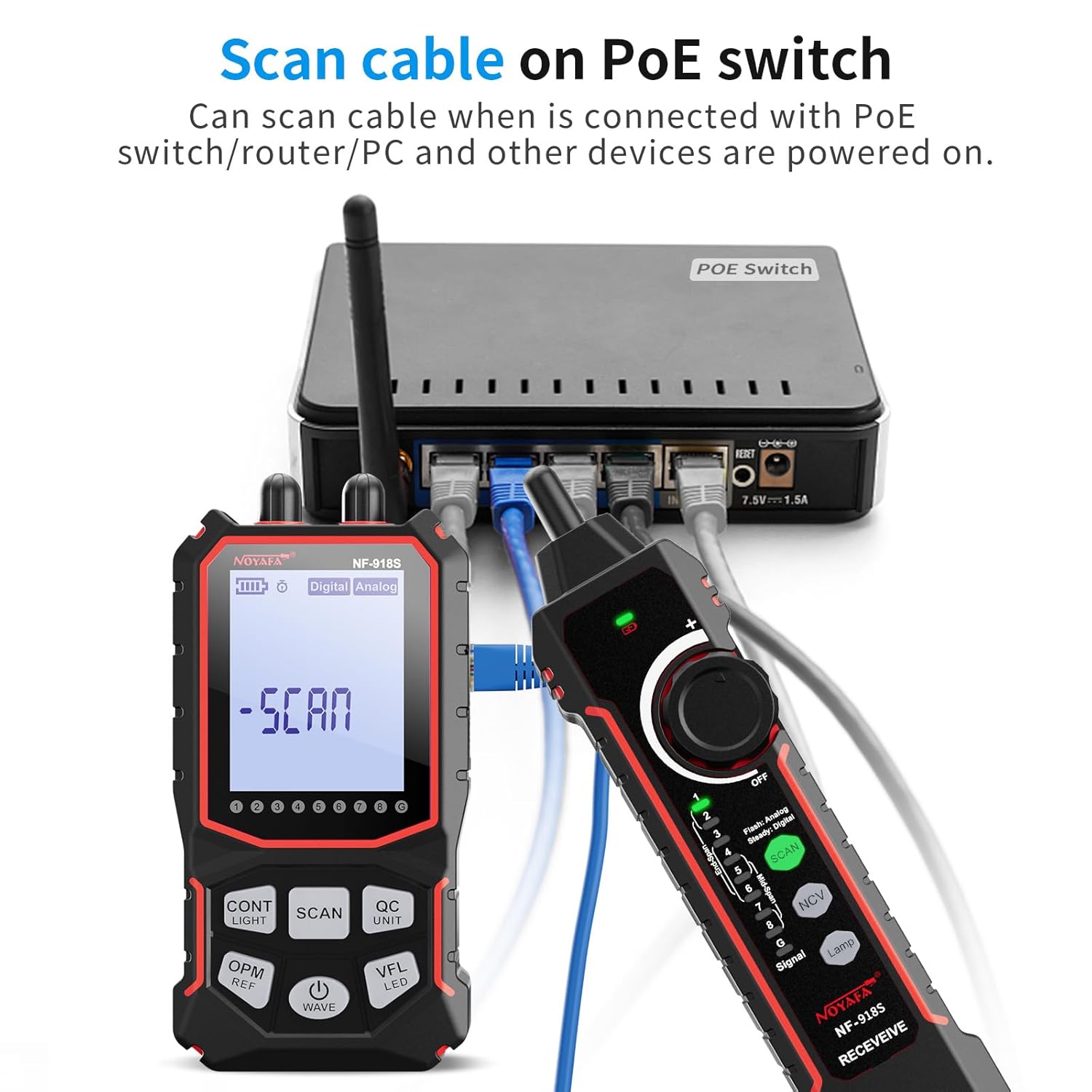
פיגורע 6.1: Scanning a cable on a PoE switch. The image depicts the NF-918S receiver being used to scan a cable connected to a PoE switch, demonstrating its ability to trace cables even when connected to powered devices.
6.2 קאַבל קאָנטינויטי טעסט
To check for open circuits, short circuits, cross-overs, or other wiring faults in network cables:
- Connect one end of the network cable to the 'CONT' port on the main unit.
- Connect the other end of the cable to the 'RECEIVE' port on the receiver.
- Select the continuity test mode on the main unit. The display will show the wiring status (e.g., open, short, cross). A green LED (G LED) indicates an STP cable.

פיגורע 6.2: Cable Continuity Test. This image illustrates the NF-918S main unit and receiver connected to an RJ45 network cable, performing a continuity test. The display shows "LINE" indicating a successful connection test.
6.3 Optical Power Meter (OPM)
To measure optical power in fiber optic cables:
- Connect the fiber optic cable to the OPM port on the main unit.
- Select the OPM function on the main unit.
- Use the 'WAVE' button to cycle through the available wavelengths (850nm, 1300nm, 1310nm, 1490nm, 1550nm, 1625nm) to match your fiber.
- Use the 'UNIT' button to switch between dBm, dB, mW, uW, nW.
- The 'REF' button allows setting a reference power level for relative measurements.
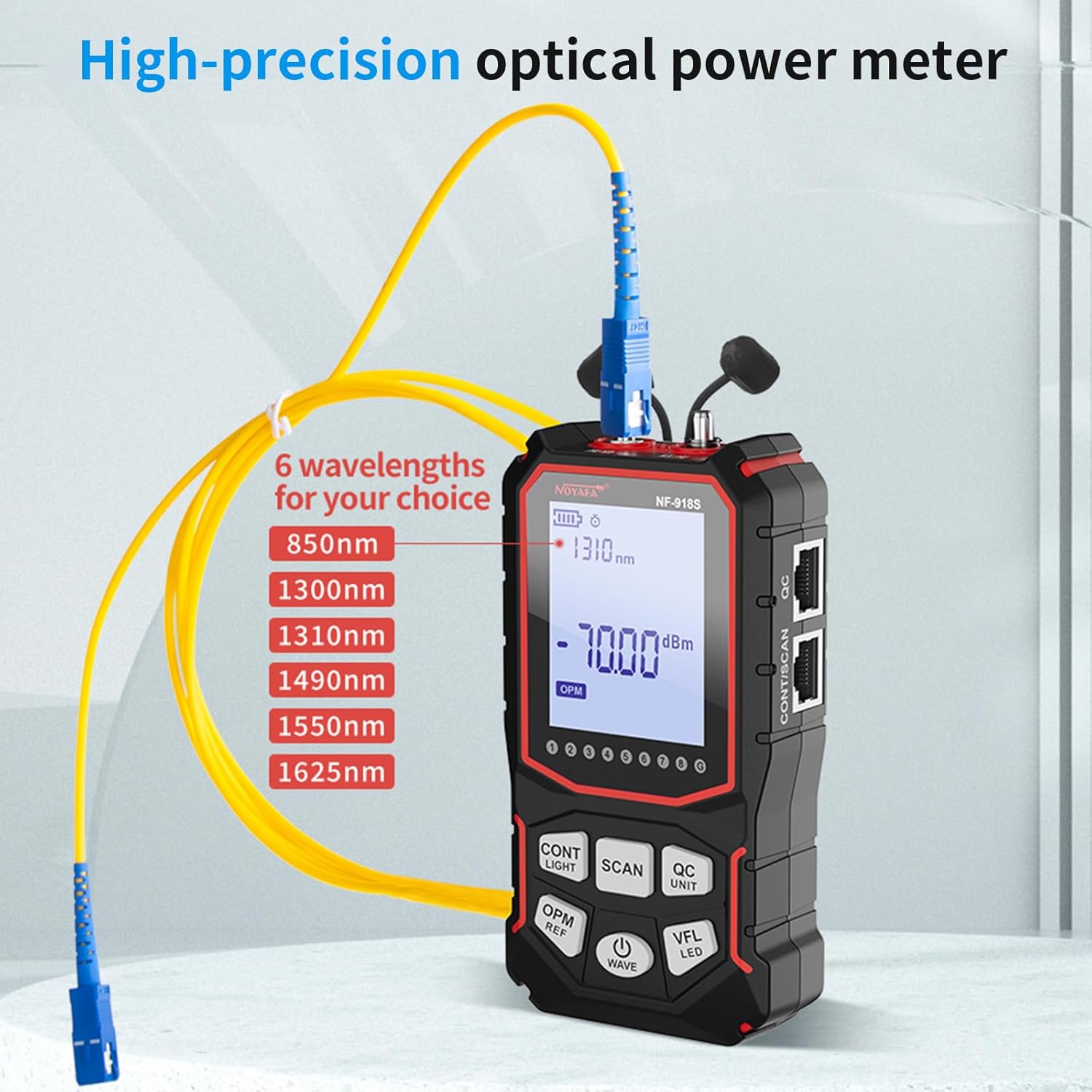
פיגורע 6.3: Optical Power Meter in use. The image shows the NF-918S main unit connected to a fiber optic cable, demonstrating its high-precision optical power meter function with selectable wavelengths.
6.4 וויזועלער שולד לאָקאַטאָר (VFL)
To visually identify faults in fiber optic cables:
- Connect the fiber optic cable to the VFL port on the main unit.
- Activate the VFL function. A strong red laser light will be emitted into the fiber.
- Observe the fiber along its path. Breaks, bends, or poor connections will cause the red light to escape or scatter, making the fault visible.
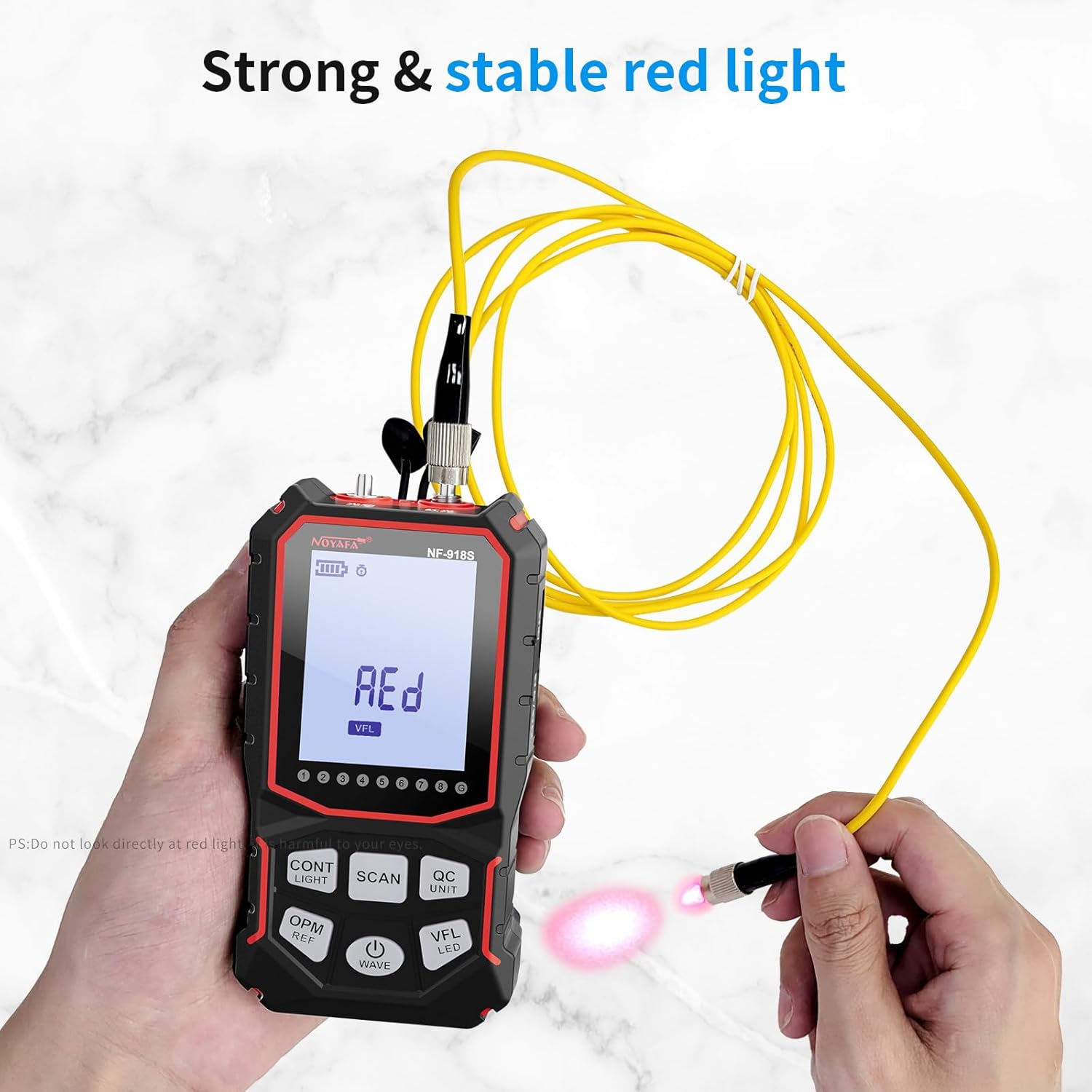
פיגורע 6.4: Visual Fault Locator. This image shows the NF-918S main unit with its Visual Fault Locator (VFL) function active, emitting a strong red light into a fiber optic cable to help identify breaks or bends.
6.5 PoE Test
To test Power over Ethernet (PoE) functionality:
- Connect the network cable from the PoE source (e.g., PoE switch) to the main unit's RJ45 port.
- Select the PoE test mode. The device will automatically identify the power supply type (middle span/end span) and whether the equipment is standard or non-standard PoE.
6.6 קאַבל לענג מעסטונג
To measure the length of various cables:
- Connect the cable to be measured to the appropriate port on the main unit (e.g., RJ45 for network cables).
- Select the length measurement function. The device will display the cable length up to 200m. This function supports network cables, telephone lines, and BNC cables.

פיגורע 6.5: Testing various cable types. A collage of four images showing the NF-918S testing different cable types: UTP/STP network cables, telephone cables, electric cables/wires, and BNC coaxial cables, demonstrating its versatility.
6.7 ניט-קאָנטאַקט VoltagE (NCV) דעטעקשאַן
The receiver unit includes an NCV function for detecting live AC voltage without direct contact. Rotate the receiver's dial to the NCV position. Bring the NCV sensor close to an electrical source (e.g., power outlet, live wire). The receiver will indicate the presence of voltage through visual and/or audible alerts.

פיגורע 6.6: NCV נישט-קאָנטאַקט וואָלtage Detector. The image shows the NF-918S receiver being used to detect non-contact voltage near an electrical outlet, indicating its NCV safety feature.
6.8 Port Flash
The port flash function helps identify the corresponding port on a switch or router. Connect the main unit to a network port. Activate the port flash function. The corresponding port's LED on the switch/router will flash, making it easy to locate.
קסנומקס געפירט ליכט
The integrated LED light on the main unit provides illumination in dark working environments. Activate it as needed for better visibility.
7. וישאַלט
- רייניקונג: ניצט אַ ווייכע, טרוקענע שטאָף צו רייניקן דעם אַפּאַראַט. ניצט נישט קיין שרײַבנדיקע רייניגערס אדער סאָלווענטן.
- סטאָרידזש: האַלט דעם אַפּאַראַט אין אַ קיל, טרוקן אָרט אַוועק פון דירעקט זונשייַן און עקסטרעמע טעמפּעראַטורן.
- באַטערי זאָרגן: If the device will not be used for an extended period, remove the battery to prevent leakage. Recharge the battery periodically to maintain its health.
- שוץ: Avoid dropping the device or subjecting it to strong impacts. Keep the ports free from dust and debris.
8. טראָובלעשאָאָטינג
- די מיטל איז נישט פּאַוערינג: Check battery level. Ensure the battery is correctly installed and charged.
- נישט פּינקטלעכע לייענונגען: Ensure cables are properly connected and undamaged. Verify that the correct test mode is selected for the task. Clean ports if necessary.
- No signal during cable scan: Ensure the main unit is transmitting and the receiver is in the correct scan mode. Check for excessive interference in the environment.
- VFL light not visible: Ensure the VFL function is activated and the fiber optic cable is properly connected. Check for severe damage to the fiber.
9. ספּעסאַפאַקיישאַנז
| שטריך | באַשרייַבונג |
|---|---|
| מאָדעל נומער | NF-918S |
| סאָרט | NOYAFA |
| מאַכט מקור | באַטאַרייע פּאַוערד (1 ליטהיום מעטאַל באַטאַרייע אַרייַנגערעכנט) |
| פּונקט וואָג | 499 ג (1.1 פונט) |
| פּראָדוקט דימענשאַנז (LxWxH) | 11.94 X 6.86 X 1.78 סענטימעטער (4.7 X 2.7 X 0.7 אינטשעס) |
| מעזשערמאַנט טיפּ | Optical Power Meter, Cable Length, Continuity, PoE |
| Optical Power Meter Wavelengths | 850/1300/1310/1490/1550/1625nm |
| Optical Power Meter Range | -70 צו +10 דבם |
| Visual Fault Locator Output | 10mW, 10KM range |
| קאַבלע לענג מעזשערמאַנט קייט | אַרויף צו 200 ם |
| שטיצט קאַבלע טייפּס | RJ45 Network, Telephone, BNC Coaxial |
| External Certification | CE |
10. זיכערקייַט אינפֿאָרמאַציע
- Do not look directly into the Visual Fault Locator (VFL) laser output. It can cause eye damage.
- פרובירט נישט צו צענעמען אדער מאדיפיצירן דעם אפאראט. לאָזט איבער אלע סערוויסעס צו קוואַליפֿיצירטע פּערסאָנעל.
- האַלטן די מיטל אַוועק פון וואַסער און אנדערע ליקווידס.
- ניצט נאָר דעם צוגעשטעלטן טשאַרדזשינג קאַבל און אַקסעסאָריעס.
- Exercise caution when using the NCV function near live electrical circuits.
11. וואָראַנטי און שטיצן
For warranty information and technical support, please refer to the documentation provided with your purchase or contact NOYAFA customer service. Keep your purchase receipt as proof of purchase.


