הקדמה
Thank you for choosing the KAIDI KD-775 TWS (True Wireless Stereo) Bluetooth Earbuds. These earbuds utilize advanced Bluetooth technology for seamless connection to your audio devices, such as smartphones, tablets, and notebooks. Designed for convenience and high-quality audio, this manual will guide you through the setup, operation, and maintenance of your new earbuds to ensure an optimal user experience.
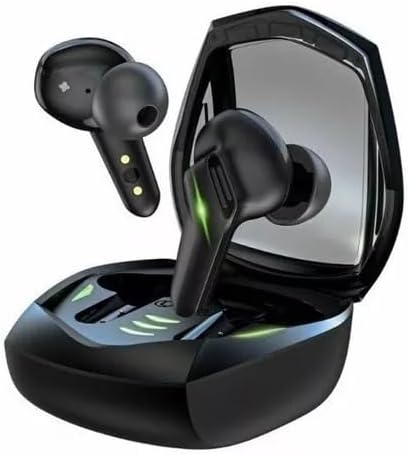
Image: KAIDI KD-775 TWS Bluetooth Wireless Earbuds in their charging case. The earbuds are black with green accents, indicating their gaming mode capability.
סעטאַפּ
1. אויספּאַקן און קאָמפּאָנענטן
ביים עפענען דעם פּעקל, זיכער מאַכן אַז אַלע קאָמפּאָנענטן זענען פאַראַן:
- KAIDI KD-775 Earbuds (Left and Right)
- טשאַרדזשינג קאַסע
- וסב טשאַרדזשינג קאַבלע

Image: Retail packaging for the KAIDI KD-775 TWS Bluetooth Wireless Earbuds, showing the earbuds and charging case on the front.
2. ערשטע אויפלאָדונג
פארן ערשטן באַנוץ, לאָדן די אויערקנעפּלעך און די טשאַרדזשינג קעסטל גאָר אויף.
- שטעלן ביידע עאַרבודז אין די טשאַרדזשינג פאַל.
- פֿאַרבינדט דעם USB טשאַרדזשינג קאַבל צום טשאַרדזשינג קעסטל און אַ מאַכט מקור.
- The indicator lights on the case and earbuds will show charging status. A full charge for the earbuds takes approximately 1 hour.
3. בלועטאָאָטה פּערינג
צו פֿאַרבינדן אייערע אויערקנעפּלעך צו אַ דעווייס:
- זיכער מאַכן אַז די אויערקנעפּלעך זענען אויפגעלאָדן און אַרויסגענומען פֿון דער טשאַרדזשינג קעסטל. זיי וועלן אויטאָמאַטיש אַרייַן אין פּערינג מאָדע.
- On your device (smartphone, tablet, notebook), enable Bluetooth.
- זוכן פֿאַר available Bluetooth devices and select "KAIDI KD-775" from the list.
- Once connected, you will hear a confirmation tone, and the indicator lights on the earbuds will change.
The earbuds feature Bluetooth V5.3 for a stable and efficient connection.
אַפּערייטינג ינסטראַקשאַנז
1. מאַכט אויף / אויסגעלאשן
- מאַכט אויף: Remove the earbuds from the charging case. They will power on automatically. Alternatively, touch and hold the touch area on both earbuds for 3 seconds.
- מאַכט אַוועק: Place the earbuds back into the charging case. They will power off automatically. Alternatively, touch and hold the touch area on both earbuds for 5 seconds.
2. קלוגע ריר קאָנטראָלס
The KAIDI KD-775 earbuds feature intuitive touch controls:
| קאַמף | לינקס עאַרבוד | רעכט עאַרבוד |
|---|---|---|
| שפּיל / פּויזע מוזיק | איין טאַפּ | איין טאַפּ |
| ווייַטער שפּור | טאָפּל צאַפּן | טאָפּל צאַפּן |
| פֿריִערדיקע שפּירט | דרייַיק טאַפּ | דרייַיק טאַפּ |
| ענטפֿערן / סוף רופן | איין טאַפּ | איין טאַפּ |
| אָפּוואַרפן רופן | Touch and Hold 2s | Touch and Hold 2s |
| אַקטאַווייט די קול אַססיסטאַנט | Touch and Hold 2s | Touch and Hold 2s |
3. גיימינג מאָדע
The KD-775 features a dedicated Gaming Mode to reduce audio latency, providing a more synchronized experience for gaming. To activate or deactivate Gaming Mode, refer to the specific touch control sequence in your product's quick start guide or experiment with a long press on one of the earbuds (typically 2-3 seconds on the right earbud).

Image: KAIDI KD-775 TWS Bluetooth Wireless Earbuds in their charging case, displaying prominent green LED lights, which often signify active gaming mode or charging status.
וישאַלט
1. רייניקונג
רעגולערע רייניקונג העלפט אויפהאלטן די קוואַליטעט פון די געזונט און היגיענע:
- ניצט אַ ווייכן, טרוקענעם, לינט-פֿרייעם שטאָף צו ווישן די אויערקנעפּלעך און די טשאַרדזשינג קעסטל.
- אַראָפּנעמען פֿאָרזיכטיק יעדן אויערוואַקס אָדער שמוץ פֿון די אויער שפּיץ און רעדנער מעש מיט אַ קליין באַרשט אָדער וואַטע שטעכל.
- ניצט נישט קיין שרײַבנדיקע מאַטעריאַלן, אַלקאָהאָל, אדער כעמישע רייניקונגס־מיטלען.
2. סטאָרידזש
ווען נישט אין באַנוץ, לייגט די אויערן-קנעפּלעך אין זייער טשאַרדזשינג קעסטל צו באַשיצן זיי און האַלטן זיי טשאַרדזשד. לייגט זיי אין אַ קיל, טרוקן אָרט אַוועק פון דירעקט זונשייַן און עקסטרעמע טעמפּעראַטורן.
3. וואַסער קעגנשטעל
The KAIDI KD-775 earbuds are designed to be sweat-proof, making them suitable for workouts and light exposure to moisture. However, they are not waterproof. Avoid submerging them in water or exposing them to heavy rain.
טראָובלעשאָאָטינג
If you encounter issues with your KAIDI KD-775 earbuds, try the following solutions:
- אויערקנעפּלעך נישט פּערינג: Ensure both earbuds are charged and out of the case. Turn off and on your device's Bluetooth. Try resetting the earbuds (refer to manufacturer's specific reset instructions if available, usually involves holding touch area for an extended period while in case).
- קיין קלאַנג פֿון איין אויערקנעפּל: Place both earbuds back in the case, close it, then reopen and remove them. Re-pair with your device.
- טשאַרדזשינג ישוז: Check the charging cable and power source. Ensure the charging contacts on the earbuds and case are clean and free of debris.
- נידעריקע קול אדער שלעכטע געזונט קוואַליטעט: Clean the earbud speaker mesh. Adjust volume on both the earbuds and your connected device.
ספּעסאַפאַקיישאַנז
קאַנעקטיוויטי| מאָדעל נומער | KD-775 |
| בלועטאָאָטה ווערסיע | V5.3 |
| קאָנטראָל מעטאָד | ריר |
| מוזיק פּלייַבאַקק צייט | אַרויף צו 7 שעה (ביי 80% באַנד) |
| רעדן צייט | אַרויף צו 5 שעה (ביי 80% באַנד) |
| טשאַרדזשינג צייט פֿאַר עאַרבוד | בעערעך 1 שעה |
| ווירעלעסס בלועטאָאָטה | |
| קאַמפּאַטאַבאַל דעוויסעס | Cell phones, Tablets, Notebooks |
| מאַטעריאַל | ABS, Polycarbonate (PC), Silicone, Thermoplastic Elastomer (TPE) |
| וואָג | 60 גראַמז |
| ספּעציעלע פֿעיִקייטן | Sweat-proof, Gaming Mode |
| Certification | אנאטעל: 09568-22-14467 |
וואָראַנטי און שטיצן
1. פאַבריקאַנט'ס גאַראַנטיע
The KAIDI KD-775 earbuds come with a manufacturer's warranty of 3 חדשים פֿון דעם קויפֿדאַטום. די וואָראַנטי דעקט פֿאַבריקאַציע־דעפֿעקטן אונטער נאָרמאַלן באַנוץ. ביטע באַהאַלטן אייער קויפֿבאַווײַז פֿאַר וואָראַנטי־קליימז.
די וואָראַנטי דעקט נישט קיין שאָדן געפֿירט דורך אומרעכט באַניץ, אַקסאַדענטן, נישט-אָטעריזירטע מאָדיפיקאַציעס, אָדער נאָרמאַלער טראָגן און טרער.
2. קונה שטיצן
For further assistance, technical support, or warranty inquiries, please contact the retailer where you purchased the product or refer to the official KAIDI website for contact information. When contacting support, please have your product model (KD-775) and proof of purchase ready.


