הקדמה
The Minolta MND65 Digital Camera is designed for capturing high-quality photos and videos in a compact, portable form. This manual provides essential information for setting up, operating, maintaining, and troubleshooting your camera. Please read this manual thoroughly before using your camera to ensure optimal performance and longevity.
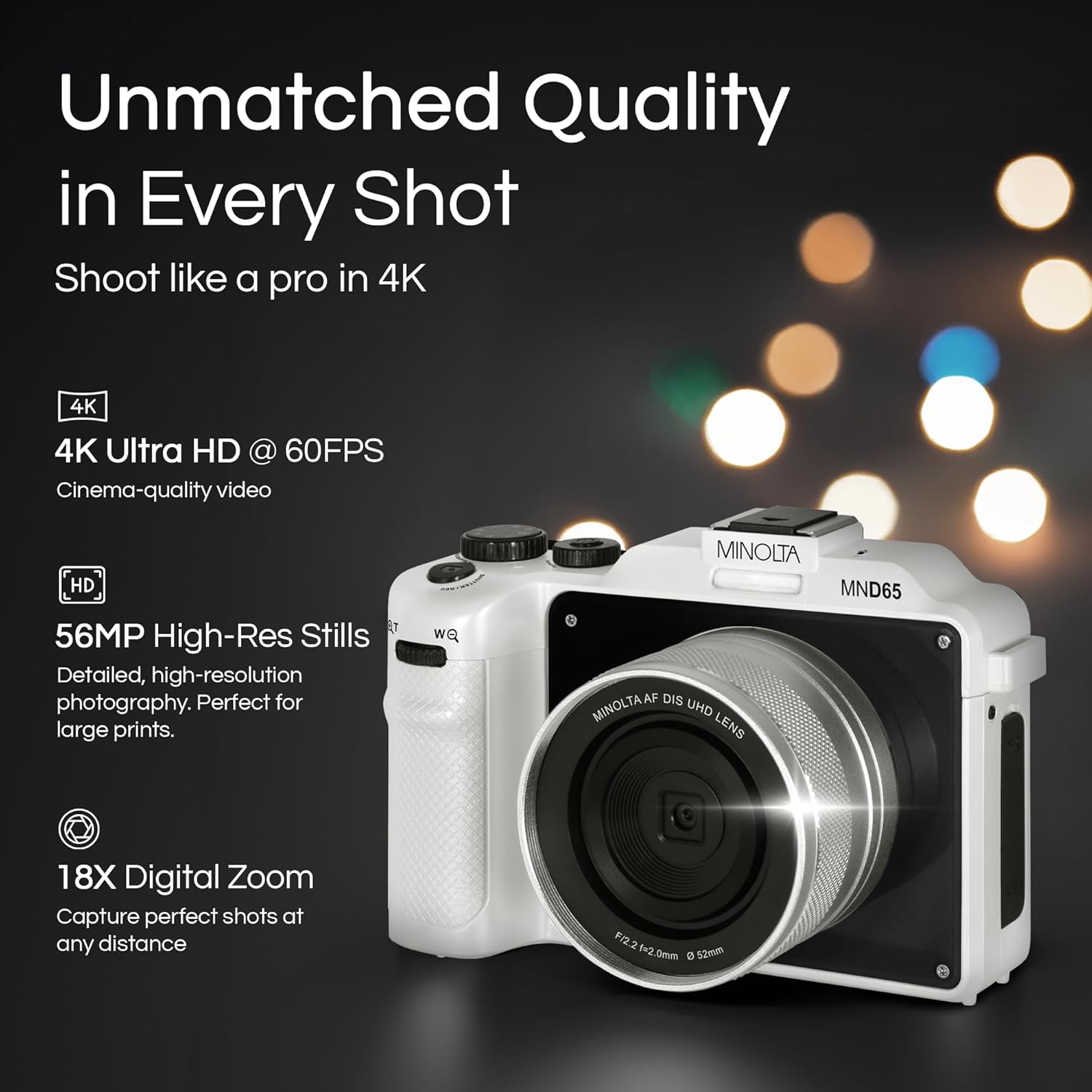
פיגורע 1: פראָנט view of the Minolta MND65 Digital Camera.
וואָס איז אין די קעסטל
באַשטעטיקן אַז אַלע זאכן זענען פאַראַן אין פּעקל:
- Minolta MND65 דיגיטאַל קאַמעראַ
- פּראַטעקטיוו טאַש
- וסב קאַבלע
- ליטהיום-יאָן באַטערי
- האַנטגעלענק רימען
- זכּרון קאַרטל (16 גיגאבייט)
- אַק אַדאַפּטער
- Lens Cap & Keeper
- Screwdriver + Screws (for faceplates)
- 2 Replaceable Faceplates (Black and Teal)
סעטאַפּ גייד
1. באַטאַרייע ייַנמאָנטירונג
- געפינט דעם דעקל פונעם באַטעריע־אָפּטייל אויף דער אונטערשטער טייל פון דער קאַמעראַ.
- שלעפּט דעם דעקל-שליסל צו עפֿענען דעם אָפּטייל.
- Insert the Lithium-Ion battery according to the polarity indicators (+/-).
- פֿאַרמאַכט דעם דעקל פֿון דער באַטעריע־אָפּטיילונג זיכער ביז עס קליקט אַרײַן אין פּלאַץ.
2. זכּרון קאַרטל ינסטאַלירונג
- Open the memory card slot cover, usually located near the battery compartment or on the side.
- Insert the provided SD memory card with the metal contacts facing the front of the camera until it clicks.
- נאָענט די זיקאָרן קאָרט שפּעלטל דעקן.
- באַמערקונג: Ensure the camera is powered off before inserting or removing the memory card.
3. טשאַרדזשינג די באַטערי
- Connect the USB cable to the camera's USB port.
- Connect the other end of the USB cable to the AC adaptor.
- צאַפּן די AC אַדאַפּטער אין אַ מאַכט ווענטיל.
- די טשאַרדזשינג אינדיקאַטאָר ליכט וועט זיך אָנצינדן. עס וועט זיך אויסלעשן אָדער טוישן קאָליר ווען די טשאַרדזשינג איז פֿאַרטיק.
- א פולע אויפלאדונג נעמט געווענליך בערך 2-3 שעה.
4. אַטאַטשינג די האַנטגעלענק רימען
Thread the wrist strap through the strap lug on the side of the camera and secure it to prevent accidental drops.
5. Customizing Faceplates
Your camera comes with replaceable faceplates (Black and Teal) and a screwdriver kit for customization.
- Using the provided screwdriver, carefully remove the small screws securing the current faceplate.
- Gently detach the faceplate.
- Align the desired new faceplate and secure it with the screws. Do not overtighten.

Figure 2: Customizing your camera with replaceable faceplates.
אפערירן אייער קאמערא
Camera Controls Overview

פיגורע 3: דערציען view of the camera showing LCD and control buttons.
- מאַכט קנעפּל: טוט אָן/אויסלעשן די קאַמעראַ.
- לאָדן קנעפּל: Press halfway to focus, fully to capture a photo or start/stop video recording.
- Mode Dial/Button: Selects shooting modes (e.g., Photo, Video, Playback).
- מעניו קנעפּל: צוטריט קאַמעראַ סעטטינגס און אָפּציעס.
- נאַוויגאַציע קנעפּלעך (אַרויף/אַראָפּ/לינקס/רעכטס): נאַוויגירן מעניוז און סטרויערן סעטטינגס.
- OK/Set Button: קאַנפערמז סאַלעקשאַנז.
- זום לעווער: Controls the 18X digital zoom.
- LCD פאַרשטעלן: 3.0" IPS display for framing shots, reviewינג בילדער, און נאַוואַגייטינג מעניוז.
גענומען פאָטאָס
- צינדט אן די קאַמעראַ מיטן פּאַוער קנעפּל.
- Select Photo mode using the Mode button/dial.
- Frame your shot using the 3.0" LCD screen.
- Press the Shutter button halfway to activate autofocus. The focus indicator will confirm focus.
- Press the Shutter button fully to capture the 56MP image.
- Images are saved in JPEG or RAW format, as selected in the settings.
רעקאָרדינג ווידיאס
- קער אויף די אַפּאַראַט.
- אויסקלייבן ווידעא מאָדע.
- Frame your scene.
- Press the Shutter button fully to start recording 4K 60FPS video. A recording indicator will appear on the screen.
- Press the Shutter button fully again to stop recording.
Using the Selfie Lens
The Minolta MND65 features a dedicated front-facing selfie lens for easy self-portraits and vlogging.
- Activate the selfie lens mode (refer to your camera's on-screen menu for specific activation steps, usually a dedicated button or menu option).
- The camera will switch to the front-facing lens, and the LCD screen will display your reflection.
- Frame your selfie or video.
- Press the Shutter button to capture.

Figure 4: The dedicated selfie lens for convenient self-portraits.
Wi-Fi Connectivity and File אַריבערפירן
The built-in Wi-Fi allows for wireless transfer of photos and videos to your smartphone or tablet.
- Download the official Minolta camera app to your mobile device (available on iOS and Android app stores).
- On the camera, navigate to the Wi-Fi settings in the menu and enable Wi-Fi.
- אויף אייער מאָבילער מיטל, פֿאַרבינדט זיך צום קאַמעראַ'ס Wi-Fi נעץ (SSID און פּאַראָל וועלן ווערן געוויזן אויף דער קאַמעראַ פאַרשטעלן).
- Open the Minolta app. You can now browse, transfer, and share your media wirelessly.
וישאַלט
רייניקונג די אַפּאַראַט
- ניצט אַ ווייכע, לינט-פֿרייע שטאָף צו רייניקן דעם קאַמעראַ קערפּער. פֿאַר שווערן שמוץ, אַ ביסל דריקןampען דעם טוך מיט וואסער.
- For the lens, use a lens brush to remove dust, then a lens cleaning cloth with a specialized lens cleaning solution if necessary. Avoid touching the lens surface with your fingers.
- Clean the LCD screen with a soft, dry microfiber cloth.
- Do not use organic solvents or strong chemical cleaners.
באַטערי קער
- סטאָר די באַטאַרייע אין אַ קיל, טרוקן אָרט ווען ניט אין נוצן.
- פֿאַרמײַדט אָפֿט פֿולשטענדיק אויסצולאָדן די באַטעריע כּדי צו פֿאַרלענגערן איר לעבן.
- אויב איר לייגט עס אויף פאר א לענגערע צייט, לאדט אויף די באטעריע ביז בערך 50% קאפאציטעט.
סטאָרידזש
- When not in use, store the camera in its protective pouch to shield it from dust and scratches.
- Avoid storing the camera in areas with extreme temperatures, high humidity, or direct sunlight.
- אַראָפּנעמען די באַטאַרייע אויב די אַפּאַראַט וועט נישט זיין געוויינט פֿאַר אַ לאַנג צייַט.
טראָובלעשאָאָטינג
| פּראָבלעם | מעגלעך סיבה | לייזונג |
|---|---|---|
| די קאַמעראַ גייט נישט אָן. | די באַטעריע איז אויסגעשעפּט אָדער נישט ריכטיק אַרײַנגעשטעלט. | לאָדט די באַטעריע גאָר אויף. לייגט די באַטעריע צוריק ריכטיק אַרײַן. |
| קען נישט נעמען בילדער/רעקארדירן ווידיאס. | די זכּרון קאַרטל איז פול, פארשפארט, אדער נישט אריינגעשטעלט. | ויסמעקן ומנייטיק files, unlock the memory card, or insert it correctly. |
| בילדער זענען בלערי. | קאַמעראַ שאָקלען, פאַלשער פאָקוס, אָדער שמוציק לינז. | Hold the camera steady. Ensure autofocus locks before shooting. Clean the lens. |
| די Wi-Fi פֿאַרבינדונג פֿאַרפֿעלט. | Incorrect password, camera Wi-Fi not enabled, or app issue. | Verify Wi-Fi password. Ensure camera Wi-Fi is active. Restart camera and mobile app. |
| Green screen appears on LCD. | Software/hardware malfunction. | צינדט אָן די קאַמעראַ און לאָזט עס אַרבעטן. אויב די פּראָבלעם בלייבט, קאָנטאַקטירט קונה שטיצע. |
| Poor image/video quality (not 56MP/4K). | Incorrect resolution settings. | Check camera settings to ensure 56MP for photos and 4K for video are selected. |
If you encounter issues not listed here or if the suggested solutions do not resolve the problem, please contact Minolta Customer Support.
ספּעסאַפאַקיישאַנז
| מאָדעל נאָמען | MND65-WK |
| פאָטאָ סענסאָר האַכלאָטע | 56 מפּ |
| ווידעא האַכלאָטע | 4K (2160p) at 60 FPS |
| דיגיטאַל פארגרעסער | 18x |
| פאַרשטעלן גרייס | 3 אינטשעס (IPS LCD) |
| קאַנעקטיוויטי | ווי-פי |
| געשטיצט File פאָרמאַץ | JPEG, RAW (Images); MP4 (Video) |
| בילד סטאַביליזאַטיאָן | דיגיטאַל |
| פאָטאָ סענסאָר טעכנאָלאָגיע | קמאָס |
| באַטערי טיפּ | ליטהיום יאָן |
| מינימום פאָקאַל לענג | 18 מילאַמיטערז |
| מאַקסימום עפענונג | 2.8 מילאַמיטערז |
| פלאַש מאָדעס | אַוטאָ פלאַש |
| סטאָרידזש מידיאַ | SD Card (Class 10, U1 recommended) |
וואָראַנטי אינפֿאָרמאַציע
The Minolta MND65 Digital Camera comes with a Limited 1 Year Manufacturer Warranty. This warranty covers defects in materials and workmanship under normal use. It does not cover damage caused by misuse, accident, unauthorized modification, or external causes such as drops or liquid damage.
Please retain your proof of purchase for warranty claims. For detailed terms and conditions, refer to the warranty card included in your product packaging or visit the official Minolta webפּלאַץ.
קונה שטיצן
For technical assistance, warranty service, or general inquiries regarding your Minolta MND65 Digital Camera, please contact Minolta Customer Support.
- Webפּלאַץ: Visit the official Minolta webזייטל פֿאַר אָפֿט געשטעלטע פֿראַגעס, ווייכווארג דערהייַנטיקונגען און שטיצע רעסורסן.
- בליצפּאָסט: זעט אייער פּראָדוקט פּאַקאַדזשינג אָדער די באַאַמטער webזייטל פֿאַר קונה סערוויס אימעיל אַדרעסן.
- טעלעפֿאָן: זעט אייער פּראָדוקט פּאַקאַדזשינג אָדער די באַאַמטער webוועבזייטל פֿאַר קונה סערוויס טעלעפאָן נומערן.
When contacting support, please have your camera model number (MND65-WK) and proof of purchase available.


