1. הקדמה
The glo HYPER PRO is an advanced tobacco heating device designed to provide an enhanced experience. It features an EasyView LED display for monitoring device status, a TasteSelect selector for choosing between Standard and Boost modes, and HeatBoost technology for consistent intensity. The device also includes fast charging capabilities and extended battery life.
Important Safety Notice: This product is not risk-free and contains nicotine, which is addictive.
2. זיכערקייַט וואָרנינגז
- This product, when used with its intended tobacco sticks, is not risk-free and delivers nicotine, a highly addictive substance.
- The device itself does not contain tobacco sticks, liquids, pre-filled cartridges, or refills. These must be purchased separately.
- The glo HYPER PRO operates without combustion, producing zero ash and less odor compared to traditional cigarettes.
- Always read the label, warnings, and instructions provided on the product packaging before use. Information on the packaging may differ from online descriptions.
- האַלטן אויס פון דערגרייכן פון קינדער און פּעץ.
- שטעלט נישט אויס דעם אפאראט צו עקסטרעמע טעמפעראטורן, דירעקטע זונשייַן, אדער וואַסער.
- Use only the charging cable provided or a certified USB-C cable with a compatible power adapter.
3. פּעקל אינהאַלט
Please check that your glo HYPER PRO package contains the following items:
- glo HYPER PRO Device
- וסב-C טשאַרדזשינג קאַבלע
- רייניקונג באַרשט
- באַניצער מאַנואַל (דעם דאָקומענט)
4. דיווייס איבערview
Familiarize yourself with the components of your glo HYPER PRO device.
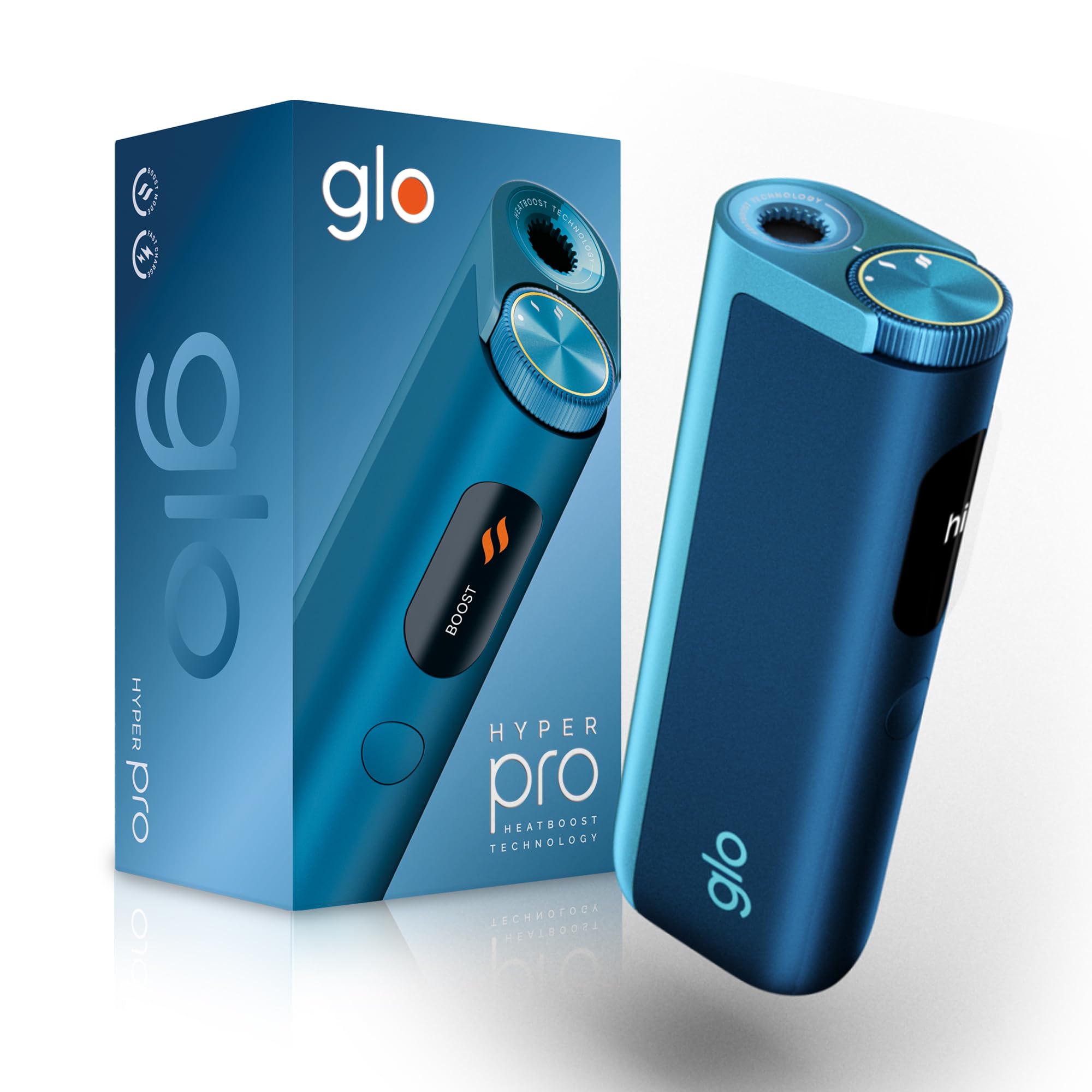
This image displays the glo HYPER PRO device in blue, highlighting its compact dimensions (96.4mm height, 36.5mm width) and weight (92 grams). Key features such as Boost Mode, EasyView Display, and Fast Charge are indicated.
- הייצונג קאַמער: Where the tobacco stick is inserted.
- TasteSelect Selector: Button to switch between Standard and Boost modes.
- גרינגView געפֿירט ווייַז: Shows selected mode, session progress, and battery status.
- וסב- C פּאָרט: פֿאַר טשאַרדזשינג די מיטל.
5. ערשט סעטאַפּ
5.1 טשאַרדזשינג די מיטל
Before first use, fully charge your glo HYPER PRO device. The device features fast charging and extended battery life.
- Connect the USB-C charging cable to the device's USB-C port.
- Plug the other end of the cable into a compatible USB power adapter.
- די גרינגעView LED display will indicate the charging progress.
- אַמאָל גאָר באפוילן, דיסקאַנעקט די מיטל פון די טשאַרדזשער.
5.2 ערשטער נוצן
To turn on the device for the first time:
- Press the TasteSelect button 5 times rapidly.
- The device will vibrate and the EasyView LED display will illuminate, indicating it is ready for use.
6. אַפּערייטינג די מיטל
6.1 Inserting a Tobacco Stick
Ensure the device is clean before inserting a tobacco stick.
- Gently insert a compatible tobacco stick into the heating chamber at the top of the device.
- Do not force the stick.
6.2 Selecting a Mode (Standard or Boost)
The TasteSelect selector allows you to choose your preferred intensity.

This image illustrates two glo HYPER PRO devices, demonstrating the selection between Standard and Boost intensity modes.
- נאָרמאַל מאָדע: For a balanced experience. Press and hold the TasteSelect button until the device vibrates once.
- בוסט מאָדע: For superior intensity, featuring HeatBoost technology. Press and hold the TasteSelect button until the device vibrates twice.
די גרינגעView LED display will show the selected mode and the heating progress.
6.3 אָנהייבן אַ סעסיע
- After inserting the tobacco stick and selecting your mode, the device will begin heating.
- די גרינגעView LED display will show a countdown or progress indicator.
- The device will vibrate when it is ready for use.
- Once the session is complete, the device will vibrate again and the display will turn off.
6.4 Ending a Session
נאָך דער סעסיע:
- Remove the used tobacco stick from the heating chamber.
- Dispose of the used stick responsibly.
- לאָזן די מיטל צו קילן אַראָפּ איידער רייניקונג אָדער סטאָרינג.
7. וישאַלט און רייניקונג
Regular cleaning ensures optimal performance and longevity of your glo HYPER PRO device.
7.1 Cleaning the Heating Chamber
- Ensure the device is turned off and completely cool before cleaning.
- Use the provided cleaning brush to gently remove any tobacco residue from the heating chamber.
- Avoid using water or liquid cleaners directly on the heating element.
- For stubborn residue, a dry cotton swab can be used carefully.
7.2 פונדרויסנדיק רייניקונג
Wipe the exterior of the device with a soft, dry cloth as needed.
8. טראָובלעשאָאָטינג
If you encounter issues with your glo HYPER PRO, refer to the following common problems and solutions:
| פּראָבלעם | מעגלעך סיבה | לייזונג |
|---|---|---|
| די מיטל איז נישט קער אויף | נידעריק אָדער קיין באַטאַרייע אָפּצאָל | לאָדט דאָס דעווייס גאָר אויף מיטן צוגעשטעלטן USB-C קאַבל. |
| מיטל נישט באַהיצונג | Tobacco stick not inserted correctly; Device malfunction | Ensure the tobacco stick is fully and correctly inserted. Try restarting the device. If the issue persists, contact customer support. |
| טשאַרדזשינג איז פּאַמעלעך אָדער אַרבעט נישט | Faulty cable or adapter; Dirty charging port | Check the USB-C cable and power adapter for damage. Try a different compatible cable/adapter. Clean the charging port gently with a dry, soft brush. |
| געפירט אַרויסווייַזן נישט ארבעטן | מיטל מאַלפאַנגקשאַן | פּרוּווט ריסטאַרטן דעם מיטל. אויב די פּראָבלעם בלייבט, קאָנטאַקטירט קונה שטיצע. |
9. ספּעסאַפאַקיישאַנז
| שטריך | דעטאַל |
|---|---|
| סאָרט | glo |
| מאָדעל נומער | 10189920 |
| דימענשאַנז (LxWxH) | 9.6 X 3.6 X 2.1 סענטימעטער |
| וואָג | 150 גראַמז |
| באַטאַרייע קאַפּאַציטעט | 2580 מאַה (ליטהיום יאָן) |
| טשאַרדזשינג פּאָרט | וסב-C |
| ספּעציעלע שטריך | סאָליד פּלאַן |
| פאַבריקאַנט | Nicoventures Trading Limited |
10. וואָראַנטי און שטיצן
10.1 וואָראַנטי אינפֿאָרמאַציע
For detailed warranty information, please refer to the warranty card included in your product packaging or visit the official glo webזייטל. גאַראַנטיע טערמינען און באדינגונגען קענען זיין אַנדערש לויט געגנט.
10.2 קונה שטיצן
If you have any questions, require assistance, or need to report an issue with your glo HYPER PRO device, please contact glo customer support through their official website or the contact details provided in your product documentation.


