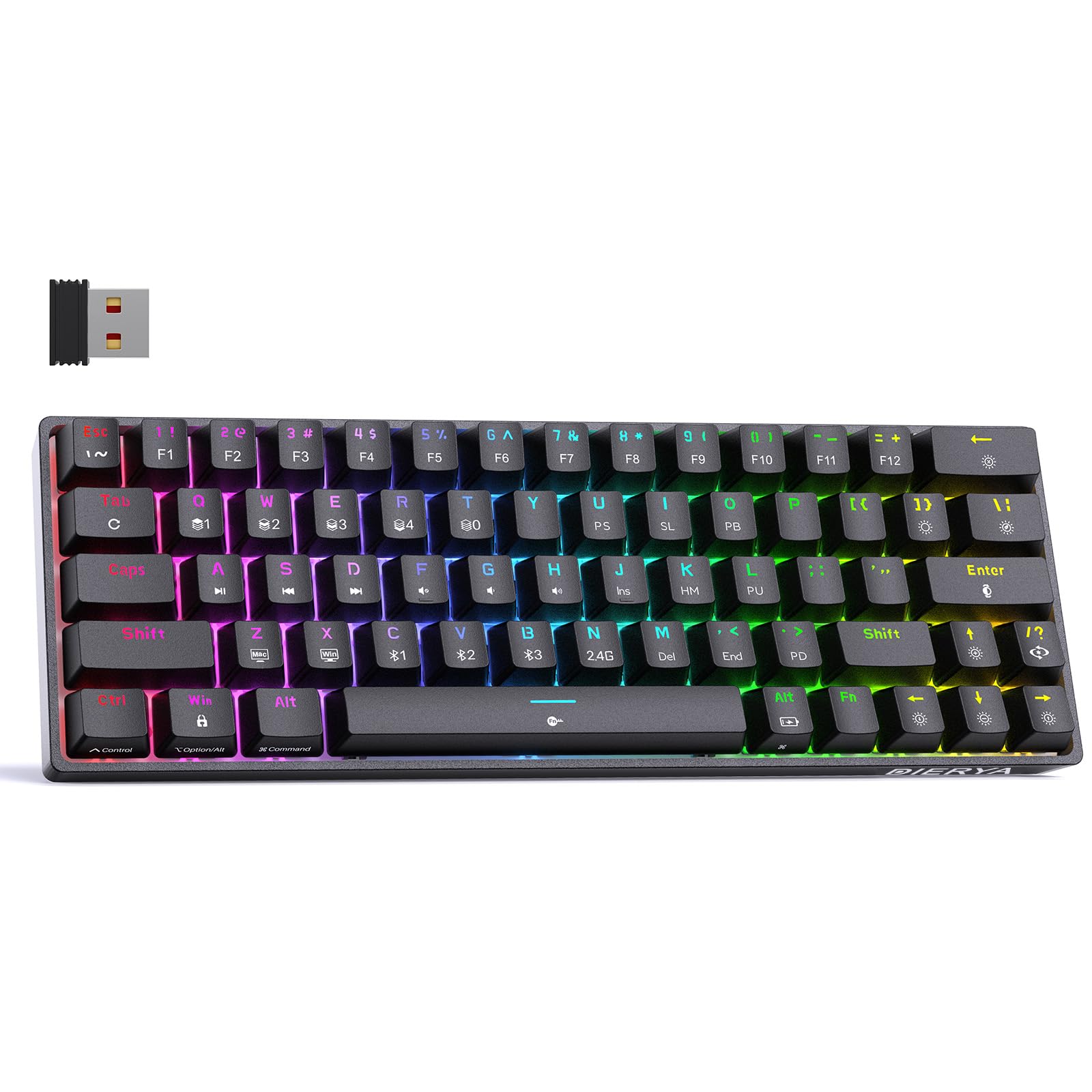
Thank you for choosing the DIERYA DK63 60% Wireless Mechanical Gaming Keyboard. This compact 63-key keyboard offers versatile connectivity options, vibrant RGB backlighting, and durable mechanical switches for an enhanced typing and gaming experience. This manual provides detailed instructions to help you set up, operate, and maintain your keyboard.
פּעקל אינהאַלט
DIERYA DK63 Wireless Mechanical Keyboard (1)
2.4G Receiver (hidden in the fuselage) (1)
שליסל קאַפּ פּולער (1)
וסב קאַבלע (1)
באַניצער מאַנואַל (1)
פּראָדוקט איבערview
The DIERYA DK63 is a compact 60% mechanical keyboard designed for efficiency and performance. It features 63 keys, including directional keys, and utilizes an "FN" key for full functionality, maximizing desktop space. The keyboard is equipped with Blue Switches, providing tactile feedback and a distinct click sound, ideal for typists. It supports three connection modes: 2.4G wireless, Bluetooth 5.0, and wired USB-C, allowing seamless switching between various devices. A high-capacity 3000mAh battery ensures extended usage, and the rich RGB dynamic lighting system offers 18 modes and 16.8 million customizable colors.
Connect the provided USB-C cable to the keyboard's USB-C port and the other end to your computer's USB port. The keyboard will automatically connect and begin charging.
Image: Close-up of the keyboard's USB-C port and the included Type-C data cable for wired connection and charging.
2. 2.4ג ווירעלעסס קאַנעקשאַן
Locate the 2.4G USB receiver, typically stored in a compartment on the underside of the keyboard.
שטעקט אריין דעם 2.4G ריסיווער אין א פאראן USB פארט אויף אייער קאמפיוטער.
Flip the connection switch on the keyboard to the "2.4G" position.
דרוק FN + N. The 2.4G indicator light will illuminate, indicating a successful connection.
Image: The underside of the keyboard showing the 2.4G dongle storage area and the connection mode switch.
Video: DIERYA DK63 Operation Guide, demonstrating 2.4G and Bluetooth connection steps, FN key usage, and RGB lighting adjustments.
3. בלועטאָאָטה קאַנעקשאַן
Flip the connection switch on the keyboard to the "Bluetooth" position.
The keyboard will appear as "DIERYA DK63-1", "DIERYA DK63-2", or "DIERYA DK63-3". Select one to pair.
To switch between Bluetooth channels (BT1, BT2, BT3), press FN + C., FN + V., אָדער פן + ב ריספּעקטיוולי.
אַפּערייטינג ינסטראַקשאַנז
FN Key Usage
די FN key is essential for accessing secondary functions on the compact DK63 keyboard. Hold down the FN key and press the desired key to activate its secondary function.
פן + ז / רענטגענ: Switch between Mac OS and Windows system layouts.
FN + ספּאַסעבאַר: Lock/Unlock the keyboard. The FN key will flash red when locked.
FN + טאַב: Hold to reset the keyboard to factory settings (keyboard will flash to indicate reset).
RGB באַקלייט קאָנטראָל
The DK63 keyboard features 18 dynamic RGB lighting modes and 16.8 million colors. Use the following key combinations to adjust the lighting:
FN + Backspace: Turn RGB lights On/Off.
FN + [ ]: Switch custom lighting effects (requires driver software for full customization).
FN + אַרייַן: ענדערן די קאָליר פון די לייטינג.
פן + /?: Switch between different lighting modes.
פן + אַרויף עראָו: פֿאַרגרעסערן די ברייטקייט פֿון דער הינטערליכטונג.
FN + אַראָפּ עראָו: פֿאַרקלענערן די ברייטקייט פֿון דער הינטערליכט.
FN + רעכטע פײַל: Speed up lighting effect.
FN + לינקער פײַל: Slow down lighting effect.
Image: The keyboard displaying various RGB lighting effects and key combinations for adjusting them.
Video: DIERYA DK63 Operation Guide, demonstrating 2.4G and Bluetooth connection steps, FN key usage, and RGB lighting adjustments.
וישאַלט
To ensure the longevity and optimal performance of your DIERYA DK63 keyboard, follow these maintenance guidelines:
רייניקונג: ניצן אַ ווייך, לינט-פֿרייַ שטאָף אַ ביסל דampened with water or a mild cleaning solution to wipe the keycaps and keyboard surface. Avoid excessive moisture. For deeper cleaning, use the provided keycap puller to remove keycaps and clean underneath with compressed air.
סטאָרידזש: האַלט די קלאַוויאַטור אין אַ קיל, טרוקן אָרט אַוועק פון דירעקט זונשייַן און עקסטרעמע טעמפּעראַטורן.
באַטערי זאָרגן: To prolong battery life, avoid fully discharging the keyboard frequently. Charge it when the battery reminder indicates low power.
Image: The DIERYA DK63 keyboard with a keycap puller, illustrating how to remove keycaps for cleaning or switch replacement.
טראָובלעשאָאָטינג
אַרויסגעבן
מעגלעך לייזונג
קלאַוויאַטור קאָנעקט זיך נישט דורך 2.4G.
Ensure the 2.4G receiver is securely plugged into a USB port and the keyboard switch is set to "2.4G". Press FN + N to re-establish connection.
בלועטאָאָטה קשר ישוז.
Ensure the keyboard switch is set to "Bluetooth". On your device, forget the keyboard and attempt to re-pair. Try switching Bluetooth channels using FN + C/V/B. Ensure the keyboard is charged.
RGB lights not working or stuck.
דרוק FN + Backspace to toggle lights. Try switching lighting modes with פן + /?. If issues persist, perform a factory reset by holding FN + טאַב.
שליסלען רעאגירן נישט.
Check if the keyboard is locked (FN + ספּאַסעבאַר). Ensure the correct system layout (Windows/Mac) is selected (פן + ז / רענטגענ). Recharge the battery if in wireless mode. Try a wired connection.
ספּעסאַפאַקיישאַנז
מאָדעל נומער: T63
אויסלייג: 60% (63-keys)
באַשטימען טיפּ: Blue Switch (Tactile & Clicky)
קאַנעקטיוויטי: 2.4GHZ Wireless, Bluetooth 5.0, USB-C Wired
באַטאַרייע קאַפּאַציטעט: 3000 מאַה
RGB באַקלייט: 18 modes, 16.8 million colors
קאַמפּאַטאַבילאַטי: Windows 11/10/8/7/XP, Mac OS, Vista, Linux
פּראָדוקט דימענשאַנז: 11.53"ל x 3.98"בר x 1.65"ה
נומער וואָג: 1.41 פונט
Image: Visual representation of the DIERYA DK63's ultra-compact 63-key layout and dimensions.
Video: DIERYA DK63 Switch Sound Comparison, demonstrating the sound profiles of Red (linear) and Blue (clicky) switches.
וואָראַנטי און שטיצן
DIERYA is committed to your satisfaction. If you encounter any issues with your DK63 keyboard, please do not hesitate to contact us. Our customer support team is available to assist you with troubleshooting, warranty claims, and any product-related inquiries.
פֿאַר שטיצע, ביטע באַזוכט די DIERYA קראָם אויף אַמאַזאָן or refer to the contact information provided with your purchase.