הקדמה
This manual provides detailed instructions for the installation, operation, and maintenance of your Amaseaudio Android 14 Car Stereo. Please read this manual thoroughly before using the product to ensure proper function and safety.
פּראָדוקט איבערview און קאַמפּאַטאַבילאַטי
The Amaseaudio Android 14 Car Stereo is designed to enhance your in-car entertainment and navigation experience. It features a 9-inch display, Quad-Core processor, DSP+, Wireless Apple Carplay, and Android Auto support.
קאַמפּאַטאַבאַל מאָדעלס:
- BMW E53 X5 (1999-2006)
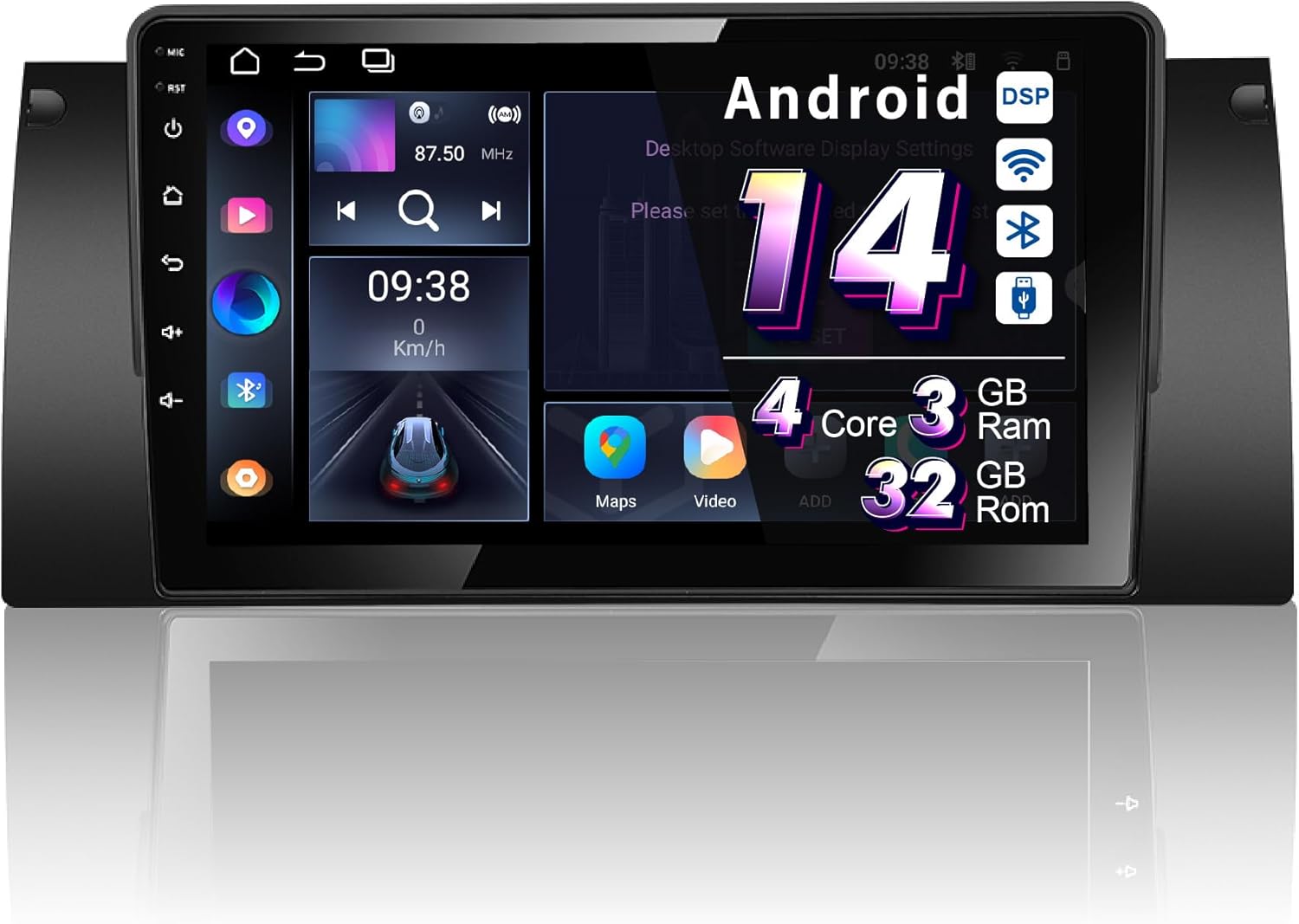
Figure 1: Amaseaudio Android 14 Car Stereo main unit, showcasinזײַן גלאַטן דיזײַן און גרויסן עקראַן.
שליסל פֿעיִקייטן
- אַפּערייטינג סיסטעם: Android 14.0 with Quad-Core processor, 3GB RAM, and 32GB ROM.
- ווירעלעסס קאַנעקטיוויטי: Built-in Wireless Apple Carplay and Android Auto, Bluetooth 5.0, 2.4GHz WiFi, and 4G support.
- אַודיאָ פֿאַרבעסערונגען: Integrated DSP (Digital Sound Processor) for superior audio quality.
- נאַוויגאַציע: Built-in Google Maps for GPS navigation.
- מולטימעדיאַ: Supports 1080p video playback, split-screen functionality.
- יקספּאַנדאַביליטי: Supports OBDII and rear camera (devices not included).

פיגורע 2: איבערview of key features including Android 14, Wireless Carplay, DSP+, WiFi, 4G, and Bluetooth 5, highlighting the system's core capabilities.
סעטאַפּ און ינסטאַלירונג
Proper installation is crucial for the optimal performance of your car stereo. It is recommended to have the installation performed by a qualified professional.
פאַר-ינסטאַלירונג טשעק:
- Ensure your vehicle is a BMW E53 X5 (1999-2006).
- Verify all included accessories are present (refer to the "Accessories" section).
- דיסקאָנעקט די באַטאַרייע פֿון פֿאָרמיטל איידער איר הייבט אָן די אינסטאַלאַציע.
ינסטאַלירונג סטעפּס:
- Remove the original car stereo unit from your BMW E53 X5 dashboard.
- Connect the provided wiring harness to the car stereo and the vehicle's existing wiring. Ensure all connections are secure.
- Connect the GPS antenna, WiFi antenna, and any other external accessories (e.g., rear camera, external microphone).
- Carefully slide the new Amaseaudio car stereo into the dashboard opening until it clicks into place.
- Reconnect the vehicle's battery and test the unit's functionality.
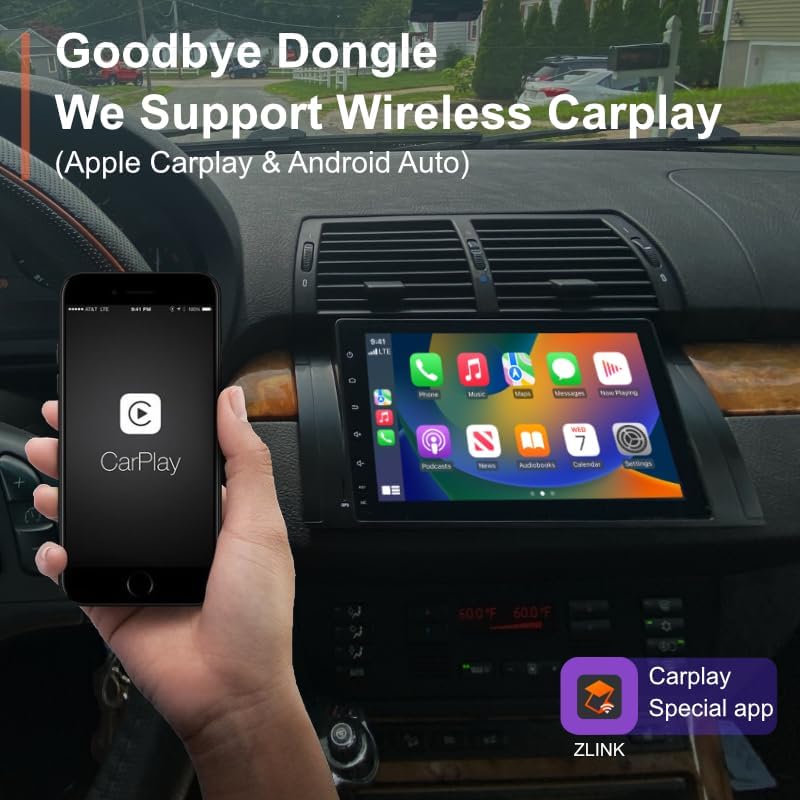
Figure 3: Visual comparison of the BMW E53 X5 dashboard before and after the Amaseaudio car stereo installation, showing the integrated fit.
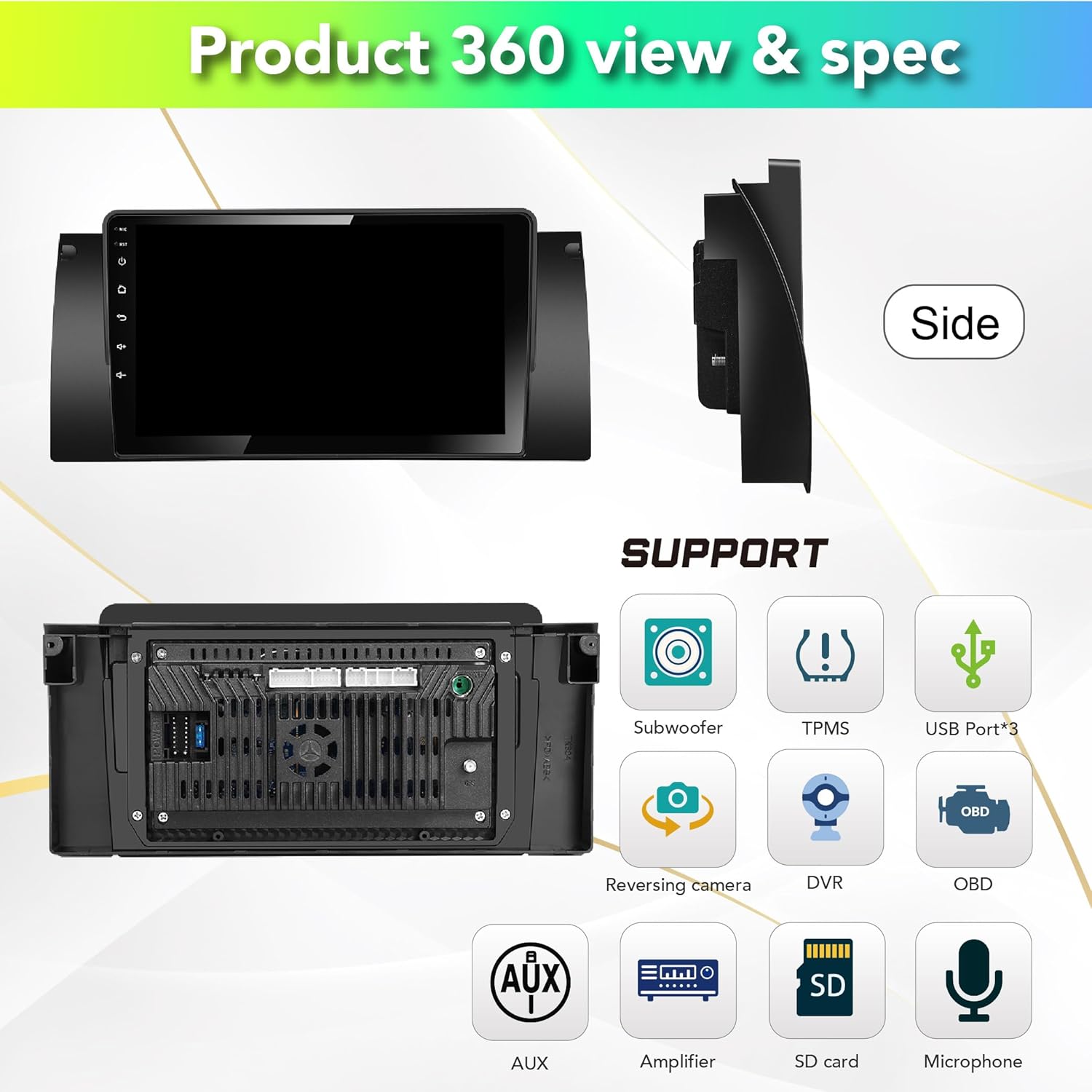
פיגורע 4: דערציען view of the car stereo showing various connection ports for subwoofer, TPMS, USB, reversing camera, DVR, OBD, AUX, amplifier, SD card, and microphone.
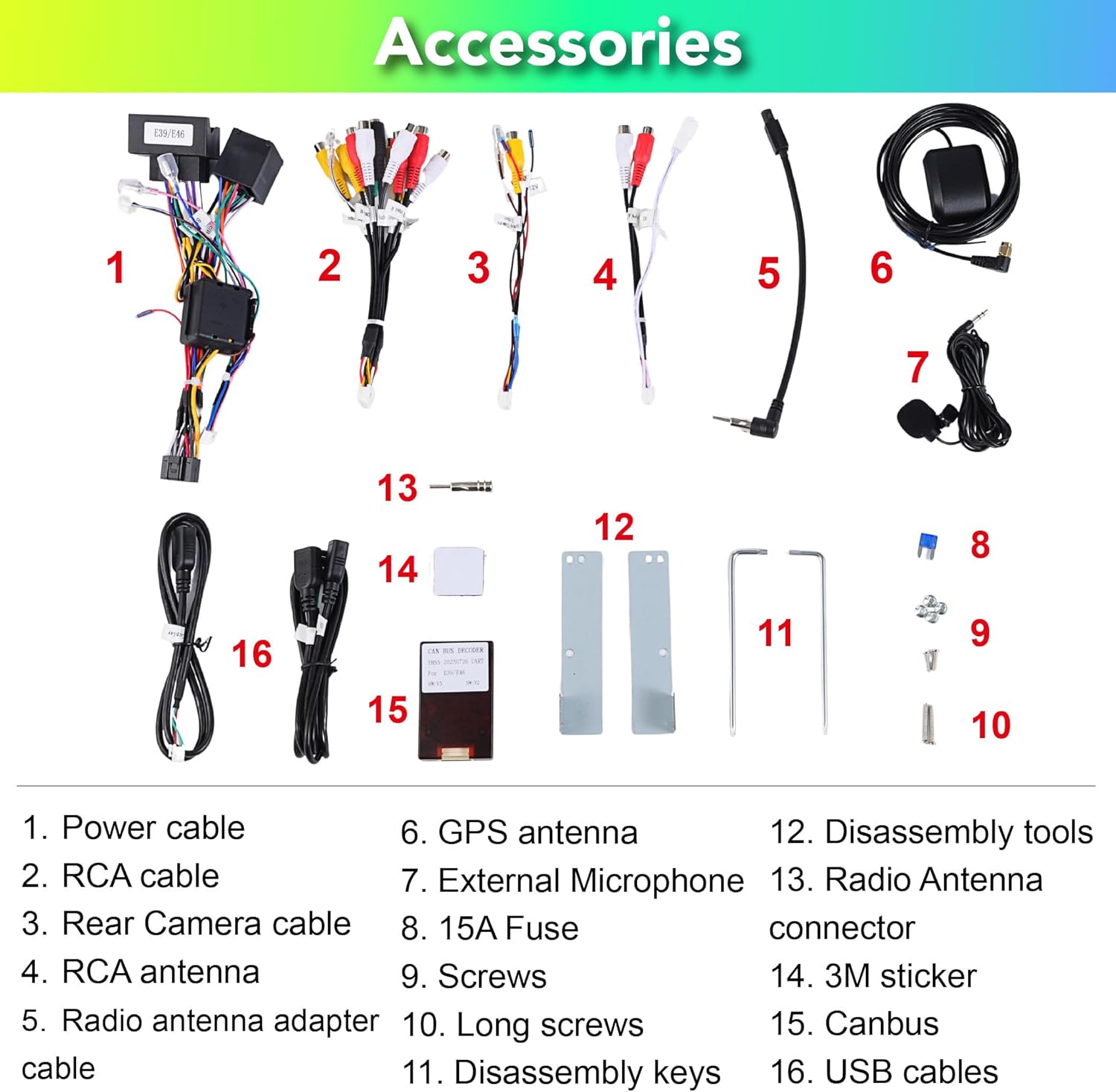
Figure 5: List of included accessories: Power cable, RCA cable, Rear Camera cable, RCA antenna, Radio antenna adapter cable, GPS antenna, External Microphone, 15A Fuse, Screws, Long screws, Disassembly keys, Disassembly tools, Radio Antenna connector, 3M sticker, Canbus, USB cables.

Figure 6: Detailed pin definitions for the 18PIN power supply socket and the 60PIN multi-functional socket, including definitions for AUX video input, audio outputs, USB, and other connections.
אַפּערייטינג ינסטראַקשאַנז
System Interface and Navigation:
Upon startup, the unit will display the main Android interface. You can customize themes and button colors. Navigate through applications using the touchscreen.

פיגורע 7: עקסamples of different user interface themes and a selection of pre-installed and downloadable applications like Google Maps, Netflix, and Play Store.
Wireless Apple Carplay & Android Auto:
The unit comes with a built-in Carplay app. Connect your iPhone or Android phone wirelessly via Bluetooth to access navigation, music, messages, and more directly on the stereo screen.

Figure 8: Demonstration of wireless Apple Carplay and Android Auto, showing a smartphone connected to the car stereo display for seamless integration.
Digital Sound Processor (DSP+):
Utilize the built-in DSP for advanced audio adjustments. This includes a 15-band graphic equalizer, preset EQ modes, special sound effects (Equiloudness, Surround system enhancement), and time correction.

Figure 9: Screenshots of the DSP interface, illustrating the 15-band equalizer, special effect adjustments, and time correction settings for optimizing audio output.
Connectivity (4G, WiFi, Bluetooth):
- WiFi: Connect to available Wi-Fi networks (2.4GHz supported) to access online content and download apps.
- בלועטאָאָטה 5.0: Pair your smartphone for hands-free calling, music streaming, and contact synchronization.
- 4G: Insert a 4G SIM card (not included) for mobile data connectivity.
גפּס נאַוויגאַציע:
The unit comes with built-in Google Maps. Ensure a stable internet connection for real-time traffic updates and accurate navigation.
אנדערע פאַנגקשאַנז:
- שפּאַלטן פאַרשטעלן: Run two applications simultaneously on the screen.
- Rear Camera Support: Connect an aftermarket rear camera for parking assistance (camera not included).
- OBDII Support: Connect an OBDII scanner (not included) to monitor vehicle diagnostics.
- FM/AM ראַדיאָ: הערט זיך אן צו אייערע באליבטע ראדיא סטאנציעס.
וישאַלט
To ensure the longevity and optimal performance of your Amaseaudio car stereo, follow these maintenance guidelines:
- רייניקונג: ניצט אַ ווייכע, טרוקענע שטאָף צו רייניקן דעם עקראַן און אַפּאַראַט. פֿאַרמייַדט אַברייסיוו רייניגער אָדער סאָלווענטן.
- ווייכווארג דערהייַנטיקונגען: Regularly check for and install system updates to improve performance and security. The unit supports OTA (Over-The-Air) updates.
- ינווייראַנמענאַל טנאָים: פֿאַרמײַדט אויסשטעלן דעם אַפּאַראַט צו עקסטרעמע טעמפּעראַטורן, דירעקטע זונשײַן פֿאַר פֿאַרלענגערטע פּעריאָדן, אָדער איבערגעטריבענע פֿײַכטקייט.

Figure 10: Screenshot of the system update interface, indicating the current software version and the option to check for new updates to keep the system optimized.
טראָובלעשאָאָטינג
אויב איר טרעפט פּראָבלעמען מיט אייער אויטאָ סטערעאָ, זעט די פאלגענדע געוויינטלעכע פּראָבלעמען און לייזונגען:
| פּראָבלעם | מעגלעך סיבה | לייזונג |
|---|---|---|
| דער אַפּאַראַט טוט נישט מאַכט אויף. | לויזער מאַכט פֿאַרבינדונג, צעבראָכענע פיוז, פּראָבלעם מיט פֿאָרמיטל באַטעריע. | Check power cables and connections. Inspect the 15A fuse. Ensure vehicle battery is charged. |
| קיין געזונט רעזולטאַט. | Incorrect wiring, volume too low, mute enabled, speaker issues. | Verify speaker wiring. Increase volume. Check if mute is active. Test with different audio sources. |
| דזשי-פי-עס סיגנאַל שוואַך אָדער נישט פּינקטלעך. | דזשי-פי-עס אַנטענע נישט ריכטיק אינסטאַלירט אָדער פֿאַרשטאָפּט. | Ensure GPS antenna is placed in an unobstructed location (e.g., dashboard). Check antenna connection. |
| Wireless Carplay/Android Auto not connecting. | Bluetooth not enabled, phone not paired, app issues. | Ensure Bluetooth is on for both devices. Re-pair the phone. Restart the Carplay/Android Auto app on the unit and phone. |
אויב די פראבלעם בלייבט נאך פרובירן די לייזונגען, ביטע קאנטאקטירט קאסטומער סופארט.
ספּעסאַפאַקיישאַנז
| שטריך | דעטאַל |
|---|---|
| מאָדעל נומער | Android 14, 4Cores, (3+32GB) |
| אָפּערייטינג סיסטעם | אַנדרויד 14.0 |
| פּראַסעסער | קוואַד-קאָר |
| באַראַן | 3 גיגאבייט |
| ראַם | 32 גיגאבייט |
| ווייַז גרייס | 9 אינטשעס |
| קאַנעקטיוויטי | Bluetooth 5.0, Wi-Fi (2.4GHz), 4G |
| ספּעציעלע פֿעיִקייטן | DSP+, Wireless Carplay, Android Auto |
| מאַפּע טיפּ | Online map (Google Maps built-in) |
| פּונקט וואָג | 1.87 פונט |
| פּעקל דימענשאַנז | 13.39 X 11.81 X 4.21 אינטשעס |
| לאַנד פון אָריגין | האָנג קאָנג |
וואָראַנטי און שטיצן
וואָראַנטי אינפֿאָרמאַציע:
The Amaseaudio Android 14 Car Stereo comes with a איין יאָר וואָראַנטי. This warranty covers defected parts, excluding the screen. Human-caused damage is not included under this warranty.
קונה שטיצן:
For technical assistance, troubleshooting, or warranty claims, please contact Amaseaudio customer support through the retailer's platform or the official brand webזייטל. ביטע האַלט אייער פּראָדוקט מאָדעל נומער און קויף דעטאַלן גרייט ווען איר קאָנטאַקטירט שטיצע.


