הקדמה
The Seagate Exos X24 series hard drives are designed for hyperscale environments, offering robust and reliable storage solutions for cloud data centers. This 24TB Enterprise Internal Hard Drive (ST24000NM002H) integrates advanced technology to meet stringent TCO requirements, providing consistent performance with low power consumption and weight. This manual provides essential information for the setup, operation, and maintenance of your Exos X24 hard drive.
שליסל פֿעיִקייטן
- סקאַלאַבלע: Designed to run big data applications and meet hyperscale demands.
- עפעקטיוו: Delivers consistent performance with low latency and repeatable response times through enhanced caching.
- הויך קאַפּאַציטעט: Supports data analytics capabilities and other dense architectures for maximum rack-space efficiency.
- קאָסט עפעקטיוו: Optimizes Total Cost of Ownership (TCO) with the lowest cost per terabyte.
- פאַרלאָזלעך: Offers extended reliability with a 2.5 million-hour Mean Time Between Failures (MTBF) and a 5-year limited warranty.
וואָס איז אין די קעסטל
- Seagate Exos X24 24TB Enterprise Internal Hard Drive (ST24000NM002H)
Note: Additional cables (SATA data, SATA power) and mounting screws are typically not included and must be purchased separately.
סעטאַפּ
1. גשמיות ייַנמאָנטירונג
Before installation, ensure your system is powered off and unplugged. Handle the hard drive by its edges to avoid static discharge. Locate an available 3.5-inch drive bay in your desktop or server chassis.
- Carefully slide the hard drive into the drive bay until it clicks into place or aligns with the screw holes.
- Secure the drive using appropriate screws (typically four screws, two on each side) to prevent vibration.
- Connect a SATA data cable from the hard drive to an available SATA port on your motherboard or RAID controller.
- Connect a SATA power cable from your power supply unit (PSU) to the hard drive's power connector.

בילד: פראָנט view of the Seagate Exos X24 hard drive, showing the SATA data and power connectors.
2. System Recognition and Formatting
After physical installation, power on your system. The operating system needs to recognize and prepare the new drive.
- Access your system's BIOS/UEFI settings to confirm the drive is detected. Ensure the SATA port is enabled.
- Boot into your operating system (Windows, Linux, macOS).
- פֿאַר Windows: Open Disk Management (right-click Start, select Disk Management). You should see the new drive listed as "Unallocated Space". Right-click on the drive, select "Initialize Disk", choose GPT (GUID Partition Table) for drives larger than 2TB, then create a "New Simple Volume" and format it (NTFS is recommended for Windows).
- פֿאַר לינוקס: Use tools like `fdisk`, `parted`, and `mkfs` to partition and format the drive.
- פֿאַר macOS: ניצט דיסק יוטיליטי צו אויסמעקן און פֿאָרמאַטירן דעם דרייוו.
Note: Formatting a drive will erase all data on it. Ensure you select the correct drive.
אפערירן דעם הארט דרייוו
Once installed and formatted, your Seagate Exos X24 hard drive is ready for use. It functions like any other internal storage device, providing high-capacity, high-performance storage for your data.
- דאַטן סטאָרידזש: Use the drive to store large datasets, applications, and media files. Its 24TB capacity is ideal for demanding enterprise applications and data archiving.
- פאָרשטעלונג: The 7200 RPM rotational speed and 6GB/s SATA interface ensure fast data transfer rates and responsive access times, suitable for data-intensive workloads.
- 24/7 אָפּעראַציע: Designed for continuous operation in server and data center environments, ensuring consistent performance and reliability around the clock.

Image: A hand installing a Seagate Exos X24 hard drive into a server rack, illustrating its scalable design for 24x7 environments.
ווידעא: א פּראָדוקט פֿאַרענדיקטview video for the Seagate Exos X24, highlighting its features and enterprise capabilities.
וישאַלט
Proper maintenance ensures the longevity and optimal performance of your hard drive.
- רעגולער באַקקופּס: Always maintain regular backups of critical data. While the Exos X24 is highly reliable, no storage device is immune to failure.
- מאָניטאָר דרייוו געזונט: Utilize S.M.A.R.T. (Self-Monitoring, Analysis and Reporting Technology) tools to monitor the drive's health status. Many operating systems and third-party utilities offer this functionality.
- געהעריק שאַטדאַון: Always shut down your system properly to prevent data corruption and mechanical stress on the drive. Avoid sudden power loss.
- ענוויראָנמענטאַל קאָנטראָל: Ensure the operating environment maintains appropriate temperature and humidity levels, as specified in the product's technical documentation, to prevent overheating and condensation.
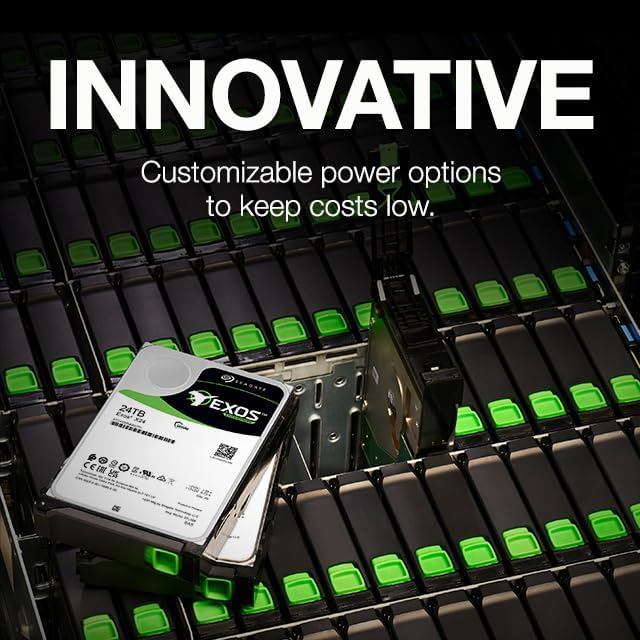
Image: Multiple Seagate Exos X24 hard drives in a server rack, emphasizing customizable power options for efficiency.
טראָובלעשאָאָטינג
If you encounter issues with your Seagate Exos X24 hard drive, consider the following common troubleshooting steps:
- דרייוו נישט דעטעקטירט:
- Check all cable connections (SATA data and power) to ensure they are secure.
- Verify the SATA port is enabled in your system's BIOS/UEFI settings.
- Test the drive in a different SATA port or with different cables if possible.
- Ensure your operating system's Disk Management (Windows) or Disk Utility (macOS/Linux) recognizes the drive, even if unformatted.
- פּאַמעלעך פאָרשטעלונג:
- קוקט נאך הינטערגרונט פראצעסן וואס פארנוצן דיסק רעסורסן.
- Ensure the drive is not excessively fragmented (for HDDs, defragmentation can improve performance).
- Verify that your SATA controller drivers are up to date.
- Monitor drive temperature; overheating can lead to performance throttling.
- ומגעוויינטלעך נויזיז:
- A clicking, grinding, or loud humming sound can indicate a potential drive failure. Immediately back up any accessible data and consider replacing the drive.
- Some enterprise drives may produce more audible operational sounds than consumer drives due to their design for high performance and reliability in server environments.
- דאַטן אָנווער:
- If data becomes inaccessible, avoid further operations on the drive to prevent overwriting.
- Seagate Exos drives often include Seagate Rescue Data Recovery Services. Refer to the warranty section or Seagate's official website for details on how to utilize this service.
ספּעסאַפאַקיישאַנז
| שטריך | דעטאַל |
|---|---|
| סאָרט | Seagate |
| מאָדעל נומער | ST24000NM002H |
| דיגיטאַל סטאָרידזש קאַפּאַציטעט | 24 טב |
| שווער דיסק צובינד | סעריאַל אַטאַטשט SCSI |
| קאַנעקטיוויטי טעכנאָלאָגיע | SATA |
| שווער דיסק פאָרם פאַקטאָר | 3.5 אינטשעס |
| שווער דיסק באַשרייַבונג | מעטשאַניקאַל שווער דיסק |
| שווער דרייוו ראָוטיישאַנאַל ספּיד | 7200 רפּם |
| פּונקט וואָג | 1.48 פונט |
| פּראָדוקט דימענשאַנז (LxWxH) | 5.79 X 4.01 X 1.03 אינטשעס |
| MTBF (מיטן צייט צווישן פייליערז) | 2.5 מיליאָן שעה |
| ספּעציעלע שטריך | דאַטאַ רעקאָווערי סערוויס |
וואָראַנטי און שטיצן
לימיטעד וואָראַנטי
The Seagate Exos X24 24TB Enterprise Internal Hard Drive (ST24000NM002H) is backed by a 5-יאָר לימיטעד וואָראַנטי. This warranty covers defects in materials and workmanship under normal use. For detailed terms and conditions, please refer to the official Seagate warranty statement available on their website or included with your product documentation.

Image: A badge indicating the Seagate 5-year limited warranty, symbolizing product reliability.
Seagate Rescue Data Recovery Services
Many Seagate drives, including the Exos X24, come with Seagate Rescue Data Recovery Services. This service helps protect your data against unexpected data loss due to mechanical failure, accidental deletion, or natural disaster. Activation and terms for this service can be found on the official Seagate webפּלאַץ.
טעכניש שטיצן
For technical assistance, driver downloads, firmware updates, or further product information, please visit the official Seagate support website. You can also contact Seagate customer support directly for personalized assistance.
- Official Seagate Webפּלאַץ: www.seagate.com
- סיגייט שטיצע: www.seagate.com/support


