1. הקדמה
This manual provides essential information for the safe and efficient operation of your Ulefone Armor Pad 2 Rugged Tablet. Please read this manual thoroughly before using the device to ensure proper functionality and to prevent damage. Keep this manual for future reference.
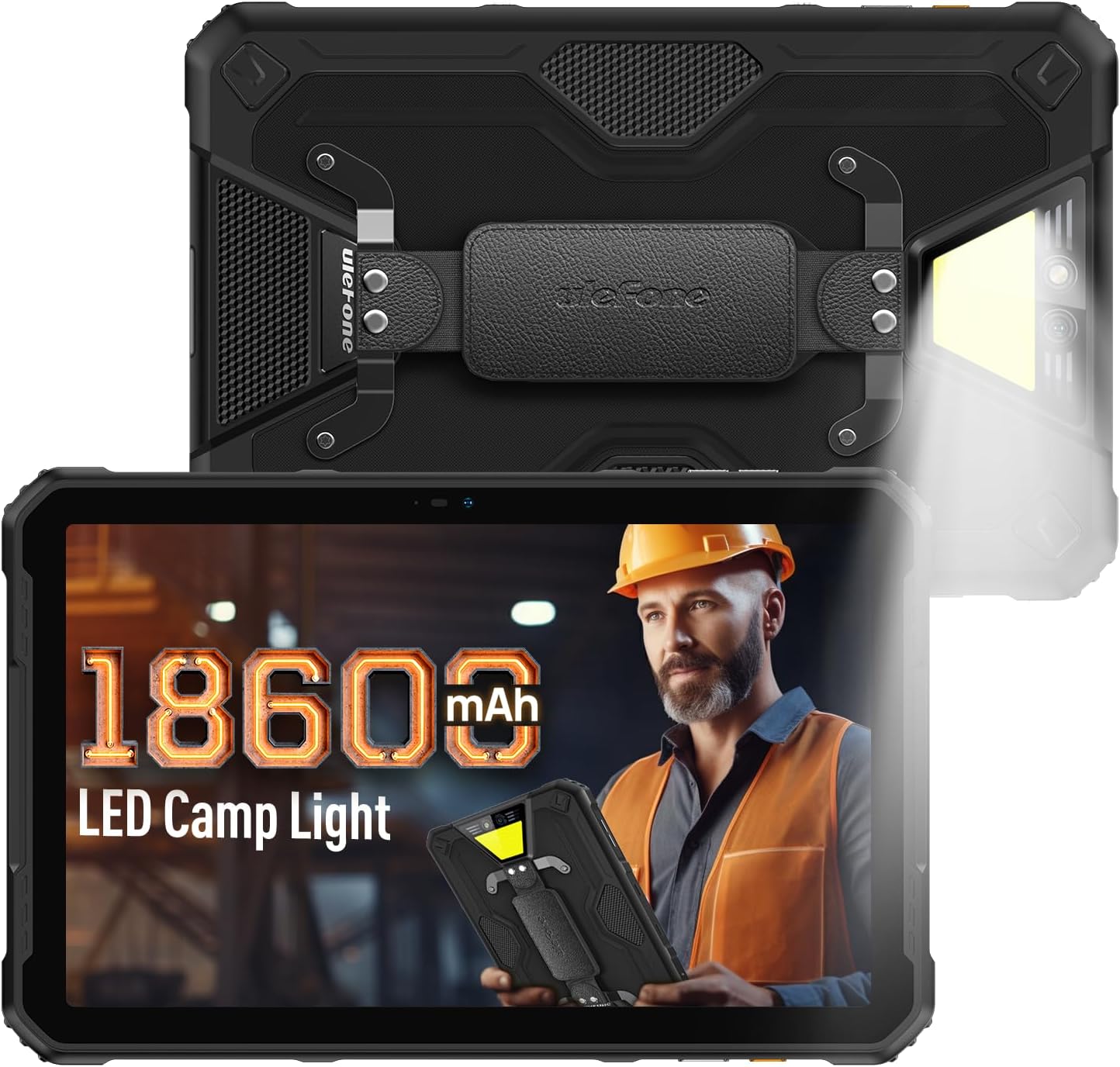
Figure 1: Ulefone Armor Pad 2 Rugged Tablet. This image displays the tablet from both front and back angles, highlighting its robust design and integrated campינג ליכט.
2. פּעקל אינהאַלט
באַשטעטיקן אַז אַלע זאכן זענען פאַראַן אין פּעקל:
- 1 x Ulefone Armor Pad 2 Tablet
- 1 x AC Power Charger
- 1 x USB Type-C 2.0 Charging Cable
- 1 x האַנט רימען
- 1 x שרויפנ - ציער
- 8 x Screws (for hand strap attachment)
- 1 x Protective Film (Pre-installed)
- 1 רענטגענ סים נאָדל
- 1 x באַניצער מאַנואַל (דאָס דאָקומענט)
Video 1: Armor Pad 2 Unboxing Video. This video demonstrates the unboxing process and shows all included accessories.
3. מיטל אויסלייג
Familiarize yourself with the physical components and ports of your Armor Pad 2 tablet.

פיגורע 2: איבערview of Ulefone Armor Pad 2 features. This image highlights various components such as the camera, camping light, uSmart connector, and buttons.
- פראָנט אַפּאַראַט: 16MP פֿאַר ווידעאָ קאַללס און סעלפֿיז.
- ווייַז: 11-inch 2K display with Corning Gorilla Glass 5.
- מאַכט קנעפּל: Located on the side, typically integrated with the fingerprint sensor.
- באַנד קנעפּלעך: אַדזשאַסטירן אַודיאָ לעוועלס.
- מנהג שליסל: Programmable button for quick access to functions (e.g., PTT, flashlight).
- וסב טיפּ-C פּאָרט: פֿאַר טשאַרדזשינג און דאַטן אַריבערפירן.
- 3.5 מם אַודיאָ דזשאַק: פֿאַר כעדפאָונז.
- סים/TF קאַרטל שפּעלטל: Supports dual Nano SIM cards and one TF card.
- דערציען אַפּאַראַט: 48MP main camera.
- Campמיט ליכט: 750 lumens LED light with multiple modes.
- uSmart Expansion Connector: For connecting compatible external accessories.
- צוויי סטערעאָ רעדנערס: Front-facing for clear and balanced audio.
4. סעטאַפּ
4.1 ערשט מאַכט אויף
- Press and hold the Power Button (usually on the side) until the Ulefone logo appears.
- פֿאָלגט די אינסטרוקציעס אויף דעם עקראַן צו פֿאַרענדיקן די ערשטע סעטאַפּ, אַרייַנגערעכנט שפּראַך אויסוואַל, Wi-Fi פֿאַרבינדונג און Google חשבון סעטאַפּ.
4.2 SIM/TF Card Installation
- Locate the SIM/TF card slot on the side of the tablet.
- Use the provided SIM needle to gently eject the card tray.
- Place your Nano SIM cards and/or TF card into the tray according to the diagram on the tray. Ensure correct orientation.
- Carefully reinsert the card tray into the slot until it clicks into place.
4.3 אויפלאָדן די טאַבלעט
- פֿאַרבינדט דעם USB טיפּ-C קאַבל צום טאַבלעט'ס טשאַרדזשינג פּאָרט.
- Connect the other end of the cable to the AC Power Charger.
- Plug the AC Power Charger into a wall outlet.
- דער טשאַרדזשינג אינדיקאַטאָר אויפן עקראַן וועט ווײַזן דעם טשאַרדזשינג סטאַטוס.
- For optimal charging, use the provided Ulefone charger and cable.

Figure 3: Battery and Charging Features. This image illustrates the tablet's large 18600mAh battery capacity, 33W fast charging capability, and support for reverse charging.
5. יקערדיק אָפּעראַציע
5.1 מאַכט אויף / אַוועק
- מאַכט אויף: Press and hold the Power Button until the device vibrates and the screen lights up.
- מאַכט אַוועק: Press and hold the Power Button for a few seconds, then select "Power off" from the options on the screen.
- ריסטאַרט: Press and hold the Power Button for a few seconds, then select "Restart" from the options.
5.2 טאָוטשסקרין דזשעסטשערז
Navigate your tablet using standard Android gestures:
- צאַפּן: אויסקלייבן אַן אייטעם אָדער אַקטיווירן אַ פונקציע.
- ריר און האלט: צוטריט קאנטעקסטועלע מעניוס אדער שלעפּן זאכן.
- לאַקכענען: סקראָלן דורך סקרינז, רשימות, אדער אינהאַלט.
- קניפּ-צו-זומען: פארגרעסערן אדער פארקלענערן בילדער און web בלעטער.
5.3 Custom Key Functions
The custom key on the side of the tablet can be programmed for various shortcuts:
- Access settings to assign single-click, double-click, and long-press actions.
- Common assignments include Push-to-Talk (PTT), flashlight, or quick camera launch.
5.4 הענטשקע מאָדע
Activate Glove Mode in settings to enable touchscreen responsiveness while wearing gloves, ideal for outdoor or industrial environments.
6. שליסל פֿעיִקייטן
6.1 שטאַרקער פּלאַן
The Armor Pad 2 is built to withstand harsh conditions:
- IP68/IP69K ראַטעד: Certified for water and dust resistance.
- MIL-STD-810H סערטיפיצירט: Meets military standards for durability against drops, shocks, and extreme temperatures.
- קאָרנינג גאָרילאַ גלאַס 5: Enhanced scratch and drop resistance for the display.

Figure 4: Ruggedness features. This image demonstrates the tablet's water, dust, and drop resistance, highlighting its IP68/IP69K and MIL-STD-810H certifications.
6.2 ווייַז
Experience clear visuals on the 11-inch 2K display:
- גרייס: 11-inch.
- רעזאלוציע: 2K (2000x1200 pixels).
- ברייטקייט: 500 nits for visibility in various lighting conditions.

Figure 5: 11-inch 2K Display. This image showcases the vibrant display protected by Corning Gorilla Glass 5.
6.3 פאָרשטעלונג
The tablet is powered by a MediaTek Helio G99 processor, ensuring smooth operation:
- פּראַסעסער: MediaTek Helio G99 (8-core, 2.2GHz, 6nm).
- באַראַן: Up to 16GB (8GB physical + 8GB virtual).
- אינערלעכער סטאָרידזש: 256 גיגאבייט.
- יקספּאַנדאַבאַל סטאָרידזש: Up to 2TB via TF card.
- אַפּערייטינג סיסטעם: אַנדרויד 13.

Figure 6: Performance specifications. This image details the MediaTek Helio G99 chipset, RAM, and ROM capabilities of the tablet.
6.4 קאַמעראַס
Capture moments with the integrated cameras:
- דערציען אַפּאַראַט: 48 מעגאַפּיקסעל.
- פראָנט אַפּאַראַט: 16 מעגאַפּיקסעל.

Figure 7: Camera capabilities. This image shows exampווייניקער פאָטאָס גענומען מיט די 48MP הינטן און 16MP פראָנט קאַמעראַס.
6.5 קאַנעקטיוויטי
Stay connected with a range of communication options:
- סעליאַלער: 4G Dual SIM Dual Standby (Note: Not compatible with AT&T, Cricket).
- ווי-פי: Wi-Fi 6 for faster wireless connections.
- בלועטאָאָטה: בלועטאָאָטה 5.2.
- נאַוויגאַציע: GPS + GLONASS + Galileo + BeiDou.
- NFC: פֿאַר קאָנטאַקטלאָזע צאָלונגען און דאַטן אויסטויש.
6.6 אַודיאָ
Enjoy immersive sound with:
- סטערעאָ צווייענדיקע רעדנערס: Front-facing for clear and balanced audio.
- 3.5 מם אַודיאָ דזשאַק: פֿאַר דראָטיקע כעדפאָונז.
6.7 סיampאין ליכט
The integrated 750 lumens LED camping light provides versatile illumination:
- ברייטקייט: 750 lumens, 383 lighting beads, 5.5 watts.
- מאָדעס: 3 lighting modes (e.g., Lighting, Sharp Light, SOS).
- ברייטנאַס לעוועלס: 3 אַדזשאַסטאַבאַל לעוועלס.
- Activated via a physical button for quick access.

Figure 8: 750LM Camping Light. This image shows the tablet's powerful integrated LED light in use during a campא סצענאַר.
6.8 uSmart Expansion Connector
Ulefone's exclusive uSmart Expansion offers fast and stable connections to professional tools with plug-and-play convenience. Compatible expansion devices (e.g., endoscope, 1000x microscope) require additional purchases.
Video 2: Ulefone Armor Pad 2 Rugged Tablet Overview. This video demonstrates various features including the uSmart Expansion Connector.
7. וישאַלט
- רייניקונג: ניצן אַ ווייך, דamp cloth to clean the tablet. Avoid harsh chemicals or abrasive materials. Ensure all port covers are securely closed before cleaning with liquids.
- Water/Dust Protection: Always ensure all port covers (USB, audio jack, SIM slot) are firmly sealed to maintain IP68/IP69K water and dust resistance.
- באַטערי זאָרגן: Avoid exposing the tablet to extreme temperatures. For long-term storage, charge the battery to approximately 50-70%.
- פאַרשטעלן פּראַטעקשאַן: The tablet comes with a pre-installed protective film. For additional protection, consider using a tempered glass screen protector.
8. טראָובלעשאָאָטינג
| פּראָבלעם | מעגלעך סיבה | לייזונג |
|---|---|---|
| די טאַבלעט גייט נישט אָן. | נידעריגע באַטעריע אָדער סיסטעם קראַך. | Charge the tablet for at least 30 minutes. If still unresponsive, press and hold the Power Button for 10-15 seconds to force restart. |
| דער טאָוטשסקרין רעאַגירט נישט. | Software glitch or screen damage. | Restart the tablet. If the issue persists, perform a factory reset (backup data first). If physical damage is suspected, contact support. |
| קענען ניט פאַרבינדן צו ווי-פי. | Incorrect password, router issue, or tablet Wi-Fi module issue. | Verify Wi-Fi password. Restart router and tablet. Try connecting to other Wi-Fi networks. |
| שלעכטע רוף קוואַליטעט אָדער קיין סיגנאַל. | Weak network signal, incorrect SIM installation, or carrier issue. | Move to an area with better signal. Reinstall SIM card. Contact your mobile carrier for network status. |
| די טאַבלעט איז פּאַמעלעך אָדער פרירט זיך. | צו פיל אַפּפּס לויפן, ווייניק סטאָרידזש, אָדער אַלטמאָדישע ווייכווארג. | Close unnecessary apps. Clear cache. Free up storage. Check for system updates. |
9. ספּעסאַפאַקיישאַנז
| שטריך | דעטאַל |
|---|---|
| מאָדעל | Ulefone Armor Pad 2 |
| דימענשאַנז | 10.94 X 7 X 0.55 אינטשעס |
| וואָג | 2.24 פונט |
| אָפּערייטינג סיסטעם | אַנדרויד 13 |
| פּראַסעסער | MediaTek Helio G99 (8-core, 2.2GHz) |
| באַראַן | Up to 16GB (8GB physical + 8GB virtual) |
| אינערלעכער סטאָרידזש | 256 גיגאבייט |
| יקספּאַנדאַבאַל סטאָרידזש | ביז 2TB (TF קאַרטל) |
| ווייַז | 11-inch 2K (1280 x 800 pixels, 500 nits, Corning Gorilla Glass 5) |
| דערציען אַפּאַראַט | 48MP |
| פראָנט אַפּאַראַט | 16MP |
| באַטאַרייע קאַפּאַציטעט | 18600 מאַה |
| טשאַרדזשינג | 33W Fast Charging, Reverse Charging (OTG) |
| געווער | IP68/IP69K, MIL-STD-810H סערטיפיצירט |
| קאַנעקטיוויטי | 4G דואַל סים, Wi-Fi 6, בלועטוט 5.2, NFC |
| נאַוויגאַציע | גפּס, GLONASS, Galileo, BeiDou |
| ספּעציעלע פֿעיִקייטן | 750לם סיamping Light, uSmart Expansion Connector, Custom Key, PTT, Digital Toolbox, Fingerprint Sensor, Glove Mode, Stereo Dual Speakers |
10. וואָראַנטי און שטיצן
Ulefone products come with a standard manufacturer's warranty. For detailed warranty information, technical support, or service inquiries, please visit the official Ulefone webזייטל אדער קאנטאקט זייער קאסטומער סערוויס גלייך. האלט אייער קויף קוויטל אלס באווייז פון קויפן פאר גאראנטיע קליימס.
Official Ulefone Webפּלאַץ: www.ulefone.com


