OKP Life L5 Robot Vacuum and Mop Combo User Manual
Your comprehensive guide to a cleaner home.
פּראָדוקט איבערview
The OKP Life L5 Robot Vacuum and Mop Combo is an advanced cleaning solution designed to simplify your home maintenance. Featuring cutting-edge LiDAR navigation, powerful 4000Pa suction, and versatile 2-in-1 sweeping and sonic mopping capabilities, it efficiently tackles dirt, debris, and pet hair on various floor types. With smart mapping, app control, and voice assistant compatibility, the L5 offers a highly customizable and convenient cleaning experience.

Figure 1: OKP Life L5 Robot Vacuum and Mop Combo
שליסל פֿעיִקייטן:
- 360° לידאַר נאַוויגאַציע: Creates accurate maps of your home for efficient and customizable cleaning routes.
- 2-in-1 Sweeping & Sonic Mopping: Combines powerful vacuuming with sonic vibration mopping for thorough cleaning of hard floors. Features a 160ml electric control water tank with 3-level water output.
- 4000Pa Deep Clean: Equipped with an advanced roller brush and two side brushes for strong suction on hardwood, tile, laminate, and low pile carpet. Option to use as a brushless suction port to prevent hair entanglement.
- Multiple Cleaning Modes & Smart Control: Offers Auto, Spot, and Edge cleaning modes. Set "no-go zones" and "invisible walls" via the OKP Life Smart App. Compatible with Alexa and Google Assistant (2.4GHz Wi-Fi required).
- Extended Runtime & Automatic Charging: Built-in 5200mAh lithium battery provides up to 200 minutes of cleaning in quiet mode, covering up to 1290ft². Automatically returns to the charging dock when battery is low.
סעטאַפּ גייד
1. Unboxing and Initial Preparation:
Carefully remove all components from the packaging. Ensure all accessories, including the charging dock, power adapter, dustbin, water tank, side brushes, and filters, are present. Install the side brushes by pressing them onto the designated posts on the underside of the robot.
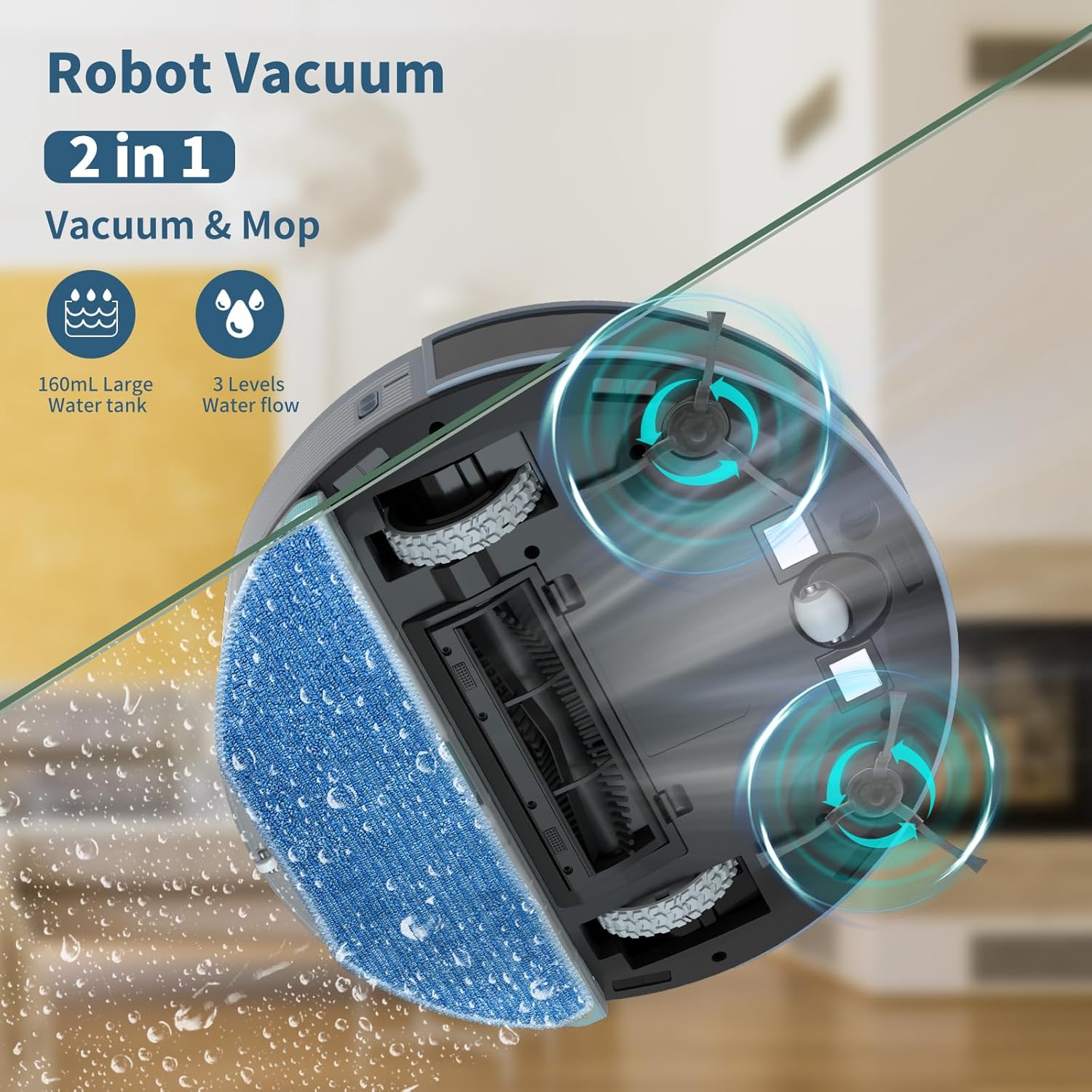
Figure 2: Underside of the robot with brushes and mop pad
2. Charging the Robot:
Place the charging dock against a wall in an open area, ensuring there are no obstacles within 1 meter (3 feet) to the sides and 1.5 meters (5 feet) in front. Connect the power adapter to the charging dock and plug it into a wall outlet. Place the robot onto the charging dock, ensuring the charging contacts align. The indicator light on the robot will show charging status.
3. App Connection and Wi-Fi Setup:
Download the "OKP Life Smart App" from your mobile app store. Open the app and follow the on-screen instructions to add your device. Ensure your Wi-Fi network is 2.4GHz, as 5G Wi-Fi is not supported. The app will guide you through connecting the robot to your home network. Once connected, you can link the robot to Alexa or Google Assistant for voice control.
Video 1: Initial setup and app connection for the OKP Life L5 Robot Vacuum.
אַפּערייטינג ינסטראַקשאַנז
1. רייניקונג מאָדעס:
- אַוטאָ רייניקונג: דער ראָבאָט נאַוויגירט און רייניקט קלוג דיין גאַנץ היים.
- אָרט רייניקונג: Focuses intense cleaning on a specific area, ideal for concentrated messes.
- ברעג רייניקונג: Cleans along walls and furniture edges to ensure no dust is left behind.
You can select these modes via the OKP Life Smart App or through voice commands if integrated with Alexa or Google Assistant.
2. LiDAR Navigation and Smart Mapping:
The L5 uses LiDAR technology to create and save accurate maps of your home. This allows for efficient navigation and the ability to customize cleaning schedules for different floors without re-mapping. Through the app, you can define "no-go zones" to restrict the robot from certain areas (e.g., pet bowls, delicate decor) or set "invisible walls" to create virtual barriers.

Figure 3: Robot mapping your home for efficient cleaning
3. Suction Power and Mopping:
The robot features 4000Pa suction power, effective for various debris including pet hair. It automatically boosts suction on carpets. For mopping, ensure the 160ml water tank is filled and attached. The robot offers 3-level water output control for different cleaning needs. Remember to remove the water tank when cleaning carpets to avoid wetting them.

Figure 4: Powerful 4000Pa suction for deep cleaning

Figure 5: Auto-boost feature on carpets
וישאַלט
1. Emptying the Dustbin:
Regularly empty the 450ml dustbin to maintain optimal suction performance. Press the release button to remove the dustbin, open it, and discard collected debris. Clean the high-efficiency filter as needed.
2. Cleaning the Water Tank and Mop Pad:
After mopping, remove the 160ml water tank by pressing the side buttons. Empty any remaining water and clean the tank. Detach the mop pad for washing. Ensure the mop pad is clean and dry before reattaching or storing.
3. Cleaning Brushes and Sensors:
Periodically check and clean the main roller brush and side brushes to remove tangled hair or debris. Use the provided cleaning tool for this purpose. Wipe the robot's sensors with a soft, dry cloth to ensure proper navigation and obstacle avoidance.
טראָובלעשאָאָטינג
פּראָסט ישוז און סאַלושאַנז:
- ראָבאָט לאָדט זיך נישט אויף: Ensure the charging contacts on both the robot and the dock are clean and properly aligned. Check if the power adapter is securely plugged in.
- ראָבאָט בלייבט אָפט שטעקן: Clear obstacles like loose cables, small toys, or thick rugs from the cleaning path. Use the app to set "no-go zones" for problematic areas.
- שלעכטע זויג-פעאיקייט: Empty the dustbin and clean or replace the filter. Check if the main brush or side brushes are tangled or damaged.
- מאַפּן נישט עפעקטיוו: Ensure the water tank is filled and the mop pad is clean. Adjust the water output level in the app if needed.
- אַפּ קאַנעקטיוויטי פּראָבלעמען: Verify your Wi-Fi is 2.4GHz. Restart your router and the robot. Try re-pairing the robot with the app.
For more detailed troubleshooting steps, please refer to the comprehensive user manual included with your product or contact OKP Life customer service.
ספּעסאַפאַקיישאַנז
| שטריך | באַשרייַבונג |
|---|---|
| סאָרט | OKP לעבן |
| מאָדעל נאָמען | ל-5 |
| פּראָדוקט דימענשאַנז | 12.59"ל x 12.59"בר x 3.85"ה |
| פּונקט וואָג | 3 פונט |
| סאַקשאַן מאַכט | 4000 פּאַ |
| דוסטבין קאַפּאַציטעט | 450 מיליליטער |
| וואַסער טאַנק קאַפּאַציטעט | 160 מיליליטער |
| באַטערי לעבן | 200 minutes (Quiet Mode) |
| קאָנטראָל מעטאָד | אַפּ, ווײַטקאָנטראָל, שטימע (אַלעקסאַ, גוגל אַסיסטאַנט) |
| פילטער טיפּ | הויך עפעקטיווקייַט פילטער |
| קאָליר | בלוי |
וואָראַנטי און שטיצן
The OKP Life L5 Robot Vacuum and Mop Combo comes with a One-Year Warranty service. For any questions, technical assistance, or warranty claims, please contact OKP Life customer service. Our dedicated A+ Customer service team is ready to assist you.
For contact information, please refer to the user manual provided in the product packaging or visit the official OKP Life webפּלאַץ.


