הקדמה
This manual provides detailed instructions for the setup, operation, and maintenance of your Zenwire USB-C Hub 10-in-1 Adapter. Please read this manual thoroughly before using the device to ensure optimal performance and longevity.

Image: The Zenwire USB-C Hub, a compact gray device, is shown connected to various cables and accessories, including HDMI, USB, Ethernet, and SD cards, illustrating its multi-functionality.
פּראָדוקט איבערview
The Zenwire USB-C Hub is a versatile 10-in-1 adapter designed to expand the connectivity of your USB-C enabled devices. It features a durable aluminum alloy shell for efficient heat dissipation.
Key Features and Ports:
- HDMI 2.1 פּאָרט: Supports resolutions up to 8K@30Hz or 4K@120Hz, with backward compatibility for lower resolutions.
- DisplayPort 1.4: Supports resolutions up to 8K@30Hz or 4K@120Hz, with backward compatibility for lower resolutions.
- USB-C Power Delivery (PD) 100W Port: Allows fast charging of your host device while using the hub, providing up to 100W power.
- 2x USB 3.0 פּאָרטן: Offers data transfer speeds up to 5 Gbps, 10 times faster than USB 2.0.
- סד קאָרט לייענער: Supports SD cards up to 2TB.
- מיקראָסד קאַרטל לייענער: Supports MicroSD cards up to 2TB.
- RJ-45 Gigabit Ethernet Port: Provides a stable wired internet connection with speeds up to 1000 Mbps.
- 3.5 מם אַודיאָ דזשאַק: For connecting headphones, microphones, or external speakers.
- USB-C 3.1 / Thunderbolt 3.0 Host Connection: Connects the hub to your laptop or compatible device.

בילד: א דעטאַלירטע view of the Zenwire USB-C Hub, highlighting its 10 ports including 3.5mm audio, Type-C PD100W, DP1.6, HDMI2.1, Gigabit Ethernet, USB3.0 5Gbps, SD, and MicroSD slots.

Image: A close-up of the Zenwire USB-C Hub, emphasizing its aluminum alloy shell designed for effective heat dissipation, ensuring the device remains cool during operation.
סעטאַפּ
- פאַרבינדן צו האָסט מיטל: Plug the integrated USB-C cable of the Zenwire Hub into a compatible USB-C or Thunderbolt 3.0/4.0 port on your laptop, tablet, or smartphone. The hub is Plug & Play and typically requires no driver installation.
- מאַכט צושטעלן (אָפּציאָנאַל): If your host device requires charging or if you are connecting power-intensive peripherals, connect your original USB-C power adapter to the USB-C PD 100W port on the hub.
- פאַרבינדן פּעריפעראַלס: Connect your desired devices (monitors, USB drives, Ethernet cable, SD/MicroSD cards, audio devices) to the corresponding ports on the hub.
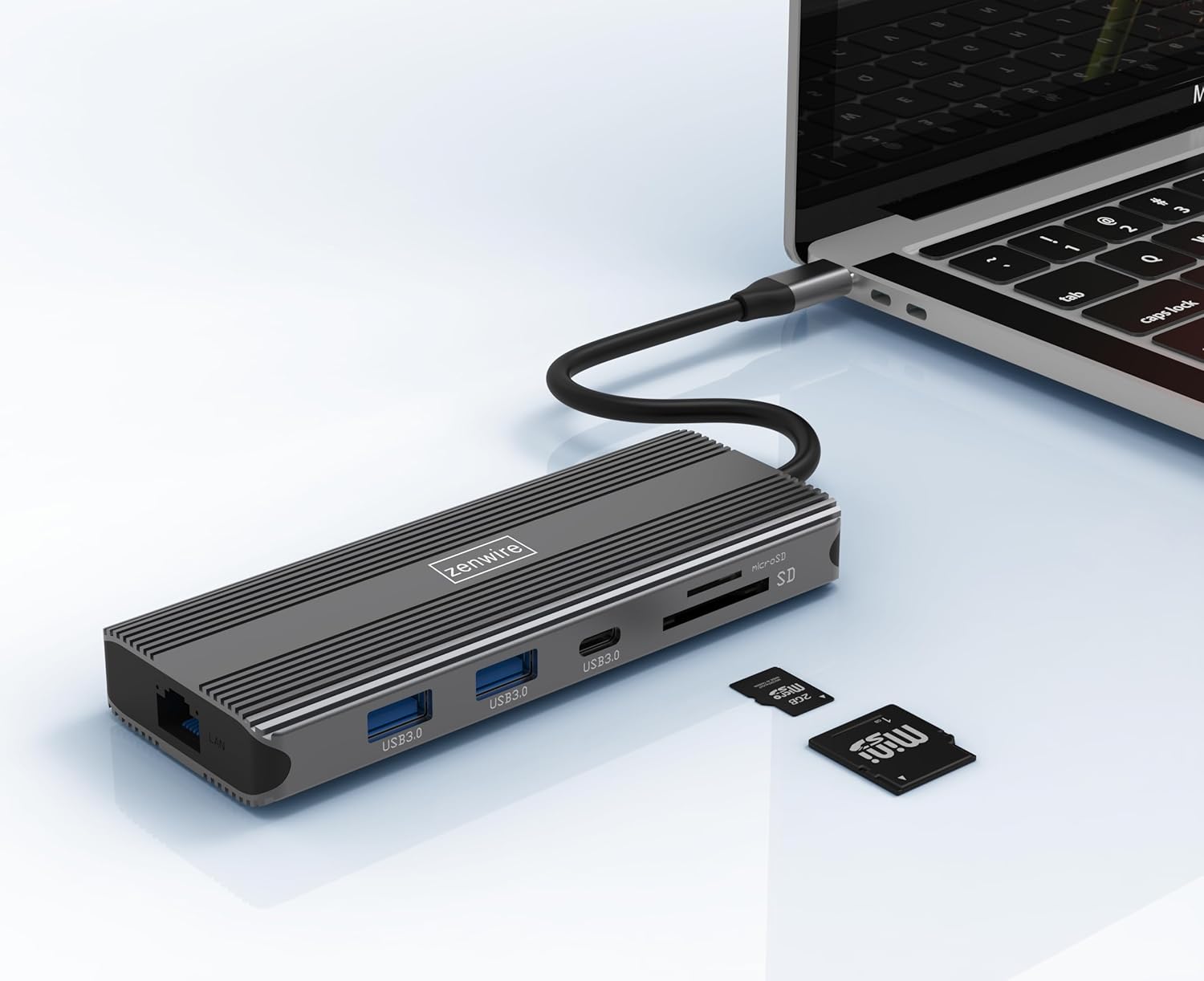
Image: The Zenwire USB-C Hub is shown connected to a laptop via its integrated USB-C cable, with SD and MicroSD cards placed nearby, illustrating a typical setup scenario.
אַפּערייטינג ינסטראַקשאַנז
אַרויסווייַז קאָנעקטיוויטי:
The hub supports connecting up to two external monitors simultaneously via its HDMI 2.1 and DisplayPort 1.4 interfaces. Both can display video in 4K@60Hz concurrently.
- Single Monitor: Connect your monitor to either the HDMI or DisplayPort.
- צוויי מאָניטאָרן: Connect one monitor to the HDMI port and another to the DisplayPort.

Image: A laptop is displayed connected to two larger external monitors, demonstrating the multi-display capability of the Zenwire USB-C Hub.
Multi-Display Modes (MacOS vs. Windows):
The behavior of multiple external displays can vary between operating systems.
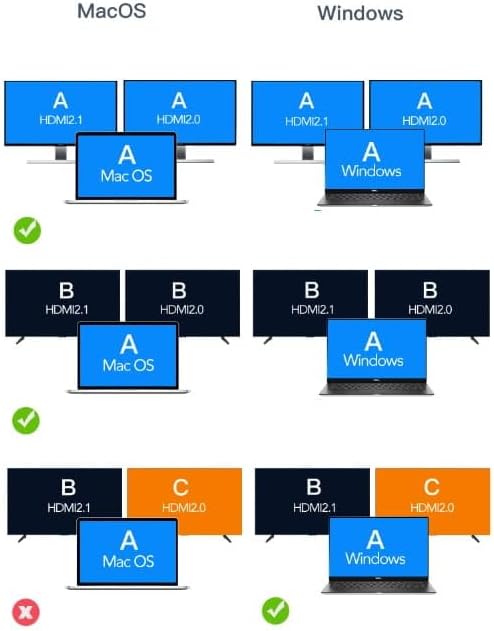
Image: A diagram illustrating different multi-display configurations for MacOS and Windows. It shows that MacOS typically supports extended desktop across two external monitors (A, B) and the laptop screen (A), while Windows can support extended desktop across three screens (A, B, C) or mirrored displays.
- מאַקאָס: Typically supports extended desktop across two external monitors (A, B) and the laptop screen (A). Mirroring is also supported.
- Windows: Supports extended desktop across three screens (A, B, C) or mirrored displays, offering more flexibility for multi-monitor setups.
HDMI 2.1 and DisplayPort 1.4 Advanced Features:
These ports offer higher refresh rates and advanced features for an enhanced visual experience:
- High Transfer Speeds: Up to 48 Gbps for HDMI 2.1, ensuring high data throughput.
- eARC (פאַרבעסערט אַודיאָ צוריקקער קאַנאַל): For higher audio quality and support for object-based audio formats like Dolby Atmos and DTS-X.
- VRR (Variable Refresh Rate): Useful for gaming, where refresh rates are not constant.
- ALLM (אַוטאָ נידעריק לייטאַנס מאָדע): Automatically detects content like games and switches the device to a low-latency mode.
- QMS (Quick Media Switching): The image on the screen changes immediately when switching between content.
- QFT (שנעל ראַם טראַנספּאָרט): Reduces input lag further.
- Dynamic HDR: Adjusts the image parameters during content transmission for higher quality visuals. Supports HDR 10 and 10+.
אַודיאָ קאַנעקטיוויטי:
The 3.5mm audio jack allows connection of various audio devices:
- מיקראָפאָנעס
- כעדפאָונז
- Headphones with integrated microphone
- פונדרויסנדיק ספּיקערז
וישאַלט
- רייניקונג: ניצט אַ ווייכע, טרוקענע שטאָף צו רייניקן דעם כאַב. פֿאַרמייַדט פֿליסיקע רייניגער אָדער אַברייסיוו מאַטעריאַלן.
- סטאָרידזש: האַלט דעם כאַב אין אַ קיל, טרוקן אָרט אַוועק פון דירעקט זונשייַן און עקסטרעמע טעמפּעראַטורן.
- האַנדלינג: ויסמיידן דראַפּינג די מיטל אָדער אונטערטעניק צו שטאַרק ימפּאַקץ.
- היץ דיסיפּיישאַן: The aluminum alloy shell is designed for effective heat dissipation. Ensure the hub is placed in a well-ventilated area during prolonged use.
טראָובלעשאָאָטינג
- קיין אַרויסווייַז רעזולטאַט:
- Ensure the USB-C cable from the hub is securely connected to your host device.
- Verify that the HDMI/DisplayPort cable is firmly connected to both the hub and the monitor.
- Check your host device's display settings to ensure the external monitor is detected and configured correctly (e.g., extended, mirrored).
- Try a different HDMI/DisplayPort cable or monitor to rule out cable/monitor issues.
- קיין מאַכט צושטעלן:
- זייט זיכער אז אייער USB-C מאַכט אַדאַפּטער איז פארבונדן צום כאַב'ס PD פּאָרט און אַרבעט ריכטיק.
- באַשטעטיקט אַז אייער האָסט דעווייס שטיצט USB-C פּאַוער דעליווערי.
- USB דעוויסעס נישט דערקענט:
- Reconnect the USB device to a different USB 3.0 port on the hub.
- Ensure the USB device is functioning correctly by connecting it directly to your host device.
- Some high-power USB devices may require external power if the hub's PD port is not utilized.
- עטערנעט קאַנעקשאַן פּראָבלעמען:
- Check if the Ethernet cable is securely connected to both the hub and your router/modem.
- וועריפֿיצירט נעץ סעטטינגס אויף אייער האָסט מיטל.
- Ensure your router/modem is working correctly.
- SD/MicroSD Card Not Detected:
- זיכער מאַכן אַז די קאַרטל איז גאָר אַרײַנגעשטעלט אין דעם ריכטיקן שפּאַלט.
- Check if the card is formatted correctly and readable by your operating system.
- Try a different card to rule out card issues.
ספּעסאַפאַקיישאַנז
| סאָרט | זענווירע |
| מאָדעל | Zenwire USB-C Hub |
| קאַנעקטיוויטי | USB-C 3.1 / Thunderbolt 3.0 (Host) |
| פּאָרץ |
|
| דאַטאַ טראַנספער ספּיד | USB 3.0: 5 Gbps; Ethernet: 1000 Mbps |
| מאַכט עקספּרעס | אַרויף צו 100 וו |
| מאַטעריאַל | אַלומינום צומיש שעל |
| דימענסיעס (L X W X H) | 118 X 48 X 15 מם |
| וואָג | 109 ג |
| קאַבלע לענג | בעערעך 15 סענטימעטער |
| אַפּערייטינג סיסטעם קאַמפּאַטאַבילאַטי | Windows 11/10/8/7, Apple macOS, Linux, Android, iPad Pro iOS (USB-C models) |

בילד: א ווינקלדיקע view of the Zenwire USB-C Hub, showcasing its compact design and the integrated USB-C host cable.
וואָראַנטי און שטיצן
Zenwire products are designed for reliability and performance. For warranty information and technical support, please refer to the official Zenwire webזייטל אדער קאָנטאַקט אייער הענדלער. האַלט אייער קויף קוויטל פֿאַר וואָראַנטי קליימז.
For the latest software updates or driver information (if applicable), please visit the Zenwire support page. This device is designed to be Plug & Play, generally not requiring additional drivers.


