הקדמה
This manual provides essential instructions for the setup, operation, and maintenance of your Telefunken TDV-322 DVD Player. Please read this manual thoroughly before using the device to ensure proper functionality and to prevent damage.
The Telefunken TDV-322 is designed to play various disc formats, offering versatile entertainment options for your home. It includes multiple output options for connecting to different television and audio systems.
פּראָדוקט איבערview
The Telefunken TDV-322 DVD Player is a compact device for playing DVDs and CDs. It features a front-loading disc tray, a digital display, and front-panel controls. Connectivity options are located on the rear panel.
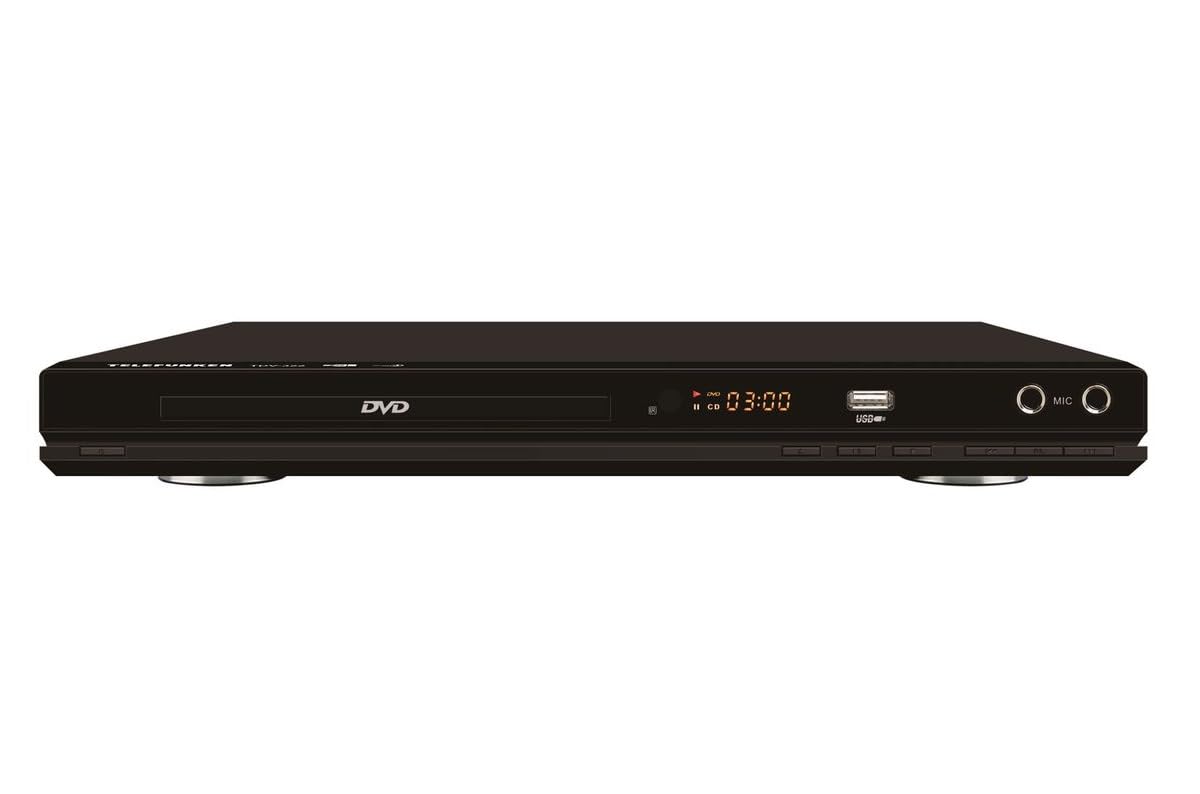
פיגורע 1: פראָנט view of the Telefunken TDV-322 DVD Player. The image displays the black unit with a central disc tray, a digital time display, a USB port, and two microphone input jacks on the right side. Below the disc tray are several control buttons.
שליסל פֿעיִקייטן
- Full DVD player functionality for various disc types.
- גרינג צו נוצן ווייַט קאָנטראָל פֿאַר באַקוועם אָפּעראַציע.
- Component video output for standard-definition television connections.
- Composite video output for older television models.
- Coaxial and optical digital audio outputs for surround sound system integration.
- Parental control features for content management.
- Compatibility with DVD, DVD-R, DVD-RW, VCD, SVCD, CD, CD-R, CD-RW, MP3, WMA, JPEG, and MPEG4 files.
סעטאַפּ אינסטרוקציעס
1. ונפּאַקקינג
Carefully remove the DVD player and all accessories from the packaging. Retain the packaging for future transport or storage.
2. Connecting to a Television
The TDV-322 offers several video output options:
- קאָמפּאָנענט ווידעאָ אַרויסגאַנג: Use a component video cable (red, green, blue connectors) to connect the DVD player's component output jacks to the corresponding input jacks on your standard-definition TV.
- קאָמפּאָסיטע ווידעא רעזולטאַט: Use a composite video cable (yellow connector) to connect the DVD player's composite video output jack to the video input jack on an older TV.
Note: This DVD player does not feature an HDMI port. Ensure your television has compatible input ports.
3. זיך פֿאַרבינדן צו אַן אַודיאָ סיסטעם
For enhanced audio, connect the DVD player to an external audio system:
- קאָאַקסיאַל דיגיטאַל אַודיאָ רעזולטאַט: Use a coaxial digital audio cable to connect the DVD player's coaxial output to a compatible input on your surround sound receiver.
- אָפּטיש דיגיטאַל אַודיאָ רעזולטאַט: Use an optical digital audio cable to connect the DVD player's optical output to a compatible input on your surround sound receiver.
4. מאַכט קאַנעקשאַן
Connect the power cord to the DVD player's power input and then plug it into a standard electrical outlet.
אַפּערייטינג ינסטראַקשאַנז
1. גרונטלעכע ווידערשפּיל
- דרוק די מאַכט קנעפּל אויף דער פראָנט פּאַנעל אָדער ווייַט קאָנטראָל צו אַקטיוויזירן דעם שפּילער.
- דרוק די עפענען / נאָענט קנעפּל צו עפענען די דיסק טאַץ.
- לייגט אַ דיסק (DVD, CD, אאז"וו) פֿאָרזיכטיק אויף דער דיסק טאַץ מיט דער עטיקעט זײַט אַרויף.
- דרוק די עפענען / נאָענט קנעפּל ווידער צו פאַרמאַכן דעם טאַץ.
- The player will automatically begin playback or display a menu.
- ניצן די שפּיל / פּויזע, האַלטן, פֿאָרווערטס, און פאַרקערט קנעפּלעך אויף דער ווײַטקאָנטראָל אָדער פראָנט פּאַנעל צו פאַרוואַלטן פּלייבאַק.
2. ניצן די רימאָוט קאָנטראָל
The included remote control provides full functionality for the DVD player. Refer to the remote control diagram (not provided in this manual) for specific button layouts. Ensure batteries are correctly inserted.
3. וסב פּלייַבאַקק
Insert a USB flash drive into the USB port on the front panel. The player will detect the drive and allow you to browse and play compatible media files (MP3, WMA, JPEG, MPEG4).
4. פּאַרענטאַל קאָנטראָלס
The DVD player includes parental control features to restrict playback of certain content. Access these settings through the system menu using the remote control. A password may be required to enable or disable these features.
וישאַלט
- רייניקונג די אַפּאַראַט: Wipe the exterior of the DVD player with a soft, dry cloth. Do not use liquid cleaners or abrasive materials.
- דיסק באַהאַנדלונג: Handle discs by their edges. Keep them clean and free of scratches. Use a soft, lint-free cloth to wipe discs from the center outwards.
- ווענטילאַטיאָן: Ensure the DVD player has adequate ventilation. Do not block any ventilation openings.
- סטאָרידזש: When not in use for extended periods, disconnect the power cord and store the unit in a cool, dry place.
טראָובלעשאָאָטינג
| פּראָבלעם | מעגלעך סיבה | לייזונג |
|---|---|---|
| קיין מאַכט | עלעקטרישע שנור נישט פארבונדן; עלעקטרישע ווענטיל נישט אקטיוו. | Ensure power cord is securely connected. Check power outlet with another device. |
| קיין ווידעא רעזולטאַט | Video cables incorrectly connected; Incorrect TV input selected. | Verify component or composite video cables are securely connected to the correct input on your TV. Select the correct input source on your TV. |
| קיין אַודיאָ רעזולטאַט | Audio cables incorrectly connected; Incorrect audio input selected on receiver/TV; Volume too low. | Check coaxial/optical audio connections. Ensure the correct audio input is selected on your audio system or TV. Increase volume. |
| די דיסק שפּילט נישט | די דיסק איז שמוציג אדער צוקראצט; די דיסק איז נישט ריכטיג אריינגעלייגט; די דיסק פֿאָרמאַט איז נישט געשטיצט. | Clean the disc. Reinsert the disc with the label side up. Verify the disc format is supported (DVD, CD, VCD, SVCD). |
| ווייַט קאָנטראָל נישט ארבעטן | באַטעריעס זענען טויט אָדער נישט ריכטיק אַרײַנגעשטעלט; אַ שטערונג צווישן דער ווײַטקאָנטראָלירער און דעם שפּילער. | טוישן די באַטעריעס. זיכער מאַכן אַז די באַטעריע איז ריכטיק פּאָלאַריטעט. אַראָפּנעמען אַלע שטערונגען. ריכטן די ווייַט קאָנטראָל גלייך אויף דעם שפּילער'ס סענסאָר. |
ספּעסאַפאַקיישאַנז
| שטריך | דעטאַל |
|---|---|
| מאָדעל נומער | TDV-322 |
| סאָרט | טעלעפונקן |
| קאָליר | שוואַרץ |
| שטיצט דיסק פֿאָרמאַטירונגען | DVD, DVD-R, DVD-RW, VCD, SVCD, CD, CD-R, CD-RW |
| געשטיצט File פאָרמאַץ | MP3, WMA, JPEG, MPEG4 (via USB) |
| ווידעא אַוטפּוץ | קאָמפּאָנענט ווידעא, קאָמפּאָסיטע ווידעא |
| אַודיאָ אַוטפּוץ | Coaxial Digital Audio, Optical Digital Audio |
| נאָך פּאָרץ | USB port, Microphone inputs |
וואָראַנטי אינפֿאָרמאַציע
The Telefunken TDV-322 DVD Player comes with a 1 יאָר מאַנופאַקטורער וואָראַנטי. Please retain your proof of purchase for warranty claims. For details regarding warranty terms and conditions, refer to the warranty card included with your product or contact Telefunken customer support.
קונה שטיצן
If you encounter any issues not covered in the troubleshooting section or require further assistance, please contact Telefunken customer support. Contact information can typically be found on the product packaging, the official Telefunken website, or the warranty documentation.
When contacting support, please have your model number (TDV-322) and purchase details ready.


