1. הקדמה
Thank you for choosing the Defender Enjoy S200 Portable Bluetooth Speaker. This manual provides essential information for setting up, operating, and maintaining your speaker to ensure optimal performance and longevity. Please read this manual thoroughly before use.
The Defender Enjoy S200 is a versatile portable speaker featuring Bluetooth 5.3 connectivity, True Wireless Stereo (TWS) pairing, an integrated FM radio, and MP3 playback capabilities via USB flash drive or microSD card. It also includes an LED light and supports hands-free calling. Designed for portability, it offers up to 9 hours of playback on a single charge and convenient USB Type-C charging.
2. פּראָדוקט איבערview
2.1 שליסל פֿעיִקייטן
- בלועטאָאָטה 5.3: For stable and efficient wireless audio streaming.
- אמת ווירעלעסס סטערעאָ (TWS): Connect two Enjoy S200 speakers for a stereo sound experience.
- קייפל פּלייַבאַקק מאָדעס: Bluetooth, FM Radio, USB Flash Drive, MicroSD Card (up to 32GB).
- ינטעגראַטעד געפירט ליכט: Provides visual ambiance.
- הענט-פריי רופן: געבויט-אין מיקראָפאָן פֿאַר טעלעפאָן קאַללס.
- לאנג באַטאַרייע לעבן: Up to 9 hours of continuous music playback.
- USB Type-C טשאַרדזשינג: מאָדערן און באַקוועם טשאַרדזשינג פּאָרט.
- פּאָרטאַטיוו פּלאַן: Compact and lightweight with a carrying strap.
2.2 פּעקל אינהאַלט
- Defender Enjoy S200 Portable Bluetooth Speaker
- טיפּ-C טשאַרדזשינג קאַבלע
- שנעל אָנהייב גייד
- קעריינג רימען

Image: The Defender Enjoy S200 Portable Bluetooth Speaker, showcasing its compact design and front grille with an illuminated LED ring.

Image: An infographic highlighting key features such as multi-colored LED lighting, True Wireless Stereo (TWS) pairing, Bluetooth 5.3, MP3 player, FM receiver, and hands-free calling.
3. סעטאַפּ
3.1 אויפלאָדן דעם רעדנער
- Locate the Type-C charging port on the back of the speaker.
- Connect the provided Type-C charging cable to the speaker and the other end to a USB power adapter (not included) or a computer's USB port.
- דער LED אינדיקאַטאָר וועט ווײַזן דעם טשאַרדזשינג סטאַטוס. א פולע טשאַרדזשינג נעמט טיפּיש אַרום 3-4 שעה.
- אָפּשטעקן דעם קאַבל אַמאָל גאָר אָפּגעלאָדן.
3.2 פּאַוערינג אויף / אַוועק
- To power on, slide the ON/OFF switch located on the back of the speaker to the 'ON' position.
- צו אויסלאָשן, רוקט דעם אָן/אויס קנעפּל צו דער 'אויס' פּאָזיציע.
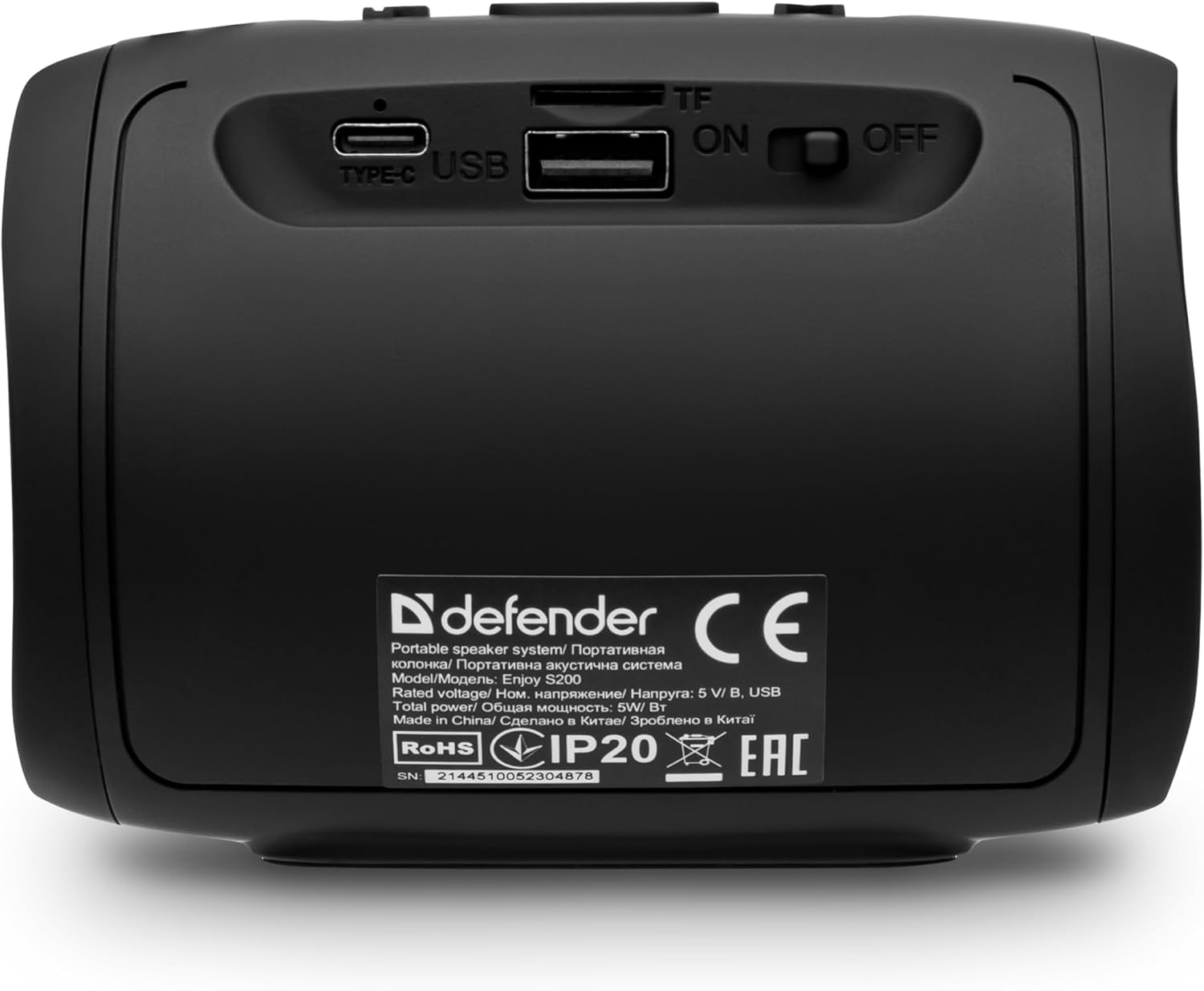
בילד: הינטערשטע view of the Defender Enjoy S200 speaker, showing the Type-C charging port, USB port, TF (microSD) card slot, and the ON/OFF power switch.
3.3 בלועטאָאָטה פּערינג
- זיכער מאַכן אַז דער רעדנער איז אנגעצונדן און אין בלועטוט פּערינג מאָדע (אנגעצייכנט דורך אַ בלינקנדיקע LED).
- אויף אייער דעווייס (סמאַרטפאָן, טאַבלעט, אאז"וו), אַקטיווירט בלועטוט און זוכט פֿאַר פֿאַראַן דעווייסעס.
- Select "Defender Enjoy S200" from the list of devices.
- Once paired, the speaker will emit a confirmation sound, and the LED will stop flashing.
3.4 אמתע ווירעלעס סטערעאָ (TWS) פּאָרינג
To pair two Defender Enjoy S200 speakers for stereo sound:
- זיכער מאַכן אַז ביידע רעדנערס זענען אנגעצונדן און נישט פארבונדן צו קיין בלוטוט דעווייס.
- On one speaker (this will be the primary speaker), press and hold the TWS button (often indicated by a double-arrow icon) until you hear a pairing tone.
- The two speakers will automatically search and connect to each other. A confirmation tone will sound once connected.
- איצט, פֿאַרבינדט אייער דעווייס צום הויפּט רעדנער דורך בלועטוט ווי באַשריבן אין סעקציע 3.3. די אַודיאָ וועט שפּילן אין סטערעאָ דורך ביידע רעדנער.

Image: A visual representation of two Defender Enjoy S200 speakers pairing wirelessly to create a True Wireless Stereo system, alongside icons for Bluetooth 5.3, MP3 player, FM receiver, and hands-free calling.
4. אַפּערייטינג ינסטרוקטיאָנס
4.1 Button Functions (Refer to top panel controls)
- מאַכט קנעפּל: Long press to power on/off. Short press to play/pause in music mode, or answer/end calls.
- באַנד אַרויף (+): Short press to increase volume. Long press for next track/station.
- באַנד אַראָפּ (-): Short press to decrease volume. Long press for previous track/station.
- מאָדע (M) קנעפּל: Short press to switch between Bluetooth, FM Radio, USB, and MicroSD modes.
- געפירט ליכט קנעפּל: Short press to cycle through LED light modes or turn off the LED.
4.2 בלועטוט פּלייבּעק
After successful Bluetooth pairing (Section 3.3), open your music application on your device and begin playback. Use the speaker's volume buttons or your device's volume controls to adjust the audio level.
4.3 עפעם ראַדיאָ מאָדע
- Press the 'M' (Mode) button until you hear the FM radio prompt.
- Long press the Play/Pause button to automatically scan and save available FM stations.
- Use the Volume Up (+) and Volume Down (-) buttons (long press) to navigate between saved stations.
4.4 USB/MicroSD Playback
- Insert a USB flash drive or a microSD card (up to 32GB) containing MP3 audio files into the respective port on the back of the speaker.
- Press the 'M' (Mode) button until the speaker automatically switches to USB or MicroSD mode and begins playback.
- Use the speaker's control buttons for play/pause, next track, and previous track.
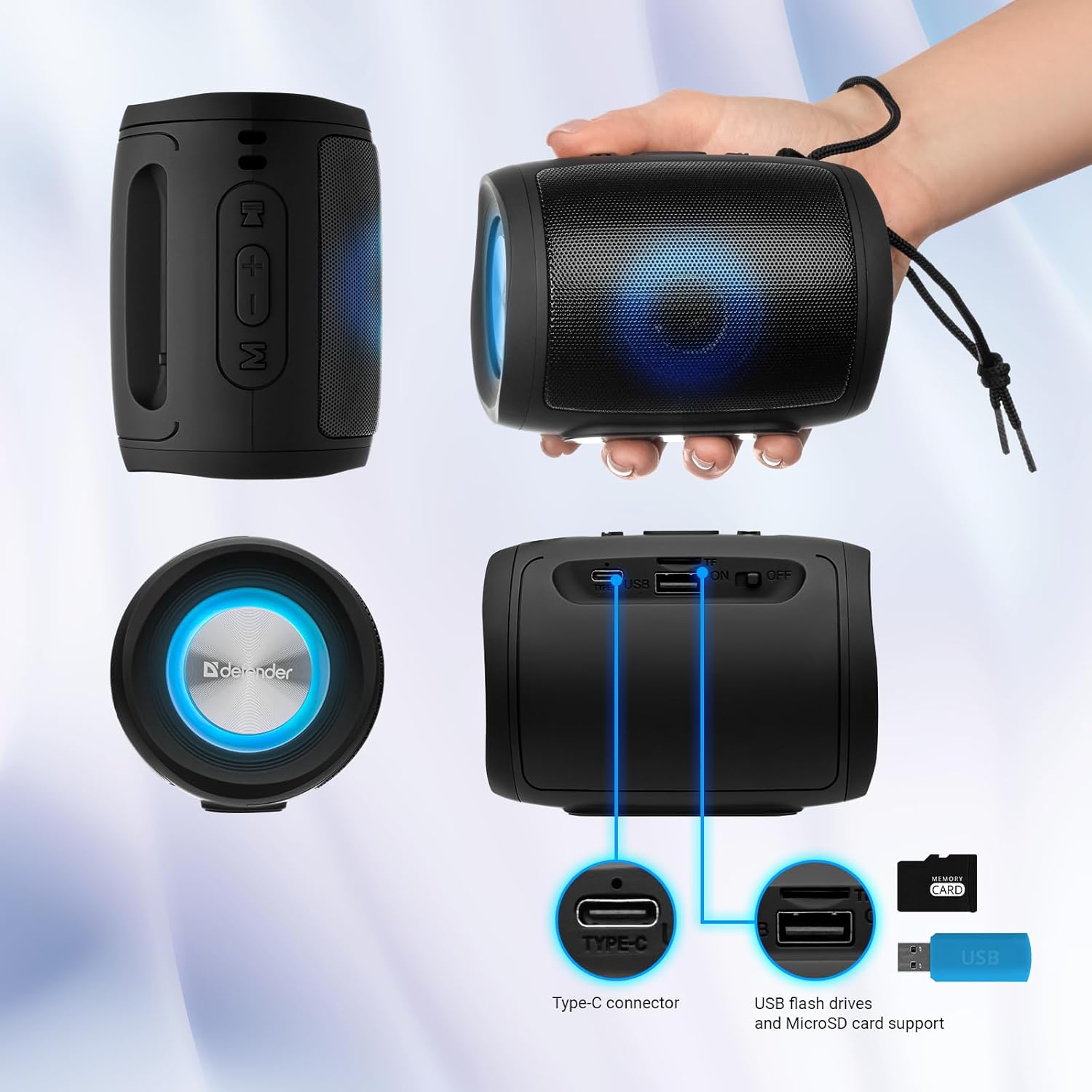
Image: A detailed diagram illustrating the Type-C connector, USB flash drive port, and MicroSD card slot on the Defender Enjoy S200 speaker.
4.5 הענט-פריי רופן
When connected to your smartphone via Bluetooth, the speaker's built-in microphone allows for hands-free calls.
- ענטפער רופן: קורץ דריקן די שפּיל / פּויזע קנעפּל.
- סוף רופן: קורץ דריקן די שפּיל / פּויזע קנעפּל.
- אָפּוואַרפן רופן: לאנג דריקן די שפּיל / פּויזע קנעפּל.
5. וישאַלט
- רייניקונג: ניצט אַ ווייכע, טרוקענע שטאָף צו רייניקן די רעדנער'ס ייבערפלאַך. ניצט נישט קיין שרײַבנדיקע רייניגער אָדער סאָלווענטן.
- סטאָרידזש: האַלט דעם רעדנער אין אַ קיל, טרוקן אָרט אַוועק פון דירעקט זונשייַן און עקסטרעמע טעמפּעראַטורן.
- וואַסער קעגנשטעל: The speaker has an IP20 rating, meaning it is protected against solid objects larger than 12.5mm but has no protection against water. Avoid exposure to rain, splashes, or immersion in water.
- באַטערי זאָרגן: To prolong battery life, fully charge the speaker before first use and recharge it at least once every three months if not used regularly.
6. טראָובלעשאָאָטינג
- קיין מאַכט: Ensure the speaker is charged. Connect the Type-C cable and allow it to charge for a few minutes before attempting to power on again.
- קיין קול: Check the volume levels on both the speaker and your connected device. Ensure the speaker is in the correct mode (Bluetooth, FM, USB, MicroSD).
- בלועטאָאָטה פּערינג ישוז: Ensure the speaker is in pairing mode. Turn off Bluetooth on your device and turn it back on. Try unpairing and re-pairing the speaker. Move closer to the speaker to ensure you are within the 10-meter range.
- FM Radio Reception Poor: Ensure you are in an area with good signal. The charging cable can sometimes act as an antenna; try connecting it for improved reception.
- USB/MicroSD Not Playing: פאַרזיכערן די אַודיאָ files are in a compatible format (e.g., MP3). Check that the USB drive or microSD card is inserted correctly and is not corrupted.
7. ספּעסאַפאַקיישאַנז
| מאָדעל נאָמען | הנאה S200 |
| נומער מאָדעל נומער | 65200 |
| סאָרט | דעפענדער |
| קאַנעקטיוויטי טעכנאָלאָגיע | בלועטאָאָטה 5.3, וסב |
| ווירעלעסס קאָמוניקאַציע טעכנאָלאָגיע | Bluetooth, Radio Frequency |
| רעדנער טיפּ | מולטימעדיאַ |
| רעדנער גרייס | 2 אינטשעס |
| מאַכט רעזולטאַט | 5 וואטס |
| אַודיאָ רעזולטאַט מאָדע | סטערעאָ |
| מאַכט מקור | באַטעריע געטריבן (1 ליטהיום-יאָן באַטעריע אַרייַנגערעכנט) |
| ספּעציעלע פֿעיִקייטן | Integrated Microphone, USB Port, Portable Bluetooth, LED Light, FM Radio, MicroSD Card Support, TWS |
| פּראָדוקט דימענשאַנז (L x W x H) | 8 X 11 X 8 סענטימעטער |
| וואָג | 330 גראַמז |
| מאַקסימום קייט | 10 מעטער |
| IP שאַץ | IP20 |
8. וואָראַנטי און שטיצן
8.1 וואָראַנטי אינפֿאָרמאַציע
ספּעציפֿישע וואָראַנטי דעטאַלן ווערן טיפּיש צוגעשטעלט מיט אייער קויפן דאָקומענטאַציע אָדער אויף דער פאַבריקאַנט'ס באַאַמטער website. Please refer to these resources for information regarding warranty coverage and duration.
8.2 קונה שטיצן
For technical assistance, troubleshooting beyond this manual, or inquiries about your Defender Enjoy S200 speaker, please contact Defender Global customer support. Contact information can usually be found on the product packaging, the manufacturer's webוועבזייטל, אדער אייער קויף קוויטל.


