הקדמה
This manual provides comprehensive instructions for the setup, operation, and maintenance of your Callez RJ9 Phone Headset. Designed for professional communication, this headset offers clear audio and comfortable wear for extended periods.

Figure 1: Callez RJ9 Phone Headset with in-line controls and RJ9 connector.
וואָס איז אין די קעסטל
Your Callez RJ9 Phone Headset package includes:
- Callez RJ9 Phone Headset (Model C502C1)
- באַניצער מאַנואַל (דעם דאָקומענט)
- Additional RJ9 adapters (for various phone models)
שליסל פֿעיִקייטן
- קריסטאַל קלאָר קאַללס: Equipped with a noise-cancelling microphone to reduce background noise and an Acoustic Shock Protection Circuit to safeguard your hearing.
- Super Comfortable Design: Lightweight construction with an adjustable headband and soft leatherette ear cushions for extended wear comfort.
- באַקוועם אין-שורה קאָנטראָלס: Features a professional microphone mute button and a volume control wheel for easy audio management.
- דוראַבאַל קאַנסטראַקשאַן: Precision-engineered with quality plastics and a unibody headband for enhanced longevity.
- פלעקסאַבאַל מיקראָפאָן בום: The microphone boom is flexible and can be rotated 330 degrees for optimal positioning.
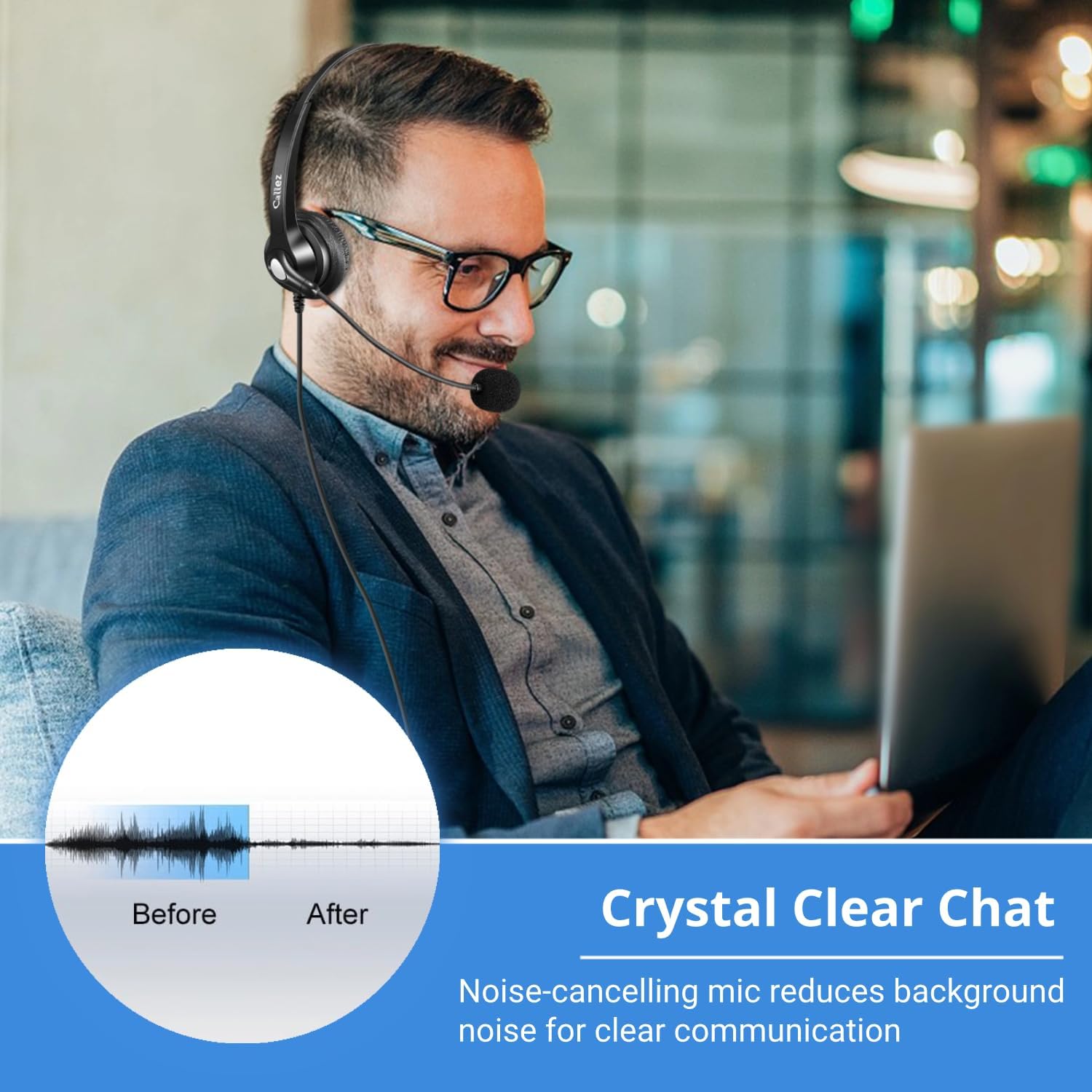
Figure 2: Noise-cancelling microphone for clear communication.

Figure 3: Microphone with 330-degree rotation for flexible use.
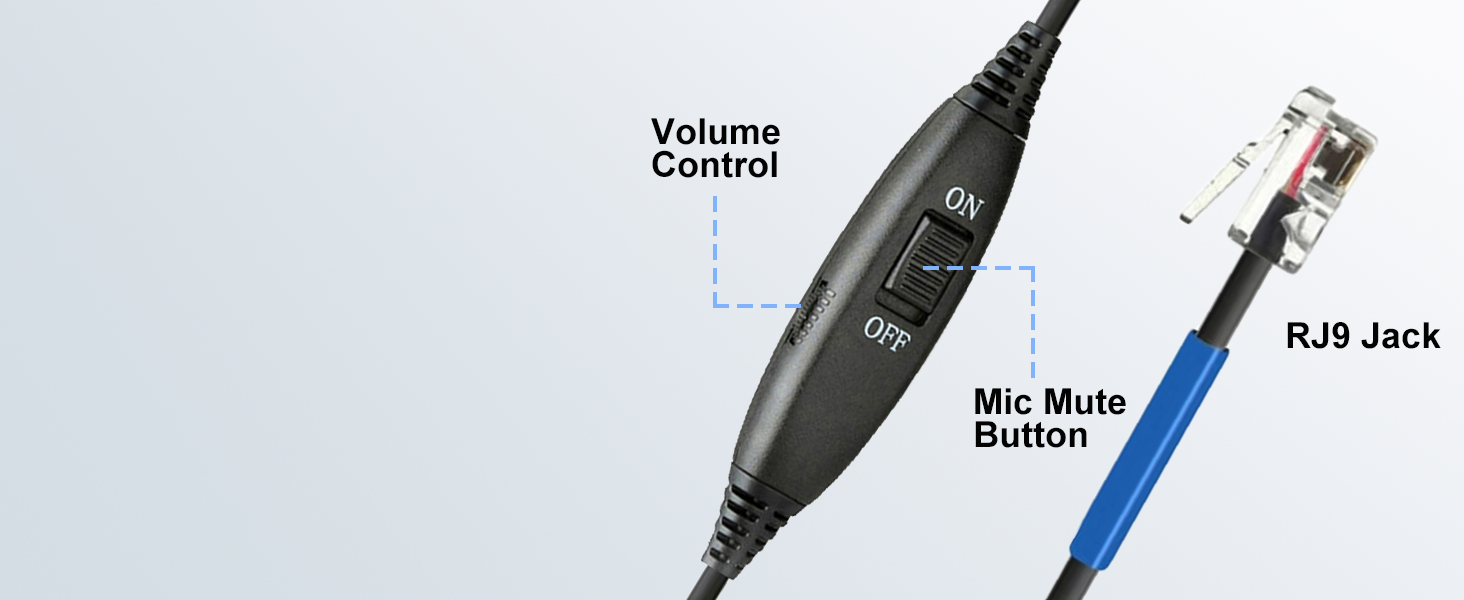
Figure 4: Adjustable headband for a comfortable fit.
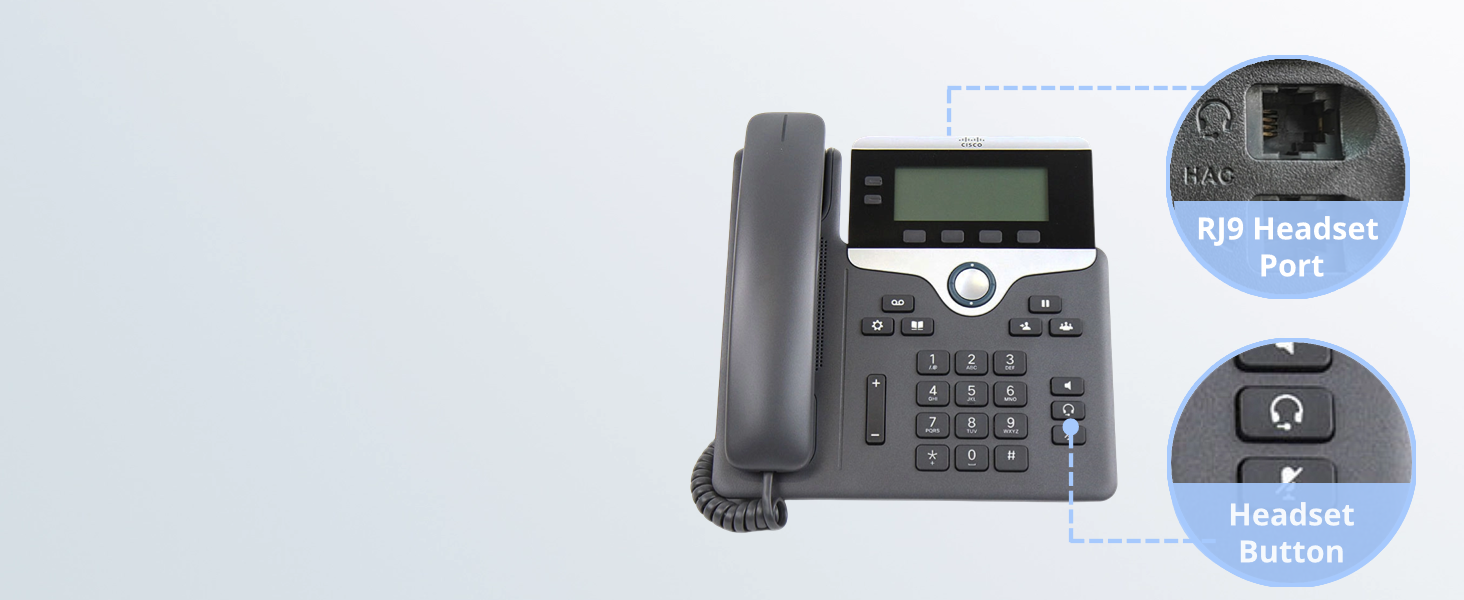
Figure 5: Diagram illustrating the in-line volume control and microphone mute button.
קאַמפּאַטאַבילאַטי
The Callez RJ9 Phone Headset is specifically designed for use with certain Cisco IP Phones and Plantronics Amplifiers. Please verify your device's compatibility before use.
קאַמפּאַטאַבאַל דעוויסעס:
- פּלאַנטראָניקס Ampליפערז: M10, M12, M22, MX10
- Cisco IP Phones: 7931G, 7940, 7940G, 7941, 7941G, 7942, 7942G, 7945, 7945G, 7960, 7960G, 7961, 7961G, 7962, 7962G, 7965, 7965G, 7970, 7970G, 7971, 7971G, 7975, 7975G, 6821, 6841, 6851, 6861, 6871, 6921, 6941, 6945, 6961, 7811, 7821, 7841, 7861, 8811, 8841, 8845, 8851, 8861, 8941, 8945, 8961, 9951, 9971.
NOTE: NOT compatible with Cisco SPA phone series, smartphones, or computers.

Figure 6: Visual guide to compatible Cisco IP Phones and the RJ9 jack connection.
סעטאַפּ אינסטרוקציעס
- Identify the RJ9 Port: Locate the RJ9 headset port on your compatible Cisco IP Phone or Plantronics Amplifier. This port is typically labeled with a headset icon.
- פֿאַרבינדן דעם כעדסעט: Insert the RJ9 connector of your Callez headset firmly into the RJ9 headset port. Ensure a secure connection.
- סטרויערן העאַדבאַנד: Place the headset on your head and adjust the headband by sliding the earpieces up or down until they rest comfortably over your ears.
- פּאָזיציע מיקראָפאָן: Gently bend the flexible microphone boom and rotate the microphone (up to 330 degrees) until it is positioned approximately 1-2 inches from your mouth for optimal voice pickup.
- Secure Cable (Optional): Use the integrated clip on the in-line control unit to attach the cable to your clothing, preventing tangles and providing strain relief.

Figure 7: Close-up of an RJ9 headset port and headset button on a Cisco IP Phone.
אַפּערייטינג ינסטראַקשאַנז
- מאַכן/באַקומען רופן: Once connected, you can typically use the headset by pressing the dedicated headset button on your Cisco IP Phone. Refer to your phone's manual for specific call handling procedures.
- באַנד קאָנטראָל: Use the volume control wheel on the in-line control unit to adjust the listening volume of the headset. Roll the wheel up to increase volume and down to decrease.
- מיקראָפאָן שטום: To mute your microphone, slide the "ON/OFF" switch on the in-line control unit to the "OFF" position. Slide it back to "ON" to unmute.

Figure 8: User demonstrating the use of in-line controls for volume and mute.
וישאַלט
- רייניקונג: Wipe the headset with a soft, dry cloth. Do not use harsh chemicals or abrasive cleaners.
- סטאָרידזש: האַלט די כעדסעט אין אַ קיל, טרוקן אָרט אַוועק פון דירעקט זונשייַן און עקסטרעמע טעמפּעראַטורן.
- קאַבלע זאָרגן: פֿאַרמײַדט שאַרפֿע בייגן אָדער איבערגעטריבענע ציען אויף דעם קאַבל צו פֿאַרמײַדן שאָדן.
טראָובלעשאָאָטינג
| פּראָבלעם | מעגלעך סיבה | לייזונג |
|---|---|---|
| קיין אַודיאָ פֿון כעדסעט | Headset not properly connected; Volume too low; Phone not configured for headset. | Ensure RJ9 connector is fully inserted. Increase volume using in-line control. Check your phone's settings to ensure headset mode is active. |
| מיקראָפאָן טוט נישט אַרבעטן | Microphone muted; Microphone not positioned correctly; Phone not configured for headset. | Slide the in-line mute switch to "ON". Adjust microphone closer to your mouth. Check your phone's settings. |
| סטאַטיש אָדער נישט קלאָר אַודיאָ | לויזע פֿאַרבינדונג; שטערונג; געשעדיגטע קאַבל. | Reconnect the RJ9 plug. Move away from other electronic devices. Inspect cable for damage; if damaged, contact support. |
| כעדסעט נישט באַקוועם | Improper adjustment. | Adjust the headband and microphone boom for a more comfortable fit. |
פּראָדוקט ספּעסאַפאַקיישאַנז
| שטריך | דעטאַל |
|---|---|
| מאָדעל נאָמען | ק 502 ק 1 |
| קאַנעקטיוויטי טעכנאָלאָגיע | ווייערד |
| כעדפאָונז דזשאַק | RJ9 דזשאַק |
| ראַש קאָנטראָל | Sound Isolation (Microphone Noise Cancelling) |
| קאָנטראָל טיפּ | In-line Volume/Mic Mute |
| מאַטעריאַל | פאַלש לעדער, פּלאַסטיק |
| קאָליר | שוואַרץ |
| פּונקט וואָג | 0.634 אונסעס |
| פּראָדוקט דימענשאַנז | 6.9 X 5.6 X 2.1 אינטשעס |
| ימפּידאַנס | 150 Ohm |
וואָראַנטי & שטיצן
Callez offers a 2-יאָר זאָרג-פֿרײַ גאַראַנטיע for this product. For any compatibility questions or support needs, please contact Callez customer service.
You can find more information and contact details on the official Callez webזייטל אדער דורך אייער קויפן פּלאַטפאָרמע.


