1. הקדמה
This manual provides essential information for setting up, operating, and maintaining your SAMSUNG Galaxy Tab S9 (Model SM-X710). Please read this manual thoroughly to ensure proper use and to maximize the performance of your device.
The Galaxy Tab S9 features an 11-inch AMOLED display, a powerful Snapdragon 8 Gen 2 processor, 128GB of storage, and runs on the Android operating system. It supports Wi-Fi 6E and Bluetooth 5.3 connectivity.
2. סעטאַפּ
2.1 אויספּאַקן און ערשטע אָפּצאָל
Carefully remove all components from the packaging. The box should contain the SAMSUNG Galaxy Tab S9 and a charging cable. Before first use, fully charge the tablet using the provided charging cable and a compatible power adapter (sold separately).

בילד: פראָנט view of the SAMSUNG Galaxy Tab S9 tablet.
2.2 פּאַוערינג אויף / אַוועק
- צו מאַכט אויף: דריק און האלט דעם פּאַוער קנעפּל וואָס געפינט זיך אויף דער זייט פון דער טאַבלעט ביז דער Samsung לאָגאָ דערשיינט.
- צו מאַכט אַוועק: Press and hold the Power button, then tap "Power off" on the screen. Alternatively, swipe down from the top of the screen to open the Quick Settings panel, tap the Power icon, and select "Power off".
- צו ריסטאַרט: Press and hold the Power button, then tap "Restart" on the screen.
2.3 ערשטע סעטאַפּ וויזאַרד
ביים ערשטן מאָל אנצינדן, וועט די טאַבלעט אייך פירן דורך אַן ערשטן סעטאַפּ פּראָצעס. פֿאָלגט די אינסטרוקציעס אויף דעם עקראַן צו:
- אויסקלייַבן דיין בילכער שפּראַך.
- פאַרבינדן צו אַ Wi-Fi נעץ.
- לאָג אַרײַן מיט אײַער גוגל אַקאַונט אָדער שאַפֿט אַ נײַעם.
- אויפשטעלן זיכערהייט פֿעיִקייטן (למשל, PIN, מוסטער, פינגערפּרינט).
- Review און אָננעמען די תּנאים און באַדינגונגען.
3. אפערירן די טאַבלעט
3.1 יקערדיק נאַוויגאַציע
- היים פאַרשטעלן: Swipe left or right to navigate between home screens. Tap an app icon to open it.
- אַפּ שופלאָד: סווייפּ אַרויף פֿון דער אונטערשטער טייל פֿון דער היים־עקראַן צו צוטריטן אַלע אינסטאַלירטע אַפּליקאַציעס.
- נאָטיפיקאַציעס און שנעלע סעטטינגס: לאַקכענען אַראָפּ פֿון די שפּיץ פון דעם עקראַן צו view נאָטיפיקאַציעס און צוטריט צו שנעלע סעטטינגס טאָגלעס (Wi-Fi, בלועטוט, ברייטנאַס, אאז"וו).
- לעצטע אַפּפּס: Swipe up from the bottom of the screen and hold, then release to view לעצטנס געעפנטע אַפּליקאַציעס.
3.2 Wi-Fi און בלועטוט קאָנעקטיוויטי
- ווי-פי: גיין צו סעטטינגס > פֿאַרבינדונגען > Wi-Fi. Turn Wi-Fi on and select your desired network. Enter the password if prompted.
- בלועטאָאָטה: גיין צו סעטטינגס> קאַנעקשאַנז> בלועטאָאָטה. Turn Bluetooth on and select a device from the list to pair.
3.3 Using the S Pen
The Galaxy Tab S9 is compatible with the S Pen (sold separately or included with some bundles). The S Pen allows for precise writing, drawing, and navigation. It magnetically attaches to the back of the tablet for charging and storage.

Image: SAMSUNG Galaxy Tab S9 with S Pen.

בילד: צוריק view of the SAMSUNG Galaxy Tab S9, highlighting the S Pen storage area.
- לופט קאמאנד: Hover the S Pen over the screen and press the S Pen button to open the Air Command menu for quick access to S Pen features like Create note, Smart select, and Screen write.
- טשאַרדזשינג: Attach the S Pen to the magnetic strip on the back of the tablet to charge it.
4. וישאַלט
4.1 רייניקונג די מיטל
צו רייניקן אייער טאַבלעט, ניצט אַ ווייכע, לינט-פֿרייע שטאָף. פֿאַר שווערע פֿלעקן, ווישט אַ ביסלampen the cloth with water or a screen cleaner specifically designed for electronics. Avoid using harsh chemicals, abrasive materials, or excessive moisture.
4.2 ווייכווארג דערהייַנטיקונגען
האַלט די ווייכווארג פון אייער טאַבלעט אַרויף-צו-דאַטע צו ענשור אָפּטימאַלע פאָרשטעלונג, זיכערהייט און צוטריט צו נייע פֿעיִקייטן. גייט צו סעטטינגס > ווייכווארג דערהייַנטיקונג > אראָפּלאָדן און ינסטאַלירן צו קאָנטראָלירן און צולייגן דערהייַנטיקונגען.
4.3 באַטערי קער
To prolong battery life, avoid extreme temperatures. It is recommended to keep the battery charge between 20% and 80% for long-term health. Use only Samsung-approved charging accessories.
5. טראָובלעשאָאָטינג
If you encounter issues with your Galaxy Tab S9, refer to the following common solutions:
- מיטל ניט ריספּאַנדינג: דריק און האלט די מאַכט קנעפּל און באַנד אַראָפּ קנעפּל סיימאַלטייניאַסלי פֿאַר וועגן 7-10 סעקונדעס צו צווינגען ריסטאַרט די מיטל.
- Wi-Fi קאַנעקטיוויטי ישוז: Try restarting your Wi-Fi router and the tablet. Ensure you are within range of the Wi-Fi signal.
- S פּען אַרבעט נישט: Ensure the S Pen is properly charged by attaching it to the magnetic strip on the back of the tablet. Check if the S Pen features are enabled in סעטטינגס > אַוואַנסירטע פֿעיִקייטן > S פּען.
- אַפּפּס קראַשינג: Clear the cache of the problematic app via סעטטינגס > אַפּפּס > [אַפּ נאָמען] > סטאָרידזש > ויסמעקן קאַשאויב די פראבלעם בלייבט, פרובירט צו ריאינסטאלירן די אפליקאציע.
- פּאַמעלעך פאָרשטעלונג: Close unnecessary background apps. Check for available software updates. Consider freeing up storage space.
- פאַבריק ריסעט (לעצטע ריזאָרט): אויב פראבלעמען בלייבן, וועט איר אפשר דארפן דורכפירן א פאַבריק ריסעט. ווארענונג: דאָס וועט אויסמעקן אַלע דאַטן אויף דיין טאַבלעט. מאַכט אַ באַקאַפּ פון וויכטיקע דאַטן איידער איר גייט ווייטער. גיין צו סעטטינגס > אַלגעמיינע פאַרוואַלטונג > צוריקשטעלן > פאַבריק דאַטן צוריקשטעלן.
6. ספּעסאַפאַקיישאַנז
Below are the key technical specifications for the SAMSUNG Galaxy Tab S9 (SM-X710):
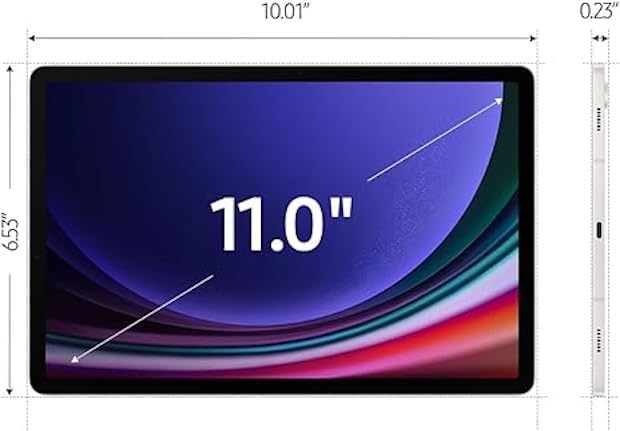
Image: Dimensions of the SAMSUNG Galaxy Tab S9.
| שטריך | דעטאַל |
|---|---|
| מאָדעל נאָמען | Galaxy Tab S9 |
| מאָדעל נומער | SM-X710 |
| פאַרשטעלן גרייס | 11 אינטשעס |
| ווייַז טיפּ | AMOLED |
| ווייַז האַכלאָטע | 2560 רענטגענ 1600 פּיקסעלס |
| פּראַסעסער | Qualcomm Snapdragon 8 Gen 2 (up to 3.2 GHz) |
| באַראַן זכּרון | 8 גיגאבייט |
| סטאָרידזש קאַפּאַסיטי | 128 גיגאבייט |
| אָפּערייטינג סיסטעם | אַנדרויד |
| ווירעלעסס טעכנאָלאָגיע | WiFi 6E (802.11ax), Bluetooth 5.3 |
| באַטאַרייע קאַפּאַציטעט | 8000 מיליamp Hours (14 Hours Average Life) |
| אַפּאַראַט | Front, Rear (FHD 1080p Video Capture) |
| אַודיאָ | Quad speakers with Dolby Atmos technology |
| דימענסיעס (L x B x H) | 8.3"ל x 4.9"ברייט x 0.3"דיג |
| פּונקט וואָג | 1.1 פונט |
| אַרייַנגערעכנט אין באָקס | טשאַרדזשינג קאַבלע |
7. וואָראַנטי און שטיצן
7.1 וואָראַנטי אינפֿאָרמאַציע
This SAMSUNG Galaxy Tab S9 (SM-X710) comes with a קסנומקס-טאָג וואָראַנטיביטע באַהאַלטן אייער קויפן-באַווייַז פֿאַר וואָראַנטי-קליימז. די וואָראַנטי דעקט פאַבריקאַציע-דעפעקטן און מאַלפאַנגקשאַנז אונטער נאָרמאַלע באַניץ-באַדינגונגען.
For detailed warranty terms and conditions, please refer to the documentation provided with your purchase or visit the official Samsung support webפּלאַץ.
7.2 קונה שטיצן
פֿאַר ווייטערדיקע הילף, טעכנישע שטיצע, אדער סערוויס אָנפֿראַגעס, ביטע קאָנטאַקטירן Samsung קונה סערוויס. איר קענט געפֿינען קאָנטאַקט אינפֿאָרמאַציע און נאָך רעסורסן אויף דער באַאַמטער Samsung שטיצע וועבזייטל. webפּלאַץ:
https://www.samsung.com/us/support/
When contacting support, please have your model number (SM-X710) and serial number ready.


