1. הקדמה
This manual provides detailed instructions for the assembly, operation, and maintenance of your FLEXISPOT Electric Standing Desk. Please read this manual thoroughly before use to ensure proper function and safety. Keep this manual for future reference.
2. זיכערקייַט אינפֿאָרמאַציע
וויכטיק זיכערקייַט פּריקאָשאַנז:
- Always keep the desk area clear of obstructions to prevent collisions during height adjustments.
- Do not use the desk at its maximum height without proper anchoring to prevent tip-overs.
- Follow the assembly instructions carefully to ensure the desk is properly set up and stable.
- Ensure all cables are managed to avoid entanglement during movement.
- האַלט קינדער און חיות אַוועק פון דעם טיש בעת אָפּעראַציע.
3. פּעקל אינהאַלט
באַשטעטיקט אַז אַלע קאָמפּאָנענטן זענען פאַראַן איידער איר הייבט אָן צו פֿאַרזאַמלען. אויב עס פֿעלן אָדער זענען צעבראָכן טיילן, ביטע קאָנטאַקטירט קונה שטיצע.
- Desktop (Natural Desktop + White Frame, 48 inch)
- Desk Legs/Frame (Alloy Steel)
- Control Panel with USB Ports
- Pull-out Storage Drawer
- פֿאַרזאַמלונג האַרדווער (שרויף, מכשירים)
- מאַכט אַדאַפּטער
- ינסטראַקשאַנז מאַנואַל
4. סעטאַפּ און אַסעמבלי
The FLEXISPOT Electric Standing Desk is designed for quick assembly. All necessary tools are included.
- Step 1: Attach Desk Legs to Desktop
Carefully place the desktop upside down on a soft, clean surface to prevent scratches. Attach the desk legs to the designated mounting points on the underside of the desktop using the provided screws. Ensure all connections are secure.
Image: Fully assembled FLEXISPOT Electric Standing Desk, showcasing the natural desktop, white frame, integrated drawer, and control panel with USB ports.
- Step 2: Install Control Panel and Drawer
Mount the control panel to the front edge of the desktop as indicated in the diagrams. Connect the motor and power cables to the control panel. Slide the pull-out storage drawer into its designated slot beneath the desktop.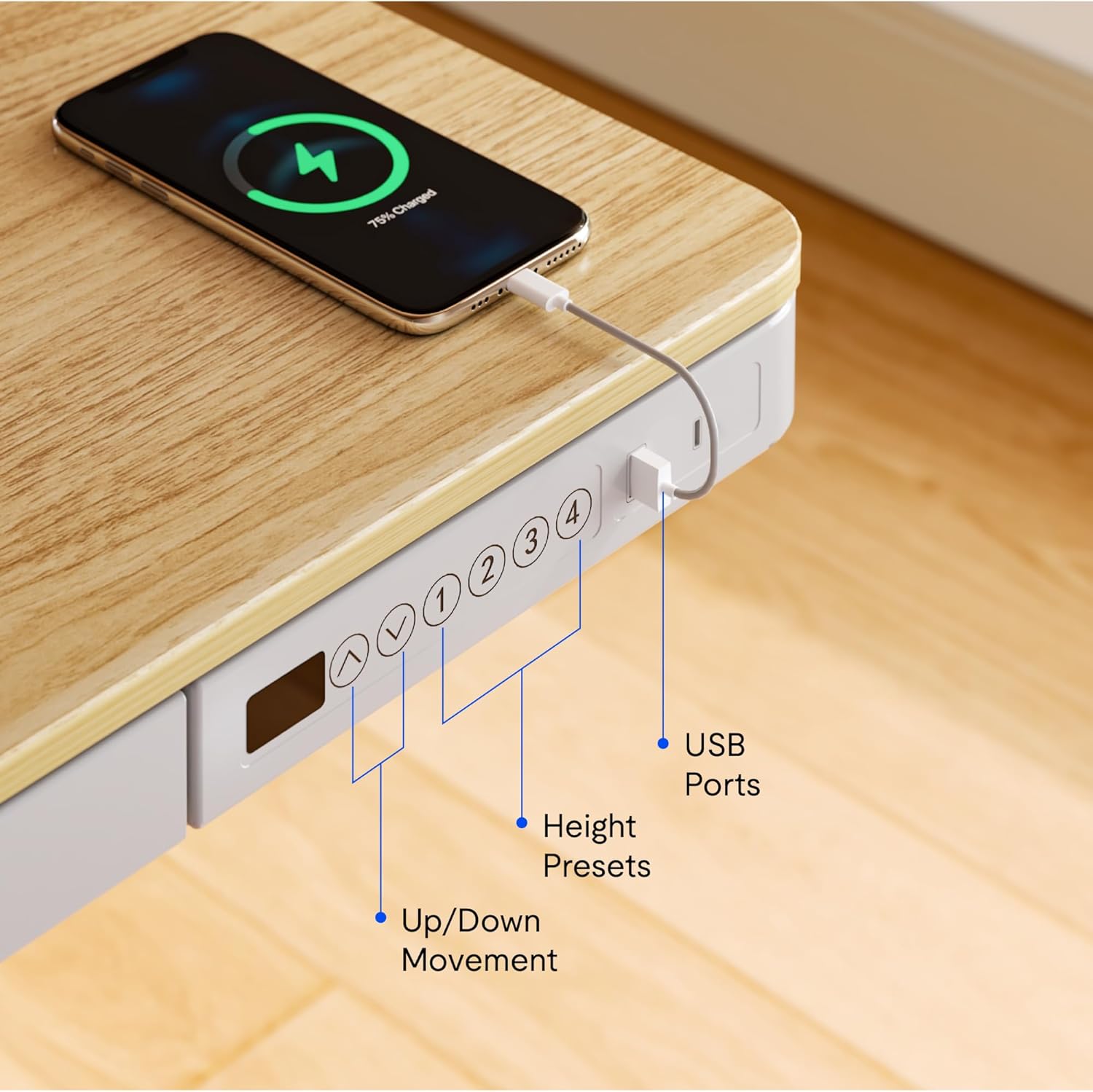
בילד: נאָענט-אַרויף view of the desk's control panel, highlighting the up/down movement buttons, four height preset buttons, and the integrated USB charging ports.
- Step 3: Connect Power and Cable Management
Connect the power adapter to the control panel and then to a power outlet. Organize cables using the provided cable management solutions to ensure they do not interfere with desk movement.
Image: The desk frame from below, showing the crossbar and anti-collision system designed to enhance stability and safety during height adjustments.
5. אַפּערייטינג ינסטרוקטיאָנס
Your FLEXISPOT Electric Standing Desk offers convenient features for adjusting height and charging devices.
5.1 הייך אַדזשאַסטמאַנט
- אַרויף/אַראָפּ באַוועגונג: ניצן די Up און אַראָפּ arrow buttons on the control panel to manually adjust the desk height. The desk can transition smoothly between 28.3 inches and 47.6 inches.
- Height Presets: The control panel features four programmable memory presets. To save a desired height, adjust the desk to the preferred level, then press and hold one of the numbered preset buttons (1, 2, 3, or 4) until the display flashes or a beep is heard. To recall a saved height, simply press the corresponding preset button.
- אַנטי-קאליזיע סיסטעם: The desk is equipped with an anti-collision system that automatically stops movement if an obstruction is detected, preventing damage to the desk or objects.
5.2 וסב טשאַרדזשינג פּאָרץ
The integrated control panel includes USB charging ports. Connect your electronic devices to these ports for convenient charging directly from your desk.
5.3 קינד לאַק פונקציע
To activate the child lock, press and hold the "Lock" button (often represented by a padlock icon) on the control panel for a few seconds until the display indicates it is locked. Repeat the process to unlock.
5.4 Integrated Storage Drawer
Utilize the pull-out storage drawer for organizing office supplies and keeping your workspace tidy. The drawer is designed to blend seamlessly with the desk's aesthetic.

בילד: דעטאַלירט view of the integrated pull-out drawer, showing its dimensions (approximately 23.6 inches wide, 11.2 inches deep, and 2 inches high) and its capacity for storing various office items.
6. וישאַלט
- רייניקונג: ווישט דעם דעסקטאַפּ און ראַם מיט אַ ווייכן, דamp שטאָף. פֿאַרמײַדט שרײַבנדיקע רייניקונגס־מיטלען אָדער שאַרפֿע כעמיקאַלן.
- קאַבלע פאַרוואַלטונג: Periodically check and reorganize cables to prevent tangling and ensure smooth operation.
- דורכקוק: Regularly inspect all screws and connections to ensure they remain tight and secure.
7. טראָובלעשאָאָטינג
אויב איר טרעפט פראבלעמען מיט אייער טיש, באציעט זיך צו די פאלגנדע אלגעמיינע לייזונגען:
- שרייַבטיש ניט מאָווינג:
- Check if the power cable is securely connected to both the desk and the power outlet.
- Ensure the child lock is not activated.
- Reset the desk by unplugging it for 30 seconds and then plugging it back in.
- אומגלייכע באַוועגונג אדער ראַש:
- באַשטעטיקן אַז דער טיש איז געשטעלט אויף אַ גלייכער ייבערפלאַך.
- Check for any obstructions beneath or around the desk legs.
- זיכער מאַכן אַז אַלע פֿאַרזאַמלונג שרויפן זענען צוגעצויגן.
- USB פּאָרץ ניט טשאַרדזשינג:
- Confirm the desk is powered on.
- Try a different USB cable or device to rule out a faulty accessory.
If problems persist, please contact FLEXISPOT customer support.
8. ספּעסאַפאַקיישאַנז
| שטריך | דעטאַל |
|---|---|
| סאָרט | FLEXISPOT |
| מאָדעל נומער | B0CKW2Q436 |
| Desktop Surface Dimensions (W x D) | 47.4"ברייט x 23.8"דיב |
| אַלגעמיינע פּראָדוקט דימענסיעס (ד x ב x ה) | 48"D x 48"W x 28.3"H (Note: Desktop surface is 47.4"W x 23.8"D) |
| קאָליר | Natural/White |
| באַזע מאַטעריאַל | אַללוי סטיל |
| שפּיץ מאַטעריאַל טיפּ | באַמבו |
| פּונקט וואָג | 74 פונט |
| מינימום הייך | 28.3 אינטשעס |
| מאַקסימום הייך | 47.6 אינטשעס |
| טאַבלעטאָפּ גרעב | 2.6 אינטשעס |
| מאַקסימום וואָג רעקאָממענדאַטיאָן | 110 פונט |
| אַרייַנגערעכנט קאַמפּאָונאַנץ | Pull-out storage drawer, USB ports |
| פארלאנגט אַסעמבלי | יא (אינקלודירט אלע פֿאַרזאַמלונג מכשירים) |

Image: Summary of key specifications including desktop size (47.4"x23.8"), height range (28.3"-48"), max loading capacity (100 lbs), and 5-year warranty.
9. וואָראַנטי און שטיצן
9.1 וואָראַנטי אינפֿאָרמאַציע
The FLEXISPOT Electric Standing Desk typically comes with a 5-year warranty, covering manufacturing defects and motor functionality. For specific warranty terms and conditions, please refer to the documentation included with your product or contact FLEXISPOT customer service.
9.2 קונה שטיצן
For technical assistance, warranty claims, or any questions regarding your FLEXISPOT product, please contact FLEXISPOT customer support. Contact information can usually be found on the manufacturer's webזייטל אדער אויף דער פּאַקאַדזשינג.
You may also refer to the seller, FlexiSpot, for support inquiries. They offer 30-day easy returns.


