1. הקדמה
This manual provides detailed instructions for the setup, operation, and customization of your BIGBIG WON Rainbow 2 SE Wireless Controller. This multi-platform controller is compatible with Nintendo Switch, Windows 10 & 11 PCs, Android 7.0+ devices, and iOS 14.0+ devices. Please read this manual thoroughly to ensure proper use and to maximize your gaming experience.

בילד 1.1: פראָנט view of the BIGBIG WON Rainbow 2 SE Wireless Controller.
2. פּעקל אינהאַלט
באַשטעטיקט אַז אַלע זאכן וואָס זענען אויסגערעכנט אונטן זענען אַרייַנגערעכנט אין אייער פּעקל:
- 1 x BIGBIG WON Rainbow 2 SE Gamepad
- 3 pairs of interchangeable joysticks (short, middle, high)
- 1 x 4-way D-pad
- 1 x 8-way D-pad
- 1 x 2.4G USB דאָנגלע
- 1 רענטגענ טיפּ-C קאַבלע
- 1 x באַניצער מאַנואַל

Image 2.1: All components included in the BIGBIG WON Rainbow 2 SE package.
3. פּראָדוקט איבערview
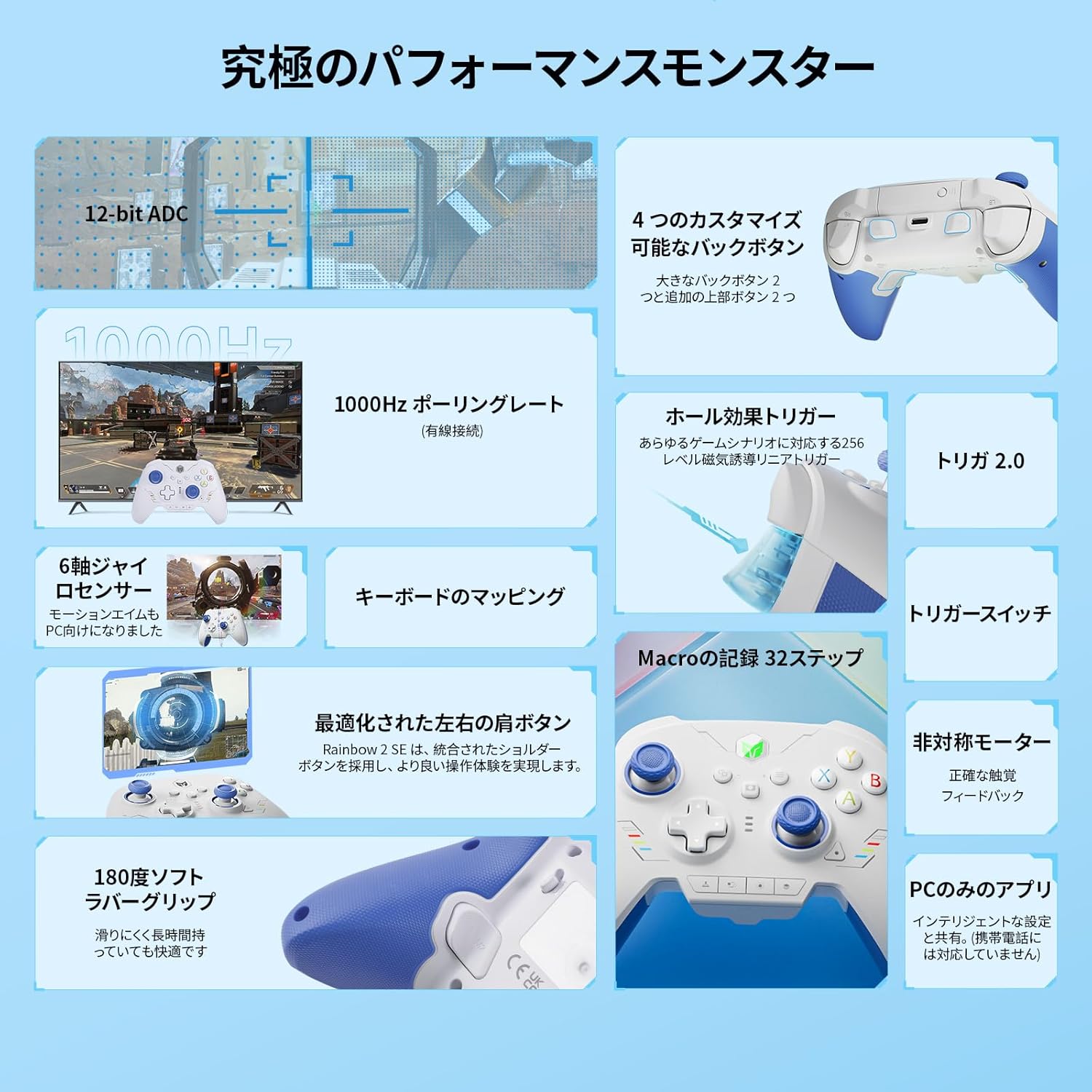
The Rainbow 2 SE controller features a robust design with various customizable elements to enhance your gaming experience. It includes Hall-effect triggers, 12-bit ADC joysticks, and multiple connectivity options.
3.1 שליסל פֿעיִקייטן
- מולטי-פּלאַטפאָרמע קאַמפּאַטאַבילאַטי: Supports Switch, Windows 10/11, Android 7.0+, iOS 14.0+.
- ווערסאַטאַל קאַנעקטיוויטי: 2.4G wireless, Bluetooth, and wired USB connections.
- Advanced Motion Control: BIGBIG WON's GYROCON+ Tech for PC motion control.
- Precision Triggers: 256-level Hall-effect triggers with trigger-stop switches.
- קוסטאָמיזאַבלע קנעפּלעך: 2 back buttons and 2 top additional buttons for Macro, Turbo, and Remapping.
- High-Resolution Joysticks: 12-bit ADC joysticks with 2000 levels axis resolution and 0 deadzone.
- Interchangeable Components: 3 sets of joysticks and 4-way & 8-way D-pads.
- PC Application: Dedicated PC App for advanced customization (not supported on mobile).
- דואַל מאָטאָר ווייבריישאַן: 255-level adjustable vibration feedback.
- Keyboard Mapping: Supports keyboard mapping for advanced in-game skills.

בילד 3.1: איבערview of the controller's multi-platform compatibility and key features.
3.2 קאָנטראָללער אויסלייג
The controller's layout is familiar to standard gamepads, with additional customizable buttons and features.
בילד 3.2: פראָנט view of the controller highlighting its buttons and analog sticks.
3.3 אפיציעלע פּראָדוקט ווידעאָ
ווידעא 3.1: אן אפיציעלער איבערview of the BIGBIG WON Rainbow 2 SE Wireless Gaming Controller, showcasinג זײַן דיזײַן און פֿעיִקייטן.
4. אויפשטעלן און פארבינדונג
4.1 ווייערד קאַנעקשאַן
- Connect the Type-C cable to the controller's USB-C port.
- Plug the other end of the Type-C cable into your PC or compatible device.
- The controller will automatically be recognized. The wired polling rate is 1000Hz.
4.2 2.4G וויירלעס פֿאַרבינדונג
- Insert the 2.4G USB dongle into an available USB port on your PC or compatible device.
- Press the HOME button on the controller to power it on. The controller will automatically connect to the dongle.
- The 2.4G wireless polling rate is 125Hz. The wireless range is approximately 30 feet.
4.3 בלועטאָאָטה קאַנעקשאַן
- Press the HOME button on the controller to power it on.
- On your device (Switch, Android, iOS), navigate to Bluetooth settings and search for available devices.
- Select "BIGBIG WON Rainbow 2 SE" from the list to pair.
- The Bluetooth wireless polling rate is 125Hz.
4.4 Platform Switching
The controller supports both X-input (for PC/Android) and Switch modes. The default mode is X-input.
- After connecting to a device, you may need to switch to the corresponding mode for normal operation. Refer to your device's settings for specific instructions.
- פֿאַר סוויטש: After connecting, enable "Settings - Controllers and Sensors - Pro Controller Wired Connection" on your Nintendo Switch.
- For Steam: It is recommended to block Steam output to protect the controller's original input.
5. Customization & Advanced Features
5.1 PC Application
The BIGBIG WON PC App allows for extensive customization of your controller. This application is supported on PC only and is not available for mobile devices.
- Adjust motion control sensitivity.
- Configure joystick and trigger dead zones and sensitivity.
- Program Macros.
- Remap buttons.

Image 5.1: The PC application interface for customizing controller settings.
5.2 קאַסטאַמייזאַבאַל קנעפּלעך
The controller features 2 back buttons and 2 top additional buttons that can be programmed for Macro, Turbo, or Remapping functions.
- מאַקראָו: Record up to 32 steps for complex command sequences.
- טורבאָ: Enable rapid-fire functionality for specific buttons.
- רימאַפּינג: Assign any button's function to another customizable button.

Image 5.2: Diagram illustrating the location and functionality of the customizable back and top buttons.
5.3 באַוועגונג קאָנטראָל
Leverage BIGBIG WON's 3rd generation GYROCON+ Tech for motion control on PC. Native motion control is supported on Switch.

Image 5.3: Visual representation of motion control functionality with the controller.
5.4 Hall-Effect Triggers & Trigger Stops
The 256-level Hall-effect triggers provide precise control. Utilize the trigger-stop switches for different gaming scenarios:
- Short Pull: Ideal for shooting games (e.g., APEX) for quick response.
- Long Pull: Suitable for racing games (e.g., Forza Horizon 5) for analog control.

בילד 5.4: דערציען view of the controller showing the trigger-stop switches and their application.
5.5 Joystick & D-pad Customization
The controller comes with 3 pairs of interchangeable joysticks (short, middle, high) and both 4-way and 8-way D-pads to suit various game genres and personal preferences.
- Short Joystick: For faster input, suitable for fighting games.
- Middle Joystick: Standard for general gaming.
- High Joystick: For increased precision, ideal for FPS games.
- 4-way D-pad: Standard for most games.
- 8-way D-pad: Specifically designed for fighting games (FTG).

Image 5.5: Illustration of the different joystick heights and D-pad types.
5.6 ווייבריישאַן סעטטינגס
Adjust the dual motor vibration intensity to your preference. The controller offers 255 levels of vibration feedback.
5.7 Keyboard Mapping
The Rainbow 2 SE supports keyboard mapping, allowing you to assign keyboard functions to controller buttons for executing advanced in-game skills through simple settings in the PC App.

Image 5.6: Controller shown alongside a keyboard, illustrating keyboard mapping capabilities.
6. וישאַלט & קער
- Keep the controller clean by wiping it with a soft, dry cloth. Avoid abrasive cleaners or solvents.
- האַלט דעם קאָנטראָללער אין אַ קיל, טרוקן אָרט אַוועק פון דירעקט זונשייַן און עקסטרעמע טעמפּעראַטורן.
- פֿאַרמײַדט צו לאָזן דעם קאָנטראָללער פאַלן אָדער אים אויסשטעלן צו שטאַרקע קלאַפּן.
- If the glossy plastic surfaces accumulate fingerprints, gently wipe them with a microfiber cloth.
7. טראָובלעשאָאָטינג
- קאָנטראָללער פֿאַרבינדט זיך נישט: Ensure the controller is powered on and fully charged. Verify the 2.4G dongle is properly inserted or Bluetooth is enabled and paired. Check platform mode settings.
- Input lag/delays: Ensure the 2.4G dongle is not obstructed and is plugged into an easily accessible port (preferably at the back of a PC to avoid accidental bumps). For wired connection, ensure the cable is securely connected.
- דזשויסטיק דריפט: The controller features BIGBIG WON adaptive calibration to reduce drift. If drift persists, use the PC App for recalibration.
- קאָנטראָללער רעאַגירט נישט: Press and hold the HOME button for 10 seconds until the controller vibrates to perform a reset.
- PC App not working: Ensure you are using the PC App on a Windows PC, as it is not supported on mobile devices.
8. ספּעסאַפאַקיישאַנז
| שטריך | באַשרייַבונג |
|---|---|
| סאָרט | BIGBIG WON (Black Shark) |
| מאָדעל נאָמען | BIGBIG WON-Rainbow 2 SE |
| קאַמפּאַטאַבילאַטי | PC (Windows 10&11), Switch, Android 7.0+, iOS 14.0+ |
| קאַנעקטיוויטי | 2.4G Wireless, Bluetooth, Wired (USB Type-C) |
| דראָטיקע פּאָלינג ראַטע | 1000 הז |
| ווירעלעסס פּאָללינג קורס | 125Hz (2.4G & Bluetooth) |
| ווירעלעסס ראַנגע | אַרויף צו 30 פֿיס |
| באַטערי לעבן | אַרויף צו 8 שעה |
| ריטשאַרדזש צייט | בעערעך. 2.5 שעה |
| דזשויסטיקס | 12-bit ADC, 0 Deadzone, 3 interchangeable sets |
| טריגערס | 256-level Hall-effect, Trigger-stop switches |
| ד-פּאַדס | Interchangeable 4-way & 8-way |
| ווייבריישאַן | Dual Motor, 255-level adjustable |
| באַוועגונג קאָנטראָל | GYROCON+ Tech (PC), Native (Switch) |
| PC App Support | Yes (PC only, not mobile) |
| פּונקט וואָג | 2.12 אונסעס |
| פּראָדוקט דימענשאַנז | 5.91 X 3.94 X 1.57 אינטשעס |
9. וואָראַנטי & שטיצן
BIGBIG WON offers a 30-day free replacement or full refund, along with lifetime before-sale and after-sale service for all your queries.
For further assistance, support, or community engagement, please visit the official BIGBIG WON Discord server:


