1. הקדמה
Thank you for choosing the Havit H2038U RGB Wired Gaming Headset. This manual provides essential information for setting up, operating, and maintaining your headset. Please read it carefully to ensure optimal performance and longevity of your product.
וויכטיק זיכערהייט אינפֿאָרמאַציע:
- פֿאַרמײַדט פֿאַרלענגערט הערן בײַ הויכע וואָלומען כּדי צו פֿאַרמײַדן שאָדן צו דער הערן.
- שטעלט נישט אויס דעם כעדסעט צו עקסטרעמע טעמפּעראַטורן, הומידיטי, אדער קאָראָזיווע סאַבסטאַנצן.
- Keep the headset away from water and liquids.
- פרובירט נישט צו צענעמען אדער מאדיפיצירן דעם כעדסעט. דאס וועט בטל מאכן די גאראנטיע.
2. פּראָדוקט איבערview
2.1 פּעקל אינהאַלט
- Havit H2038U RGB Wired Gaming Headset
- דעטאַטשאַבלע מיקראָפאָן
- באַניצער מאַנואַל (דעם דאָקומענט)
2.2 כעדסעט קאָמפּאָנענטן
The Havit H2038U headset features a comfortable over-ear design with soft earcups and an adjustable headband. It includes a detachable microphone for clear communication and integrated RGB lighting for an enhanced gaming experience.

פיגורע 2.1: פראָנט view of the Havit H2038U RGB Wired Gaming Headset. This image displays the white over-ear headphones with RGB lighting elements on the earcups and the adjustable headband.
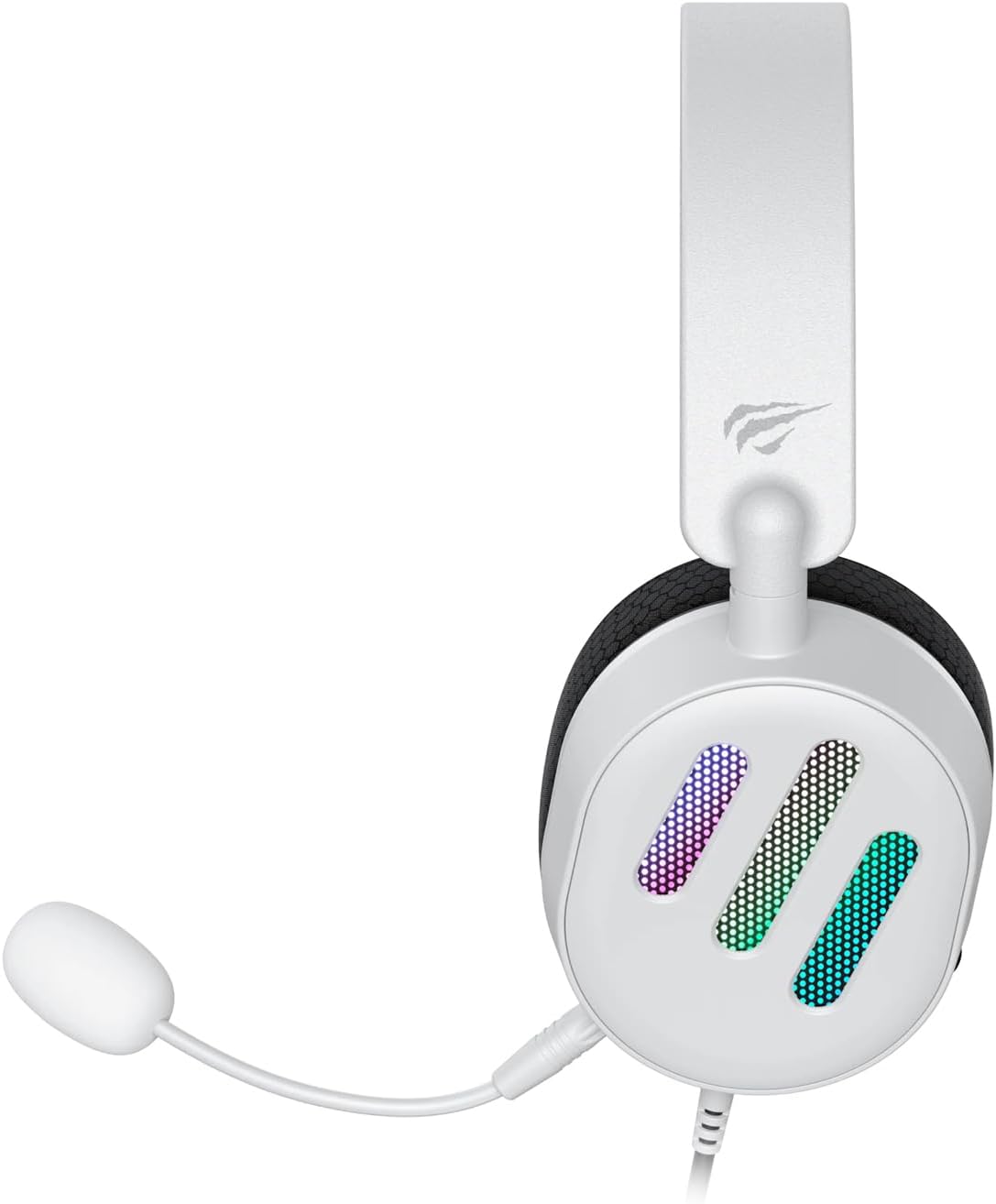
פיגורע 2.2: זייַט view of the Havit H2038U RGB Wired Gaming Headset, showing the detachable microphone connected to the left earcup. The volume control wheel is also visible on the earcup.

פיגורע 2.3: Top view of the Havit H2038U RGB Wired Gaming Headset, highlighting the adjustable headband and the soft, breathable earcups.
3. סעטאַפּ
The Havit H2038U headset utilizes a dual-connection system for full functionality: a 3.5mm jack for audio and a USB connection for RGB lighting and virtual 7.1 surround sound.

פיגורע 3.1: נאָענט-אַרויף view illustrating the detachable microphone connection (3.5mm jack) and the USB connection for the Havit H2038U headset. This image also indicates 360-degree sound direction and 7.1 USB connectivity.
- פאַרבינדן די מיקראָפאָן: Insert the detachable microphone into the 3.5mm microphone jack located on the left earcup until it clicks into place. Ensure it is securely connected.
- פֿאַרבינדן פֿאַר אַודיאָ: Plug the 3.5mm audio jack from the headset into the corresponding audio output port on your computer, gaming console, or mobile device.
- Connect for RGB Lighting and 7.1 Surround Sound: Plug the USB connector from the headset into an available USB port on your computer or gaming console. This connection powers the RGB lighting and enables the virtual 7.1 surround sound feature.
- אַדזשאַסטירן כעדסעט פּאַסיק: Adjust the headband to ensure a comfortable and secure fit over your ears. The earcups should fully enclose your ears for optimal sound isolation.
- System Configuration (for PC):
- אַודיאָ רעזולטאַט: Go to your operating system's sound settings and ensure the Havit H2038U is selected as the default playback device.
- מיקראָפאָן אַרייַנשרייַב: In the sound settings, select the Havit H2038U as the default recording device.
- 7.1 סאָונד סאָונד: If applicable, install any necessary drivers from the Havit official website to enable and configure the virtual 7.1 surround sound feature.
4. אַפּערייטינג ינסטרוקטיאָנס
4.1 באַנד קאָנטראָל
The headset features an integrated volume control wheel, typically located on the left earcup or inline on the cable. Rotate the wheel to increase or decrease the audio volume.
4.2 מיקראָפאָן באַניץ
The detachable microphone can be positioned for optimal voice pickup. Adjust its flexible arm to bring the microphone close to your mouth, ensuring clear communication. For privacy, you may mute the microphone using software settings on your device if no physical mute button is present on the headset.
4.3 RGB לייטינג
The RGB lighting on the earcups is powered via the USB connection. Once connected, the lighting will activate automatically. Specific control options for lighting patterns or colors may be available through dedicated software, if provided by Havit.

פיגורע 4.1: The Havit H2038U RGB Wired Gaming Headset displayed with its active RGB lighting feature, showcasing the illuminated earcups.
4.4 ווירטועל 7.1 סוראַונד סאַונד
When connected via USB, the headset supports virtual 7.1 surround sound. This feature enhances spatial audio awareness in games and media. Ensure relevant drivers are installed and configured through your system's sound settings or Havit's software for optimal experience.

פיגורע 4.2: An illustrative image demonstrating the virtual 7.1 surround sound capability of the Havit H2038U headset, enhancing immersive audio experiences.
5. וישאַלט
5.1 רייניקונג
- Use a soft, dry cloth to wipe the exterior surfaces of the headset.
- פֿאַר די אויערקעפּלעך, ווישט אָפּ מיט אַ לייכטן טרוקענעם טאָפּ.amp שטאָף און לאָזט עס גאָר טרוקן אין דער לופט איידער נוצן.
- ניצט נישט קיין שטרענגע כעמיקאלן, סאָלווענטן אדער אַברייסיוו רייניגער.
5.2 סטאָרידזש
When not in use, store the headset in a clean, dry place, away from direct sunlight and extreme temperatures. Avoid tangling the cables to prevent damage.
6. טראָובלעשאָאָטינג
| פּראָבלעם | מעגלעך סיבה | לייזונג |
|---|---|---|
| קיין אַודיאָ פֿון כעדסעט | 3.5mm jack not fully inserted; incorrect audio output selected; volume too low. | Ensure 3.5mm jack is fully connected. Check system sound settings to select Havit H2038U as default playback device. Increase volume using the headset's control wheel and system volume. |
| מיקראָפאָן טוט נישט אַרבעטן | Microphone not fully inserted; incorrect input device selected; microphone muted. | Ensure microphone is securely attached. Check system sound settings to select Havit H2038U as default recording device. Unmute microphone in software settings. |
| RGB לייטינג טוט נישט אַרבעטן | USB cable not connected; faulty USB port. | זיכער מאַכן אַז דער USB קאַבל איז זיכער אַרײַנגעשטעקט אין אַ פֿונקציאָנירנדיקן USB פּאָרט. פּרוּווט אַן אַנדערן USB פּאָרט. |
| 7.1 Surround Sound not active | USB cable not connected; drivers not installed/configured. | Ensure the USB cable is connected. Install and configure necessary drivers from the Havit official webפּלאַץ. |
7. ספּעסאַפאַקיישאַנז
| שטריך | באַשרייַבונג |
|---|---|
| מאָדעל | H2038U |
| קאַנעקטיוויטי טעכנאָלאָגיע | Wired (3.5mm Jack + USB) |
| כעדפאָונז פאָרעם פאַקטאָר | איבער אויער |
| ימפּידאַנס | 24 אָהמס |
| אָפטקייַט ענטפער | 20 הערץ - 20 קילאָהערץ |
| סענסיטיוויטי | 114 דב |
| קאָנטראָל טיפּ | באַנד קאָנטראָל, דרוק קנעפּל |
| מאַטעריאַל | פּלאַסטיק |
| פּונקט וואָג | 550 ג |
| פּראָדוקט דימענשאַנז | 11.2 X 21.9 X 28.5 סענטימעטער |
| קאָליר | ווייַס |
| ספּעציעלע פֿעיִקייטן | RGB Lighting, Detachable Microphone, Virtual 7.1 Surround Sound |
8. וואָראַנטי און שטיצן
Havit products are designed for reliability and performance. For information regarding warranty coverage, technical support, or service, please refer to the warranty card included with your product or visit the official Havit webזייטל. האַלט אייער קויף קוויטל ווי אַ באַווייַז פון קויפן פֿאַר וואָראַנטי קליימז.
קאָנטאַקט אינפֿאָרמאַציע:
- Official Havit Webפּלאַץ: www.havit.com (ביטע טשעק פֿאַר רעגיאָנאַלע websites for specific support)


