הקדמה
Thank you for choosing the HyperGear Stealth2 ANC Wireless Headphones. This manual provides detailed instructions for setting up, operating, and maintaining your headphones to ensure optimal performance and longevity. Please read this manual thoroughly before use.

Image: HyperGear Stealth2 ANC Wireless Headphones, Bone color, showcasing key features like Active Noise Cancelling, 40mm Neodymium Drivers, Deep HD Stereo Sound, up to 24-hour playing time, rapid charge, and lightweight foldable design.
פּעקל אינהאַלט
באַשטעטיקן אַז אַלע זאכן זענען פאַראַן אין פּעקל:
- HyperGear Stealth2 ANC Wireless Headphones
- וסב-C טשאַרדזשינג קאַבלע
- באַניצער מאַנואַל (דעם דאָקומענט)
פּראָדוקט איבערview
מאַכט זיך באַקאַנט מיט די פֿאַרשידענע קאָמפּאָנענטן און קאָנטראָלס פֿון אייערע כעדפֿאָונז.

Image: Detailed diagram of the HyperGear Stealth2 ANC Wireless Headphones, highlighting the on-ear controls. Labels include Power On/Off, Enter Pairing Mode, Volume Up/Next Track, Play/Pause/Answer/End Call, Reject Call, Activate Voice Assistant, Gaming Mode On/Off, Volume Down/Previous Track, and Active Noise Cancellation On/Off. Also shows Quick Pairing and Auto Reconnection features.
אָנ-אויער קאָנטראָלס:
- מאַכט קנעפּל: Press and hold to power on/off. Press and hold to enter pairing mode.
- באַנד אַרויף / ווייַטער ליד קנעפּל: Press to increase volume. Press and hold to skip to the next track.
- מולטי-פונקציע קנעפל (שפּיל/פּויזע): Press to play/pause audio. Press to answer/end calls. Press and hold to reject calls. Double-press to activate voice assistant. Triple-press to toggle Gaming Mode.
- באַנד אַראָפּ / פריערדיקע ליד קנעפּל: דריקן צו פֿאַרמינערן די באַנד. דריקן און האַלטן צו גיין צום פֿריִערדיקן ליד.
- ANC קנעפּל: Press to toggle Active Noise Cancellation on/off.
סעטאַפּ
1. טשאַרדזשינג די כעדפאָונז
פארן ערשטן באַנוץ, זאָלט איר גאָר אויפלאָדן אייערע כעדפאָונז.
- פֿאַרבינדט דעם צוגעשטעלטן USB-C טשאַרדזשינג קאַבל צום טשאַרדזשינג פּאָרט אויף די כעדפאָונז.
- פֿאַרבינדט דעם אַנדערן עק פֿונעם קאַבל צו אַ USB מאַכט מקור (למשל, וואַנט אַדאַפּטער, קאָמפּיוטער USB פּאָרט).
- The LED indicator will show charging status. It typically takes about 2 hours for a full charge.
- A 10-minute rapid charge can provide approximately 3 hours of playback.
Image: A person wearing HyperGear Stealth2 ANC Wireless Headphones on an airplane, illustrating battery life: 18 hours with ANC on, 24 hours with ANC off. Also highlights rapid charge: 10 minutes of charging provides 3 hours of playback.
2. בלועטאָאָטה פּערינג
Pair your headphones with your device for wireless audio.
- זיכער מאַכן אַז די כעדפאָונז זענען אויפגעלאָדן און אויסגעלאָשן.
- דריק און האלט דעם פּאַוער קנעפּל ביז דער LED אינדיקאַטאָר בלינקט בלוי און רויט, וואָס ווײַזט אויף פּערינג מאָדע.
- אויף אייער דעווייס (סמאַרטפאָן, טאַבלעט, קאָמפּיוטער), אַקטיווירט בלועטוט און זוכט פֿאַר פֿאַראַן דעווייסעס.
- Select "HyperGear Stealth2" from the list of found devices.
- אַמאָל פארבונדן, וועט דער LED אינדיקאַטאָר ווײַזן אַ האַרט בלוי ליכט אָדער בליצן לאַנגזאַם.
שנעל פּאָרינג: The headphones are designed for instant connection with your device in seconds after initial pairing.
אַוטאָ ריקאַנעקשאַן: The headphones will remember and automatically reconnect to the last paired device when powered on and within range.
אַפּערייטינג ינסטראַקשאַנז
מאַכט אויף / אַוועק
- צו אנצינדן, דריק און האלט דעם פּאַוער קנעפּל ביז די LED אינדיקאַטאָר צינדט זיך אָן.
- צו אויסלאָשן, דריק און האַלט די פּאַוער קנעפּל ביז די LED אינדיקאַטאָר גייט אויס.
אַקטיוו ראַש קאַנסאַליישאַן (ANC)
- Press the dedicated ANC button to toggle Active Noise Cancellation on or off.
- When ANC is active, ambient noise is significantly reduced, providing a quieter listening experience.
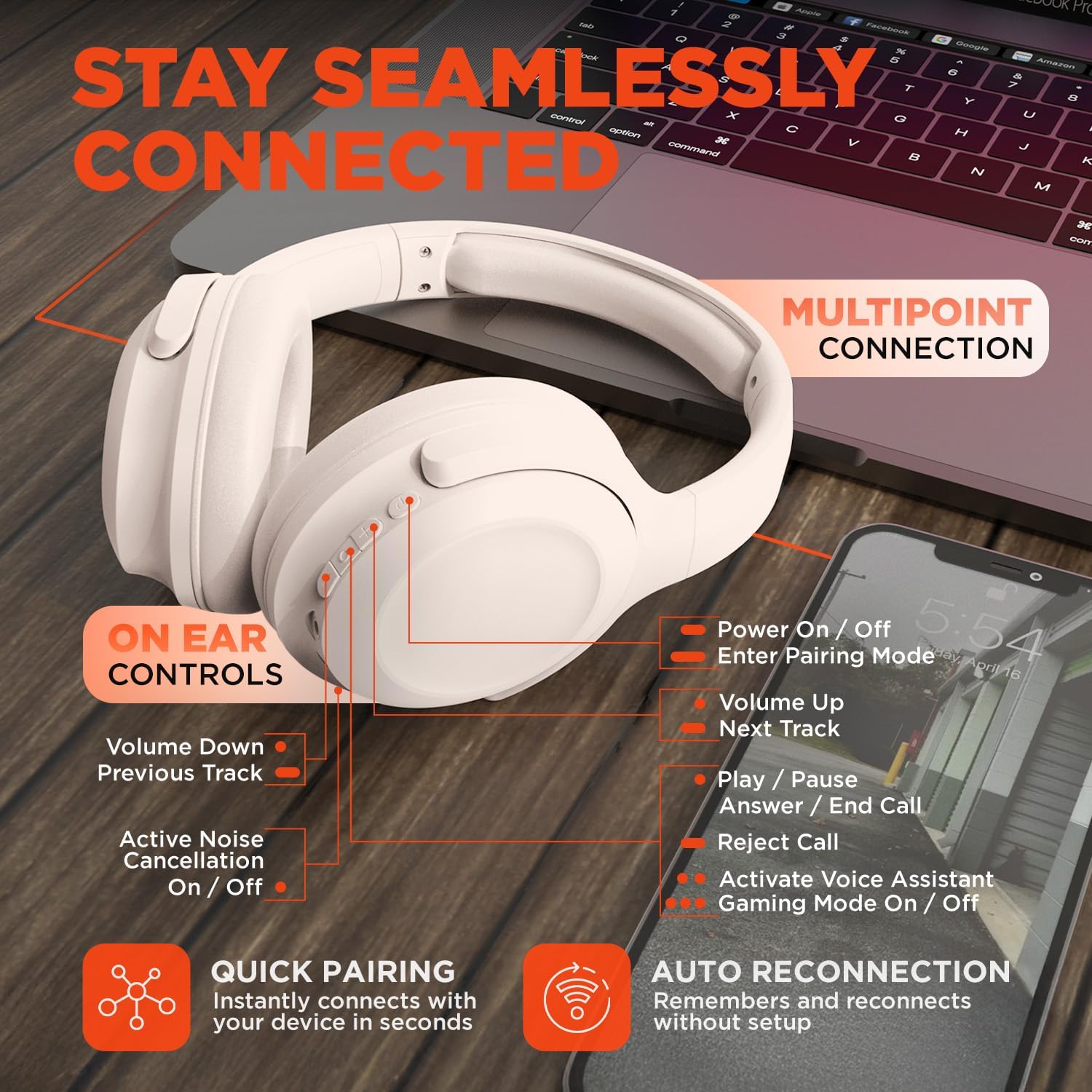
Image: HyperGear Stealth2 ANC Wireless Headphones highlighting "Pure Sound Anywhere" with Dual ANC Microphones for blocking unwanted noise and Adaptive Sound Control for real-time environment adjustment. Also shows compatibility with Siri and Google Assistant, and use cases for exercise, gaming, and travel.
אַודיאָ פּלייבאַק און רופן
- שפּיל / פּויזע: דרוק אַ מאָל אויף די מולטי-פונקציאָנירן.
- ווייַטער שפּור: דריק און האַלט די באַנד אַרויף קנעפּל.
- פֿריִערדיקע שפּור: דריקן און האַלטן די Volume Down קנעפּל.
- באַנד קאָנטראָל: דריקן די Volume Up אָדער Volume Down קנעפּלעך.
- ענטפֿערן / סוף רופן: דרוק אַ מאָל אויף די מולטי-פונקציאָנירן.
- אָפּוואַרפן רופן: דריקן און האַלטן די מולטי-פונקציע קנעפּל.
קול אַססיסטאַנט
- Double-press the Multi-function button to activate your device's voice assistant (Siri, Google Assistant, etc.).
גיימינג מאָדע
- Triple-press the Multi-function button to toggle the no-lag Gaming Mode. This mode optimizes audio synchronization for enhanced gameplay.
מולטיפּאָינט קאַנעקשאַן
The headphones support multipoint connection, allowing them to be connected to two Bluetooth devices simultaneously.
- פֿאַרבינדט די קאָפּהערער מיטן ערשטן דעווייס ווי באַשריבן אין דער "בלוטעט פֿאַרבינדונג" סעקציע.
- דיאַקטיווירן בלועטוט אויף דער ערשטער דעווייס.
- שטעלט די כעדפאָונז צוריק אין פּערינג מאָדע און פּערט זיי מיטן צווייטן דעווייס.
- אַקטיווירט ווידער בלועטוט אויף דער ערשטער דעווייס. די כעדפאָונז זאָלן איצט זיין פארבונדן צו ביידע דעווייסעס.
- Audio will play from the device that is actively playing content.

Image: HyperGear Stealth2 ANC Wireless Headphones positioned between a laptop and a smartphone, demonstrating the multipoint connection feature. This allows the headphones to stay seamlessly connected to multiple devices.
וישאַלט
געהעריקע זאָרג גאַראַנטירט די לאַנגלעבעדיקייט און פאָרשטעלונג פון דיין כעדפאָונז.
- Keep the headphones dry. Do not expose them to water or excessive moisture. They are not water resistant.
- Clean the earcups and headband with a soft, dry cloth. Avoid using harsh chemicals or abrasive materials.
- לייגט די כעדפאָונז אין אַ קיל, טרוקן אָרט ווען זיי ווערן נישט גענוצט. דער צוזאַמענפאַלטבאַרער פּלאַן ערמעגליכט קאָמפּאַקט סטאָרידזש.
- ויסמיידן עקסטרעם טעמפּעראַטורעס.
- פּרוּווט נישט צו צענעמען אָדער מאָדיפֿיצירן די כעדפאָונז, ווײַל דאָס וועט בטל מאַכן די וואָראַנטי.
טראָובלעשאָאָטינג
אויב איר טרעפט פּראָבלעמען, באַציעט זיך צו די פאלגענדע געוויינטלעכע לייזונגען.
| פּראָבלעם | לייזונג |
|---|---|
| די קאָפּהערער וועלן זיך נישט אָנצינדן. | זיכער מאַכן אַז די קאָפּהערער זענען גאָר אָנגעלאָדן. פאַרבינדן צו אַ מאַכט מקור ניצן די USB-C קאַבל. |
| קען נישט פאַרבינדן זיך מיט אַ דעווייס. |
|
| קיין קלאַנג אָדער נידעריקע וואָלומען. |
|
| ANC איז נישט עפעקטיוו. |
|
ספּעסאַפאַקיישאַנז
| שטריך | דעטאַל |
|---|---|
| מאָדעל נאָמען | HyperGear Stealth2 ANC Headphones |
| מאָדעל נומער | 15860 |
| קאַנעקטיוויטי טעכנאָלאָגיע | ווירעלעסס (בלועטאָאָטה) |
| בלועטאָאָטה ווערסיע | 5.2 |
| בלועטאָאָטה קייט | 10 מעטער |
| אַודיאָ דרייווער גרייס | 40 מם |
| אָפטקייַט ראַנגע | 20 הערץ - 20,000 הערץ |
| ראַש קאָנטראָל | אַקטיוו ראַש קאַנסאַליישאַן |
| באַטערי לעבן | ביז 24 שעה (ANC אויסגעלאשן) |
| טשאַרדזשינג צייט | 2 שעה |
| טשאַרדזשינג פּאָרט | וסב-C |
| מאַטעריאַל | פּלאַסטיק |
| פּונקט וואָג | 0.38 קילאָגראַמס (13.3 אונסעס) |
| פּראָדוקט דימענשאַנז | 7.88 X 2.25 X 10.51 אינטשעס |
| וואַסער קעגנשטעל מדרגה | ניט וואַסער קעגנשטעליק |
| UPC | 633755158605 |
וואָראַנטי און שטיצן
HyperGear products are designed for reliability and performance. For warranty information and customer support, please refer to the warranty card included with your purchase or visit the official HyperGear webפּלאַץ.
צוריקקער פּאָליטיק: This product typically includes a 30-day return policy for refunds or replacements. Please check your purchase details for specific terms.
פאַבריקאַנט: HYPERGEAR


