1. הקדמה
The Shiftcam LensUltra 60mm Telephoto Lens is designed to enhance your mobile photography by providing superior optical performance. This lens allows you to capture distant details with precision, offering sharper image quality, naturally balanced proportions, and authentic bokeh effects, surpassing your phone's built-in telephoto capabilities.
2. פּראָדוקט איבערview & שליסל פֿעיִקייטן
- העכער אָפּטיש פאָרשטעלונג: Experience ultimate clarity with the LensUltra 60mm Telephoto Lens, designed to zoom in on distant details with precision. This lens surpasses your phone's built-in telephoto lens by offering sharper image quality, more naturally balanced proportions, and authentic bokeh effects, unlike computational alternatives.
- Ideal for Distant Photography: Perfect for capturing distant subjects such as wildlife, scenic portraits, and detailed scenes. The LensUltra 60mm provides 2-5x crisp optical zoom, delivering stunning clarity, sharpness, and a beautifully compressed perspective that brings your subjects to life.
- Advanced Fluorite Optics: The only mobile lens powered by fluorite, known for its ability to reduce color fringing and enhance color accuracy. Enjoy sharper, clearer, and more precise images thanks to its unique optical properties.
- Universal Compatibility & Easy Setup: Mount the lens using a ShiftCam camera case or universal mount (sold separately; not included with the lens). Compatible with all smartphones.
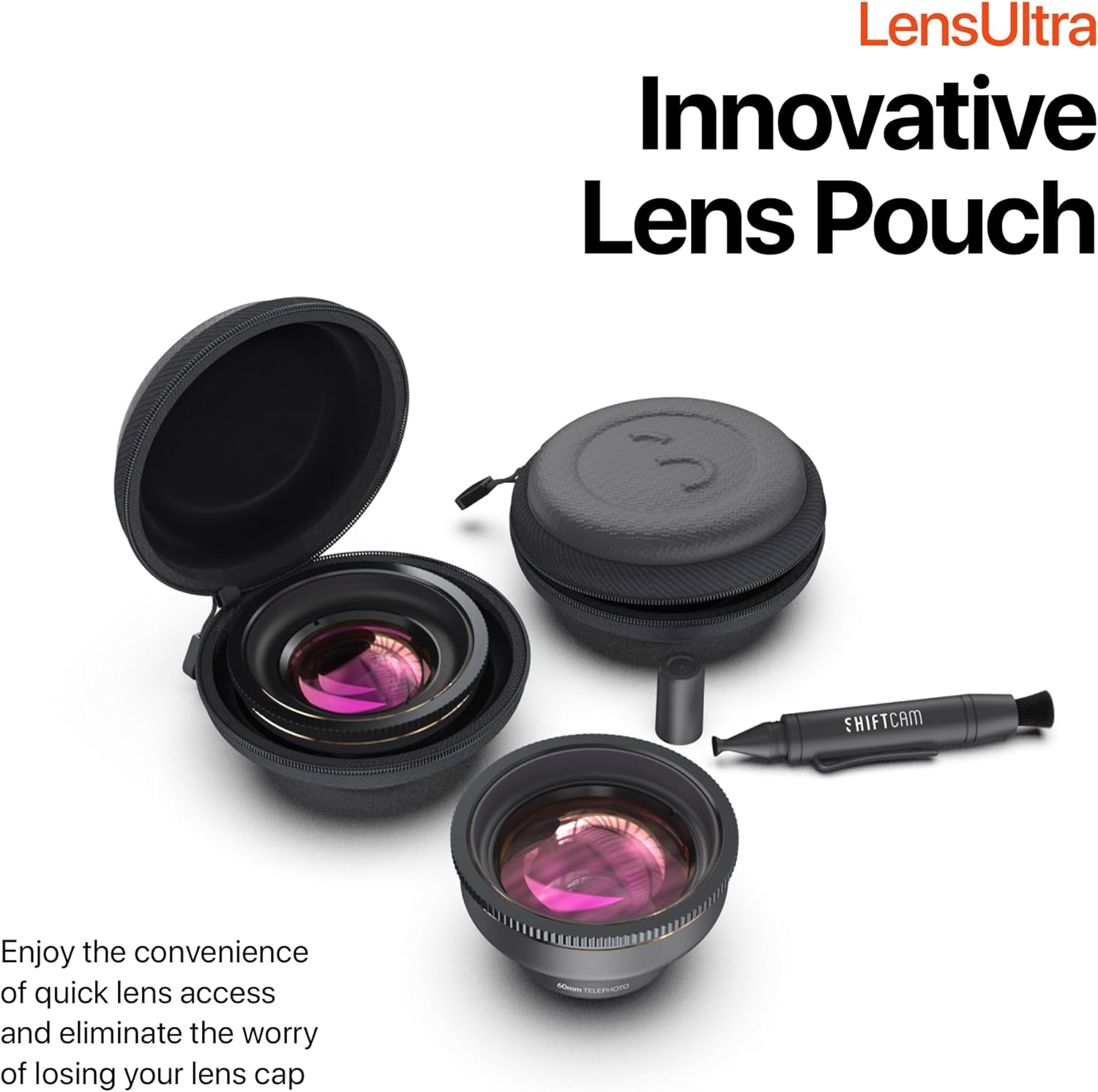
- Innovative Dual-Purpose Lens Pouch: Forget about losing lens caps. Our uniquely designed lens pouch not only protects your LensUltra lens but also provides quick access when you're on the move.
3. וואָס איז אַרייַנגערעכנט
Your Shiftcam LensUltra 60mm Telephoto Lens package includes:
- Shiftcam LensUltra 60mm Telephoto Lens
- Innovative Dual-Purpose Lens Pouch
- אָביעקטיוו רייניקונג פּען
4. סעטאַפּ אינסטרוקציעס
To use your Shiftcam LensUltra 60mm Telephoto Lens, you will need a compatible ShiftCam camera case or a universal mount (sold separately).
4.1. Attaching the Lens to a ShiftCam Camera Case (iPhone)
- Place your iPhone into the ShiftCam Camera Case. Ensure it is securely seated.
- Identify the main camera lens on your iPhone through the case's opening.
- Align the LensUltra 60mm Telephoto Lens with the screw thread marked 'M' (for Main Camera) on the ShiftCam case.
- Turn the lens clockwise until it is securely fastened to the case.

Video Guide for iPhone Users:
Video: This video provides a step-by-step guide on how to attach and use the LensUltra with an iPhone, including camera settings adjustments.
4.2. Attaching the Lens with a Universal Mount (Android & Other Devices)
- Identify the main camera lens on your smartphone.
- Align the Universal Lens Mount (sold separately) with your phone's main camera lens. Ensure the mount is centered over the lens.
- Tighten the universal mount to secure it firmly to your phone.
- Place the LensUltra 60mm Telephoto Lens above the main camera lens on the universal mount.
- Rotate the lens clockwise until it is securely attached to the universal mount.

Video Guide for Android Users:
Video: This video demonstrates how to attach and use the LensUltra with an Android device, including necessary camera settings adjustments.
5. אַפּערייטינג ינסטרוקטיאָנס
Once your LensUltra 60mm Telephoto Lens is securely attached, you can begin capturing stunning images and videos.
5.1. Capturing Distant Subjects and Portraits
The 60mm telephoto lens is ideal for bringing distant subjects closer and achieving a compressed perspective, which is flattering for portraits. For best results, ensure your subject is well-lit and maintain a focus distance of 30-40cm.

Tips for 60mm Telephoto Lens:
Video: This video offers practical tips and techniques for maximizing the potential of your 60mm Telephoto Lens, including framing and composition advice.
6. וישאַלט
Proper maintenance ensures the longevity and optimal performance of your LensUltra 60mm Telephoto Lens.
6.1. רייניקונג פון די לינז
Use the provided lens cleaning pen or a soft, lint-free microfiber cloth to gently wipe the lens surfaces. Avoid using harsh chemicals or abrasive materials that could scratch the lens coating. For stubborn smudges, a small amount of lens cleaning solution can be applied to the cloth, not directly to the lens.
6.2. סטאָרידזש
Always store the lens in its innovative dual-purpose pouch when not in use. This protects the lens from dust, scratches, and impacts. Keep the lens in a cool, dry place away from direct sunlight and extreme temperatures.
7. טראָובלעשאָאָטינג
- בלערד בילדער: Ensure the lens is securely attached and properly aligned with your phone's camera. Check that your phone's autofocus is working correctly or manually adjust focus if available. Maintain the recommended focus distance of 30-40cm.
- וויניעטינג (טונקעלע ווינקלען): This can occur if the lens is not perfectly aligned or if your phone's camera is set to a wider angle than intended for the telephoto lens. Re-align the lens or adjust your phone's camera settings to use the main camera without digital zoom.
- Lens Blocking Camera View: If the lens appears to block your camera's view, especially on iPhones, enable 'Macro Control' in your phone's camera settings (Settings > Camera > Macro Control). For Android, toggle off 'Auto lens switching' in Camera Assistant (Galaxy Store). Refer to the setup videos for detailed steps.
8. ספּעסאַפאַקיישאַנז
| שטריך | דעטאַל |
|---|---|
| פאַרגרעסערונג | 2x |
| ווינקל | 48° |
| אַר קאָוטינג | מולטילייַער |
| דעפאָרמאַטיאָן | -1% |
| מין פאָקוס דיסטאַנסע | 30-40קם |
| בארג | M12 x P0.75 |
| לענג | 35 מם |
| נעץ וואָג | 109.3ג |
| מאַטעריאַל | Fluorite Glass & Aluminium |
| פּראָדוקט דימענשאַנז | 3.93 X 8.11 X 8.11 אינטשעס |
| פּונקט וואָג | 13.7 אונסעס |
9. וואָראַנטי און שטיצן
ShiftCam products are designed for durability and performance. For specific warranty details and support inquiries, please refer to the official ShiftCam webזייטל אדער קאנטאקט זייער קאסטומער סערוויס גלייך. האלט אייער באווייז פון קויפן פאר גאראנטיע פארלאנגען.


