הקדמה
The SUNOL T16 Wireless Earbuds are designed for an active lifestyle, offering high-quality audio and convenient features. These Bluetooth headphones provide up to 48 hours of total playtime with their wireless charging case, featuring an LED power display for easy monitoring. With earhooks for a secure fit and water resistance, they are ideal for workouts, running, and various sports activities. The built-in microphone with noise cancellation ensures clear calls.
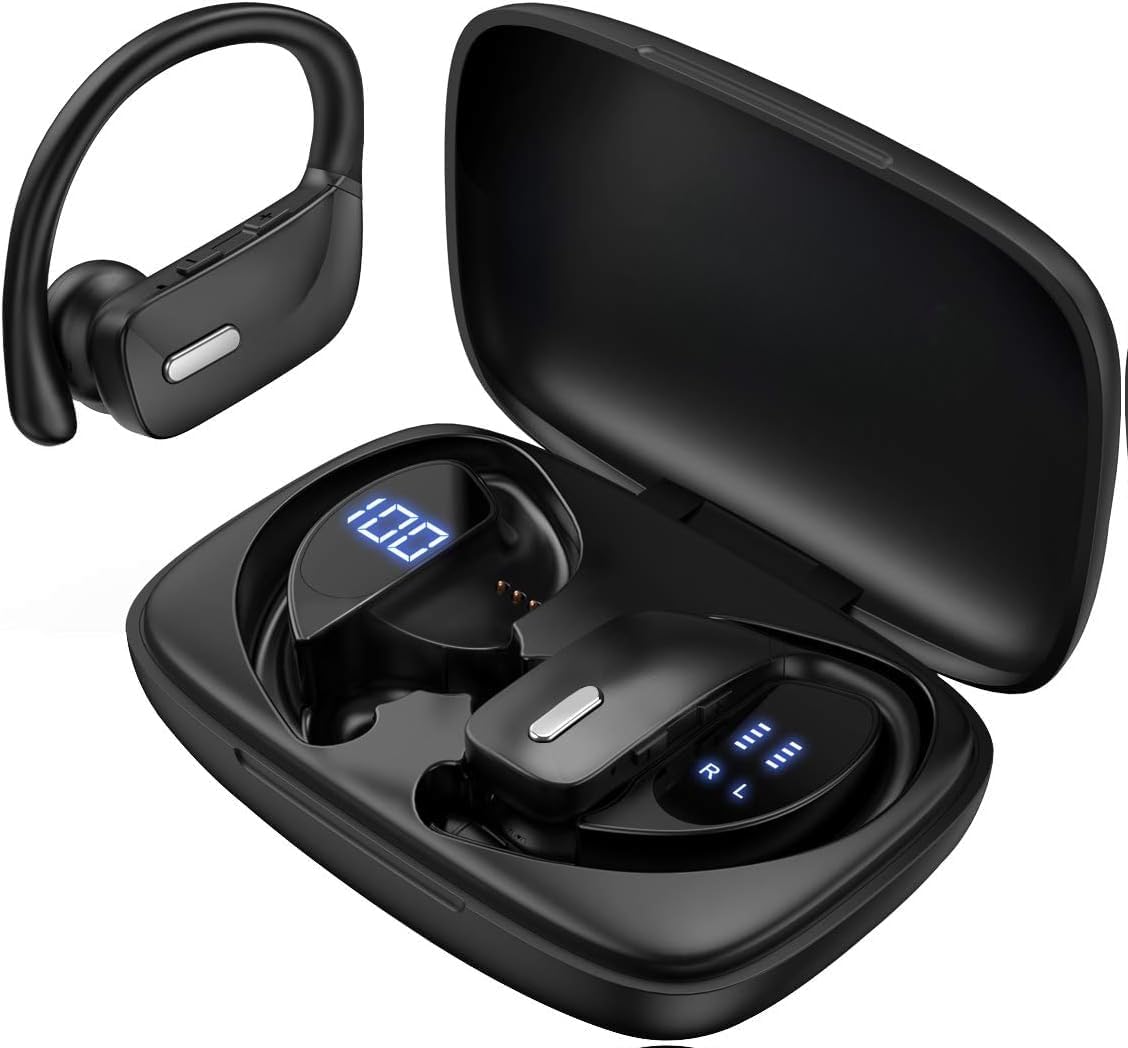
Image: The SUNOL T16 Wireless Earbuds with their charging case, showcasing the digital display.
וואָס איז אין די קעסטל
- SUNOL T16 Wireless Earbuds (Left and Right)
- ווירעלעסס טשאַרדזשינג קאַסע
- וסב-C טשאַרדזשינג קאַבלע
- 3 Pairs of Ear Caps (S, M, L)
ספּעסאַפאַקיישאַנז
| שטריך | דעטאַל |
|---|---|
| מאָדעל נאָמען | T16 |
| קאַנעקטיוויטי טעכנאָלאָגיע | ווירעלעס (בלוטוט 5.0) |
| בלועטאָאָטה קייט | אַרויף צו 10 מעטער |
| עאַרבוד באַטערי לעבן | ביז 9 שעה (איין אָפּצאָל) |
| גאַנץ שפּילצייט (מיט קעסטל) | אַרויף צו 48 שעה |
| טשאַרדזשינג אָפּציעס | Wireless Charging, USB-C Charging |
| אַודיאָ דרייווער גרייס | 10 מם דינאַמיק דרייווער |
| אָפטקייַט ראַנגע | 20 הערץ - 20,000 הערץ |
| ימפּידאַנס | 40 Ohm |
| ראַש קאָנטראָל | אַקטיוו ראַש קאַנסאַליישאַן |
| מיקראָפאָן | Built-in with Noise Cancellation |
| וואַסער קעגנשטעל מדרגה | וואַסער קעגנשטעליק |
| קאָנטראָל טיפּ | Touch, Siri Voice Assistant |
| אויער פּלייסמאַנט | Over Ear (with earhooks) |
| מאַטעריאַל | אַקרילאָניטרילע בוטאַדיענע סטירענע (אַבס) |
| פּונקט וואָג | 6.4 אונסעס |

Image: Diagram illustrating the premium stereo sound quality and Bluetooth 5.0 connectivity.
סעטאַפּ
1. אויפלאָדן די אויערקנעפּלעך און קעסטל
The charging case supports both wireless charging and USB-C charging. The impressive 9 hours of listening time on a single charge for the sports wireless headphones are extended to a remarkable 48 hours of play time with the included charging case.
- To charge the case, connect a USB-C cable to the charging port on the back of the case, or place it on a compatible wireless charging pad.
- Place the earbuds into their respective slots in the charging case. Ensure they are properly seated to initiate charging.
- The smart LED digital power display on the case will show the remaining battery level of the charging case and the individual earbuds. The percentage in the middle indicates the case battery, while the battery icons on both sides indicate the left and right earbud charge levels.

Image: The charging case with its LED display showing battery levels for the case and individual earbuds.

Image: Diagram illustrating the battery life: 15 min charge for 1 hour playtime, 8 hours on a single charge, and 48 hours with the charging case.
2. פּערינג מיט דיין מיטל
The earbuds automatically enter pairing mode when removed from the charging case.
- עפֿנט דעם טשאַרדזשינג קעסטל און נעמט אַרויס ביידע אויערקנעפּלעך. זיי וועלן זיך אויטאָמאַטיש אָנצינדן און אַרײַן אין פּערינג מאָדע.
- On your mobile device (smartphone, tablet, laptop), go to the Bluetooth settings.
- זוכן פֿאַר available devices. You should see "T16" or "S8" appear in the list.
- Select "T16" or "S8" to connect. Once connected, you will hear an audio prompt, and the earbuds will be ready for use.

Image: Diagram showing the earbuds automatically pairing with mobile phones.
Video: Official product video demonstrating the unboxing, charging, and Bluetooth pairing process of the SUNOL T16 Wireless Earbuds.
אַפּערייטינג ינסטראַקשאַנז
טראָגן די עאַרבודז
The T16 earbuds are designed with flexible earhooks to ensure a secure and comfortable fit, especially during physical activity. Gently place the earbud into your ear canal and adjust the earhook over the top of your ear until it feels stable and comfortable. Experiment with the included ear cap sizes to find the best fit for optimal sound and comfort.

Image: A woman wearing the SUNOL T16 earbuds, demonstrating their secure fit for an active lifestyle.
ריר קאָנטראָלס
The earbuds feature physical buttons for precise control of various functions:
- שפּיל / פּויזע: איין צאַפּן אויף יעדער עאַרבוד.
- ענטפֿערן / הענגען אַרויף רופן: איין צאַפּ אויף יעדן אויערקנעפּעל בעת אַ רוף.
- פֿריִער ליד: צאַפּ צוויי מאָל אויף די לינקע אויערקנעפּל.
- ווייַטער ליד: צאַפּ צוויי מאָל אויף די רעכטע אויערקנעפּל.
- Active Voice Assistant (Siri): טרייפאַך צאַפּן אויף יעדן אויערקנעפּעל.
- אָפּוואַרפן קאַללס: לאַנג דריקן אויף יעדן אויערקנעפּל בעת אַן אינקאַמינג רוף.
- באַנד אַדזשאַסטמאַנט: Use the dedicated volume buttons on the earbuds.

Image: Diagram detailing the physical buttons and their functions, including volume adjustment, play/pause, call management, and voice assistant activation.
וישאַלט
To ensure the longevity and optimal performance of your SUNOL T16 Wireless Earbuds, follow these maintenance guidelines:
- רייניקונג: Regularly wipe the earbuds and charging case with a soft, dry, lint-free cloth. For ear caps, remove them and clean with mild soap and water, then dry thoroughly before reattaching.
- וואַסער קעגנשטעל: While water-resistant, avoid submerging the earbuds in water. Dry them completely if they get wet from sweat or rain before placing them back in the charging case.
- סטאָרידזש: ווען נישט אין באַנוץ, לייגט די אויערקנעפּלעך אין זייער טשאַרדזשינג קעסטל צו באַשיצן זיי און האַלטן זיי טשאַרדזשד. לייגט זיי אין אַ קיל, טרוקן אָרט אַוועק פון עקסטרעמע טעמפּעראַטורן.
- טשאַרדזשינג פּאָרט: האַלט דעם USB-C טשאַרדזשינג פּאָרט פריי פון שטויב און שמוץ.
טראָובלעשאָאָטינג
If you encounter any issues with your SUNOL T16 Wireless Earbuds, try the following solutions:
- אויערקנעפּלעך נישט פּערינג:
- פאַרזיכערן אַז ביידע עאַרבודז זענען גאָר באפוילן.
- Place earbuds back in the case, close the lid, wait a few seconds, then open and remove them again.
- אויסלעשן בלועטוט אויף אייער דעווייס, דערנאך עס צוריק אנצינדן און פרובירן נאכאמאל צו פארבינדן.
- Forget or remove the "T16" or "S8" device from your device's Bluetooth list and attempt to pair from scratch.
- נאָר איין אויערקנעפּל אַרבעט:
- מאַכן זיכער אַז ביידע עאַרבודז זענען באפוילן.
- Place both earbuds back in the charging case, close the lid, and then take them out simultaneously.
- If the issue persists, try resetting the earbuds.
- נעבעך געזונט קוואַליטעט:
- Ensure the earbuds are properly seated in your ears and the ear caps provide a good seal.
- Check the audio source device's volume and sound settings.
- Move closer to your connected device to avoid interference or exceeding the 10-meter Bluetooth range.
- רייניקט די אויערקנעפל רעדנערס און אויער קאַפּס.
- טשאַרדזשינג פאַל ניט טשאַרדזשינג:
- זיכער מאַכן אַז דער USB-C קאַבל איז זיכער פארבונדן צו ביידע דעם קעסטל און דער מאַכט מקור.
- פּרוּווט אַ אַנדערש וסב-C קאַבלע אָדער מאַכט אַדאַפּטער.
- אויב איר ניצט וויירלעס טשאַרדזשינג, זאָרגט אַז די קעיס איז ריכטיק פּאַזיציאָנירט אויף די טשאַרדזשינג פּאַד.
וואָראַנטי און שטיצן
For warranty information and technical support, please refer to the documentation included with your product or contact the manufacturer, SUNOL, directly through their official webזייטל אדער קונה סערוויס קאנאלן. האַלט אייער קויף קוויטל ווי אַ באַווייַז פון קויפן פֿאַר קיין וואָראַנטי קליימז.


