הקדמה
This manual provides essential information for the setup, operation, maintenance, and troubleshooting of your Star Micronics mC-Label3 MCL32CBI Direct Thermal Printer. Please read this manual thoroughly before using the printer to ensure proper and safe operation.
פּעקל אינהאַלט
באַשטעטיקט אַז אַלע זאכן וואָס זענען אויסגערעכנט אונטן זענען אַרייַנגערעכנט אין אייער פּעקל:
- mC-Label3 Multifunctional Printer
- אַק אַדאַפּטער
- מאַכט קאַבלע
- USB Cables (C-C 1.0m and C-A 1.8m)
- לאַן קאַבלע (1 עם)
- Simple Setup Sheet Safety Guide

בילד: פראָנט view of the Star Micronics mC-Label3 printer, showcasing its compact design and label output slot.
סעטאַפּ
1. פֿאַרבינדן דעם דרוקער
The mC-Label3 MCL32CBI printer offers multiple connectivity options:
- וסב- C: Connect the printer directly to your PC, Android, or iOS device using the provided USB-C to USB-C or USB-C to USB-A cables.
- עטהערנעט (לאַן): For network connectivity, connect the printer to your router or network switch using the supplied LAN cable.
- בלועטאָאָטה: The MCL32CBI model supports Bluetooth connectivity for iOS and Android devices. Ensure Bluetooth is enabled on your device and pair with the printer.

בילד: הינטערשטע view of the mC-Label3 printer, highlighting the LAN, USB, and power ports for various connection types.
2. לאָודינג מעדיע
The printer supports various media types, including linerless labels, die-cut labels, continuous labels, and thermal receipt paper.
- Open the top cover of the printer by lifting the latch.
- Place the media roll into the media compartment, ensuring the leading edge feeds out from the top.
- Pull a small amount of media past the print head and close the top cover securely.
- Ensure the media is properly aligned within the guides.

בילד: פון אויבן אַראָפּ view of the mC-Label3 printer with its cover open, illustrating the internal mechanism for loading thermal paper or label rolls.
אַפּערייטינג ינסטראַקשאַנז
1. פּאָווערינג אויף / אויסגעלאשן
Connect the power cable to the printer and a power outlet. Press the power button located on the front of the printer to turn it on. The status indicator light will illuminate.
2. דרוקן עטיקעטן און קוויטונגען
The mC-Label3 MCL32CBI printer is designed for efficient label and receipt printing. It supports various applications and cloud services.
- ווייכווארג קאַמפּאַטאַבילאַטי: Works seamlessly with PC, Android, and iOS applications.
- וואָלקן סערוויסעס: Utilize Star Micronics Cloud Services to design and manage labels.
- One Touch Label: This feature allows storing pre-made receipts and labels for quick and easy printing directly from the printer.
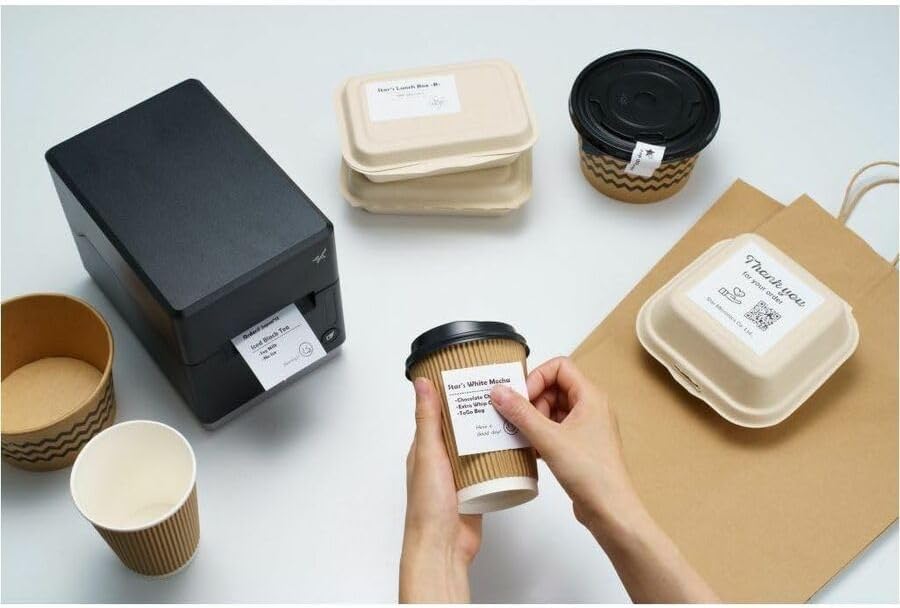
Image: A hand pressing the feed button on the mC-Label3 printer, demonstrating the printing of a 'Thank you' label.

Image: The mC-Label3 printer shown in a practical setting, printing labels for food containers and coffee cups, illustrating its versatility.
וישאַלט
1. רייניקונג די פּרינטער
Regular cleaning ensures optimal performance and extends the life of your printer.
- ניצן אַ ווייך, לינט-פֿרייַ שטאָף דampבאשפּריצט מיט איזאָפּראָפּיל אַלקאָהאָל צו רייניקן דעם דרוק קאָפּ.
- Wipe down the exterior of the printer with a soft, dry cloth.
- ויסמיידן ניצן אַברייסיוו קלינערז אָדער סאָלוואַנץ.
2. Replacing Media
When the media roll is depleted, follow the media loading instructions in the Setup section to replace it.
3. Effortless Repairs
The mC-Label3 is designed for effortless, no-tools-required repairs with minimal upkeep, simplifying any necessary component replacements.
טראָובלעשאָאָטינג
די סעקציע גיט לייזונגען צו געוויינטלעכע פראבלעמען וואָס איר קענט באַגעגענען.
| פּראָבלעם | מעגלעך סיבה | לייזונג |
|---|---|---|
| דרוקער גייט נישט אן | שטראָם קאַבל נישט פארבונדן; פּראָבלעם מיט שטראָם אַוטלעט | זיכער מאַכן אַז דער עלעקטרישער קאַבל איז זיכער פארבונדן; פּרוּווט אַן אַנדער עלעקטרישער אַוטלעט. |
| קיין דרוק ארויסגאַנג | Out of media; Media loaded incorrectly; Driver issue | Load new media; Re-load media correctly; Reinstall printer drivers. |
| נעבעך דרוק קוואַליטעט | Dirty print head; Low quality media | Clean the print head; Use recommended thermal media. |
| קאַנעקטיוויטי ישוז | Incorrect cable connection; Bluetooth not paired; Network configuration | Check USB/Ethernet cables; Re-pair Bluetooth; Verify network settings. |
ספּעסאַפאַקיישאַנז
| שטריך | דעטאַל |
|---|---|
| מאָדעל נאָמען | mC-Label3 |
| נומער מאָדעל נומער | MCL32CBI |
| דרוק טעכנאָלאָגיע | דירעקט טערמאַל |
| דרוקער רעזולטאַט | מאָנאָטשראָמע |
| מאַקס פּרינט ספּיד מאָנאָטשראָמע | 23 פּיפּיעם |
| מאַקסימום שוואַרץ און ווייַס פּרינט האַכלאָטע | 203 DPI (203 x 203 DPI) |
| דרוק מידיאַ | Labels (Linerless, Die-Cut, Continuous), Thermal Receipt |
| קאַנעקטיוויטי טעכנאָלאָגיע | Bluetooth, Wired (USB, Ethernet) |
| ייַזנוואַרג צובינד | וסב, עטהערנעט |
| קאַמפּאַטאַבאַל דעוויסעס | פּיסי, אַנדרויד, יאָס |
| קאָנטראָללער טיפּ | יאָס, אַנדרויד |
| פּראָדוקט דימענשאַנז | 6.7" ד x 5.6" ב x 8.3" ה (17.0 x 14.2 x 21.1 ס"מ) |
| פּונקט וואָג | 7.2 פונט (3.27 קג) |
| זכּרון סטאָרידזש קאַפּאַסיטי | 64 מב |
| קאָליר | שוואַרץ |
| פאַבריקאַנט | STAR MICRONICS |
| לאַנד פון אָריגין | כינע |
וואָראַנטי אינפֿאָרמאַציע
The Star Micronics mC-Label3 MCL32CBI printer comes with a manufacturer's warranty. For specific terms and conditions, please refer to the warranty card included in your package or visit the official Star Micronics webפּלאַץ.
וואָראַנטי טיפּ: פאַבריקאַנט
שטיצן
For further assistance, technical support, or to download the latest drivers and firmware, please visit the official Star Micronics support webפּלאַץ אָדער קאָנטאַקט זייער קונה דינסט.
שטערן מיקראָניקס אפיציעל Webפּלאַץ: www.starmicronics.com
שטיצן לינק: www.starmicronics.com/support


