
1. הקדמה
This user manual provides detailed instructions for the installation, operation, and maintenance of your Refoss Smart Wi-Fi Roller Shutter Switch (Model: RRS100). This smart switch integrates seamlessly with Apple HomeKit, Alexa, and Google Home, offering convenient control of your roller shutters or blinds. It features precise percentage control, temperature-based automation, LED backlight, and remote control capabilities.

Image: Refoss Smart Wi-Fi Roller Shutter Switch, its packaging, and a smartphone displaying the control app.
2. זיכערקייַט אינפֿאָרמאַציע
וויכטיק: A neutral wire is required for the installation of this smart roller shutter switch. Ensure that the power supply is disconnected before beginning any installation work. Installation should be performed by a qualified electrician if you are unsure.
- אַרבעטן די מיטל אין די ספּעסיפיעד וואַלtagE קייט (240 וואלטס).
- דו זאלסט נישט ויסשטעלן די מיטל צו נעץ אָדער עקסטרעם טעמפּעראַטורעס.
- The unit is made of flame-retardant PC material, providing safety and protection against overload.
- ענשור אַז אַלע קאַנעקשאַנז זענען זיכער און רעכט ינסאַלייטיד.
3. סעטאַפּ און ייַנמאָנטירונג
The Refoss Smart Wi-Fi Roller Shutter Switch is designed for straightforward installation.
- מאַכט דיסקאַנעקשאַן: Before starting, turn off the main power supply to the circuit where you intend to install the switch.
- וויירינג: Connect the neutral wire, live wire, and motor wires to the corresponding terminals on the switch. Refer to the wiring diagram provided in the packaging for detailed instructions.
- מאָונטינג: Secure the switch into the wall box. The compact design (80mm x 80mm) ensures it fits standard electrical boxes.
- מאַכט רעסטאָראַטיאָן: Once the switch is securely mounted and wired, restore power to the circuit.
- אַפּ פּאָרינג: Download the Refoss app from your smartphone's app store. Follow the in-app instructions to pair the switch with your Wi-Fi network (2.4 GHz only). No additional hub is required.

Image: Comparison showing the compact 80mm x 80mm design of the Refoss switch, making it suitable for various installations.
4. אַפּערייטינג ינסטרוקטיאָנס
The Refoss Smart Wi-Fi Roller Shutter Switch offers multiple ways to control your blinds.
4.1. Smart Home Integration (HomeKit, Alexa, Google Home)
The switch is fully compatible with Apple HomeKit, Amazon Alexa, and Google Home. Once paired with your Wi-Fi network, you can add it to your preferred smart home ecosystem for voice control and automation.

Image: A smartphone screen displaying the smart home app interface for controlling blinds, showing "blinds office Open".
4.2. קול קאָנטראָל
Use voice commands through Siri, Alexa, or Google Assistant to open, close, or adjust your roller shutters.
- "Hey Siri, open the living room blinds."
- "Alexa, close the bedroom curtains."
- "Hey Google, set the kitchen blinds to 50%."

בילד: אַן עקסample of voice control, showing a speech bubble with "Hey Siri, expand the blind spot by 60%." and "Okay." response, with smart home logos for Apple Home, Alexa, and Google Home.
4.3. פּראָצענטtage Control and Automatic Calibration
Achieve precise control over your blinds' opening distance, from 1% to 100%. The switch supports automatic calibration to accurately measure the full open and close distances, simplifying precise control.
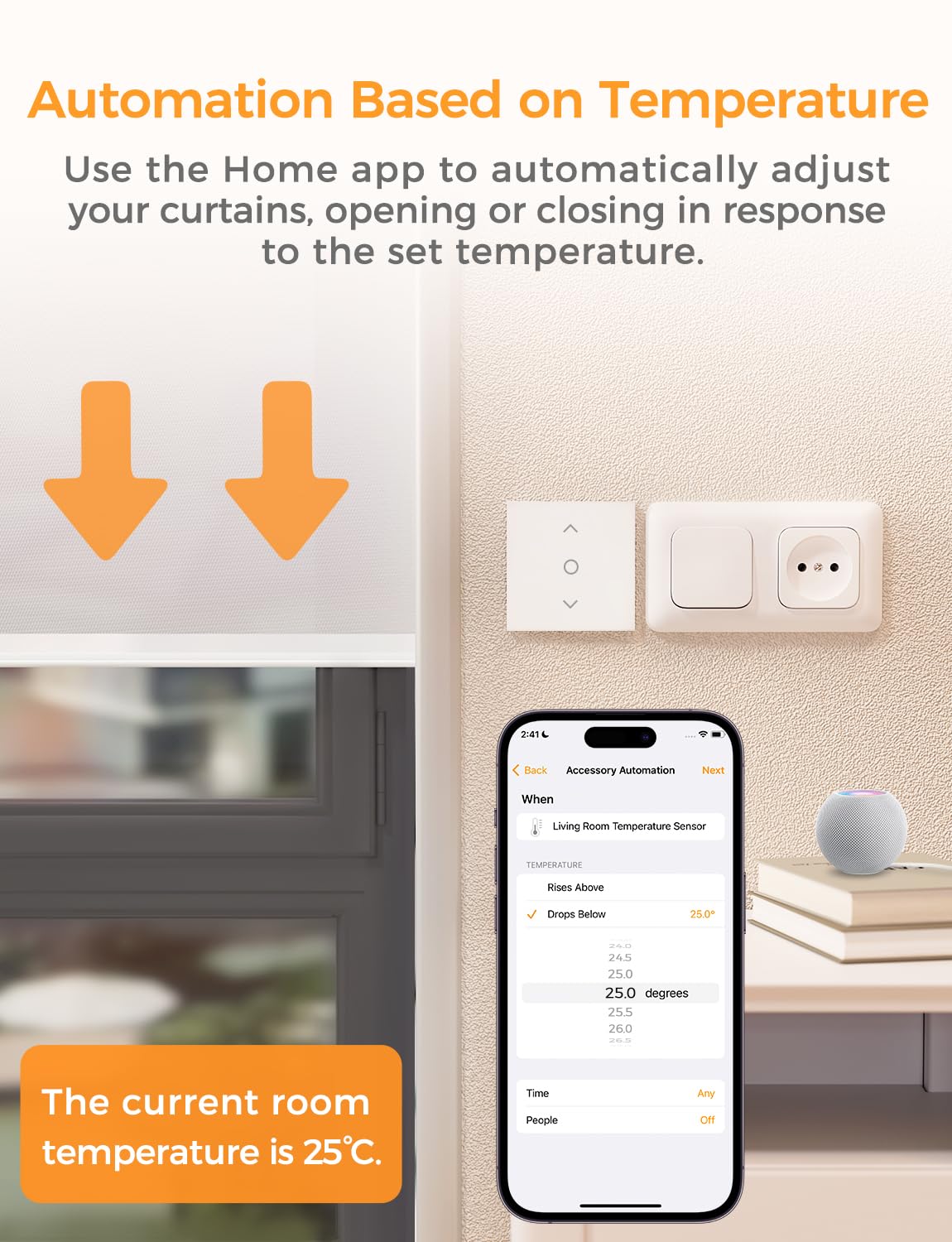
Image: A visual representation of accurate percentage control, showing a blind at 100%, 30%, and 0% open, with a smartphone app displaying the percentage slider.
4.4. Temperature-Based Automation
Through the Apple Home app, you can set temperature thresholds to automate your blinds. For example, you can configure the blinds to close automatically if the temperature drops below a certain degree (e.g., -5°C) to help maintain indoor warmth.

Image: A smartphone screen showing the setup for temperature-based automation in the Home app, with arrows indicating blinds closing in response to temperature changes.
4.5. LED Backlight Function
The integrated LED backlight can be toggled on or off via the Refoss app, providing clear visibility of the switch in low-light conditions and ensuring easy operation at night.

Image: Two scenes demonstrating the LED backlight function: one with the backlight off and another with it on, illuminating the switch buttons in a dark room.
4.6. רימאָוט קאָנטראָל
With the free Refoss app, you can control your curtains remotely from anywhere, as long as you have an internet connection.

Image: A hand holding a smartphone displaying the Refoss app, with a view of a room with blinds, illustrating remote control capabilities.
4.7. טיימער און סקעדזשול פונקציעס
Set schedules and timers for your roller shutters to open or close automatically at predetermined times. This feature enhances convenience and energy efficiency. You can also utilize sunrise and sunset modes.

Image: A visual showing the smart switch and a smartphone app interface for setting timers and schedules, with examples like "7:00 On Living room curtains" and "20:00 Off Bedroom curtains".
5. וישאַלט
The Refoss Smart Wi-Fi Roller Shutter Switch requires minimal maintenance.
- רייניקונג: Wipe the surface of the switch with a soft, dry cloth. Do not use abrasive cleaners or solvents.
- Firmware דערהייַנטיקונגען: Periodically check the Refoss app for available firmware updates to ensure optimal performance and access to new features.
6. טראָובלעשאָאָטינג
| פּראָבלעם | מעגלעך סיבה | לייזונג |
|---|---|---|
| סוויטש רעאַגירט נישט / קיין מאַכט | No power to the circuit; Incorrect wiring; Neutral wire not connected. | Check circuit breaker. Verify wiring according to the manual, ensuring the neutral wire is connected. Consult a qualified electrician if unsure. |
| קענען ניט פאַרבינדן צו ווי-פי | Incorrect Wi-Fi password; Router too far; Only 5GHz Wi-Fi available; Wi-Fi interference. | Ensure correct 2.4GHz Wi-Fi network is selected and password is correct. Move router closer or use a Wi-Fi extender. Temporarily disable 5GHz on your router during setup if necessary. Reduce interference from other devices. |
| קול קאָנטראָל איז נישט ארבעטן | Not linked to smart home assistant; Incorrect device name; Internet connectivity issues. | Ensure the switch is properly linked in your HomeKit, Alexa, or Google Home app. Use the exact device name configured in the app. Check your internet connection. |
| Blinds not moving to correct percentage | קאַלאַבריישאַן אַרויסגעבן. | Perform automatic calibration through the Refoss app to re-measure the full travel distance of your blinds. |
7. ספּעסאַפאַקיישאַנז
| שטריך | דעטאַל |
|---|---|
| מאָדעל נומער | RRS100 |
| סאָרט | Refoss |
| דימענסיעס (L X W X H) | 8 X 8 X 3.5 סענטימעטער |
| וואָג | 103.4 גראַמז |
| מאַטעריאַל | Acrylonitrile Butadiene Styrene (PC flame-retardant) |
| אַפּערייטינג מאָדע | אנצינדן אויסלעשן |
| קראַנט רייטינג | 5 א |
| אַפּערייטינג וואָלtage | 240 וואלטס |
| באַשטימען טיפּ | טאַקטיל |
| קאַנעקטיוויטי | Wi-Fi (נאָר 2.4 GHz) |
| קאַמפּאַטאַבילאַטי | Apple HomeKit, Amazon Alexa, Google Home |
| לאַנד פון אָריגין | כינע |
8. וואָראַנטי און שטיצן
רעפאָס גיט אַ 2 יאָר וואָראַנטי for this product, ensuring long-term safety and quality for your use.
For technical support, troubleshooting assistance, or warranty claims, please contact Refoss customer service through the contact information provided in your product packaging or on the official Refoss webפּלאַץ.


