הקדמה
Thank you for choosing the MEGATEK Portable CD Player. This device is designed to provide a versatile and high-quality audio experience, supporting various media formats and offering multiple connectivity options. Please read this manual carefully to ensure proper use and maintenance of your new CD player.

Image: The MEGATEK Portable CD Player, showcasing its compact design, integrated speakers, control buttons, and included accessories like headphones and USB-C charging cables.
זיכערקייַט אינפֿאָרמאַציע
כדי צו זיכער מאַכן זיכערע אָפּעראַציע און פאַרמייַדן שאָדן, ביטע אָבסערווירן די פאלגענדע פאָרזיכטיגקייטן:
- דו זאלסט נישט ויסשטעלן די מיטל צו עקסטרעם טעמפּעראַטורעס, הומידיטי אָדער דירעקט זונשייַן.
- ויסמיידן דראַפּינג אָדער אונטערטעניק די מיטל צו שטאַרק ימפּאַקץ.
- נעמט נישט אויס דעם אפאראט אדער פרובירט נישט צו פאררעכטן אליין. לאָזט איבער אלע סערוויסעס צו קוואַליפֿיצירטע פּערסאָנעל.
- ניצט נאָר דעם צוגעשטעלטן טשאַרדזשינג קאַבל און אַ קאָמפּאַטיבלע מאַכט אַדאַפּטער.
- האַלטן די מיטל אַוועק פון וואַסער און אנדערע ליקווידס.
- רייניקט דעם אַפּאַראַט מיט אַ ווייכן, טרוקענעם שטאָף. ניצט נישט קיין שרײַבנדיקע רייניגערס אדער סאָלווענטן.
- פארלענגערט הערן ביי הויכע וואליום לעוועלס קען שאפן געהער שאדן. שטעלט אפ דעם וואליום צו א זיכערן לעוועל.
פּעקל אינהאַלט
באַשטעטיקן אַז אַלע זאכן זענען פאַראַן אין פּעקל:
- MEGATEK Portable CD Player - Black
- ווייערד כעדפאָונז
- וסב-C טשאַרדזשינג קאַבלע
- באַניצער ס מאַנואַל

Image: A visual representation of the package contents, including the CD player, headphones, USB-C cable, and user manual.
פּראָדוקט איבערview
Familiarize yourself with the various parts and controls of your MEGATEK Portable CD Player.
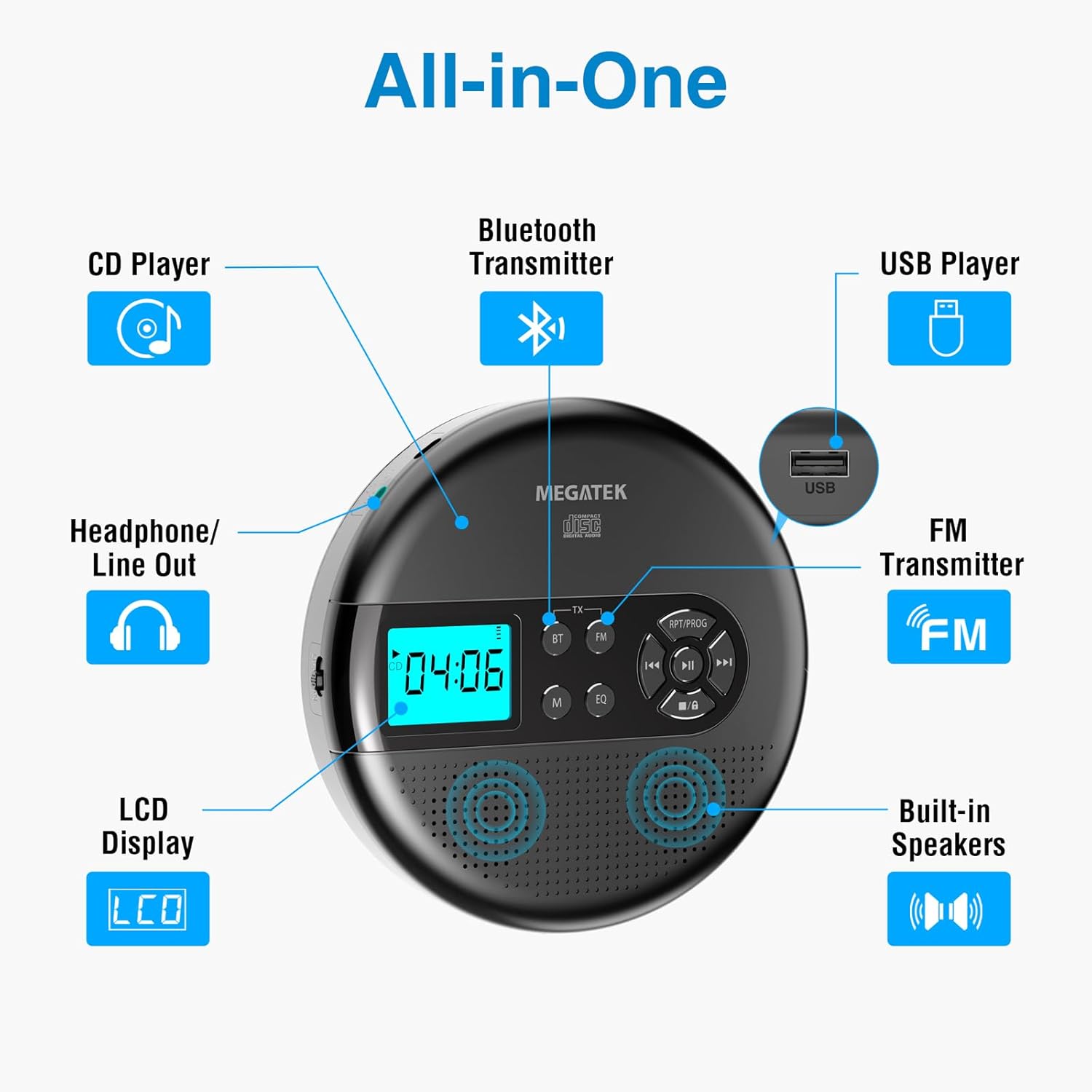
Image: An "All-in-One" diagram highlighting key features such as the CD Player, Bluetooth Transmitter, USB Player, FM Transmitter, Built-in Speakers, LCD Display, and Headphone/Line Out port.
קאָנטראָלס און פּאָרץ:
- LCD ווייַז: Shows track number, time, mode, and battery status.
- שפּיל / פּויזע קנעפּל: סטאַרץ אָדער פּאָזאַז פּלייבאַק.
- פריערדיגע/נעקסטע קנעפּלעך: Skips tracks or fast-forwards/rewinds.
- האַלטן קנעפּל: סטאַפּס פּלייבאַק.
- RPT/PROG Button: Controls repeat modes and programming tracks.
- BT קנעפּל: Activates Bluetooth transmission mode.
- FM קנעפּל: Activates FM transmission mode.
- M (מאָדע) קנעפּל: Switches between CD, USB, Bluetooth, and FM modes.
- עק קנעפּל: גייט דורך ציקלען דורך יקוואַלייזער פּרעסעטס.
- באַנד קאָנטראָל: אַדזשאַסטירט אַודיאָ אַרויסגאַנג לעוועל.
- וסב פּאָרט: פֿאַר שפּילן אַודיאָ fileס פון אַ וסב פאָר.
- טיפּ C טשאַרדזשינג פּאָרט: פֿאַר אָפּלאָדן די אינעווייניקסטע באַטאַרייע.
- 3.5mm Audio Out Jack: פֿאַר פֿאַרבינדן כעדפֿאָונז אָדער עקסטערנע רעדנערס.
- געבויט-אין סטערעאָ ספּיקערז: פֿאַר דירעקטע אַודיאָ ווידערשפּיל.
סעטאַפּ
טשאַרדזשינג די באַטאַרייע:
The device is equipped with a built-in 2000mAh rechargeable Li-ion battery. Before first use, fully charge the player.
- Connect the provided USB-C charging cable to the Type-C charging port on the player.
- פֿאַרבינדט דעם אַנדערן עק פֿונעם USB-C קאַבל צו אַ USB מאַכט אַדאַפּטער (נישט אַרייַנגערעכנט) אָדער אַ קאָמפּיוטער'ס USB פּאָרט.
- The battery indicator on the LCD display will show charging status. A full charge provides up to 15 hours of playtime at medium volume.

Image: The portable CD player connected to a power source via its USB-C cable, resting on a nightstand next to a bed.
Inserting a CD:
- Locate the CD compartment latch/button on the side of the player and slide/press it to open the lid.
- Carefully place the CD onto the center spindle with the label side facing up.
- דריק די סי-די אראפ מיט א גוטן טון ביז זי קליקט אריין אין פלאץ.
- פֿאַרמאַכט דעם דעקל פֿון דעם סי-די אָפּטייל פֿעסט ביז עס פֿאַרשליסט זיך.

Image: The portable CD player with its lid open, showing a blue CD disc inserted into the compartment, ready for playback.
אַפּערייטינג ינסטראַקשאַנז
קאָמפּאַקטדיסק פּלייבאַק:
- Insert a CD as described in the Setup section.
- דרוק די שפּיל / פּויזע קנעפּל צו אָנהייבן פּלייבאַק.
- ניצן די פרייַערדיק / ווייַטער buttons to navigate between tracks. Hold to fast-forward or rewind.
- דרוק די RPT/PROG button to cycle through repeat modes (repeat one, repeat all, random) or to program a custom playback order.
- דרוק די האַלטן קנעפּל צו ענדיקן ווידערשפּיל.
- Adjust volume using the dedicated volume control.
וסב פּלייַבאַקק:
The player supports MP3, WMA, and WAV audio fileס פון אַ וסב פאָר.
- אַרײַנשטעלן אַ USB בליץ דרייוו אין דעם USB פּאָרט.
- דרוק די מ (מאָדע) קנעפּל צו באַשטימען צו וסב מאָדע.
- ניצן די שפּיל / פּויזע, פרייַערדיק / ווייַטער, און RPT/PROG buttons as you would for CD playback.
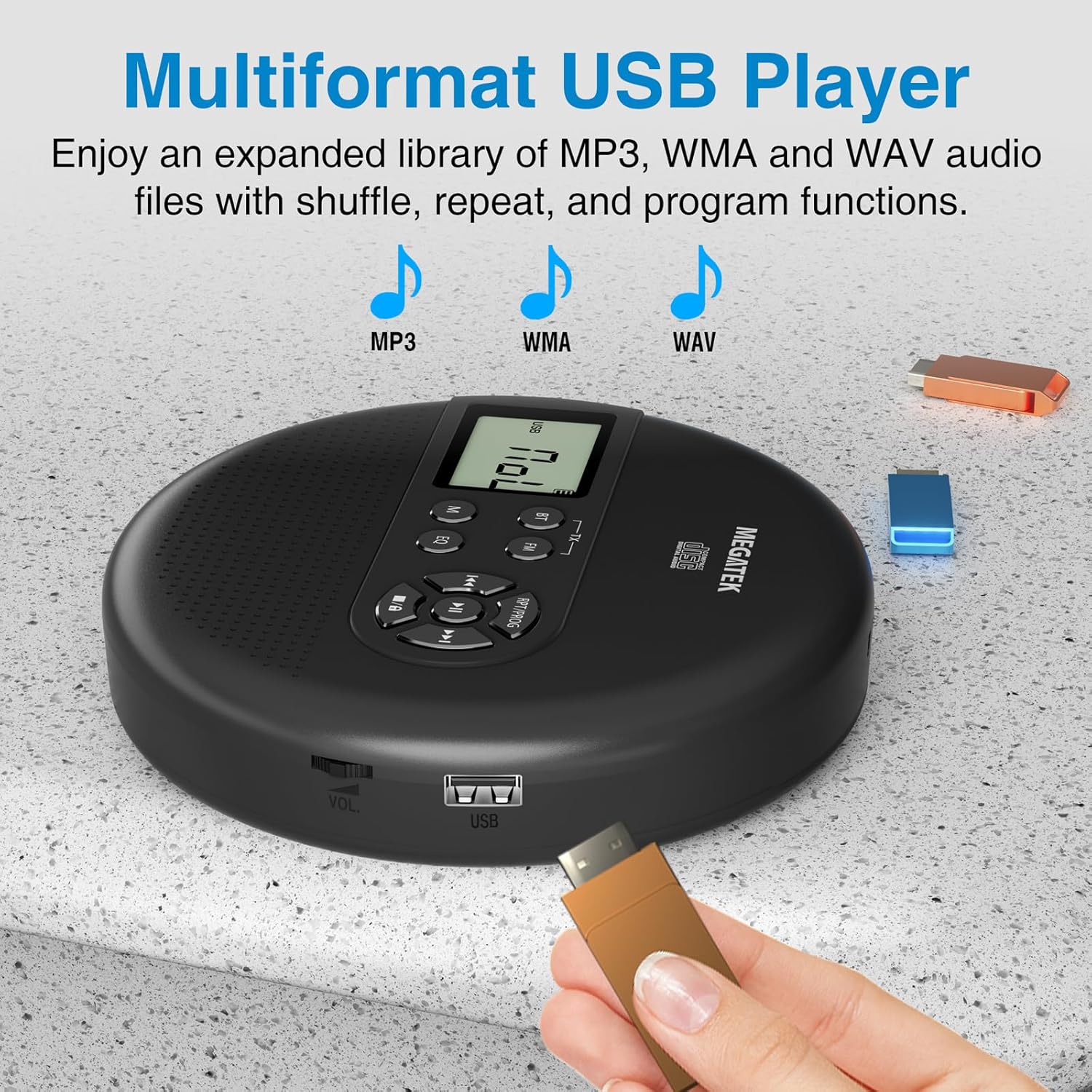
Image: The portable CD player with a USB flash drive inserted into its side port, illustrating its multi-format USB playback capability.
בלועטאָאָטה טראַנסמיסיע:
Stream audio wirelessly to Bluetooth-enabled headphones or speakers. Note: This feature does not support connections to car stereo systems.
- זיכער מאַכן אַז אייערע בלועטוט כעדפאָונז אָדער רעדנער זענען אין פּערינג מאָדע.
- On the CD player, press the BT button. The Bluetooth indicator on the display will flash.
- The player will automatically search for and connect to nearby Bluetooth devices. Once connected, the indicator will stop flashing.

Image: The portable CD player wirelessly transmitting audio to two external Bluetooth speakers, demonstrating its Bluetooth transmission capability.
FM טראַנסמיסיע:
Transmit audio signals to nearby FM radios, including car FM stereos and home stereo systems.
- דרוק די FM button on the CD player. The display will show an FM frequency.
- Tune your FM radio (car stereo, home stereo) to the same frequency displayed on the CD player.
- Adjust the frequency on the CD player using the פרייַערדיק / ווייַטער buttons if interference occurs or to find a clearer channel.

Image: The portable CD player placed on a car dashboard, transmitting audio to the car's FM stereo system, indicated by an FM frequency on the car's display.
Using Headphones/External Speakers:
For private listening or connecting to wired audio systems:
- Plug the included wired headphones into the 3.5mm audio out jack.
- Alternatively, connect an audio cable (not included) from the 3.5mm audio out jack to the AUX input of external speakers or an audio system.
- The built-in speakers will automatically mute when headphones or external speakers are connected.

Image: A close-up of the portable CD player, visually representing sound waves emitting from its dual stereo speakers, emphasizing the built-in audio capability.
וישאַלט
- רייניקונג: Use a soft, dry, lint-free cloth to clean the exterior of the player. For the CD lens, use a specialized CD lens cleaner. Do not use liquids or aerosol cleaners directly on the device.
- סטאָרידזש: ווען נישט אין באַנוץ פֿאַר לענגערע פּעריאָדן, זאָל מען דעם שפּילער אַוועקלייגן אין אַ קיל, טרוקן אָרט, אַוועק פֿון דירעקטער זון און עקסטרעמע טעמפּעראַטורן.
- באַטערי זאָרגן: כדי צו פארלענגערן די לעבן פון די באַטעריע, זאָלט איר נישט אָפט אויסלאָדן די באַטעריע. לאָדט דאָס אַפּאַראַט רעגולער אויף, אפילו אויב עס איז נישט אין אַקטיוון באַנוץ.
טראָובלעשאָאָטינג
| פּראָבלעם | מעגלעך סיבה | לייזונג |
|---|---|---|
| דער שפּילער טוט זיך נישט אָן. | באַטערי איז דיפּליטיד. | Charge the player using the USB-C cable. |
| קיין קלאַנג פֿון די רעדנערס/כעדפאָונז. | Volume is too low; headphones not fully plugged in; incorrect mode selected. | Increase volume; ensure headphones are securely connected; press the מ (מאָדע) קנעפּל צו אויסקלייבן די ריכטיקע מקור. |
| סי-די שפרינגט איבער אדער שפילט נישט. | CD is dirty, scratched, or inserted incorrectly; anti-skip function overwhelmed. | Clean the CD; ensure CD is properly seated; avoid strong vibrations. |
| בלועטאָאָטה קשר ישוז. | Device not in pairing mode; too far from player; interference. | Ensure receiving device is in pairing mode; move closer to the player; restart both devices. |
| FM transmission static/poor quality. | Interference; incorrect frequency. | Adjust the FM frequency on the player and receiver to find a clear channel. |
ספּעסאַפאַקיישאַנז
| שטריך | דעטאַל |
|---|---|
| מאָדעל נומער | CP27BR |
| פּראָדוקט דימענשאַנז | 5.91 X 5.91 X 1.32 אינטשעס |
| פּונקט וואָג | 10.9 אונסעס |
| באַטערי | 2000mAh ליטהיום יאָן (ריטשאַרדזשאַבאַל) |
| פּלייַטימע | אַרויף צו 15 שעה (אין מיטל באַנד) |
| געשטיצטע סי-די פֿאָרמאַטן | CD, CD-R/RW, MP3 CD, Audio Book CD |
| געשטיצטע USB פֿאָרמאַטן | MP3, WMA, WAV |
| אַנטי-האָפּקען פּראַטעקשאַן | 60 סעקונדעס |
| קאַנעקטיוויטי | USB, Bluetooth Transmitter, FM Transmitter, 3.5mm Audio Out |
| ספּעציעלע פֿעיִקייטן | Built-in Stereo Speakers, Resume Play, Shuffle, Repeat, Program Functions, 5 EQ Options |
וואָראַנטי און שטיצן
MEGATEK offers comprehensive support for its products:
- 12-חודש אויסטויש: In case of product defects or issues within 12 months of purchase.
- לעבן טעכניש שטיצן: Assistance with product usage, troubleshooting, and general inquiries.
- 24/7 קונה סערוויס: Available through Amazon buyer-seller messaging.
For any questions or problems, please contact MEGATEK customer service via the Amazon platform or refer to the contact information provided in the product packaging.
Image: A graphic detailing MEGATEK's customer support, including 12-month replacement, lifetime technical support, and 24/7 Amazon buyer-seller messaging, alongside an image of customer service representatives.